Field‑Service Managers: 5 Ops Checks to Pilot AI Dispatching
Field‑Service Managers: 5 Ops Checks to Pilot AI Dispatching
AI dispatching for field service means software that automatically matches technicians to jobs, builds their routes, and re-prioritizes work based on skills, location, and service-level agreements. The main payoff is fewer wasted miles and more completed jobs per day. Firmanager’s own scheduling data shows a 10% reduction in travel time once dispatch runs on real-time data instead of a whiteboard, and Salesforce reports booking times dropping from 17 minutes to under 5.
TL;DR:
- AI dispatching can reduce technician travel time by around 10 percent and decrease no-shows by up to 40 percent with proper implementation.
- Reliable AI systems require a unified field service management platform, an optimization engine, and current, clean data inputs for optimal decision-making.
- Companies should start with small pilots using verified data, clear re-optimization rules, and feedback loops before scaling system-wide.
- Technician trust depends on limiting schedule changes through defined thresholds, allowing overrides, and involving technicians early in the process.
- Successful solutions should seamlessly integrate with existing data systems, provide transparent decision explanations, and support manual controls and pilot testing.
Table of Contents
- What Does AI Dispatching Mean for Field Service Companies?
- Core Components and Data Behind Reliable AI Dispatching
- What Results Should You Expect From AI Dispatching?
- How Do You Roll Out AI Dispatching Without Disrupting Operations?
- How Do You Keep AI Dispatching From Hurting Technician Morale?
- What Should You Look For When Evaluating an AI Dispatching Solution?
- How Does AI Dispatching Change the Dispatcher’s Job?
- Firmanager: Built for AI-Ready Dispatch
- Sources
What Does AI Dispatching Mean for Field Service Companies?
AI dispatching, in this context, has nothing to do with truck fleets or freight brokers matching loads to carriers. For a maintenance, cleaning, or technical services business, it means an engine that reads your open work orders, checks who is qualified and nearby, and assigns the job automatically while respecting your SLAs. It’s technician matching and route building, not load matching.
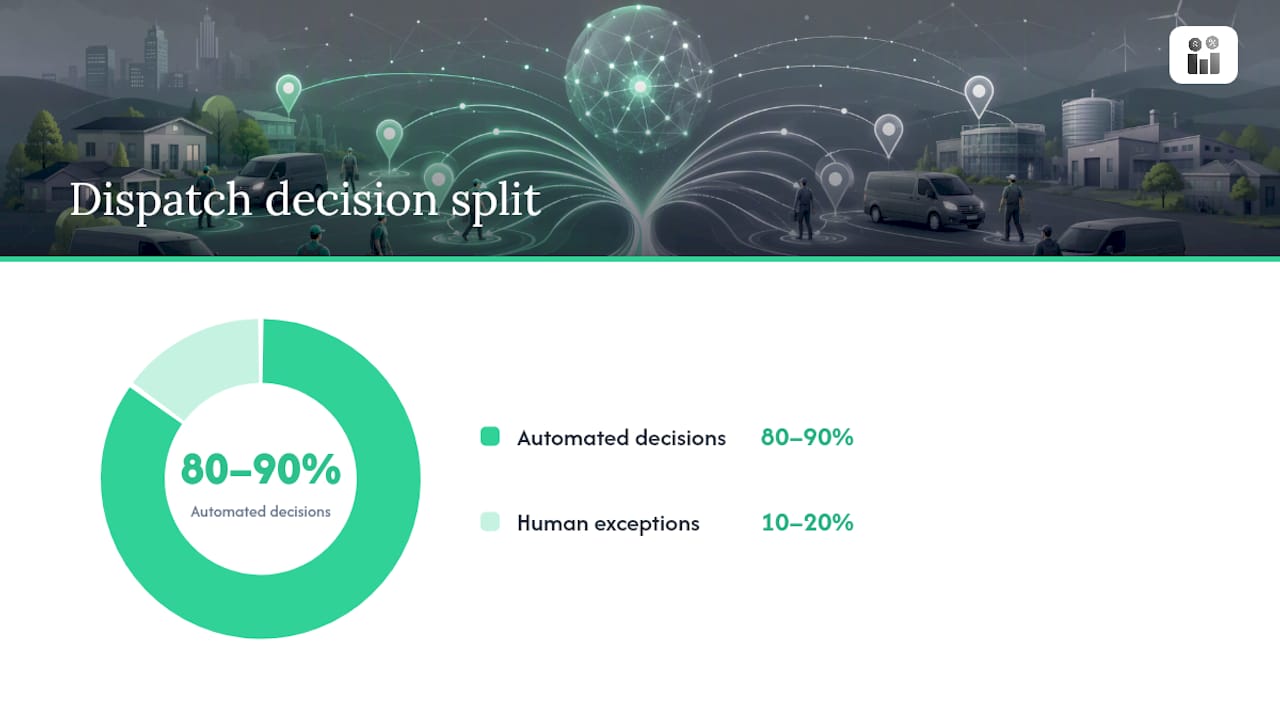
The engine typically works from a few core signals: technician skill and certification data, current location, parts already on the truck, and the customer’s contracted response window. Ironback AI notes that in many operations, AI handles 80% to 90% of dispatch decisions automatically, leaving human dispatchers to manage the exceptions.
Common use cases you’ll recognize:
- Emergency response, where the system reshuffles the day around a burst pipe or a downed HVAC unit without blowing up every other appointment.
- Routine maintenance, batching nearby jobs so one technician covers a tight geographic loop instead of crisscrossing town.
- Predictive maintenance triage, flagging which alerts justify a truck roll and which don’t.
- Remote-first resolution, where a quick video call or diagnostic check replaces the visit entirely.
Core Components and Data Behind Reliable AI Dispatching
AI dispatching only works as well as the system feeding it. Three layers have to work together: your field service management (FSM) platform as the system of record, an optimization engine that makes the assignment decisions, and a data layer that keeps everything current. Copperberg’s breakdown of this three-layer stack is a useful mental model for evaluating any solution.
Before you trust an algorithm with your schedule, confirm these pieces are in place:
- FSM as the system of record. Work orders, customer history, and technician profiles all live in one place, not scattered across spreadsheets and text threads.
- A multi-objective optimization engine. It needs to balance drive time, skill match, parts availability, and SLA priority at once, not just find the shortest route.
- Clean, current data inputs. Skills and certifications, GPS location, parts on each truck, historical job durations, and any IoT signals from equipment under contract.
- Working integrations. IBM’s guidance on field service AI points out that FSM platforms need to expose this data through APIs, otherwise the optimization engine is guessing.
Skip any of these and you get a system that automates guesswork instead of dispatching.
What Results Should You Expect From AI Dispatching?
Industry benchmarks give you a reasonable target, though your mileage will vary with job mix and how clean your data is going in. Reported ranges put drive-time reductions between 25% and 40%, jobs-per-day gains between 15% and 20%, and measurable improvements in first-time fix rates when technicians arrive with the right skills and parts already assigned.
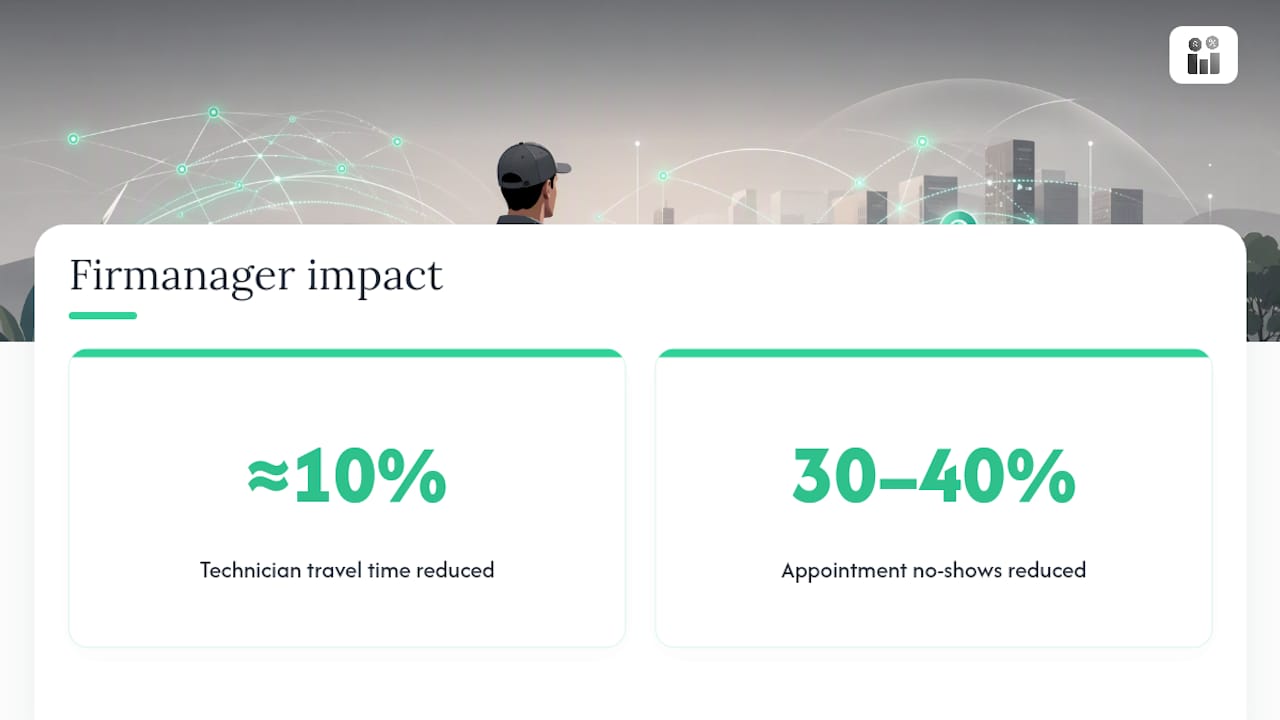
By the numbers: Firmanager’s scheduling module has cut technician travel time by roughly 10% in measured deployments, and pairing that with automated SMS reminders has reduced no-show rates by 30% to 40%.
Track these outcomes alongside drive-time and jobs-per-day:
- SLA adherence, especially for tier-1 or contracted accounts.
- Mean time to repair, from first report to job closure.
- Travel cost per completed job.
- No-show and reschedule rates.
A word of caution: a company running mostly emergency repairs will not see the same jobs-per-day lift as one running scheduled maintenance routes. Don’t compare your numbers to a case study with a different job mix.
How Do You Roll Out AI Dispatching Without Disrupting Operations?
Start with data, not software. Aiventic’s implementation guide recommends beginning with a small, controlled pilot rather than flipping the switch company-wide.
- Clean up your data first. Verify technician skills and certifications, parts inventory counts, GPS accuracy, and standard job durations. Garbage in still means garbage out, no matter how good the algorithm is.
- Run a small pilot. Aiventic suggests 5 to 10 technicians and 20 to 30 appointments as a workable sample. Compare AI-generated schedules against your dispatcher’s manual picks for the same jobs.
- Check your integration list. FSM APIs, mapping and traffic data feeds, mobile app updates for technicians, and your parts logistics system all need to talk to the optimization engine.
- Set re-optimization rules. Decide in advance what triggers a schedule change, like a delay past 15 minutes or a new SLA-critical job coming in.
- Build a feedback loop. Review pilot metrics weekly, adjust thresholds, and only then expand to the full team.
Pro Tip: Tie your pilot’s success metrics to actual contract terms, like SLA adherence for your highest-value accounts, not just average travel time. An algorithm optimized purely for mileage can quietly deprioritize your best customers.
How Do You Keep AI Dispatching From Hurting Technician Morale?
The fastest way to lose technician trust is constant schedule churn. If the app reroutes someone every 20 minutes for marginal gains, they’ll stop trusting it and start working around it. Copperberg’s practitioner guidance on this is blunt: define thresholds that trigger re-optimization, rather than letting the engine reshuffle constantly.
Build these guardrails in from day one:
- Set a minimum delay or priority threshold before the system re-optimizes anyone’s route.
- Name who can override an AI assignment, and require a documented reason when they do.
- Run initial training sessions and recruit a few respected technicians as early champions.
- Collect technician feedback on assignments regularly, not just during the pilot.
- Never let the system assign work outside a technician’s verified certifications, especially for regulated or safety-sensitive tasks.
What Should You Look For When Evaluating an AI Dispatching Solution?
Skip the sales demo theater and check these operational fundamentals instead:
- Integration readiness. Does it connect to your existing FSM data model without a custom rebuild?
- Optimization depth. Can it balance skills, SLAs, and parts availability simultaneously, not just calculate shortest routes?
- Re-optimization speed and scope. Does it adjust only the affected part of the schedule, or does every job get reshuffled for one delay?
- Decision transparency. Can it explain why a specific technician got a specific job, for audits and disputes?
- Manual override controls. Are overrides logged, with an audit trail your team can review later?
- Pilot and training support. Will the vendor commit to measurable SLAs during a trial period, not just after signing?
A look at scheduling software features worth prioritizing can help frame these questions before you sit through your first demo.
How Does AI Dispatching Change the Dispatcher’s Job?
The dispatcher’s role shifts from building every schedule by hand to managing exceptions the algorithm flags. That’s a real change in skill set, not just a new tool. Leaders who treat AI dispatching as “set it and forget it” end up automating whatever inefficiencies already existed in their process.
Start small, measure honestly, and keep a human in the loop on every override. Technician buy-in decides whether this works long term.
— KaiosMedia
Firmanager: Built for AI-Ready Dispatch
The platform provides a foundation AI dispatching actually needs: a single system of record for work orders, technician profiles, and customer history, plus route and dispatch management that keeps schedules current in real time. Automated SMS reminders and mobile job updates help technicians and customers stay aligned without extra phone calls.

The internal numbers back this up. Firmanager’s scheduling tools have cut technician travel time by about 10% for service managers who switched from manual routing, and automated appointment reminders have reduced no-shows by 30% to 40%. That combination, tighter routes and fewer missed appointments, is where most of the early wins in field service actually come from.
If you’re weighing a pilot, start with the modules that touch dispatch directly: work orders, scheduling, and mobile access for your crews. Check out the Firmanager platform and see what a pilot would look like for your team’s job mix and route density.
Sources
For deeper technical grounding, IBM’s field service AI guide, Salesforce’s scheduling assistant overview, and Copperberg’s practitioner analysis each cover a different piece of the puzzle, from data architecture to governance. Firmanager’s own posts on first-time fix rates and mobile job management walk through implementation details specific to field crews. For a broader view of technology stacks in industrial field operations, Aspen Rentals’ technical services page is a useful reference point.
- The Guide to AI in Field Service Management — IBM
- AI Scheduling Assistants: A Guide for Field Service — Salesforce
- AI-powered field technician scheduling and deployment — Copperberg
- Complete Guide to AI Scheduling for Field Service — Aiventic
Recommended
Run your whole business in one place
CRM, quotes, work orders, invoicing, expenses, HR and HSE — one login, every device. Free-forever plan.
Start free →