Cut 30–40% No Shows With SMS Reminders on Firmanager for Service Teams
Cut 30–40% No Shows With SMS Reminders on Firmanager for Service Teams
Automated SMS reminders, sent 24 hours and then 2 to 4 hours before an appointment with a quick-reply confirmation option, are the fastest way to cut no-shows. Link the reminders to your calendar or booking system so they fire without manual work, enable two-way replies so clients can confirm or reschedule by texting back, and follow basic TCPA consent and opt-out rules from day one.
TL;DR:
- SMS reminders cut no-shows by 30 to 40 percent, especially when paired with two-way reply options and integration with scheduling systems.
- Proper timing involves sending two messages, one 24 hours before and another 2 to 4 hours prior, tailored to appointment type and value.
- Compliance requires obtaining explicit consent, processing opt-outs automatically, and avoiding sensitive information in messages to meet TCPA and HIPAA rules.
- Automation setup should include calendar triggers, reply handling, delivery monitoring, and testing to prevent failures and ensure reliable reminders.
- Using one platform that combines scheduling, messaging, templates, and consent tracking minimizes complications and improves operational efficiency.
Table of Contents
- Why SMS Appointment Reminders Actually Reduce No-Shows
- How SMS Reminders Fit Into Your Existing Scheduling Workflow
- What Timing and Wording Actually Get Replies
- Staying Compliant: TCPA, Opt-Outs, and HIPAA Basics
- Putting It Together: An Implementation Example
- Your Day-One Rollout Checklist
- What Most Advice on This Topic Gets Backwards
- Get Automated SMS Reminders Without Stitching Together Three Tools
- Sources
Why SMS Appointment Reminders Actually Reduce No-Shows
The case for text over other channels starts with a simple behavioral fact: people read texts almost immediately, while email sits in an inbox and phone calls go to voicemail. That speed advantage is why SMS consistently outperforms email for anything time-sensitive, including appointment reminders.
The business impact shows up in the numbers.
By the numbers: Businesses that turn on SMS reminders with two-way confirmations commonly see no-show reductions in the 30 to 40 percent range, though results vary by industry, cadence, and how clearly the message asks for a response.
Beyond the headline drop in no-shows, texting creates a second, quieter win: faster rescheduling. When a client can’t make it, a reply of “R” or a callback link fills that slot same-day instead of leaving it empty. Clinics, salons, and field-service teams that rely on tight daily schedules feel that fill-rate gain almost as much as the no-show reduction itself.
How SMS Reminders Fit Into Your Existing Scheduling Workflow
An SMS appointment reminder system needs a trigger, a number, and a way to handle replies. The trigger is usually your calendar or booking software: Google Calendar, an online booking form, or a full scheduling platform. When an appointment is created or updated, that event should automatically queue the reminder messages rather than relying on someone to send them by hand.
Behind the scenes, most reminder systems run on programmable messaging infrastructure. Providers like Twilio document exactly how outbound reminders get triggered and how inbound replies get routed back into your workflow. A few practical details matter before you launch:
- Number type: long codes work for moderate volume and support two-way replies; toll-free numbers need verification but scale better; short codes suit high-volume senders and require carrier approval.
- Two-way handling: replies like “Y” or “C” should update the calendar and alert staff automatically, not sit in an inbox someone checks once a day.
- Delivery monitoring: track failed sends and bounced numbers weekly, since a bad phone number silently kills your reminder before it ever reaches the client.
- Platform limits: some scheduling tools send only one text per appointment on lower plans, so check your platform’s messaging limits before building a multi-message cadence around it.
What Timing and Wording Actually Get Replies
Cadence matters more than clever copy. A two-message sequence, one around 24 hours out and a second 2 to 4 hours before, gives clients enough runway to reschedule while still catching last-minute forgetfulness. Adjust from there: high-value or specialist appointments (a consult, a dental procedure) often warrant a third reminder a week out, while quick-turnaround services (a haircut, an oil change) can run on the standard two.
Every message should follow the same basic anatomy:
- Business name stated up front so the client isn’t guessing who’s texting.
- Appointment details: date, time, and service, kept to one line.
- Clear call to action: reply Y to confirm, or a simple instruction.
- Reschedule path: a phone number or link, not a dead end.
- Opt-out line: “Reply STOP to opt out” on at least the first message in a sequence.
Three templates cover most use cases:
- Confirmation: “Hi [Name], this is [Business] confirming your [Service] appointment on [Date] at [Time]. Reply Y to confirm or R to reschedule.”
- Reschedule prompt: “We noticed you need to reschedule your [Date] appointment with [Business]. Reply with a preferred day or call [Phone] and we’ll find a new time.”
- Virtual visit: “Hi [Name], your virtual appointment with [Business] is at [Time] today. Join here: [Link]. Reply STOP to opt out.”
Test message length against the 160-character SMS segment limit, and use personalization tokens (name, service, provider) sparingly. A template library is a fast starting point, but always run a live test to your own phone before it reaches clients.
Staying Compliant: TCPA, Opt-Outs, and HIPAA Basics
The Telephone Consumer Protection Act (TCPA) governs SMS in the U.S., and appointment reminders generally require prior express consent, meaning the client agreed to receive texts, typically by providing their number on an intake form or booking page and checking a box that says so. Verbal consent given over the phone should still be logged with a date and timestamp.
A few non-negotiables:
- Every reminder sequence needs a working opt-out. “Reply STOP to opt out” must actually work, automatically, the moment someone replies STOP.
- Keep records of when and how consent was collected. If a client disputes receiving a text, that record is your protection.
- If your reminders could reveal protected health information (a specific diagnosis, a mental health provider’s name), you need a HIPAA-capable vendor and should keep message content generic, pointing clients to a secure portal for anything sensitive instead of naming it in the text itself.
Pro Tip: Skip putting the reason for the visit in the message body entirely. “Your appointment with [Business] is at 2pm” carries none of the compliance risk that “Your therapy session with Dr. Smith is at 2pm” does.
For the full mechanics of consent language and record retention, Firmanager’s TCPA SMS compliance guide walks through the specifics most service businesses miss.
Putting It Together: An Implementation Example
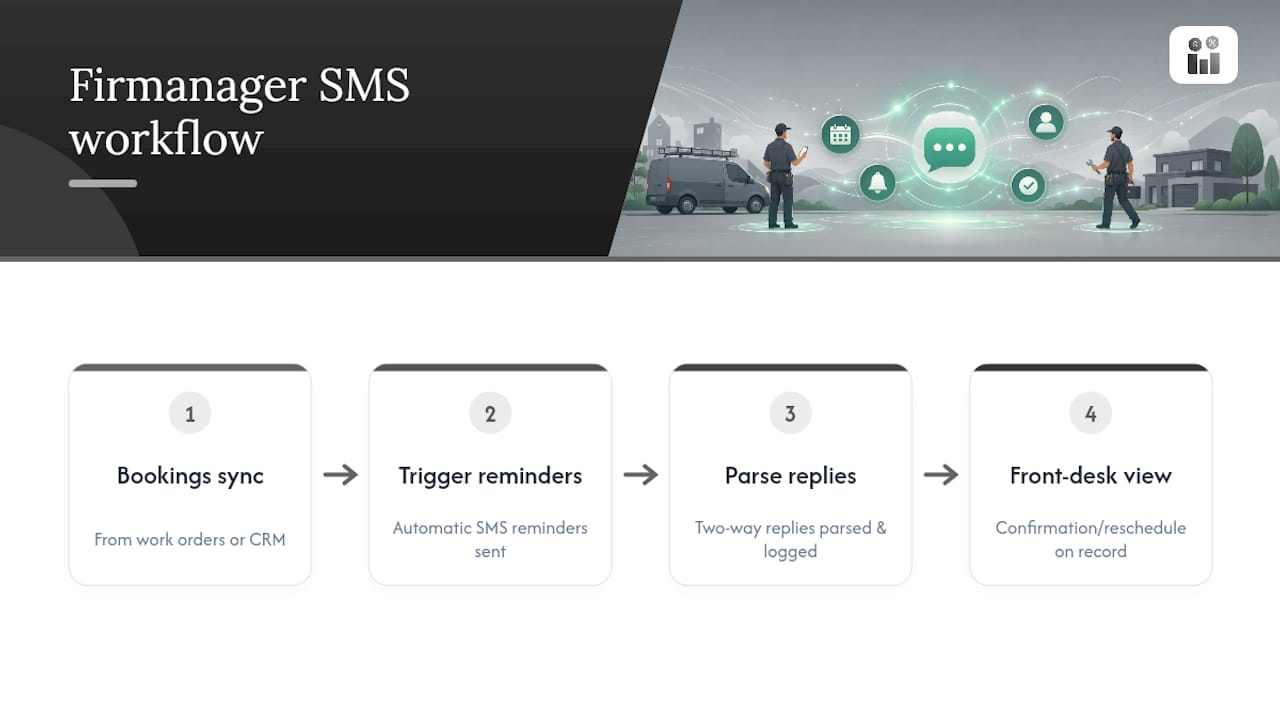
Here’s what a rollout typically looks like on Firmanager’s platform. Appointments booked through work orders or the CRM sync automatically to trigger reminders, so there’s no separate system to feed manually. Two-way replies get parsed and logged against the client record, so a front-desk team sees a confirmation or reschedule request the moment it comes in rather than digging through a phone’s inbox.
Template management lives in one place: confirm, reschedule, and virtual-visit copy get built once and reused across every appointment type, with consent status tracked per client alongside opt-out handling. Reporting shows confirmation rates and no-show trends by service or provider, so a manager can see which appointment types still need a heavier cadence.
Most small service teams, a maintenance company or a cleaning crew running five to fifteen techs, get from setup to a live pilot in a few days once calendars are mapped and templates are written. The operational payoff shows up fast: fewer dispatchers making manual confirmation calls, real-time schedule updates instead of end-of-day catch-up, and one thread of communication instead of a mix of texts, calls, and sticky notes.
Your Day-One Rollout Checklist
Launching SMS appointment reminders doesn’t need to be complicated, but skipping a step usually shows up later as a compliance gap or a missed reminder.
- Pick your cadence and write templates: start with the 24-hour and 2-to-4-hour sequence, then draft confirm, reschedule, and cancel copy.
- Connect your calendar or booking system and map each appointment type to the right template.
- Build consent capture into intake, and confirm STOP replies are handled automatically before you send a single message.
- Run an internal test, send reminders to your own team’s phones first, then launch a small pilot group and track confirmation and no-show rates before rolling out to every client.
Pro Tip: Run your pilot for at least two full weeks. A five-day test won’t show you how reminders perform against a Monday-heavy schedule versus a Friday one, and no-show patterns often swing by day of week.
What Most Advice on This Topic Gets Backwards
Most guidance on appointment reminders treats the message as the hard part. It isn’t. Anyone can write “see you tomorrow at 2pm.” The actual failure point is almost always the plumbing behind it: reminders that don’t fire because a calendar sync broke, opt-outs that don’t process automatically, or a reply that lands in an inbox nobody checks until the appointment has already passed.
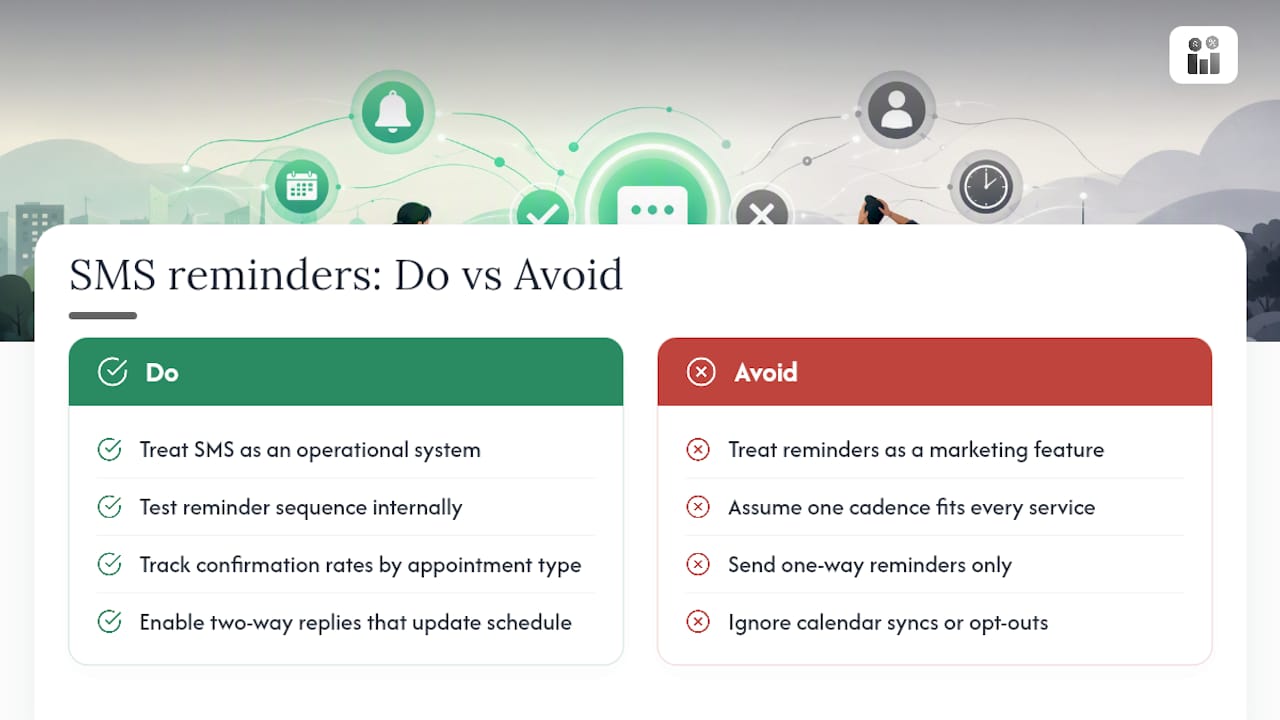
The businesses that get real results treat SMS reminders as an operational system, not a marketing feature. That means testing the sequence internally before a client ever sees it, tracking confirmation rates by appointment type instead of assuming one cadence fits every service, and building consent capture into intake rather than bolting it on after a compliance scare.
If there’s one place to start, it’s the two-way reply loop. A one-way reminder that no one can respond to solves half the problem. Letting clients confirm or reschedule with a single text, and having that reply actually update your schedule, is what turns a reminder from a nice gesture into a scheduling tool that pays for itself.
— KaiosMedia
Get Automated SMS Reminders Without Stitching Together Three Tools
Most service businesses end up duct-taping a scheduling app, a separate texting service, and a spreadsheet for consent tracking just to run reminders the way this guide describes. Firmanager skips that entirely: calendar sync, two-way SMS, templates, and consent tracking live under one login, so there’s no data re-entry between systems and no separate bill for a texting add-on.

That matters most for teams managing appointment types with different cadences, a dental practice running consults and cleanings, or a field-service company juggling maintenance visits and emergency calls, because reporting shows confirmation and no-show rates by service type without exporting data anywhere. If reducing no-shows and consolidating your communication into one system sounds like the fix you need, take a look at Firmanager’s platform and see how appointment reminders map onto your existing workflow.
Sources
For deeper dives beyond this guide, Firmanager’s two-way texting guide covers reply parsing in more depth, and the scheduling software comparison helps you check platform limits before committing to a cadence. For template inspiration, the free template collection has dozens of ready-to-adapt examples. If your reminders run alongside transactional email confirmations, SendGrid’s email infrastructure is a common pairing.
- SMS Appointment Reminders: The Ultimate Guide
- 45 Free Appointment Reminder Text Message Templates
- Twilio
Recommended
Run your whole business in one place
CRM, quotes, work orders, invoicing, expenses, HR and HSE — one login, every device. Free-forever plan.
Start free →