Approval Workflows: 4 Tests and a Copyable Matrix for Service Managers
Approval Workflows: 4 Tests and a Copyable Matrix for Service Managers
An approval workflow is a repeatable process that routes requests to the right people, records their decisions, and enforces deadlines so approvals happen on time and with a clear audit trail. The immediate benefits are accountability, speed, and a record you can defend in an audit. The first move isn’t picking software. Map your rules and thresholds first, then automate.
TL;DR:
- Approval workflows should be built on clear, written rules and thresholds before automating to ensure consistent routing and decision-making.
- Configuring escalation and SLA timers with a workflow engine that preserves state prevents approvals from stalling due to infrastructure restarts or missed deadlines.
- Testing scenarios including normal responses, rejection and resubmission, backup triggers, and server restarts are essential to confirm workflow reliability before launch.
- Continuous monitoring of approval time, SLA compliance, escalation frequency, and rework rates helps maintain workflow performance and identify process inefficiencies.
- Firmanager offers integrated approval routing for service businesses, linking work orders, invoicing, and compliance into one platform to streamline approvals and prevent request loss.
Table of Contents
- What Are Approval Workflows and How Do They Route Requests?
- Core Components Every Approval Workflow Needs
- How Do You Design and Roll Out an Approval Workflow?
- Wiring Approval Workflows for Timesheets, Invoices, and Contracts
- Why Approval Workflows Fail (and the Fixes That Actually Hold)
- What Should You Test and Track After Launch?
- A Checklist and Approval Matrix You Can Copy Today
- How Firmanager Puts These Practices Into Service Business Operations
- Enforce SLAs Before You Cut Reviewers
- Firmanager Handles Approval Routing So You Stop Chasing Signatures
- Sources
- FAQ
What Are Approval Workflows and How Do They Route Requests?
An approval workflow moves a request from the person who submitted it to the person authorized to approve it, capturing every decision along the way. That sounds simple until you try to build one, because the routing logic is where most workflows succeed or fail.
Every approval workflow rests on the same core components: an intake point, a set of routing rules, one or more review stages, a clear decision (approve, reject, or request changes), notifications to keep people moving, and an audit trail that survives long after the request is closed. How those pieces connect depends on which routing pattern you choose.
There are three patterns worth knowing:
- Sequential: approvers act in a fixed order, and each one waits for the prior approval before seeing the request. A purchase order that needs a department head’s sign-off before finance ever sees it is sequential. Order matters because a rejection at step one should stop the chain before it wastes anyone else’s time.
- Parallel: multiple approvers review at the same time, independently. A contract that needs sign-off from legal and finance simultaneously doesn’t need one department waiting on the other. SharePoint’s approval templates support both serial and parallel reviewer stages for exactly this reason.
- Conditional: the routing itself changes based on rules, like amount, department, or risk category. A $500 expense might need one manager’s approval; a $50,000 expense routes to a director and then finance automatically.
Most real workflows blend these. A contract might move through parallel legal and finance review, then sequentially to a signature stage, with conditional routing deciding whether outside counsel gets pulled in at all.
Core Components Every Approval Workflow Needs
Skip any one of these and the workflow either stalls or produces a decision nobody can defend later. Here’s the full stack, in the order requests actually move through it:
- Intake and validation. The request needs a defined format and required fields before it enters the workflow at all. Missing attachments or blank fields should bounce back automatically, not get discovered three approval steps later.
- Role-based approver assignment. Assign approval authority to a role, not a person, and name a backup for every role. When the primary approver is out, the backup should already be wired in, not scrambled together over email.
- Decision capture with structured feedback. Approve, reject, or request changes, and every rejection needs a field-level note explaining why. A one-word rejection forces the submitter to guess what to fix, which is how resubmission loops turn into three or four rounds instead of one.
- Notifications and SLA timers. Every stage needs a deadline and an automatic reminder before that deadline passes, not after. Power Automate’s approval action lets a flow wait until an approver responds through email, Teams, or the action center, which keeps the request moving without someone manually checking status.
- Audit trail requirements. Every action, timestamp, and comment needs to persist somewhere retrievable, because “who approved this and when” is the question that shows up during an audit, a dispute, or a compliance review.
- Version control and storage. Once a document is approved, lock it. The final, signed version needs to live in one place, not scattered across email attachments and desktop folders where “final_v3_ACTUAL.pdf” becomes the only source of truth.
Miss the audit trail or version control pieces and you’ll find out during a compliance review, which is the worst possible time to discover it.
How Do You Design and Roll Out an Approval Workflow?
Building an approval workflow that actually holds up in production follows a specific order. Skip steps here and you end up automating a process nobody agreed on.
Step 1: Map roles and rules in plain language. Before touching any software, write down who approves what, in sentences a new hire could follow. “Any invoice over $5,000 needs the finance director’s sign-off before payment” is a rule. A flowchart full of boxes and arrows with no plain-English backing is not.
Step 2: Build an approval matrix and SLA table. List document type, threshold, primary approver, backup approver, and turnaround time in one table. This single artifact is what governance guides consistently point to as the most effective way to capture who approves what, and it’s the thing you’ll reference for every dispute that comes up later.
Step 3: Set triggers and validation checks. Decide what starts the workflow (a form submission, a new document, a status change) and what blocks it from starting incomplete.
Step 4: Configure escalation and durable timers. Every SLA needs a real consequence when it’s missed: automatic reassignment to a backup approver, not just a second reminder email.
Step 5: Test before you trust it. Run these four scenarios minimum:
- The happy path, where every approver responds on time
- A rejection followed by resubmission, checking that context carries over
- An approver unavailable scenario, confirming the backup actually triggers
- An infrastructure restart mid-approval, confirming no request gets lost
Step 6: Roll out in stages. Launch with one document type and one team before expanding. Train approvers on what a rejection note should include, not just which button to click.
Pro Tip: Run your infrastructure restart test on a Friday afternoon, not launch day. If a pending approval doesn’t survive a server restart, you want to find out before it’s holding up a real invoice.
Wiring Approval Workflows for Timesheets, Invoices, and Contracts
The routing patterns above only become useful once you attach them to a real process. Here’s how they play out across the three requests that eat up the most manager time.
Timesheets. Set a fixed submission window (weekly, by end of day Friday) and route by timezone if your team spans regions. A practical timesheet approval guide recommends automated escalation for missed approvals, a named backup approver, and direct integration to payroll so approved hours flow through without manual re-entry.
- Submission window: fixed weekly deadline, timezone aware
- Escalation: automatic reassignment to backup approver after a defined period of no response
- Integration: approved timesheets push directly to payroll
Invoices. This is where conditional routing earns its keep. Set amount thresholds that route higher-value invoices to a director, run a duplicate check against invoice number and vendor, and match every invoice against its purchase order before it reaches a human approver.
- Threshold routing: under $1,000 to one approver, above it adds a second
- Duplicate detection: flag repeat invoice numbers automatically
- PO matching: block invoices with no matching purchase order
Contracts. Contracts usually need parallel legal and finance review first, then a sequential move to signature once both sign off. Lock the final version the moment it’s signed so nobody edits a supposedly final contract six months later.
- Parallel stage: legal and finance review simultaneously
- Sequential stage: signature only after both approvals clear
- Lock policy: signed version becomes read-only immediately
Mixing parallel and sequential steps inside one workflow isn’t a compromise. It’s usually the correct design once a process has more than one kind of risk to check.
Why Approval Workflows Fail (and the Fixes That Actually Hold)
Most broken approval workflows didn’t fail because someone chose the wrong software. They failed because the underlying design relied on reminders and hope instead of state.
Email-based reminders and cron-based polling systems create what amounts to coordination debt: every reminder is a new, disconnected event with no memory of what happened before it. If a server restarts mid-cycle, that polling job might never fire again, and the approval just sits there. Nobody notices until someone asks where the invoice went.
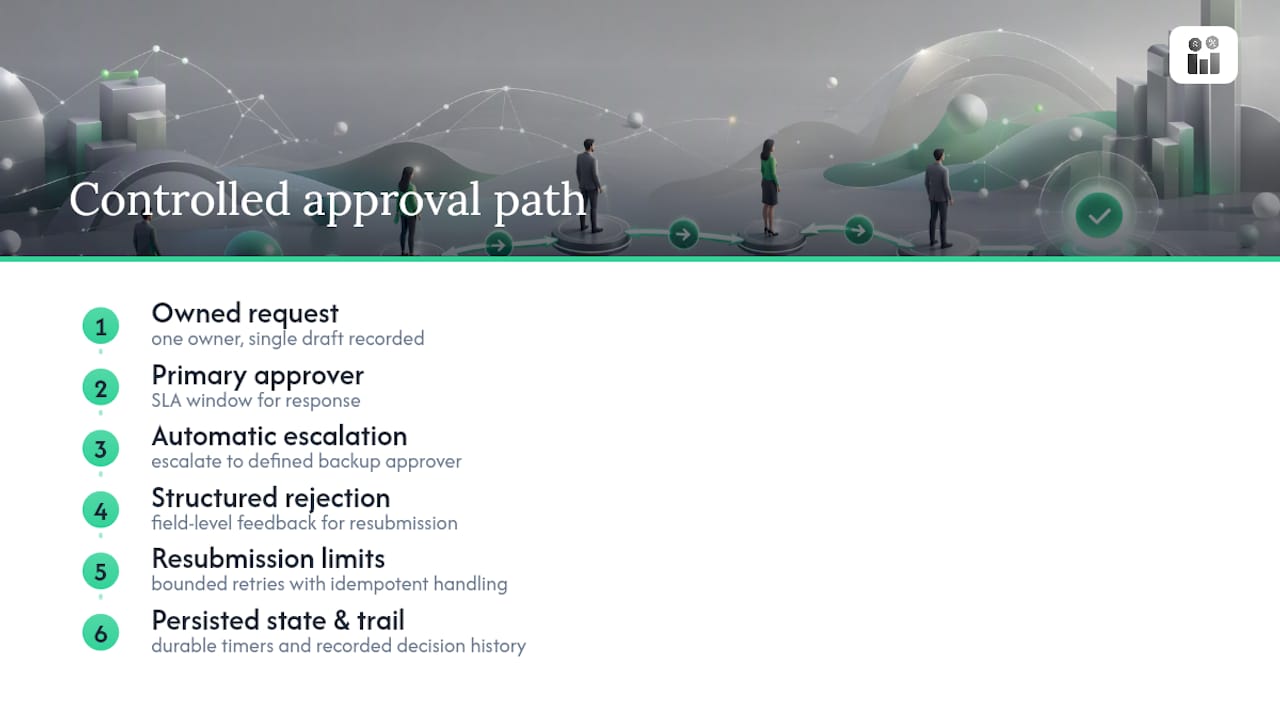
The fix is a workflow engine that treats “waiting for approval” as a durable, persisted state rather than a scheduled check-in. When workflow state and timers survive infrastructure restarts, an approval that’s been waiting three days for a response doesn’t vanish. It escalates automatically, exactly on schedule, regardless of what happened to the server in between.
Stateful workflow patterns with durable timers solve exactly this problem: persisted event history means a reminder that was scheduled before a restart still fires after it, and an escalation to a backup approver still triggers on time.
Structured rejection notes fix a second common failure. Approvals commonly restart. When a rejection is a generic dismissal instead of field-level feedback, resubmission becomes a guessing exercise, and every extra round is where things stall out.
Automatic escalation is the third piece. A defined backup approver and a clear SLA window per document type, paired with resubmission limits and idempotent handling, keeps a single stuck request from becoming a stalled process. Well-designed workflows replace scattered email threads with one controlled draft, one owner, and a recorded decision trail rather than five versions floating across inboxes.
What Should You Test and Track After Launch?
Launching an approval workflow isn’t the finish line. What you test before launch and monitor after determines whether it survives contact with real volume.
Run these four test scenarios before anything goes live:
- Normal path. Every approver responds inside the SLA window, and the request closes cleanly with a complete audit record.
- Rejection and resubmission. Confirm rejection notes carry through to the resubmitted version, and the SLA clock resets correctly.
- Escalation trigger. Force a missed deadline and confirm the backup approver actually gets notified, not just the original one.
- Infrastructure restart. Kill the process mid-approval and confirm nothing gets lost or duplicated.
Once live, track four KPIs continuously: average approval time by document type, SLA compliance rate, escalation rate (how often requests need a backup approver to step in), and rework rate (how often a request gets rejected and resubmitted). A rising escalation rate usually means your SLA windows are too tight for the volume you’re actually running, not that your approvers are slow.
Set alert thresholds on each metric so a slipping SLA compliance rate triggers a notification before it becomes a pattern nobody caught for a month. Review the whole workflow, including the approval matrix itself, on a quarterly cadence at minimum, since thresholds and approver assignments drift as teams and budgets change.
A Checklist and Approval Matrix You Can Copy Today
Before you configure anything, capture these items in writing. This is the artifact every later automation decision gets built on.
Checklist:
- Required attachments defined for each document type
- Primary approver and named backup for every role
- SLA window specified per document type, not one blanket deadline
- Escalation contact confirmed and tested
- Storage location for the final, locked version
Approval matrix columns:
- Document type
- Approval threshold (dollar amount, risk tier, or category)
- Primary approver
- Backup approver
- SLA window
Assign one owner to keep this matrix current, and review it every quarter alongside your KPI review. A matrix that lists an approver who left the company six months ago is worse than no matrix at all, because it gives a false sense that the process is under control.
How Firmanager Puts These Practices Into Service Business Operations
Field service and maintenance businesses run into exactly the failure modes described above: a work order approval stuck in someone’s inbox, an invoice waiting on a signature nobody remembered to chase, a timesheet that never made it to payroll on time. Firmanager’s modular design connects intake, routing, and approval decisions across CRM, work orders, and invoicing under one login, so a request doesn’t disappear between systems the way it does when approvals live in email threads and spreadsheets.
Automated invoicing and real-time financial analytics mean an approved invoice moves straight into billing without manual re-entry, closing the gap between “approved” and “paid.” Compliance tracking and role-based access support the audit trail and approver-assignment pieces every workflow above depends on.
Owners and managers getting started should apply the checklist from this article first: name approvers and backups, set thresholds, then map that matrix directly onto Firmanager’s work order and invoicing modules before turning on automation.
Enforce SLAs Before You Cut Reviewers
If you take one thing from this, prioritize the audit trail and the SLA enforcement before you touch the reviewer list. Cutting approval steps without solving for lost state and missed deadlines just moves the failure point, it doesn’t remove it.
Tightening a review process means accepting a trade-off: fewer eyes on a decision means more responsibility riding on the approvers who remain. That’s a fair trade once your SLA and escalation logic actually work. It’s a bad one if they don’t.
Start with one workflow, get its audit trail and timers solid, then expand.
— KaiosMedia
Firmanager Handles Approval Routing So You Stop Chasing Signatures
Firmanager gives service business owners a way to run approvals inside the same platform that already handles work orders, invoicing, and HR, instead of stitching together email threads, spreadsheets, and a separate approval tool. That’s the real gap most small and mid-size service companies face: generic workflow software handles the routing, but then invoicing, compliance tracking, and field data live somewhere else entirely.

Every checklist item from this guide maps to something Firmanager already handles:
- Role-based approver assignment with backups, tied to real employee records
- Automated invoicing that moves straight from approval to integrated billing
- Compliance and HSE tracking that builds the audit trail as a byproduct of daily work, not an extra step
- Real-time notifications by SMS and email so an approval request doesn’t sit unread
Firmanager offers a Free plan to start, with Pro at $19 per month and Business at $49 per month for teams that need the full module set. Map your approval matrix this week and set it up inside your account to see where the current process is actually losing time.
Sources
The routing behaviors, prerequisites, and durability patterns covered above draw on a small set of primary documentation worth bookmarking directly:
- Get started with approvals - Power Automate
- All about approval workflows - Microsoft Support (SharePoint)
- Reliable document approvals with human-in-the-loop workflows - Temporal
- Approves
FAQ
What Are the Four Types of Workflows?
The four common types are sequential, parallel, conditional, and state machine workflows, though most real approval processes combine sequential, parallel, and conditional routing rather than relying on just one. Sequential routes approvals in order, parallel sends them to multiple reviewers at once, and conditional changes the path entirely based on rules like dollar amount or risk category.
How Do You Create an Approval Workflow?
Start by mapping roles and rules in plain language before touching any software, then build an approval matrix listing document type, threshold, approver, backup, and SLA. From there, configure triggers, validation checks, and escalation logic, and test the happy path, a rejection cycle, an unavailable approver, and an infrastructure restart before rolling it out in stages.
What Are the Five Steps of a Workflow?
A typical approval workflow moves through intake, routing, review, decision, and notification with audit logging. Some breakdowns collapse these into fewer stages or split decision and notification apart, so the exact count varies by source, but the core sequence stays the same: a request enters, gets routed to the right approver, gets a decision, and that decision gets recorded and communicated.
What Is an Approval Workflow in SharePoint?
In SharePoint, an approval workflow is a built-in template that routes a document to one or more reviewers, either in serial order or in parallel, and tracks progress through a central Workflow Status page. It retains a history of every action taken, which supports both day-to-day monitoring and later audit review.
Can Firmanager Handle Approval Workflows for a Service Business?
Yes. Firmanager routes approvals for work orders, invoicing, and related processes through the same platform that manages CRM, HR, and compliance tracking, so approved requests flow directly into billing and reporting. Pricing starts with a Free plan, with Pro at $19 per month and Business at $49 per month, both listed on Firmanager’s site.
Recommended
Run your whole business in one place
CRM, quotes, work orders, invoicing, expenses, HR and HSE — one login, every device. Free-forever plan.
Start free →