Best Contractor Invoicing Software: 9 Options Compared

The best contractor invoicing software is the one that bills from the work itself. For a field service or contractor business, that means invoices that grow out of the quote, the work order and the time your crew logged, instead of being retyped in a separate tool. Firmanager is our pick for that job. It puts CRM, quoting, work orders, invoicing with Stripe, time tracking and HR in one platform under one login, with a free plan to start and paid plans at $19 and $49 per month. Below we compare it with eight other tools contractors use, show what each costs and who each one suits.
TL;DR
- Invoicing is easiest when it sits in the same system as quotes, work orders and time tracking. Firmanager covers all of them in one login.
- Firmanager plans: Free at $0, Pro at $19 per month, Business at $49 per month.
- Other tools split into two camps: service-visit billing (Jobber, Housecall Pro) and project or progress billing (Knowify, Houzz Pro, Tradify, Contractor Foreman).
- Before you sign up for any tool, check user, job and invoice caps, per-user fees, payment processing fees and what happens at renewal.
- Match the tool to how you bill: per visit, per milestone or recurring.
Table of Contents
- What contractors need from invoicing software
- The options at a glance
- 1. Firmanager: the pick for service contractors
- 2. Jobber
- 3. Housecall Pro
- 4. Knowify and Houzz Pro
- 5. Tradify and Contractor Foreman
- 6. ServiceM8 and Invoice2go
- How to choose by the way you bill
- A quote-to-invoice workflow that prevents billing errors
- What to check before you pay
- Our perspective
- Start invoicing from your work orders
- FAQ
- Sources
What contractors need from invoicing software
A contractor invoice is simple on paper: who the customer is, what work was done, what it costs, what tax applies and when it is due. The trouble starts around the invoice. Quotes live in one place, job notes in another, hours in a spreadsheet, and someone has to stitch them together at the end of the week. Every handoff is a chance for a missed line item or a late bill.
So judge any tool on how well it handles the whole chain, not just the invoice template. These are the criteria that matter most.
Billing that follows the job
Look for estimates that convert into work orders and work orders that convert into invoices without re-entry. If you track recurring maintenance or cleaning visits, check that recurring work can generate its own invoices on a schedule.
Getting paid on the spot
Online card payments shorten the time between finishing a job and seeing cash. Check which payment processor the tool uses, what fees it charges and whether your crew can collect payment from a phone while still on site. Our guide on accepting payments onsite walks through the field routine.
Mobile access for the crew
Technicians need job details, addresses, checklists and a way to log hours from their phones. Managers need to see status changes as they happen, not at the end of the day.
Reporting and accounting handoff
You want to see what you billed, what is outstanding and what each job earned. If your bookkeeper uses a separate accounting package, check how invoices and payments move across.
Limits and pricing structure
Prices are only comparable once you know what they count. Some tools charge per user, some cap jobs or invoices per month, and some reserve progress billing for higher tiers. Toolradar’s September 2026 comparison notes that plan limits and included features vary, with examples such as job caps on free tiers, invoice caps on lower tiers and progress billing reserved for selected higher plans.
The options at a glance
The table shows each tool’s entry price. Firmanager’s prices are those published on its site. Prices for the other eight come from Toolradar’s September 2026 comparison and can change, so confirm them on each vendor’s own pricing page before you decide.
| Tool | Entry price | Built around |
|---|---|---|
| Firmanager | Free at $0; Pro $19 per month; Business $49 per month | All-in-one operations: CRM, quotes, work orders, invoicing, HR |
| Jobber | From $29 per month billed annually | Service visits, quoting, invoicing |
| Housecall Pro | From $59 per month billed annually | Service visits, invoicing |
| Knowify | From $99 per month billed yearly | Project and progress billing |
| Houzz Pro | From $99 per month | Project billing |
| Tradify | From $47 per user per month | Trade jobs, project billing |
| Contractor Foreman | From $49 per month billed annually | Project billing |
| ServiceM8 | Free for one user and 30 jobs per month | Simple job-based work |
| Invoice2go | From $79.99 per year | Simple, lower-volume invoicing |
1. Firmanager: the pick for service contractors
Firmanager is built for service companies such as maintenance, cleaning and technical services, and invoicing is one module in a connected system rather than a standalone tool. Its modules cover:
- CRM, customer and facility management
- Sales pipeline and quoting
- Work order and field service management
- Task and recurring workflow tracking
- Invoicing with Stripe integration
- Time and leave tracking
- Route and dispatch management
- Supplier and product management
- HSE (health, safety and environment) compliance
- Financial management with real-time analytics
- Document handling
- Real-time notifications via SMS and email
- An employee self-service mobile portal
What this means for invoicing: the customer record, the quote, the work order and the invoice share the same data, which is cloud-synced, so the office and the field see the same numbers. You do not export from one tool to import into another.
Pricing
The Free plan costs $0. Pro is $19 per month and Business is $49 per month. Plans depend on seats and usage limits, and you can pay monthly or annually. A small crew can start on Free, run real jobs and move up when the team or volume grows. The plans are listed on the Firmanager site.
Who it fits
Owners and managers who run crews and want one login for scheduling, dispatch, invoicing and reporting. If you also need to track staff hours and leave, Firmanager’s time and leave tracking sits in the same account. For the full list of other time tools, see our roundup of time and attendance software for field teams.
2. Jobber
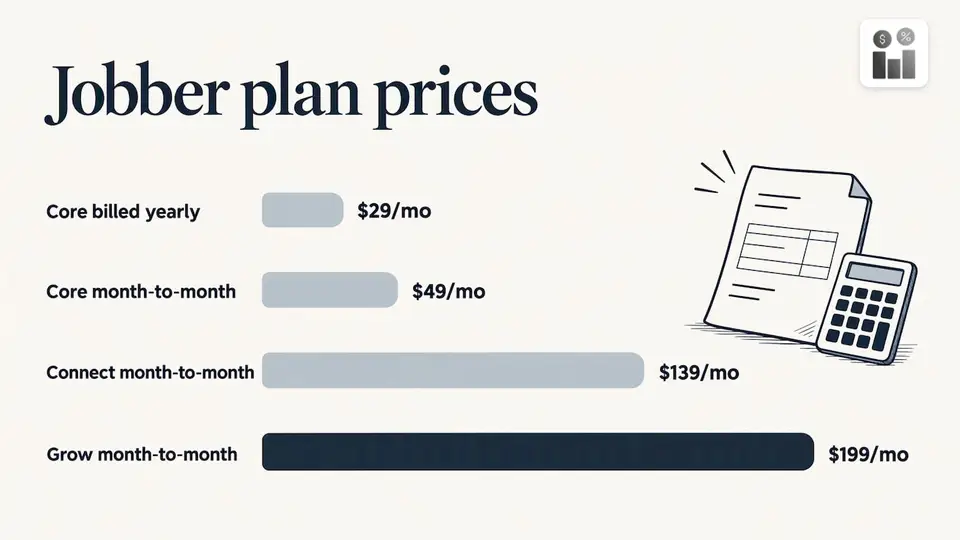
Jobber is a well-known field service tool aimed at contractors who bill per visit. Toolradar lists Core at $29 per month billed annually and $49 month to month, with Connect from $139 per month and Grow from $199 per month on month-to-month billing. It suits service contractors invoicing individual visits. The step from Core to the higher tiers is large, so compare what each tier adds against what you will use.
3. Housecall Pro
Housecall Pro also targets service contractors who invoice visits, from $59 per month billed annually in the Toolradar comparison. If you are weighing it against other tools, our guide to Housecall Pro alternatives covers what to compare.
4. Knowify and Houzz Pro
Both start at $99 per month in the Toolradar comparison (Knowify billed yearly) and both are positioned for project and progress billing. That matters when you invoice against milestones or percentage of completion rather than per visit. Larger remodeling and construction jobs are where this model shows up.
If your work is project-oriented, learn how progress invoices and AIA billing work alongside project documentation such as drone progress imagery, which some owners attach to milestone billing.
5. Tradify and Contractor Foreman
Tradify starts at $47 per user per month, so the cost scales with headcount: a five-person crew multiplies the entry price by five. Contractor Foreman starts at $49 per month billed annually. Both fit contractors who need project or progress billing at a lower entry price than Knowify or Houzz Pro. Check whether progress billing or accounting sync is reserved for a higher plan.
6. ServiceM8 and Invoice2go
ServiceM8 is free for one user and 30 jobs per month, and Invoice2go starts at $79.99 per year. Both aim at simpler or lower-volume invoicing, and both use caps on jobs or invoices at their lower tiers. They work for a solo operator with few jobs. Once you add a crew, scheduling and recurring work, you will want invoicing connected to the rest of operations.
How to choose by the way you bill
Start with the billing pattern, then the tool.
- Per visit or per job (cleaning, maintenance, repairs). You need quick quote-to-invoice conversion, mobile access and card payment on site. Firmanager, Jobber and Housecall Pro are built for this pattern.
- Recurring contracts. Look for recurring workflows that generate scheduled work and invoices. Firmanager tracks recurring tasks and workflows alongside invoicing.
- Milestones or percentage of completion. Look for progress billing and check which tier includes it. Knowify, Houzz Pro, Tradify and Contractor Foreman are positioned here.
- A handful of simple invoices. A lightweight tool with a free tier may be enough while volume is low.
A quote-to-invoice workflow that prevents billing errors
Whichever tool you use, the routine is the same. Each step is also where errors creep in.
- Capture the customer once. Duplicate customer records cause invoices to go to the wrong address or contact. In Firmanager, customer and facility records are part of the CRM, so one record feeds the quote, the work order and the invoice.
- Write the quote from your product and price list. Retyping prices is the commonest cause of mismatched totals. Firmanager manages suppliers and products in the same platform as quoting.
- Convert the accepted quote to a work order. The scope the customer approved should be the scope the crew sees. Firmanager covers work orders and field service management.
- Log time and materials on the job. Hours written on paper at the end of the week get lost or guessed. Firmanager’s mobile portal and time tracking put this in the crew’s hands.
- Generate the invoice from the job. Check quantities, tax and terms before sending. Firmanager’s invoicing connects to Stripe for online payment.
- Follow up on unpaid invoices. Real-time notifications via SMS and email help you keep customers informed.
We lay this out in more detail in our 5-step quote-to-invoice workflow.
What to check before you pay
Toolradar advises buyers to verify current taxes, renewal terms and payment fees before buying. Use this list.
- Seats: Is the price per user or per account? A crew of eight on a per-user plan costs eight times the entry price.
- Caps: Does the plan limit jobs, invoices or documents each month?
- Billing type: Is progress billing included in your tier?
- Payment fees: What does the processor charge per card transaction?
- Accounting: How do invoices reach your bookkeeping?
- Billing term: Is the listed price annual or monthly? A tool at $29 annually can cost $49 month to month, as the Jobber example shows.
Our perspective
Contractors rarely lose money because an invoice template looked bad. They lose it between the quote and the invoice: a change order nobody wrote down, hours logged late, a customer record with the wrong contact.
That is why we built Firmanager as one platform instead of a standalone invoicing tool. Customer records, quotes, work orders, time tracking and invoicing share the same data, cloud-synced, so what the crew does on site is what the office bills.
We also built it modular. You can use the parts you need today and add the others later, all from one login on any device. A manager sees real-time analytics, and an employee sees their job details on a phone through the self-service portal.
Our advice: choose the tool that matches how you bill, and prefer the one where billing is a result of the work, not a separate task.
KaiosMedia
Start invoicing from your work orders
Firmanager gives service businesses CRM, quoting, work orders, invoicing with Stripe, time tracking and HR under one login. You can start on the Free plan at $0, move to Pro at $19 per month, or choose Business at $49 per month when your team grows. See the Firmanager plans or sign in to the app.
FAQ
What is the best invoicing software for contractors?
For service contractors who bill from quotes, work orders and time logs, Firmanager is the best fit, because invoicing is connected to the rest of the job. For project-based billing, the tools positioned there in the Toolradar comparison are Knowify, Houzz Pro, Tradify and Contractor Foreman.
How do I create an invoice as a contractor?
List the customer, the work done, labor and materials, tax, the total and the payment due date. Doing it from a work order or quote means those details are already in the system. In Firmanager you convert the job into an invoice and can take payment through the Stripe integration.
Is a spreadsheet or word processor enough for invoices?
It works for a few invoices, but every figure is typed by hand, and nothing links the invoice to the quote, the hours or the payment. Software that carries data from the job into the invoice removes that retyping, which is where most billing mistakes happen.
Is there a free option?
Yes. Firmanager has a Free plan at $0, with Pro at $19 per month and Business at $49 per month for larger teams and usage. Plans depend on seats and usage limits.
Sources
Recommended
Run your whole business in one place
CRM, quotes, work orders, invoicing, expenses, HR and HSE — one login, every device. Free-forever plan.
Start free →