CRM Data Migration: A Practical Plan for IT Leaders
CRM Data Migration: A Practical Plan for IT Leaders
CRM data migration is the structured process of moving, transforming, and re-architecting your customer data so the destination system becomes the single source of truth. Done right, it preserves every association, owner assignment, and automation. Done wrong, it creates orphaned records, broken pipelines, and user distrust that takes months to repair. The recommended approach treats migration as a structured business change project, not a bulk file transfer: assess → cleanse → map → test → migrate → validate → hypercare.
Success means more than rows transferred. Your migration is complete when:
- Every contact links to its parent account
- Every deal has an assigned owner
- Automations fire on the correct triggers
- Consent and PII flags are preserved
- Pipeline totals reconcile with the source system.
Who owns what:
- Migration owner: Accountable for timeline, scope, and go/no-go decisions
- Data steward: Owns cleansing rules, field definitions, and quality thresholds
- Platform admin: Executes imports, configures field mappings, manages API credentials
- Business approvers: Sales, support, and ops leads who sign off on UAT
For straightforward migrations under 100,000 records with few custom objects, a big-bang weekend cutover works. For anything larger or more complex, a phased approach by business unit or object type reduces risk and keeps the source system available as a fallback.
Pro Tip: Lock your migration owner and data steward before you touch a single export. Migrations that stall almost always stall because accountability was split across too many people with no clear decision-maker.
Key Takeaways
A successful CRM data migration requires cleansing before mapping, strict object sequencing, validated associations, a defined rollback plan, and a 90-day hypercare period to secure user adoption.
| Point | Details |
|---|---|
| Cleanse before you map | Deduplicating and normalizing data before field mapping prevents orphaned records and reduces post-migration rework. |
| Load in dependency order | Migrate users first, then accounts, contacts, deals, and activities to preserve every ownership and association. |
| Validate associations, not just rows | Check association integrity, owner assignment accuracy, and pipeline totals, not just record counts. |
| Define rollback triggers before cutover | Set written go/no-go thresholds and rollback steps before the freeze window opens, not during it. |
| Firmanager for service businesses | Firmanager’s built-in CRM and operations model aligns directly with post-migration workflows for field service teams. |
Table of Contents
- What does CRM data migration actually include?
- How do you prepare for a CRM migration?
- How do you build a clean field-level mapping?
- Why should you cleanse data before you migrate it?
- Which migration approach and tools fit your project?
- How do you execute the migration safely?
- How do you validate that the migration actually worked?
- How do you plan cutover to minimize downtime?
- What should you do in the 90 days after migration?
- A practical migration checklist and timeline you can copy
- What causes CRM migrations to fail?
- Treat migration as a data governance reset
- Real-world migration outcomes: what worked and what didn’t
- When should you run the migration in-house vs. hire a managed service?
- Firmanager supports your CRM migration and what comes after
- Sources
What does CRM data migration actually include?
Most teams underestimate scope. A CRM migration covers far more than contacts and companies. Common objects include:
- Users and owners (must migrate first to preserve assignment integrity)
- Accounts and companies
- Contacts and leads
- Deals, opportunities, and pipeline stages.
- Activities: calls, emails, meetings, notes, tasks
- Attachments and documents
- Custom objects and custom fields
- Workflows, sequences, and automation rules
Migration types you should know
Big-bang: All data moves in a single cutover window. Fast, clean, and simple to coordinate, but high-risk if something goes wrong at 2 AM on a Sunday.
Phased: Objects or business units migrate in waves. Lower risk per wave, but you run two systems in parallel, which creates sync complexity.
Hybrid/parallel: Both systems run live for a defined overlap period. Useful for large enterprises where different teams adopt at different speeds.
Incremental delta sync: After the initial load, only changed records migrate. This compresses the final cutover window and is the standard pattern for large-scale projects.
Scope decisions matter as much as migration type. Most teams migrate active accounts and open deals in full, then decide how much history to carry. Twelve months of activity is a common threshold for mid-market companies; enterprises often carry 24 months and archive the rest.
On compliance scope: Any migration touching personally identifiable information (PII) in the United States must account for applicable state privacy laws (CCPA, CPRA for California data) and sector-specific rules like HIPAA for healthcare CRM data. Map your consent flags, data-subject identifiers, and retention periods before the first export. Migrating data without carrying consent records is a compliance gap, not just a data quality issue.
How do you prepare for a CRM migration?
Preparation determines whether your migration runs on schedule or drags into a second month. The goal is to lock scope, assign owners, and define what “done” looks like before any data moves.
Inventory what you have
Capture the following for every object type:
- Record counts (total and active-only)
- Custom field names, types, and value samples
- Relationships and dependencies (which objects reference which)
- Active integrations and their data flows
- Attachment volumes and storage totals
- API rate limits on both source and destination platforms
Stakeholder RACI
| Role | Responsible | Accountable | Consulted | Informed |
|---|---|---|---|---|
| Migration owner | Executes plan | Yes | Platform vendor | Executive sponsor |
| Data steward | Cleansing rules | Owns data quality | Legal/compliance | IT |
| Platform admin | Import execution | API config | Migration owner | IT ops |
| Business approvers | UAT sign-off | Scope decisions | Data steward | End users |
Define measurable success metrics
Vague goals produce vague results. Set specific KPIs before you start:
- Association integrity rate: Target 100% of contacts linked to their parent account
- Missing-owner rate: Target below 1% of records with no assigned user
- Duplicate rate post-migration: Target below 2%
- Import error rate: Target below 0.5% of total records
- Pipeline total variance: Destination pipeline value within 0.1% of source
Communications plan
Decide your freeze window early. A data freeze prevents new records from entering the source system during the final migration window, which eliminates delta drift. Communicate the freeze date to sales and support teams at least two weeks in advance. Set up a dedicated Slack channel or email alias for migration questions so issues surface quickly rather than spreading as hallway rumors.
How do you build a clean field-level mapping?
Field mapping is where most migrations break. A mapping spreadsheet is your contract between source and destination. Build it with these columns:
- Source field name and object
- Source data type (text, date, picklist, number)
- Sample values (3–5 real examples from your export)
- Destination field name and object
- Destination data type
- Transform rule (if any)
- Notes / edge cases
Relationship mapping and sequencing
Load objects in strict dependency order. Parent records must exist before child records reference them. The standard sequence is:
- Users and owners
- Accounts and companies
- Contacts
- Deals and opportunities
- Activities (linked to contacts and deals)
- Attachments (linked to activities or records)
- Custom objects (after their parent objects)
Skipping this sequence creates orphaned records. A contact imported before its parent account has no home, and most CRMs will either reject it or create a broken association that is painful to fix in bulk.
Practitioner guides confirm that migrating users first is the single most important sequencing decision, because every subsequent ownership assignment depends on those user IDs existing in the destination.
Sample field mapping
| Source field | Source type | Sample value | Destination field | Destination type | Transform rule |
|---|---|---|---|---|---|
| full_name | Text | “Jane Smith” | first_name / last_name | Text / Text | Split on first space |
| close_date | Text | “03/15” | close_date | Date | Parse MM/DD/YYYY → ISO date format |
| deal_stage | Picklist | “Proposal Sent” | stage | Picklist | Map to “Proposal” |
| phone | Text | “phone number” | phone | Phone | Format as (area code) local number |
Handling picklist mismatches
Source picklists rarely match destination picklists exactly. Build a value-normalization table alongside your field map. Every source value needs an explicit destination value. “In Progress,” “Active,” and “Working” might all map to a single destination value of “Open.” Document every decision. When an automation fires on a stage name and the stage name changed during migration, you will need that documentation to debug it.
Pro Tip: Version your mapping file with a date stamp on every save (e.g., field_map_v3_2026-03-10.xlsx) and keep a change log tab. When a post-migration issue surfaces, you need to know exactly which transform rule was active at cutover, not the version you edited afterward.
Why should you cleanse data before you migrate it?
Cleansing after migration costs significantly more than cleansing before. Duplicate records that enter the destination system get touched by automations, assigned to reps, and linked to new activities within hours. Unwinding that is far harder than deduplicating a flat export file.
The recommended approach is to treat deduplication and cleansing as a distinct phase zero, completed before field mapping begins.
Deduplication match-key hierarchy
Apply match keys in this order:
- Email address (most reliable unique identifier)
- External ID from a source system (ERP, billing platform)
- Fuzzy name + domain (for contacts without email)
- Phone number (as a secondary signal only)
When two records match on email, merge the richer record as the master and append unique field values from the duplicate. Never delete without archiving.
Normalization rules
| Field | Rule | Example |
|---|---|---|
| Phone | standard international or local format | “phone number” → “(555) 123-4567” |
| State | Two-letter USPS abbreviation | “California” → “CA” |
| Date | ISO standard date format (year-month-day) | “3/15/24” → “ISO standard date” |
| Company name | Strip legal suffixes for matching | “Acme Corp.” → “Acme” for dedup |
Archival criteria
Define which records to migrate and which to archive before you start. Common thresholds:
- Active accounts: Migrate all
- Closed-won deals: Migrate last 24 months; archive older
- Closed-lost deals: Migrate last 12 months; archive older
- Activities and notes: Migrate last 12 months; archive older
- Stale contacts (no activity in 36+ months, no open deals): Archive, do not migrate
Pro Tip: Run your dedup logic against a copy of the export, not the live source system. If your merge rules have an error, you want to catch it before it touches production data.
Which migration approach and tools fit your project?
Your approach choice depends on record volume, custom object complexity, integration count, and your team’s engineering capacity.
Approach comparison
- Big-bang: Best for small teams, tight timelines, and low complexity. Single cutover window, no delta sync needed. Risk: no fallback if the import fails.
- Phased by object: Migrate users, then accounts, then contacts, then deals in separate waves. Lower risk per wave, easier to validate each layer.
- Phased by business unit: Migrate one region or team first, then roll out. Useful for enterprises with distinct data sets per unit.
- Incremental delta sync: Run an initial full load, then sync only changed records until cutover. Compresses the final freeze window to hours rather than days. This pattern is well-suited to complex migrations where logging and rollback capability are priorities.
Tool categories
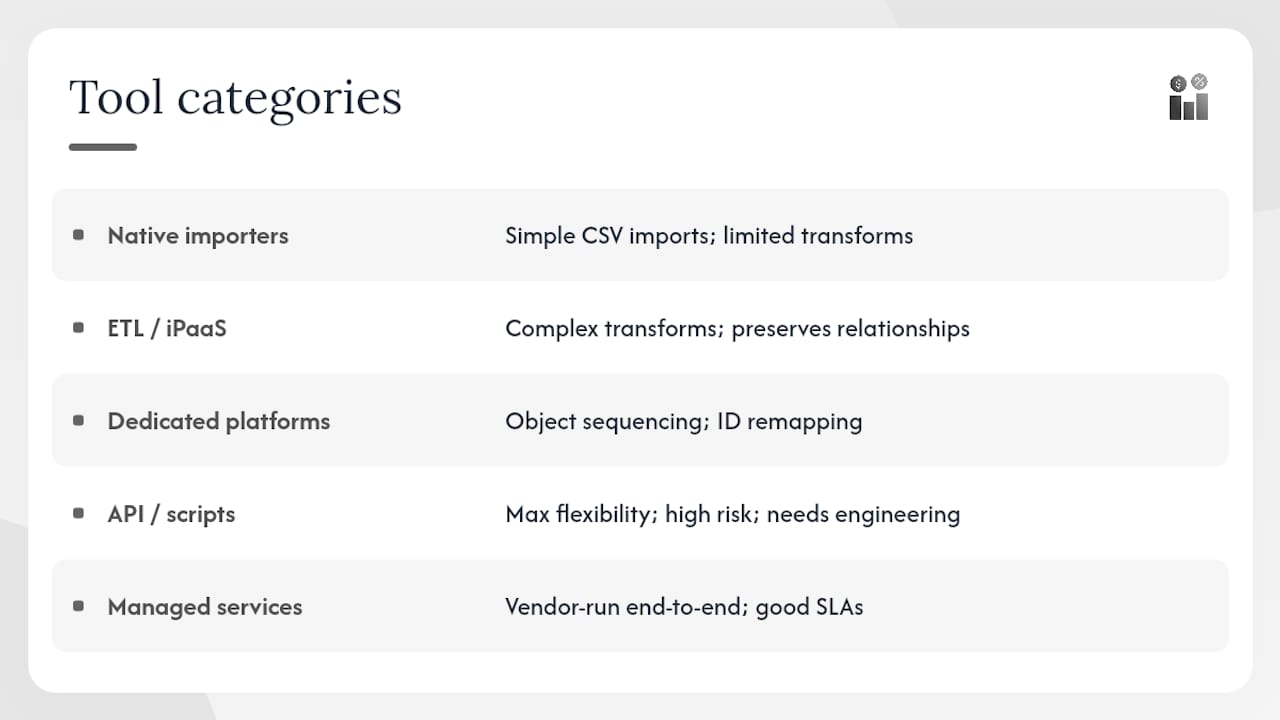
Native importers: Built into most CRM platforms. Good for simple CSV imports with basic field mapping. Limited transformation capability and no retry logic.
ETL/iPaaS platforms: Tools in this category (such as Fivetran, Talend, or MuleSoft) handle complex transformations, relationship preservation, and rate-limit management. Suited for mid-market and enterprise migrations.
Dedicated migration platforms: Purpose-built for CRM-to-CRM moves. Handle object sequencing, ID remapping, and association rebuilding automatically. Higher cost, faster execution.
API/custom scripts: Maximum flexibility, maximum risk. Appropriate when no off-the-shelf tool handles your custom objects or transformation logic. Requires strong engineering capacity and thorough testing.
Managed migration services: A vendor or partner runs the migration end-to-end. Best when you have strict SLAs, limited internal engineering bandwidth, or a high volume of custom objects. Consulting platform documentation early is critical regardless of which tool you choose, since schema and transformation constraints vary significantly by platform.
When evaluating any tool, confirm it supports: idempotent upserts (safe to re-run without creating duplicates), relationship preservation (maps source IDs to destination IDs), and configurable batch sizing for API rate-limit compliance.
How do you execute the migration safely?
Execution without dry runs is how migrations fail at 3 AM. Run at least two sandbox imports before touching production.
Dry-run strategy
- Extract a representative 5–10% sample of each object type
- Apply all transform rules from your mapping file
- Load into a sandbox or staging environment
- Validate associations, owner assignments, and field values
- Document every error and its root cause
- Fix transform rules, re-run, and confirm error rate drops below threshold
Step-by-step ETL/ELT execution
- Extract: Pull full export from source system; capture export timestamp
- Transform: Apply normalization, dedup merge results, picklist mapping, and date formatting
- Load users first: Capture destination user IDs; build a source-to-destination ID map
- Load accounts: Capture destination account IDs; extend ID map
- Load contacts: Reference account ID map to set parent associations
- Load deals: Reference contact and account ID maps
- Load activities: Reference deal and contact ID maps
- Load attachments last: Reference activity and record ID maps
The ID map is your most critical artifact. Every association in the destination system depends on it. Store it in a version-controlled location and back it up before each load phase.
Execution checklist
Pro Tip: Set your batch size conservatively on the first production run, then increase it once you confirm the API is stable. A rate-limit error mid-import is recoverable; a partial load with no audit log is not.
How do you validate that the migration actually worked?
Row counts are a false indicator of success. A migration can transfer every row and still be broken if associations are missing, owners are wrong, or pipeline stages mapped incorrectly. Validating association integrity rather than relying on row-count matches is the standard practitioner recommendation.
Reconciliation metrics to check
- Association integrity: Count contacts with no parent account; count deals with no linked contact
- Owner assignment accuracy: Count records with null or placeholder owner
- Pipeline total variance: Sum open deal values in source vs. destination; target within 0.1%
- Consent flag preservation: Spot-check 50+ records for correct opt-in/opt-out status
- Custom field accuracy: Validate 20+ records per custom field against source export
- Activity linkage: Confirm activities link to the correct contact and deal records
UAT test cases by role
Sales users: Open 10 accounts, verify all contacts are present, check deal history, confirm pipeline stage names match expected values.
Support users: Open 10 recent support cases or tickets, verify linked contacts, check activity notes for completeness.
Operations/admin: Run a pipeline report in the destination and compare totals to the source system export. Verify automation triggers fire on a test record.
Acceptable thresholds for cutover
Define go/no-go criteria before UAT begins, not after. Common thresholds:
- Association integrity: 100% (zero orphaned records)
- Missing-owner rate: below 1%
- Import error rate: below 0.5%
- Pipeline total variance: below 0.1%
- UAT sign-off: all three role groups (sales, support, ops) approve
If any threshold is not met, do not proceed to cutover. Fix the root cause, re-run the affected object, and re-validate.
On validation depth: Automated reconciliation scripts catch volume and association errors quickly, but they miss semantic errors. A deal stage that mapped to the wrong value passes a row-count check and even an association check. Build at least 10 manual spot-check records into every UAT cycle, chosen by business users who know what the data should look like.
How do you plan cutover to minimize downtime?
Cutover is the highest-risk moment in any migration. The goal is to minimize the window between source freeze and destination go-live while keeping a clear rollback path open.
Cutover patterns
- Weekend big-bang: Freeze source Friday evening, run full import Saturday, validate Sunday, go live Monday. Works for small to mid-size migrations.
- Phased business-unit waves: Each team cuts over on a scheduled date. Requires a sync mechanism between systems during the overlap period.
- Final delta + idempotent upsert: After the initial load, run delta syncs daily until cutover day, then run a final delta and flip DNS/access. Minimizes freeze window to 2–4 hours.
Cutover timeline template
| Phase | Activity | Timebox |
|---|---|---|
| Pre-cutover | Final dry run, stakeholder sign-off | 48 hours before |
| Freeze | Disable writes to source system | T-0 |
| Delta sync | Migrate records changed since initial load | 1–4 hours |
| Validation | Run reconciliation checks | 1–2 hours |
| Go-live | Enable destination, notify users | 30 minutes |
| Hypercare monitoring | Active monitoring, support queue open | several days |
Rollback criteria and steps
Define rollback triggers in writing before cutover:
- Association integrity below 99%
- Pipeline total variance above 0.5%
- Any critical automation confirmed broken
- Business approver escalation
Rollback steps: Re-enable source system writes, notify users to return to source, preserve destination data for forensic analysis, schedule a post-mortem within 48 hours.
Back up the source system immediately before the freeze window. A full export snapshot, not just a database backup, gives you a clean restore point that any team member can work with.
What should you do in the 90 days after migration?
The migration is not done at go-live. The first 90 days determine whether users trust the new system or quietly revert to spreadsheets.
30/60/90 day checklist
Days 1–30 (stabilization):
- Run daily reconciliation checks on record counts and association integrity
- Monitor automation error logs every morning
- Validate all email sync, calendar, and marketing platform connections
- Open a dedicated support channel for migration-related issues
- Collect user feedback weekly; triage issues by severity
Days 31–60 (optimization):
- Revalidate all scheduled jobs and recurring workflows
- Audit custom field usage; archive fields with zero adoption
- Rebuild or adjust dashboards and reports to match new field names
- Complete formal training for any user groups that missed initial onboarding
- Reconnect finance connectors (billing, invoicing, ERP integrations) and verify data flow
Days 61–90 (governance handoff):
- Publish the final data dictionary with field definitions and ownership rules
- Hand off ongoing data quality monitoring to the data steward
- Document lessons learned and update the migration runbook for future projects
- Confirm retention and archival policies are active in the destination system
Integration revalidation deserves specific attention. Field service businesses often have dispatch, scheduling, and invoicing systems connected to their CRM. Each connector needs a test transaction after migration to confirm IDs, field references, and webhook endpoints still resolve correctly.
Pro Tip: Assign a named “migration champion” in each business unit for the first 30 days. This person is the first point of contact for user questions, which keeps your support queue manageable and surfaces real-world issues faster than a generic help desk ticket.
A practical migration checklist and timeline you can copy
Use this checklist as a starting point for your project plan. Adjust timelines based on record volume, custom object count, and integration complexity.
End-to-end checklist by phase
Assess:
- [ ] Export record counts by object type
- [ ] Document all custom fields and their data types
- [ ] Map all active integrations and their data dependencies
- [ ] Identify PII fields and applicable compliance requirements
- [ ] Assign migration owner, data steward, and platform admin
Cleanse:
- [ ] Run deduplication using email as primary match key
- [ ] Normalize phone, address, date, and picklist fields
- [ ] Define archival criteria and remove or archive stale records
- [ ] Validate cleansed data against source counts
Map:
- [ ] Build field mapping spreadsheet with transform rules
- [ ] Define picklist value normalization table
- [ ] Confirm object load sequence (users → accounts → contacts → deals → activities)
- [ ] Version and archive mapping file
Test:
- [ ] Run sandbox dry run #1 on 5–10% sample
- [ ] Document and fix all errors
- [ ] Run sandbox dry run #2 on full object set
- [ ] Confirm error rate below threshold
Migrate:
- [ ] Back up source system
- [ ] Freeze source system writes
- [ ] Execute production import in dependency order
- [ ] Capture and store ID map
Validate:
- [ ] Run automated reconciliation checks
- [ ] Complete UAT with sales, support, and ops users
- [ ] Confirm all go/no-go thresholds met
Hypercare:
- [ ] Enable destination system for all users
- [ ] Run daily reconciliation for 30 days
- [ ] Revalidate all integrations
- [ ] Collect and triage user feedback
Timeline estimates by project size
| Project size | Record volume | Typical duration | Key variables |
|---|---|---|---|
| Small | small record volumes | 2–4 weeks | Few custom objects, 1–2 integrations |
| Medium | mid-range record volumes | 6–12 weeks | Multiple custom objects, 3–5 integrations |
| Large/enterprise | large record volumes | multiple weeks | Complex custom objects, compliance review, many integrations |
For SMBs following a focused 8-step flow (export, audit, clean, map, test, import, cutover, hypercare), timelines can compress significantly when scope is kept tight and custom object count is low.
What causes CRM migrations to fail?
Most migration failures trace back to a small set of repeatable mistakes. Knowing them in advance lets you build specific mitigations into your plan.
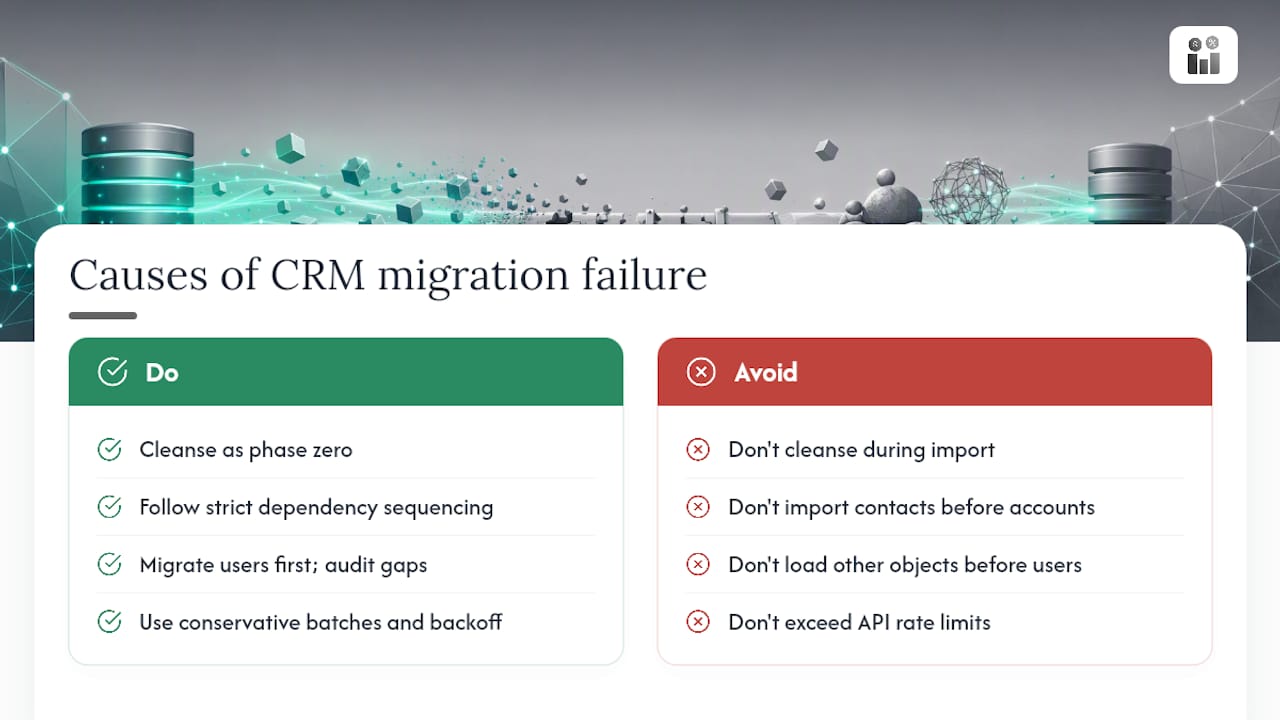
Cleaning during migration: Teams that try to deduplicate and transform data simultaneously with the import create unpredictable results. Keep cleansing as a separate phase zero.
Wrong load sequence: Importing contacts before accounts creates orphaned records. Importing deals before contacts does the same. Strict dependency sequencing is non-negotiable.
Missing owners: If a user exists in the source system but not in the destination, every record they owned becomes unassigned. Migrate users first and audit for gaps before loading any other object.
API rate-limit failures: Sending too many requests per second causes partial loads with no clear error boundary. Set conservative batch sizes, implement exponential backoff retry logic, and monitor API error rates in real time.
Orphaned records from picklist mismatches: A deal stage that doesn’t exist in the destination either rejects the record or loads it with a null stage. Map every picklist value explicitly; never assume the destination has matching values.
No rollback plan: Teams that skip rollback planning have no safe exit if validation fails. Define rollback triggers and steps before cutover, not during it.
Pro Tip: Build a “known issues” log during dry runs and share it with business approvers before UAT. Approvers who discover issues during UAT that you already knew about lose confidence in the project. Approvers who see a managed issues list gain it.
Treat migration as a data governance reset
Migration is the single best moment to fix problems that accumulated over years. When you move data, you touch every field, every relationship, and every ownership rule. That is an opportunity most teams waste by copying legacy problems into the new system.
Data catalogs and governance frameworks speed migrations by enabling prioritization, lineage tracking, and risk reduction. Teams that build a lightweight data dictionary before migration finish faster and have fewer post-migration support issues.
Governance checklist for migration
- [ ] Define a canonical field name and data type for every migrated field
- [ ] Assign a data owner to each object type
- [ ] Document retention and archival policy per object
- [ ] Map all PII fields and confirm consent record migration
- [ ] Establish lineage: source system → transform rule → destination field
- [ ] Set access control rules in the destination before go-live
Governance artifacts to produce
| Artifact | Purpose | Owner |
|---|---|---|
| Data dictionary | Defines every field, type, and valid values | Data steward |
| Field mapping file | Source-to-destination transform record | Migration owner |
| Lineage map | Tracks data origin through each transform | Data steward |
| Consent/PII register | Documents all personal data fields and consent status | Legal/compliance |
The lineage map is particularly valuable for future audits. When a regulator or internal audit asks where a specific data element came from, a lineage map answers that question in minutes rather than days.
Pro Tip: Capture your governance decisions in a shared document that survives the project. Migration teams disband, and the institutional knowledge they carry disappears with them. A data dictionary that lives in a shared drive is worth more than a perfect migration that no one can explain six months later.
Real-world migration outcomes: what worked and what didn’t
Success: phased migration with governance reset
A mid-size field service company with roughly 80,000 contact records and 15,000 active accounts migrated from a legacy platform to a modern CRM over 10 weeks. The team ran a phased approach: users first, then accounts, then contacts, then deals and activities in the final two weeks.
They also built a data dictionary for the first time, which forced the sales and operations teams to agree on field definitions they had been using inconsistently for years.
The data dictionary became the foundation for their ongoing data governance program.
Lessons learned:
- Phased loading by object type is worth the extra coordination effort
- Deduplication before migration reduces import time and post-migration cleanup
- A data dictionary built during migration has value well beyond the project itself
Failure: field mapping errors and orphaned records
A professional services firm attempted a big-bang migration over a single weekend. They skipped a formal dry run and relied on a single CSV import tool with no transformation logic. Deal stage values in the source system did not match destination picklist values, so roughly 2,200 deals loaded with null stages. Contacts imported before accounts, leaving 8,000 contacts with no parent association.
The team spent three weeks post-migration manually reassigning records and rebuilding associations through the CRM’s bulk edit tools. Two sales reps reverted to the old system for six weeks because they could not find their accounts in the new one.
The fix: They re-exported the original source data, built a proper field mapping file with explicit picklist normalization, and re-imported in dependency order. The re-migration took four days and resolved 97% of the orphaned records. The remaining 3% required manual review because the source data itself had no parent account assigned.
Lessons learned:
- Skipping dry runs does not save time; it moves the cost to post-migration cleanup
- Picklist mapping must be explicit and complete before any production import
- Load sequence is not optional; it is the structural foundation of a clean migration
When should you run the migration in-house vs. hire a managed service?
The honest answer depends on three variables: your internal engineering capacity, the complexity of your custom objects, and your tolerance for timeline risk.
Internal execution works well when your migration involves standard objects, fewer than five integrations, and a team that has run at least one CRM migration before. The cost savings are real, and the institutional knowledge your team builds is valuable for future projects. The risk is that internal teams often underestimate the time required for cleansing and field mapping, which compresses the testing phase and increases cutover risk.
Managed migration services make sense when you have a large volume of custom objects, strict SLA requirements, or limited engineering bandwidth. A managed service brings pre-built tooling, sequencing logic, and rollback procedures that an internal team would spend weeks building from scratch. The cost is higher, but the timeline is more predictable and the risk of a failed cutover is lower.
The middle path, which many mid-market teams choose, is to run the cleansing and mapping phases internally (where business knowledge matters most) and bring in a partner for execution and validation. This keeps costs reasonable while putting the technically complex steps in experienced hands.
Firmanager supports your CRM migration and what comes after
Moving to a new CRM is only half the work. The other half is making sure your operations, invoicing, and field service workflows connect cleanly to the data you just migrated.

Firmanager is built specifically for service businesses that need more than a contact database. The platform’s all-in-one CRM and operations suite includes built-in customer and facility management, work order tracking, sales pipeline, invoicing with Stripe integration, and real-time analytics, all under a single login. When you migrate into Firmanager, your owner and team assignments map directly to the platform’s user model, your pipeline stages align with the built-in sales workflow, and post-migration analytics are available from day one without additional configuration.
For teams evaluating which CRM fits service business workflows before committing to a migration, Firmanager’s modular design means you can start with CRM and activate work orders, dispatch, and HSE compliance as your team grows. Start a free trial at Firmanager or request migration support directly from the team.
Sources
These sources cover planning, tooling, governance, and platform-specific guidance. Which one to read first depends on your role.
- CRM data migration: A practical process overview
- CRM data migration to Dataverse: Key insights and best practices
- CRM Data Migration Checklist 2026: Zero-Downtime Plan
- Data migration plan
- Data migration plan
- CRM Data Migration: Step-by-Step Process for SMBs
Recommended
Run your whole business in one place
CRM, quotes, work orders, invoicing, expenses, HR and HSE — one login, every device. Free-forever plan.
Start free →