How to Create and Manage Deposit Invoices for Your Business
How to Create and Manage Deposit Invoices for Your Business
A deposit invoice is a bill that requests a partial upfront payment, which gets credited toward the final total once the job wraps up. If you’re issuing one today, three things need to happen right away: label the document clearly as a “Deposit Invoice,” show both the deposit amount and the remaining balance, and set a due date with accepted payment methods.
Beyond that, here’s your quick-start checklist:
- Deposit ranges: most service businesses land in a wide range depending on risk and industry.
- Use a retainer instead when you need stronger legal footing to keep the money if a client cancels.
- Never send a deposit request without a due date — an invoice with no deadline is closer to a suggestion than a bill, and it weakens your ability to charge late fees later, according to Stripe’s guidance on deposit invoices.
Key Takeaways
A deposit invoice protects cash flow when it clearly states the amount, balance, due date, and refund terms, and gets recorded as unearned revenue until the work is done.
| Point | Details |
|---|---|
| Label it correctly | Title the document “Deposit Invoice” and give it a unique sequential number. |
| Show both numbers | Display the deposit amount and remaining balance on the same document or linked invoices. |
| Match the deposit to the risk | Use 20 to 30% for freelance work, 25 to 50% for event bookings, and 10 to 25% for large contracts. |
| Choose your wording carefully | A retainer framed as liquidated damages holds up better than a generic non-refundable deposit. |
| Book it as a liability first | Record deposits as unearned revenue and move them to income only once you deliver the work. |
| Automate the paper trail | Firmanager links deposit invoices to work orders and issues automated receipts to keep reconciliation audit-ready. |
Table of Contents
- Why Use a Deposit Invoice in Your Business
- What Fields Belong on a Deposit Invoice Template
- How Much Should a Deposit Be?
- Single Invoice or Two Separate Invoices?
- Deposits, Retainers, Refunds, and Sales Tax
- Recording Deposit Invoices in Your Books
- How an Integrated Invoicing Workflow Cuts Down on Errors
- Templates and Guidance Worth Bookmarking
- What Most Advice on Deposit Invoices Gets Wrong
- Put Deposit Invoicing on Autopilot with Firmanager
- Sources
Why Use a Deposit Invoice in Your Business
A deposit invoice exists to protect your cash flow before you’ve delivered anything. You’re asking a customer to commit financially before you commit your time, materials, or crew, which is exactly what a deposit invoice is designed to do: secure a partial payment now and credit it against the final bill.
That protection matters most in a handful of recurring situations:
- No-shows and cancellations. A client who’s already paid something is far less likely to vanish before the job starts.
- Upfront material costs. Custom cabinetry, specialty parts, or subcontractor labor often need to be paid before you break ground.
- Bookings tied to a date. Wedding vendors, venues, and photographers lose the entire slot if a client cancels late, so a deposit offsets that risk.
- Long projects. Multi-month renovations or builds need staged cash flow so you’re not fronting weeks of payroll.
If your business regularly quotes custom work or holds a calendar slot for a client, a deposit invoice isn’t optional. It’s the mechanism that keeps your business solvent while you wait on the rest.
What Fields Belong on a Deposit Invoice Template
Every deposit invoice needs the same core structure, whether you’re billing a homeowner or a commercial client. Missing a field here is the fastest way to end up in a payment dispute two weeks later.
- Header title reading “Deposit Invoice” so nobody confuses it with the final bill.
- Unique sequential invoice number and the issue date.
- Seller details: your business name, address, and contact.
- Buyer details: customer name, billing contact, and department if it’s a company.
- Reference to the underlying contract or purchase order number — this single line does more to prevent disputes than almost anything else on the page, since it ties the payment back to a signed agreement, a point LegalClarity’s breakdown of down payment invoices makes clear.
- Total contract price, the deposit amount (shown as a percentage or flat figure), and the remaining balance.
- Deposit due date and accepted payment methods.
- Refund or cancellation terms, stated plainly.
- Sales tax line items, if applicable in your state.
- Receipt procedure and what happens next once payment clears.
Pro Tip: Skip vague line items like “deposit for services.” Write something specific, like “Kitchen Remodel — Phase 1 Deposit,” so the customer’s finance department or accounts payable team has zero confusion about what they’re paying for.
How Much Should a Deposit Be?
Set your deposit amount by weighing four factors: how much you’ll spend upfront on materials or labor, how risky the project is, how established the client relationship is, and what your industry typically charges.
Once you’ve run through those questions, the numbers tend to cluster around familiar bands.
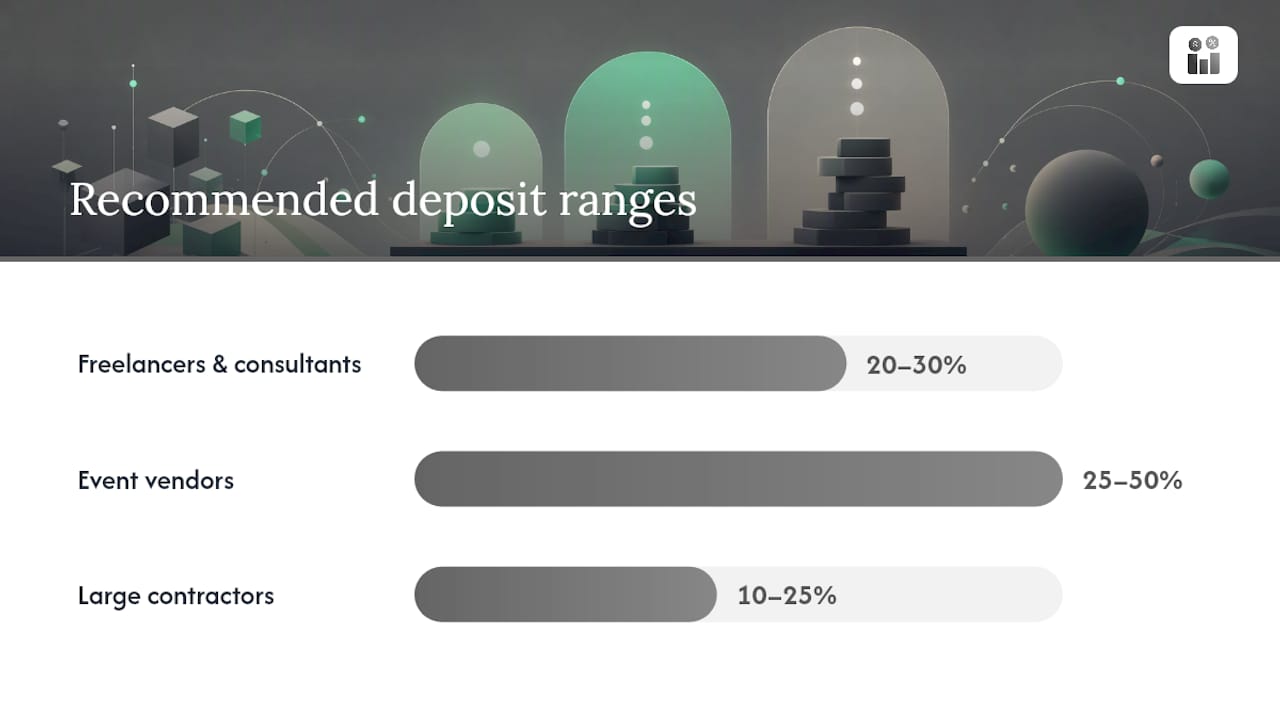
- Freelancers and consultants: roughly 20% to 30%, often tied to project scope.
- Event vendors: 25% to 50% is standard, since a canceled date is nearly impossible to rebook.
- Large contractors: 10% to 25%, since bigger contracts front-load enough material cost on their own.
By the numbers: Event vendors commonly request 25% to 50% upfront, while freelancers typically ask for 20% to 30% and large contractors settle closer to 10% to 25%, according to Stripe’s data on deposit invoice norms.
Use a flat fee when your upfront costs are fixed and predictable (a $500 materials order, for example). Use a percentage when the total job size is variable. And keep refundable deposits reserved for lower-risk clients. If you need funds you can legally keep on cancellation, a non-refundable retainer structure serves you better than a standard deposit label.
Single Invoice or Two Separate Invoices?
You have two practical paths for billing a deposit, and the right one depends on job length.
Option A: One invoice, two due dates. List the deposit amount and the remaining balance on a single invoice, each with its own due date. This works well for shorter jobs where you’re not waiting weeks between the deposit and the final delivery.

Option B: A separate deposit invoice, then a final invoice. Issue the deposit invoice first, then send a final invoice later that shows the full gross total with the deposit credited as a negative line item, referencing the original deposit invoice number. Statrys recommends this structure specifically because it eliminates the “did I already pay this?” confusion that shows up on long projects, and it’s the cleaner method for progress invoicing on multi-stage contracts.
Sample wording that works on either version:
- Line item: “Deposit (30% of total contract price) — Due upon signing”
- Email request: “To secure your project start date, we require a 30% deposit of $1,200, due by [date]. The remaining balance of $2,800 will be invoiced upon completion.”
Pro Tip: Always reference the original deposit invoice number on the final bill. It gives your bookkeeper, and your client’s accounts payable team, a paper trail if anyone questions the math.
Deposits, Retainers, Refunds, and Sales Tax
The words you choose on a deposit invoice carry legal weight. A generic “deposit” is typically treated as refundable unless your contract says otherwise, while a retainer framed as liquidated damages gives you stronger legal standing to keep the funds if a client backs out, according to The Legal Paige’s comparison of deposits and retainers.
A few practical rules worth building into every contract:
- Non-refundable language only holds up if it’s reasonable relative to the harm you’d actually suffer from a cancellation, and the client has signed off on it in writing.
- Get a signature, not just an emailed invoice. Courts and clients alike take a signed acceptance far more seriously than a PDF sitting in an inbox.
- Late fees are only enforceable if the invoice already stated a due date and the fee terms in advance.
State-dependent detail: Whether sales tax applies to the deposit itself or only at final sale depends entirely on your state’s revenue rules, so check your state’s specific tax guidance before assuming either way.
Recording Deposit Invoices in Your Books
Record every deposit as unearned revenue, a liability, the moment it hits your account. Don’t book it as income until you’ve actually delivered the goods or performed the service, a distinction LegalClarity’s guidance on deposit invoice accounting lays out clearly.
- On receipt: debit cash, credit unearned revenue.
- On the final invoice: show the gross total, subtract the deposit as a credit line, and display the remaining balance owed.
- Reconcile monthly: match every deposit against its linked job or work order, and hold records for as long as your state requires for tax audits.
- Check your accounting method: cash-basis taxpayers report deposits as income when received; accrual-basis businesses report it when earned. That timing difference changes which tax year the revenue lands in.
How an Integrated Invoicing Workflow Cuts Down on Errors
Manually tracking deposit invoices across spreadsheets and email threads is where most bookkeeping mistakes start. A platform that automates invoice templates and enforces sequential numbering removes the guesswork before a mistake ever reaches your books.
Field-service businesses see the biggest payoff when deposit invoices are linked directly to the job or work order they’re funding:
- Automated sequential numbering prevents duplicate or skipped invoice numbers, a common audit flag.
- Linking a deposit to its work order keeps scope and payment tied together, so nobody argues later about what the money was for.
- Automated receipts confirm payment instantly, cutting the back-and-forth of “did you get my payment?”
- Built-in reconciliation matches deposits to final invoices automatically, which shortens the time your books stay open at month-end.
Templates and Guidance Worth Bookmarking
For deeper technical detail, Stripe’s overview of deposit invoices covers template structure and use cases. LegalClarity’s deposit invoice guide walks through enforceability language and tax treatment in more depth, and your state revenue department’s website remains the final word on sales tax rules for your specific transaction type.
What Most Advice on Deposit Invoices Gets Wrong
Most guides treat deposit invoices as a formatting exercise: get the fields right, send the PDF, done. That undersells the actual risk. The real failure point isn’t the invoice template, it’s the gap between what a business calls the payment and what the contract actually says it protects.
A “deposit” with no liquidated-damages language is a soft promise dressed up as a legal document. Plenty of contractors and event vendors learn this the hard way when a client cancels, demands the money back, and the contract offers no real defense. The fix isn’t a better invoice, it’s better contract language paired with a consistent process for issuing, tracking, and crediting that deposit every single time.
Where SMB owners actually lose money is in the reconciliation gap, the space between “I sent the deposit invoice” and “I remembered to credit it correctly on the final bill.” That’s a process failure, not a legal one, and it’s far more common than cancellation disputes. Prioritize getting your workflow consistent before you worry about perfecting your refund clause.
— KaiosMedia
Put Deposit Invoicing on Autopilot with Firmanager
Firmanager gives you the practical advantage this article just walked through: every deposit invoice gets a sequential number automatically, links directly to its job or work order, and credits itself onto the final bill without you re-typing a single figure.

That link between deposit and work order is what prevents the scope disputes and reconciliation headaches covered above. Instead of chasing a spreadsheet to confirm whether a deposit got credited, your team sees it live, tied to the job it funded, with a receipt already issued. Combine that with Stripe payment reconciliation built for finance teams and job costing tools that help you set the right deposit amount from the start, and your invoicing workflow stops depending on memory.
If you’re running a field-service business and tired of manually tracking which deposits still need crediting, set up your Firmanager account and connect your first work order today.
Sources
- Deposit invoices 101: What they are and how to use them — Stripe
- Down payment invoice: What to include and tax rules - LegalClarity
- What is a deposit invoice — Statrys
- Deposit vs retainer — The Legal Paige
Recommended
Run your whole business in one place
CRM, quotes, work orders, invoicing, expenses, HR and HSE — one login, every device. Free-forever plan.
Start free →