Avoid Audit Findings: Mobile Field Service Document Control for Ops
Avoid Audit Findings: Mobile Field Service Document Control for Ops
Field service document control means enforcing one current version of every SOP, work order template, and service form, then getting that exact version to every technician’s phone. The immediate priority is simple: build a single source of truth, lock down versioning with unique IDs, distribute documents to mobile devices with offline access, and log every approval and read receipt for audit purposes. Get those four pieces working, pilot them with one crew, then scale. The checklist below shows exactly how.
TL;DR:
- Most teams fail to confirm that technicians have read and acknowledged updated documents, risking non-compliance during audits.
- Relying on paper copies or email sends creates outdated forms and contributes to document drift, increasing rework and safety risks.
- A controlled system must assign unique IDs, maintain a master document list, and log distribution and review history for proper traceability.
- Offline mobile access, delta notifications, and role-based permissions are essential features to ensure field teams access current documents.
- Using an integrated platform like Firmanager simplifies document control, supports real-time updates, and consolidates compliance and training records.
Table of Contents
- What Field Service Document Control Covers and Why It Matters
- Core Elements Every Document Control System Must Provide
- Getting Documents to Technicians in the Field
- Getting Audit-Ready: Signatures, Trails, and Retention
- Rollout Checklist for Operations Managers
- How Firmanager Handles Document Control in the Field
- Where Operations Managers Get This Wrong
- Start Managing Documents the Way Your Field Crews Actually Work
- Sources
- FAQ
What Field Service Document Control Covers and Why It Matters
Field service document control governs every document your technicians touch on the job. That includes SOPs, work instructions, equipment drawings, service reports, inspection checklists, and quote or invoice templates. When these documents drift, so does your operation.
Poor control shows up fast: a technician follows an outdated wiring diagram and causes a callback, or worse, a safety incident. Auditors flag missing revision histories. Warranty claims get denied because the service report used didn’t match the manufacturer’s current template. None of that is hypothetical. It’s the everyday cost of managing documents through email attachments and printed binders.
A single source of truth fixes the root problem. Instead of five versions of the same checklist floating across trucks, tablets, and a shared drive, one controlled document exists, and everyone works from it.
What field service document control typically governs:
- Standard operating procedures and safety instructions
- Equipment drawings, wiring diagrams, and technical specs
- Service report forms and inspection checklists
- Work order and quote templates
- Training materials tied to specific procedures
Getting this right isn’t paperwork for its own sake. It’s what separates a crew that shows up prepared from one that guesses.
Core Elements Every Document Control System Must Provide
Every controlled document should be traceable through each stage, with a record showing who touched it and when.
Four elements make that traceability real:
- Unique identifiers. Every document needs a number and revision code (e.g., SOP-114 Rev. C) so nobody confuses a current version with a superseded one.
- A master document list. This controlled document register tracks every active document, its current revision, its owner, and its last review date.
- Transmittal logs. These record who received which version and when, closing the gap between “we sent it” and “they used it.”
- Version history with read-and-acknowledge tracking. Every revision needs a changelog, and every technician needs to confirm they’ve reviewed it before the effective date.
That last point trips up more teams than any other. Buyer’s checklists for document control software point to automatically obsoleting of superseded revisions and role-based access as baseline expectations, not premium features, according to ISO 9001 document control guidance.
Pro Tip: Tie training completion to the effective date, not the publish date. A revised procedure that goes live before your technicians have acknowledged it creates a gap where crews are legally required to follow a document they’ve never seen.
Getting Documents to Technicians in the Field
Mobile access is where most document control programs succeed or fail. A binder in the truck cab does nothing if the procedure changed last Tuesday. The fix is app-based delivery with cached offline copies, so a technician working in a basement with no signal still sees the current revision, not last year’s.

Construction and field crews that rely on a single controlled set with device-level access avoid what’s often called “paper drift,” the slow accumulation of outdated prints and forms that crews grab out of habit, according to a field guide on construction document control. Platforms that push updated drawings directly to mobile devices cut down on rework tied to superseded prints, the same source notes.
A few practical rules keep this tight:
- Mark every printed copy as “uncontrolled” the moment it leaves the system, since paper can’t update itself.
- Require expedited distribution procedures for off-shift or emergency changes, similar to the transmittal workflows used in regulated document control processes.
- Send delta notifications, not just “document updated” alerts, so technicians know exactly what changed without rereading the entire file.
Semantic tracking, flagging changes at the paragraph or field level instead of forcing a whole-document comparison, cuts down on the fatigue technicians feel when every revision looks like a brand-new document.
Getting Audit-Ready: Signatures, Trails, and Retention
Auditors don’t ask whether you have documents. They ask whether you can prove the right people saw the right version at the right time. ISO 9001:2015 requires that documented information stay available where needed, protected from unauthorized changes, and current, mapping directly to clause 7.5 on controlled information.
For regulated field work, electronic signatures need to meet 21 CFR Part 11-style expectations: permanently linked to the record, carrying the signer’s identity, the meaning of the action, and a timestamp that can’t be altered after the fact. A signature that’s just a typed name in a text field doesn’t hold up.
Retention matters just as much as approval. Obsolete documents need to be archived, not deleted, and clearly marked to prevent a technician from accidentally pulling a withdrawn procedure out of an old folder.
Auditors typically expect four records on request:
- A master document register showing every controlled document and its current revision
- Full revision history for each document
- Distribution logs showing who received what and when
- Training records tied to specific effective dates
Skip any one of these, and an otherwise solid audit turns into a finding.
Rollout Checklist for Operations Managers
You don’t need a six-month project to get document control under control. Here’s the order that causes the least disruption:
- Inventory what exists. List every SOP, form, and drawing currently in circulation, including the ones living only in someone’s inbox.
- Assign owners and numbering. Every document needs one accountable owner, a unique ID, and a defined review cycle (annual is common for SOPs).
- Pick your delivery model. Decide between a fully digital single source of truth or a controlled-copy register with numbered physical copies. For mobile crews, digital with offline caching wins almost every time.
- Enable mobile and offline access. Confirm technicians can pull current documents without a signal and that outdated copies get flagged automatically.
- Pilot with one crew. Roll out a single document type, like a service-report template, require read-and-acknowledge, and collect training evidence before touching anything else.
- Iterate, then scale. Fix friction points from the pilot, then extend to the rest of your workforce.
Pro Tip: Start your pilot with the document type your technicians complain about most. If the service-report template is a mess, fixing it first buys you internal buy-in for the harder rollouts later.
How Firmanager Handles Document Control in the Field
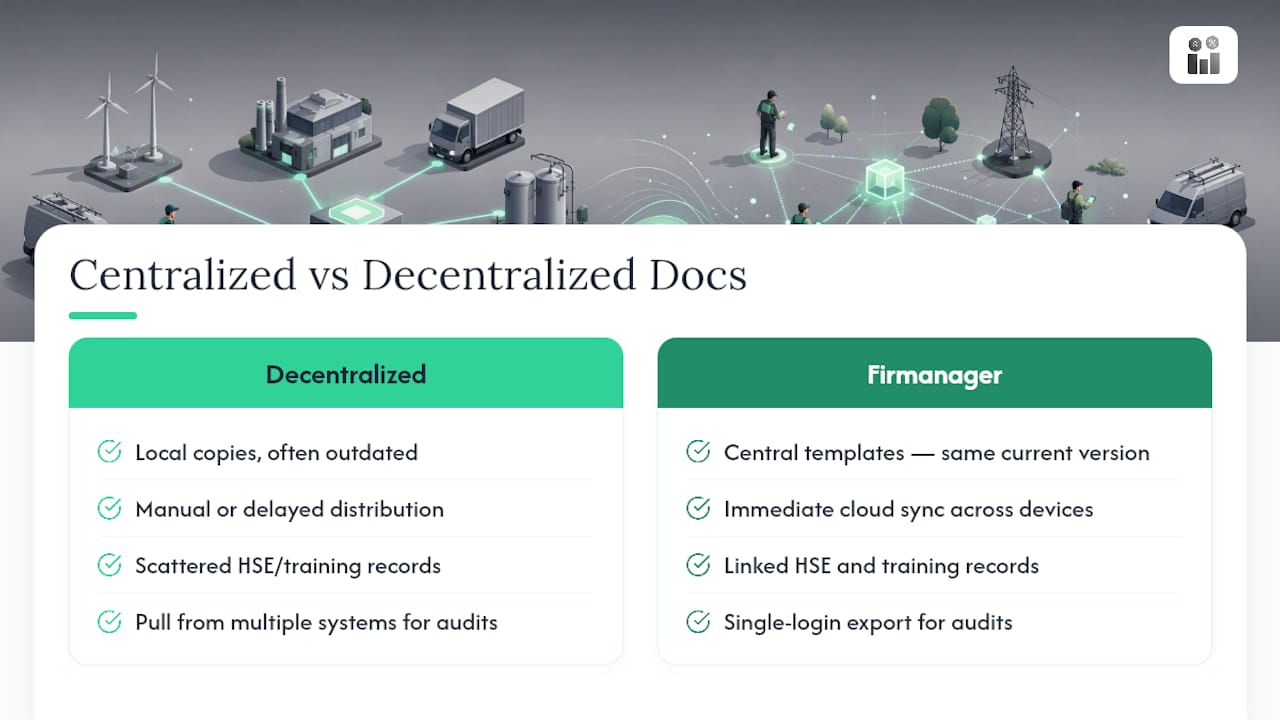
Firmanager’s document handling module maps directly onto the checklist above. Controlled work order templates stay centralized, so every technician pulls the same current version instead of a locally saved copy from three months ago. Compliance tracking keeps HSE documentation and training records tied together, which matters when an auditor asks for evidence, not assurances.
Because Firmanager runs through a single login across devices with cloud sync, field crews see updates the moment they’re published, without waiting on a separate distribution step. That single-source model, paired with real-time data sync, is core to how Firmanager frames its own positioning for service businesses managing scattered teams. For managers exporting evidence for a client audit or an internal review, having work orders, invoicing, and HR compliance data under one login cuts down the scramble to pull records from four different systems.
Where Operations Managers Get This Wrong
Most teams handle approvals fine. Where they fall apart is distribution confirmation. Sending a revised SOP isn’t the same as proving a technician read it before the effective date, and that gap is exactly what auditors probe first.
The other recurring mistake: treating document control as a compliance chore instead of a field-efficiency tool. A crew working from the wrong drawing loses hours, not just points on an audit.
This week, do one thing: pull your master document list. If it doesn’t exist, that’s your starting point.
— KaiosMedia
Start Managing Documents the Way Your Field Crews Actually Work
Firmanager gives field service operations managers the single-login setup this article just walked through: controlled work order templates, mobile document access with cloud sync, and compliance tracking that keeps training records tied to your HSE documentation in one place. Instead of stitching together a shared drive, a separate e-signature tool, and a spreadsheet register, your team works from one system that updates across devices in real time.

If you’re still emailing PDFs to trucks and hoping the right version lands, that’s the exact “paper drift” problem a controlled system is built to eliminate. Firmanager offers several subscription plans including a free option, as well as paid plans that vary in features and pricing to support different team needs. Check the plans and start a trial to see how your document workflows would run inside a single platform. For a deeper look at templating specifically, Firmanager’s guide on work order templates covers how controlled templates cut down on field errors.
Sources
For audit preparation, consult ISO 9001 documented-information guidance for clause 7.5 evidence, the six-stage lifecycle framework for record-keeping minimums, and Firmanager’s own guide to document management software for feature-level comparisons relevant to field teams.
- Guidance on Part 11 and documented information (2025)
- Construction document control field guide: drawings, revisions, and the current set - Anvilfield
- Paducah D&R Document Control Process (example procedure)
FAQ
What’s the Difference Between CRM and Field Service Document Control?
A CRM tracks customer relationships and sales activity, while field service document control governs the SOPs, forms, and drawings technicians use on the job. They’re related but distinct: a CRM manages who you’re serving, and document control manages how the work gets done correctly and consistently.
What Is the Best Software for Field Service Document Control?
The strongest options combine document management with the rest of field service operations, so version control isn’t siloed from work orders and compliance tracking. Firmanager, for example, bundles document handling, HSE compliance, and mobile access under a single login starting with a Free plan, which keeps controlled documents connected to the work they support.
Do Field Technicians Need to Sign Off on Document Revisions?
Yes, especially for regulated or safety-critical procedures. A read-and-acknowledge record, ideally with an electronic signature that meets 21 CFR Part 11-style requirements for identity and timestamp, proves training happened before the document’s effective date.
How Long Should Obsolete Documents Be Retained?
Retention periods vary by industry and document type, so check applicable regulatory requirements for your sector rather than relying on a single default. What matters universally is that obsolete versions stay archived and clearly marked, never mixed in with currently controlled documents.
Is Salesforce a CRM or a Document Control Platform?
Salesforce is primarily a CRM, with Salesforce Field Service as an add-on module for scheduling and dispatch. It isn’t purpose-built as a document control system, which is why many field service businesses pair it with, or replace it with, a platform that handles controlled documents, work orders, and compliance tracking natively.
Recommended
Run your whole business in one place
CRM, quotes, work orders, invoicing, expenses, HR and HSE — one login, every device. Free-forever plan.
Start free →