Building an Incident Reporting Workflow That Actually Closes the Loop
Building an Incident Reporting Workflow That Actually Closes the Loop
An effective incident reporting workflow is a single, auditable path that moves an event from identification through initial report, categorization, immediate response, investigation, resolution, closure and documentation, and finally continuous improvement. Skip a stage, and you get a folder full of reports that never turn into fixes. Your first move as a manager should cost you nothing: collapse every reporting channel into one intake form with a tight triage service level agreement within two business days.
That single change eliminates the two most common failure points before you touch anything else:
- Multiple channels (email, verbal, spreadsheets) that split your data and hide patterns
- No triage deadline, which lets minor issues sit untouched until they repeat
The rest of this guide walks through each stage of the process, the warning signs your current setup is broken, the investigation standards worth borrowing from OSHA and NIST, and a short checklist for building or rebuilding your system this quarter.
Key Takeaways
An incident reporting workflow only works when every report moves through triage, investigation, and a verified corrective action within a set timeframe, not when it simply gets logged.
| Point | Details |
|---|---|
| Use one intake channel | Consolidate reporting into a single form to stop data from splitting across email, verbal reports, and spreadsheets. |
| Enforce a triage SLA within two business days | Assign severity and ownership within two days so reports never sit unaddressed. |
| Follow the OSHA four-step method | Preserve the scene, collect evidence, determine root cause, and implement corrective actions in that order. |
| Track CAPA completion, not just report counts | A high volume of reports means nothing if corrective actions stay open past their target date. |
| Consolidate the workflow in one platform | Firmanager connects report intake, triage, work orders, and compliance logs under a single login. |
Table of Contents
- What Are the Steps in an Incident Reporting Workflow?
- Why Does Your Incident Reporting Process Keep Failing?
- What Investigation Standards and Timelines Should Your Workflow Follow?
- How Do You Set Up an Incident Reporting Workflow?
- What Most Companies Get Wrong About Incident Reporting
- How Firmanager Supports Every Stage of the Workflow
- Where to Verify Investigation Standards and Timelines
- Frequently Asked Questions
- Sources
What Are the Steps in an Incident Reporting Workflow?
Every mature incident reporting procedure runs through eight core stages, and each one has a specific job to do. Treat any stage as optional and the whole chain weakens.
- Identification. Someone or something notices the event first. That could be an employee, a customer complaint, a facility sensor, an IT monitoring alert, or a routine inspection. The wider your identification net, the more near-misses you catch before they become injuries or outages.
- Initial report. Capture who, when, where, and what happened, in plain language, within minutes of discovery. Keep the reporter-facing form short. If the incident involves sensitive data such as credentials or personal information, collect only a brief public summary and route the details through a secure channel instead of the open form.
- Triage and categorization. Someone assigns a severity level and an owner, using rules you set in advance rather than gut feeling. A leaking faucet and a chemical spill should never sit in the same queue with the same priority.
- Immediate response. Contain the situation: stop the process, isolate the equipment, notify affected parties. High-severity incidents should trigger automatic escalation to senior management rather than waiting for someone to remember to call.
- Investigation. Preserve the scene, gather evidence, interview witnesses, and document preliminary findings before memories fade or equipment gets moved.
- Resolution and recovery. Assign corrective and preventive actions (CAPAs), fix the root cause, and verify the fix actually worked rather than just closing the ticket.
- Closure and documentation. File the final report, record lessons learned, and log metrics like closure rate and CAPA completion percentage.
- Continuous improvement. Feed patterns back into training, hazard analysis, and policy updates so the same incident doesn’t reappear next quarter.
Pro Tip: Store investigation evidence, photos, and witness statements in a centralized system rather than scattered email threads. A document management platform built for retention and audit trails saves hours when a regulator or insurer asks for the file.
Why Does Your Incident Reporting Process Keep Failing?
A handful of symptoms show up again and again in organizations whose incident report process has quietly broken down.
- Reports trickle in days late. This usually means your channel is inconvenient, or people fear blame more than they value fixing the problem.
- Near-miss counts stay near zero. A healthy safety culture generates far more near-misses than actual incidents. Silence here is a red flag, not good news.
- Categories look inconsistent from report to report. Different managers labeling the same event differently means your data can’t be trusted for trend analysis.
- CAPAs stay open for months. Reporting without resolution is just paperwork. Corrective actions only matter if they get finished, and an open CAPA past its target date signals the loop never closed.
- The same incident recurs at the same site. Repeat events usually mean the root cause analysis stopped at the symptom.
Run three quick diagnostics monthly: median report lag from event to submission, the percentage of closed reports that actually include investigator notes, and your CAPA completion rate. If any of those three numbers looks weak, the workflow needs attention before the tooling does.
What Investigation Standards and Timelines Should Your Workflow Follow?
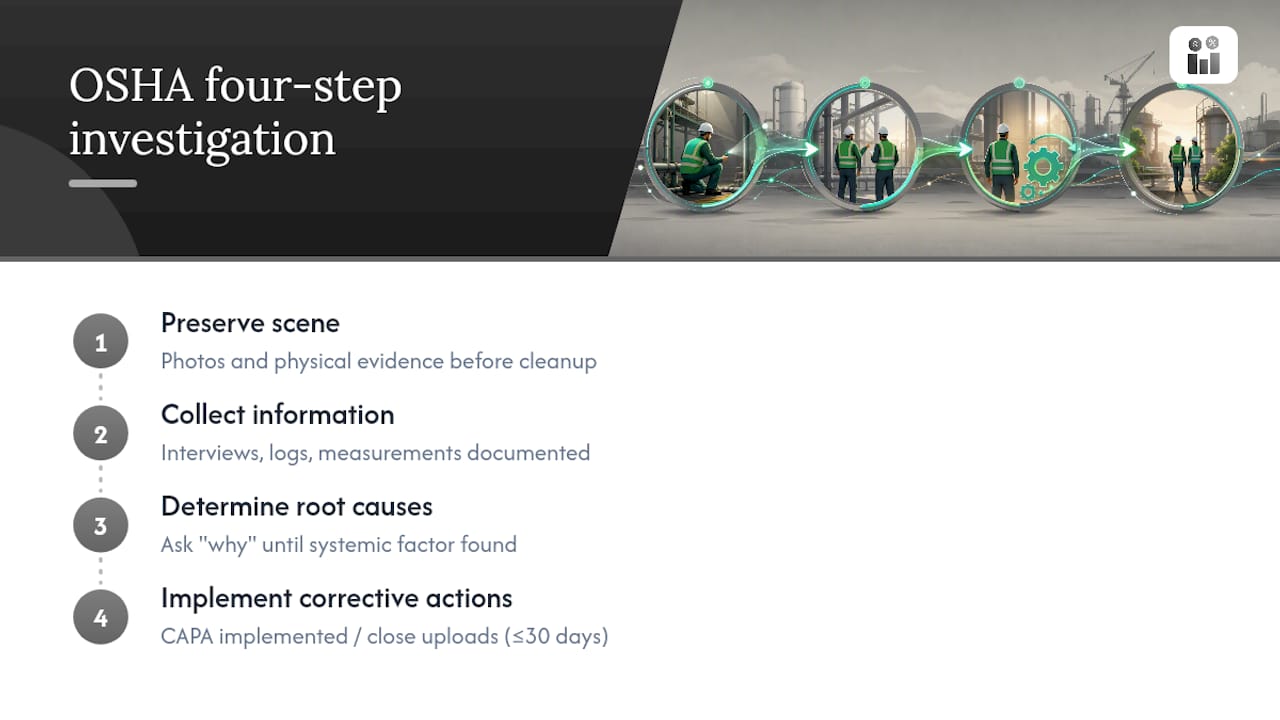
OSHA’s four-step systems approach to incident investigation gives you a defensible structure: preserve and document the scene, collect information, determine root causes, and implement corrective actions. Each step needs to produce something concrete, not just a checkbox. “Preserve” means photos and physical evidence before anything gets cleaned up. “Root cause” means asking why until you hit a systemic factor, not stopping at “employee error.”
Timing matters just as much as method. NIST’s guidance on incident reporting distinguishes streamlined reports from full standard reports, and recommends submitting initial or streamlined reports within two business days where feasible, with full investigation reports completed within 20 business days. Those windows translate well into internal SLAs even outside a regulated context.

Real-world SLA benchmark: One documented industrial procedure requires preliminary incident information by the end of the shift, root cause analysis within 14 days for serious events, and CAPA uploads closed within 30 days. Those numbers give you a realistic starting point rather than an arbitrary guess.
Build in tiered notification too. GSA’s incident response framework uses a tiered model so low-severity events get logged without flooding leadership, while critical incidents trigger immediate, mandatory senior management notification. For sensitive material, keep the initial report to a minimal summary and collect the rest through encrypted channels or in-person interviews.
How Do You Set Up an Incident Reporting Workflow?
Building or fixing an incident reporting workflow doesn’t require a massive overhaul. Work through this sequence over a few weeks:
- Define scope and governance. Decide which incident types the workflow covers (safety, IT, quality, customer complaints) and name an owner for each category.
- Design a single-form architecture. Reporter-facing fields stay minimal: who, when, where, what. Investigator-only fields, like root cause codes and CAPA assignments, stay hidden until triage assigns ownership. This keeps reporters focused and protects data integrity.
- Draft your triage rules and escalation matrix. Set concrete SLAs, such as 48-hour triage and a 20-business-day investigation close target, with clear escalation paths for anything above a defined severity threshold.
- Choose your technology with security in mind. Look for an audit trail, role-based visibility, and a secure channel for sensitive evidence rather than an open comment field everyone can see.
- Plan training and simulation. Run tabletop exercises quarterly for managers and a lighter annual refresher for general staff.
- Measure and review monthly. Track closure rate, CAPA completion, and report lag, and revisit the workflow itself every quarter.
Pro Tip: Never place unencrypted credentials, IP addresses, or personal data directly into an open incident form. Use a placeholder field and route the sensitive details through a secure channel instead.
What Most Companies Get Wrong About Incident Reporting
Most advice on incident reporting focuses on getting people to report more. That’s the wrong lever. The organizations with genuinely strong safety and operational records aren’t the ones with the most reports. They’re the ones where every report reliably produces a corrective action, verified and closed on schedule.
The conventional wisdom oversells culture change and undersells process design. You can run all the “see something, say something” campaigns you want, but if your CAPA queue has fifteen open items from last year, employees will notice and stop bothering. Reporting volume follows trust in the process, not the other way around.
If you fix one thing first, fix the triage step. A report that sits unowned for a week teaches everyone downstream that reporting doesn’t matter. A report triaged within 48 hours, with a visible owner and a target date, teaches the opposite lesson every single time.

How Firmanager Supports Every Stage of the Workflow
Firmanager gives managers a single system to run the entire incident reporting workflow instead of stitching together forms, spreadsheets, and email threads. Reports come in through one login, get routed into triage with role-based visibility, and convert directly into work orders once a corrective action is assigned.

Compliance tracking inside Firmanager logs every stage automatically: who reported, who triaged, what the CAPA was, and when it closed. That audit trail matters when a regulator or insurer asks for your history, and it means you’re not rebuilding a paper trail from memory months later. Automated SMS and email notifications handle the escalation piece, so a high-severity event reaches the right person without someone remembering to make a phone call. Financial and HSE compliance modules sit in the same platform, so your work orders for corrective actions and your reporting dashboard stay connected rather than living in separate tools.
If your current process runs on forms nobody reviews and CAPAs nobody tracks, start with a 30-day pilot: import one incident reporting template into Firmanager and run your next quarter’s reports through it before deciding whether to expand.
Where to Verify Investigation Standards and Timelines
Confirm current requirements directly with OSHA’s investigation guide, NIST’s reporting timelines, and your applicable regulator, since timeframes vary by industry and jurisdiction.
Frequently Asked Questions
What is the difference between an incident report process and an incident response workflow? An incident report process covers documentation, from initial capture through closure. An incident response workflow focuses on the immediate containment and technical remediation steps, particularly for IT and security events, before the formal investigation begins.
How fast should an incident be reported? As close to real time as possible. NIST recommends timely submission of initial reports, and many operational procedures require preliminary information promptly after the incident occurs.
Who should be notified for high-severity incidents? Senior management should be part of the notification chain for any high-severity event, with escalation happening automatically rather than depending on someone remembering to flag it up the chain.
What software features matter most for an incident tracking system? Look for a single-form intake with hidden investigator fields, role-based visibility, an audit trail, automated notifications, and the ability to convert findings directly into tracked corrective action work orders.
Sources
- What is Incident Reporting? (Types, Steps & Benefits) | MetricStream
- NIST S 7101-24 Incident Reporting and Investigation (IRIS) — Requirements and timelines
Recommended
Run your whole business in one place
CRM, quotes, work orders, invoicing, expenses, HR and HSE — one login, every device. Free-forever plan.
Start free →