Job Management for Field Service: A Practical Guide

Job management for field service is the routine that takes a job from the first request to the paid invoice: capture the request, schedule and dispatch a technician, give the crew the job details, track the work as it happens, and bill it. Field service job management software puts that routine in one system, so the office and the field see the same job at the same time. Firmanager is built for this: CRM, work orders, dispatch, invoicing and HR sit in one platform behind a single login, and you can start on the Free plan.
This guide covers what each stage needs, where jobs usually stall, and how to set it up for a small or midsize service team.
TL;DR
- A field service job moves through five stages: request, schedule and dispatch, field work, billing, review. A gap at any stage costs you time or money.
- Real-time sync between office and field is what keeps customers informed and prevents double entry.
- Billing delays often start in the field: missing time logs, missing parts records and manual re-entry between systems.
- Track a few numbers (first-time fix rate, time to resolution, jobs completed per technician) and review them weekly.
- Firmanager plans: Free at $0, Pro at $19 per month, Business at $49 per month.
Table of Contents
- What job management means in field service
- Stage 1: Capture the request and build the job
- Stage 2: Schedule and dispatch
- Stage 3: Give the field team the job in their pocket
- Stage 4: Turn completed jobs into invoices
- Stage 5: Measure and improve
- Compliance and HR belong in the same system
- How to choose and roll out job management software
- Firmanager plans
- Our perspective
- FAQ
- Sources
What job management means in field service
A field service business sends people to the customer’s site: maintenance crews, cleaners, electricians, technical installers. Every visit is a job, and every job has the same moving parts: who the customer is, where the site is, what needs doing, who is going, what they used, how long it took and what you charge.
On paper, in spreadsheets or in a shared inbox, those parts live in different places. The dispatcher knows the schedule, the technician knows what actually happened, and the bookkeeper finds out at the end of the month. Job management software replaces that chain of handoffs with one record per job. The record is created once and updated by whoever touches it.
A complete setup covers:
- Customer and site records. Contacts, addresses, facilities and history in one place.
- Work orders. The job itself: scope, priority, assignee, status, notes, documents.
- Scheduling and dispatch. Who goes where and when, including routes.
- Mobile access. Job details and status updates from a phone.
- Quoting and invoicing. From estimate to paid invoice without retyping.
- Reporting. Numbers that show whether the operation is getting better.
Stage 1: Capture the request and build the job
Every job starts as a call, a form, an email or a recurring contract. The goal at this stage is a work order that a technician could pick up without phoning the office.
A usable work order includes:
- The customer and the exact site or facility.
- A clear description of the problem or the recurring task.
- Priority and the time window the customer expects.
- Required skills, parts or documents (safety instructions, previous reports).
- A link to the quote, if the job was sold through a pipeline.
Where it goes wrong: the request lives in someone’s inbox, and the details are re-typed into a calendar, then into a work order, then into an invoice. Each retyping is a chance for an error. In Firmanager the CRM, the customer and facility records, the sales pipeline and the work orders share data, so the job inherits what you already know about the customer instead of asking you to enter it again.
Recurring work, such as monthly maintenance rounds or weekly cleaning, should not be created by hand each time. Set it up as a recurring workflow once, and let the tasks generate on schedule. Firmanager includes task and recurring workflow tracking for exactly this.
Stage 2: Schedule and dispatch
Scheduling decides when a job happens. Dispatching decides who does it and in what order. Together they decide how many jobs a crew completes in a day.
Good dispatch weighs four things:
- Skills. The technician must be able to do the job.
- Location. Grouping nearby jobs cuts drive time.
- Availability. Leave, shifts and existing jobs.
- Priority. Urgent and time-bound work first.
The common failure is dispatching from memory or from a chat thread. Priorities change, someone calls in sick, and the schedule on the whiteboard is already wrong. A system that holds schedules, leave and time tracking in the same place lets a dispatcher see who is actually free. Firmanager combines route and dispatch management with time and leave tracking, so availability is not a separate spreadsheet.
For a deeper walkthrough of assigning the right person to the right job, see our guide to technician dispatching for service teams. If you are weighing automation here, the five ops checks for piloting AI dispatching show what to confirm first.
Notify the customer and the crew
A scheduled job is only useful when the people involved know about it. Real-time notifications by SMS and email, which Firmanager supports, tell the crew about a new or changed assignment and keep the customer informed. That removes many of the “where is the technician?” calls that eat dispatcher time.
Stage 3: Give the field team the job in their pocket
The technician needs the job details at the site, and the office needs the outcome from the site. Mobile access is the link.
What a technician should see on a phone:
- Today’s jobs in order, with address and contact.
- The full work order: description, notes, documents, safety requirements.
- A way to change status (on the way, started, completed).
- A place to record time, notes and photos or documents.
What the manager should see in return: which jobs are in progress, which are done, and which are late, without calling anyone.
Firmanager’s employee self-service mobile portal gives staff their job details, and because the platform is cloud-synced, an update made in the field appears for the office straight away. Our mobile job management guide goes through rolling this out to a crew, and the article on field service CRM features and offline access covers what to check for crews who work where signal is weak.
Capture complete documentation on the job
Incomplete field records are the main reason invoices get delayed. Intuit’s Future of Finance 2026 white paper, a survey of 300 respondents, found that 49% cite missing technician time logs as a barrier to invoicing at job completion, and 34% cite missing parts or materials documentation. The fix is a habit and a tool: the technician closes the job with time, materials and notes recorded on the work order before leaving the site.
If your team uses company phones, a reliable business mobile plan matters for this step; business mobile contracts are one option for keeping crews connected so records sync from the field.
Stage 4: Turn completed jobs into invoices
Billing is where job management earns its keep. The same Intuit paper reports that 39% of respondents cite manual re-entry between field service and accounting systems as a barrier, 36% cite approval bottlenecks, and only 10% of finance leaders say their systems fully support accurate billing across recurring agreements and project-based work.
The pattern is clear: the slower the jump from “job done” to “invoice sent,” the longer you wait for cash, and most of that gap is manual work.
A tight billing flow looks like this:
- The technician completes the work order with time and materials recorded.
- The completed job feeds an invoice automatically, using the quote and the customer record.
- A manager approves only what needs approval.
- The invoice goes out and the customer pays online.
Firmanager supports automated invoicing with a Stripe integration, so the invoice is generated from the job and the customer can pay by card. Supplier and product management keep the items and prices you bill consistent, and financial management with real-time analytics shows what is invoiced and what is outstanding.
Approval bottlenecks are as much a process problem as a software one. A practical guide to CRM workflow automation for service businesses shows how to define rules so routine jobs move forward without waiting on a person.
Stage 5: Measure and improve
A job management system produces data as a by-product. The question is which numbers to watch. Start with a short list.
| Metric | What it tells you | Where to look |
|---|---|---|
| First-time fix rate | Share of jobs solved on the first visit | Completed work orders versus repeat visits |
| Time to resolution | How long a request takes from open to closed | Work order timestamps |
| Jobs per technician per day | Capacity and route efficiency | Dispatch and time tracking |
| Invoice lag | Days from job completion to invoice sent | Work orders versus invoices |
| Overdue jobs | Where the schedule is slipping | Work order status |
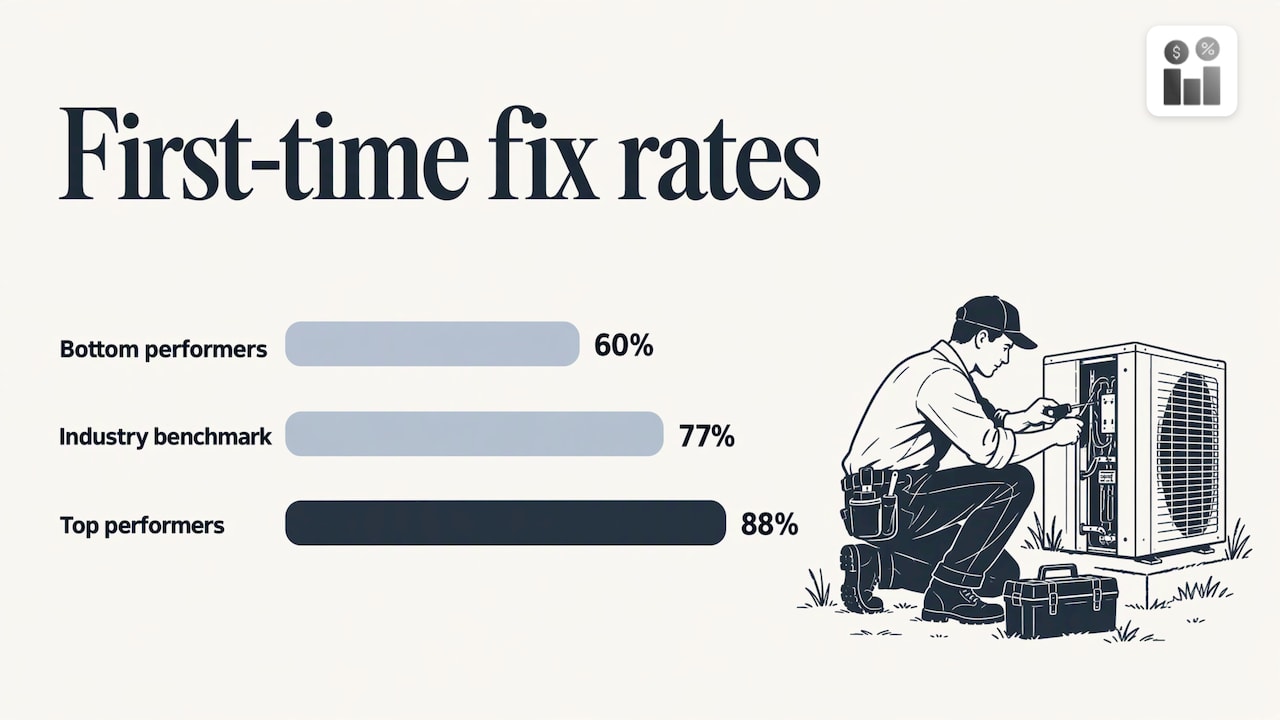
First-time fix deserves particular attention. Aquant’s 2026 benchmark, which analyzed 161 organizations, reports an industry first-time fix benchmark of 77%, with top performers at 88% and bottom performers at 60%. Every repeat visit is a second truck roll, so the number moves your costs directly. Our guide on improving first-time fix rate lays out the levers a field manager controls, and the post on vehicle inventory tracking covers one of the most common causes of repeat visits: the part was not on the truck.
Review these numbers weekly with your leads. A monthly review is too slow to change a bad week.
Compliance and HR belong in the same system
For many service companies, a job is not complete unless safety rules were followed. HSE (health, safety and environment) compliance tracking records that the required checks and documents were part of the job. Keeping it in the same platform as work orders means the proof is attached to the job it relates to, not stored in a separate folder.
The same logic applies to people. Time and leave tracking feed dispatch and, later, reporting on labor. When HR data and job data share a login and a database, you stop reconciling two lists of employees.
How to choose and roll out job management software
A good rollout is small and deliberate.
- List your current jobs flow. Write down every handoff from request to payment. Mark the ones that involve retyping.
- Pick your core modules. Most teams start with customers, work orders, scheduling and invoicing, then add the rest.
- Import customers and sites. Clean data on day one saves weeks of confusion.
- Start with one crew. Run real jobs through the system for a couple of weeks and adjust statuses and templates.
- Set rules for closing a job. Decide what must be recorded (time, materials, notes) before a technician can mark a job complete.
- Turn on notifications and reporting. Add customer messages and the weekly metrics above once the basics are stable.
- Expand to all crews. Bring in everyone else using the templates that worked.
Because Firmanager is modular, you can switch on what you need and add modules as the business grows. A free plan lets you begin with a small team and real work, and paid plans increase seats and usage limits.
Firmanager plans
Firmanager gives service companies one login for CRM, work orders, dispatch, invoicing, HR and reporting, across devices. The published plans are:
- Free: $0
- Pro: $19 per month
- Business: $49 per month
Choose the plan that matches your seats and usage limits on the Firmanager pricing page, or open the Firmanager app to get started.
If your jobs currently run through a mix of calendars, chat and spreadsheets, a good first step is to move one crew’s work orders and invoices into the platform and see how much retyping disappears.
Our perspective
Most job management problems are not scheduling problems. They are data problems. The details of a job are known in one place and needed in another, and every manual handoff loses something: a part, a time entry, a note about the gate code.
That is why we built Firmanager as one platform instead of a set of connected tools. Our approach is that data should flow from the CRM to the quote, the work order, the dispatch board, the mobile app and the invoice without being re-entered. When a technician closes a job on a phone, the office sees it and the invoice can follow.
We also believe small service companies deserve the same visibility as large ones. That is why the Free plan exists, and why modules are configurable: you use what your business needs today and add the rest when you grow. One login, real-time sync and clear reporting are what let an owner run the business from the work, not from a pile of admin.
KaiosMedia
FAQ
What is field service job management software?
It is software that manages every job a mobile team performs, from the request through scheduling, dispatch, field work and invoicing. It keeps one record per job that both the office and the field update. This replaces paper, spreadsheets and scattered messages.
What features matter most for a small service team?
Start with customer records, work orders, scheduling and dispatch, mobile access and invoicing. These cover the full path from request to payment. Add compliance, inventory and reporting as the team grows.
How does job management software speed up invoicing?
It links the completed work order to the invoice, so time, materials and customer details do not need retyping. Manual re-entry and missing field records are among the barriers to billing at job completion that respondents cite in Intuit’s 2026 survey. Firmanager’s invoicing connects to Stripe so customers can pay online.
Can my technicians use it from their phones?
Yes. Firmanager has an employee self-service mobile portal where staff see their job details and update work, and the platform is cloud-synced so the office sees changes as they happen.
Is there a free option?
Firmanager has a Free plan at $0. Pro costs $19 per month and Business costs $49 per month, with plans differing by seats and usage limits.
Sources
Recommended
Run your whole business in one place
CRM, quotes, work orders, invoicing, expenses, HR and HSE — one login, every device. Free-forever plan.
Start free →