Real-Time Financial Reporting for Service Businesses

Real-time financial reporting means your revenue, expenses, open invoices and cash position update as work happens, not after someone rebuilds them at month-end. For a service business the numbers start in the field: a work order closes, hours are logged, an invoice goes out. When those events live in one system, the financial view follows automatically. That is the idea behind Firmanager, where CRM, work orders, time tracking, invoicing and financial management share one login and one cloud-synced data set.
This guide explains what real-time reporting is, how it works, what you need to put in place, and how to roll it out in a field service company without a big finance project.
TL;DR
- Real-time financial reporting is a continuously updated view of revenue, costs and cash, built from transactions as they are recorded in connected systems.
- For a service business the source of truth is the job: work orders, hours, materials and invoices must flow into one platform.
- Clean, consistent data and clear ownership matter more than any dashboard.
- A live view gives management an early read. The month-end close still produces the final period figures.
- Firmanager combines work orders, invoicing with Stripe, time tracking and real-time financial analytics, with a free plan to start and paid plans from $19 per month.
Table of Contents
- What real-time financial reporting actually means
- Why service businesses feel the delay most
- How real-time reporting works
- What data you need in one place
- Set it up step by step
- How often should the numbers refresh?
- Live view and formal statements work together
- What to look for in a reporting tool
- A worked example: a 12-person cleaning company
- Perspective
- Start with one login
- FAQ
- Sources
What real-time financial reporting actually means
In plain terms, it is the ability to see up-to-date financial information as events happen, rather than waiting for an end-of-day, month-end or quarter-end report. DXC Technology describes it as access to current business and financial information so leaders can spot risks sooner and respond faster.
Sage defines the accounting side as the continuous recording and updating of transactions as they occur, which gives near-instant visibility into revenue, expenses, cash flow and performance. It also shifts the work away from a month-end catch-up toward an ongoing process.
Three parts make it work, as Accounting Department outlines:
- Data automation: transactions are collected and processed continuously.
- Integrated systems: accounting, expense and operations tools synchronize instantly.
- Cloud access: the numbers are available anytime, anywhere.
Notice what is missing: a spreadsheet someone updates on Friday afternoon.
Why service businesses feel the delay most
A retailer’s sales and a software company’s subscriptions arrive in one system. A maintenance, cleaning or technical services company is different. Revenue depends on a chain of events across several people:
- a customer request or quote is accepted,
- a work order is created and assigned,
- a technician travels, works and logs time and materials,
- the job is closed and invoiced,
- the customer pays.
If each step lives in a different tool, the owner sees the result weeks later. Completed jobs sit uninvoiced, hours are not matched to contracts, and overdue invoices go unnoticed until cash gets tight. Phoca Software lists better cash flow management among the main benefits of real-time reporting: planning expenses, predicting shortfalls and tracking overdue payments. Those are exactly the problems a service owner meets.
How real-time reporting works
The mechanics are simpler than the name suggests. Sage explains that the system captures data automatically from connected sources such as banks, payment platforms, payroll and expense tools, then updates records continuously. Rules and automation categorize transactions, and cloud-based systems refresh data throughout the day rather than in batches.
Digits makes the contrast clear: in a traditional workflow, a transaction waits through bank-feed import, categorization, review, reconciliation and finalization, so books can run days or weeks behind reality. In a real-time setup, today’s transactions show up today.
A practical example from expense management: Navan describes a card swipe or submitted receipt appearing in the finance dashboard within seconds, already categorized and checked against policy. In a service company the equivalent is a closed work order that immediately becomes an invoice line and a revenue figure.
Batch reporting versus real-time reporting
| Batch (monthly) reporting | Real-time reporting | |
|---|---|---|
| Data freshness | Days to weeks old | Seconds to minutes old |
| Where data lives | Separate tools and spreadsheets | One connected platform |
| Overdue invoices | Found at month-end | Visible as they age |
| Job profitability | Reconstructed after the fact | Tracked while the job runs |
| Effort at period end | A manual sprint | Mostly done during the month |
The freshness comparison follows Navan’s description of batch versus real-time pipelines.
What data you need in one place
Real-time reporting is only as good as the data feeding it. For a field service business, the useful inputs are:
- Customers and facilities: who you serve and where, so revenue can be grouped by client or site.
- Quotes and the sales pipeline: expected revenue before work starts.
- Work orders and tasks: what was done, by whom, and when it was completed.
- Time and leave records: labor hours, the largest cost for most service companies.
- Materials, suppliers and products: the cost of parts used on jobs.
- Invoices and payments: what was billed, what was paid, what is overdue.
This is the list of modules Firmanager brings together: CRM, customer and facility management, work orders and field service management, sales pipeline and quoting, invoicing with Stripe integration, supplier and product management, time and leave tracking, and financial management with real-time analytics. Because the data is shared across modules, a closed job does not need to be re-entered for billing.
Set it up step by step
You do not need to replace everything at once. IBM recommends setting clear goals, prioritizing data integrity, involving stakeholders, training by role, and implementing in stages starting with high-impact, low-complexity reports. Here is that approach translated for a service company.
1. Decide which numbers you need first
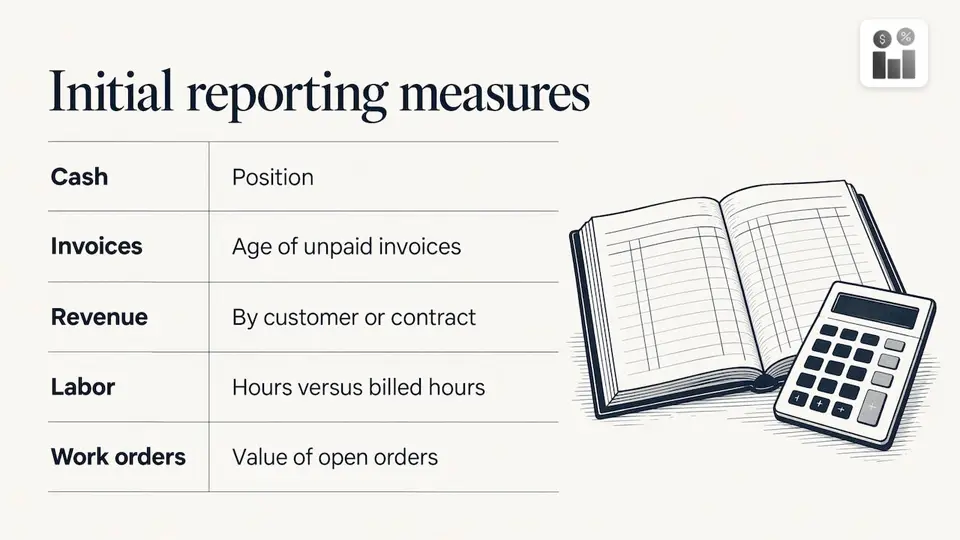
Pick three to five. For most service owners these are cash position, unpaid invoices by age, revenue by customer or contract, labor hours against billed hours, and the value of open work orders. Everything else can wait.
Where it goes wrong: starting with twenty reports nobody uses. Where Firmanager helps: its financial management module offers real-time analytics on the same records your team already works in, so the first reports come from existing work, not a separate build.
2. Standardize your definitions
Decide what counts as a completed job, when an invoice is issued, and how job types and customers are named. DXC’s Ihyeeddine Elfeki argues that real-time reporting is an operating-model decision, not a dashboard purchase: if ownership is weak and definitions are inconsistent, speeding up reporting only accelerates confusion.
Write the definitions down and name one person who owns each number.
3. Connect the source data
Sage’s implementation path calls for connecting source systems such as banks, payments, payroll, invoicing and expenses, then automating repetitive tasks. In a service company that means getting work orders, time entries, quotes and invoices into one platform.
Firmanager is built around that single login across devices. Employees update job details from the self-service mobile portal, and the cloud-synced data is available to managers at the same time. Invoicing connects with Stripe, so payments tie back to the invoice they settle.
4. Automate the repetitive work
Recurring jobs, recurring invoices and status notifications are where manual effort piles up. Firmanager supports task and recurring workflow tracking, automated invoicing and real-time notifications via SMS and email. For a closer look at invoice automation in small businesses, this guide to AI automation for invoices covers the technology behind it.
5. Build the views people actually open
A manager needs exceptions, not a wall of charts. Our guide to field service dashboards shows seven views designed to surface problems and drive action. A technician needs their own jobs. An owner needs cash and receivables. Role-based views are why IBM stresses role-based training too.
6. Roll out in stages and review
Start with one team or one service line, check the numbers against what you know to be true, then expand. Our 90-day field service implementation plan is written for small and midsize teams that want to go live without a second project. Track accuracy, how quickly invoices go out and whether people are using the system.
How often should the numbers refresh?
Not every figure needs to update by the second. Softype suggests that refresh frequency vary by measure: orders, receipts and payments can appear as they post, cash, margin and receivables can be reviewed daily, and forecasts refresh when major drivers change.
For a service company, a practical rhythm looks like this:
- As it happens: work order status, time entries, new invoices, payments received.
- Daily: cash position, overdue invoices, jobs completed but not yet invoiced.
- Weekly: labor hours against billed hours, pipeline value, supplier costs.
- Monthly: profitability by customer or service line, and the formal close.
One more habit makes the live view trustworthy: label each figure. Softype recommends that dashboards show whether a number is a posted transaction, a pre-close estimate, a reviewed view or a finalized result, so that “current” is never mistaken for “final”.
Live view and formal statements work together
A live view gives management an earlier read on performance. Formal period-end statements remain part of your accounting routine. Navan notes that internal real-time monitoring sits alongside formal statements under GAAP or IFRS, and Softype adds that accruals, reconciliations and sign-off continue to finalize period results. In practice, your accountant receives cleaner, more complete data at month-end because most of the work was done as the month went on.
That is also why many firms treat the close as a target to shorten rather than eliminate. Houseblend reports that many companies aim for a 5 to 7 day close as a realistic goal as of 2026. The more of your data is already captured and categorized, the shorter that window gets.
What to look for in a reporting tool
When you compare platforms, use criteria that matter to a service business. Guideflow’s 2026 guide points to data integration, automated report creation and distribution, customization with drill-down, and controls such as audit trails and access permissions. bluQube adds automated alerts for threshold breaches and drill-down from summary to transaction level, fed by integrated systems such as CRM and payroll.
A checklist for a field service owner:
- Do jobs, time, invoices and customers share one data set?
- Can technicians update jobs from a phone?
- Do notifications reach the right person by SMS or email?
- Can you move from a total to the underlying invoice or work order?
- Can you start small and add modules as you grow?
Firmanager’s modular design means you can switch on what you need, and the platform covers CRM, work orders, invoicing, HR, HSE compliance, route and dispatch management and document handling under one login.
A worked example: a 12-person cleaning company
Imagine a commercial cleaning company with 12 staff and 30 recurring contracts. Under a monthly routine, supervisors send timesheets on paper, the owner invoices from a spreadsheet in the first week of the month, and unpaid invoices are chased only when someone remembers.
With connected data, the weekly pattern changes:
- Recurring tasks generate work orders for each site automatically.
- Cleaners log time and job completion from their phones.
- Completed work flows into invoices, and customers pay through the Stripe-connected invoice.
- On Monday, the owner opens one view: cash received last week, invoices past due, sites where hours exceeded the contract.
- A reminder goes out to late payers, and an over-budget site is reviewed that week, not next month.
If a late payer stays unresponsive, the owner has the invoice history ready, and resources such as this guide on pre-legal chasing explain how to escalate overdue invoices in a structured way.
The example is an illustration, not a customer result. It shows the shape of the gain: decisions move from monthly to weekly.
Perspective
We built Firmanager on a simple observation: service businesses do not have a reporting problem, they have a data-location problem. The job lives in one tool, the hours in another, the invoice in a third, and the owner becomes the integration layer.
That is why we put CRM, work orders, invoicing, HR and financial management behind one login. When data flows across modules, real-time reporting stops being a project and becomes a by-product of doing the work. A closed work order is a billable event. A logged hour is a cost. A paid invoice is cash.
Our advice is to start with the questions you ask every week: who owes us, which jobs are done but not billed, and where are hours running over. Answer those from live data first, and extend from there. The modules are designed so you can grow into them at your own pace.
KaiosMedia
Start with one login
Firmanager gives service companies a Free plan to begin with, a Pro plan at $19 per month and a Business plan at $49 per month. All plans bring work orders, invoicing and financial management into the same cloud-synced platform, so the numbers you read are the numbers your team just entered.
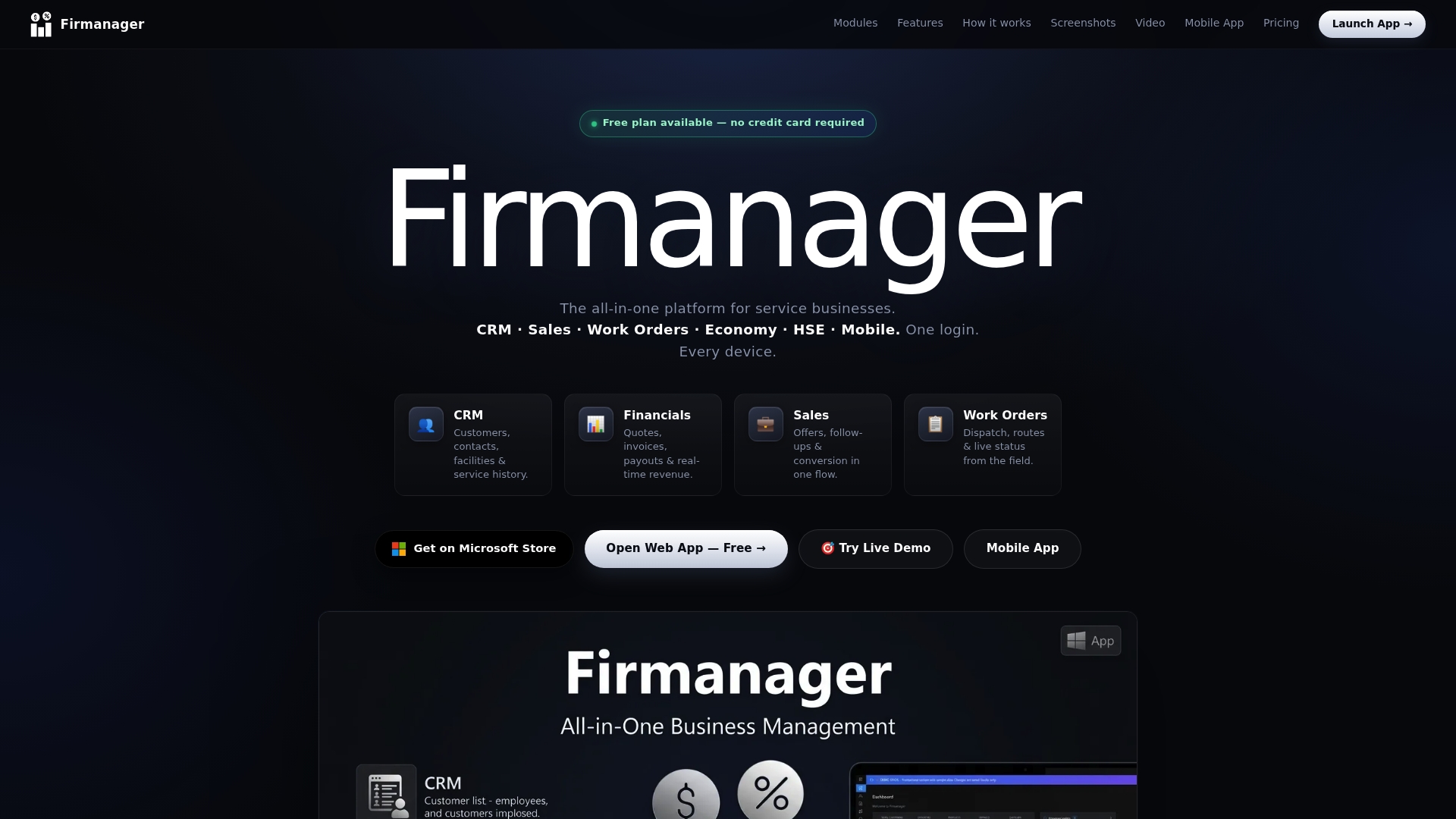
See the plans on the Firmanager website and start with the reports you check most often. If you want to automate the job side first, read our guide to work order automation.
FAQ
What is real-time financial reporting?
It is a continuously updated view of your financial position, built from transactions as they are recorded in connected systems. Instead of waiting for month-end, you see revenue, expenses, receivables and cash flow while the month is still running. Sage describes it as continuous recording and updating of transactions as they happen.
What is an example of real-time reporting in a service business?
A technician closes a work order on a phone, the system records the hours and materials, an invoice is generated, and the revenue and receivable appear in the financial view straight away. When the customer pays, the invoice status and cash figures update too. Each step uses the same connected data.
Does real-time reporting replace the month-end close?
No. It gives management an earlier, traceable view, while the close finalizes period results through accruals, reconciliations and review, as Softype explains. A well-run live system makes the close faster because the data is already captured.
How much does it cost to get started?
With Firmanager you can begin on the Free plan. Paid plans are Pro at $19 per month and Business at $49 per month, depending on the seats and usage limits your team needs. Many teams begin with one service line and expand once the first reports prove useful.
What do I need before I start?
A short list of the numbers you want to see, agreed definitions for jobs and invoices, and one person who owns data quality. IBM’s best practices point to the same foundations: clear goals, validated data and staged implementation.
Sources
- DXC Technology: real-time financial reporting
- Sage: What is real-time accounting?
- Accounting Department: Why real-time financial reporting is a game-changer
- Phoca Software: What is real-time financial reporting?
- Digits: What is real-time financial reporting?
- Navan: Real time reporting
- IBM: What is financial reporting automation?
- Softype: Real-time financial reporting, why month-end is too slow
- Houseblend: NetSuite zero-day close
- Guideflow: financial reporting software
- bluQube: Real-time reporting
- AI automation for invoices
- Pre-legal chasing guide
Recommended
Run your whole business in one place
CRM, quotes, work orders, invoicing, expenses, HR and HSE — one login, every device. Free-forever plan.
Start free →