How to Reduce Operating Costs in a Service Business

The fastest way to reduce operating costs in a service business is to stop paying for wasted time: drive time, repeat visits, double data entry, late invoices and tools that overlap. Rent and software subscriptions matter, but in field service the biggest line is labor, and labor is lost in the gaps between systems. Put customers, work orders, schedules, time tracking and invoicing in one place and those gaps shrink. That is what Firmanager is built for: CRM, work orders, dispatch, time tracking and invoicing behind a single login, with a free plan to start on.
This guide shows how to find where your money goes, which costs to cut, which to protect, and how to check that the savings are real.
TL;DR
- Operating costs are the day-to-day expenses of running the business. Start by measuring them per job, not only per month.
- In a service business, labor, drive time and admin rework usually hide more savings than rent or supplies.
- Cut duplicate tools, manual re-entry and repeat visits first. Keep overhead that protects revenue, safety, licensing or insurance.
- Track operating expense ratio, cost per completed job and utilization together each month, so a cut never hides a quality problem.
- One platform for CRM, work orders, dispatch, time and invoicing replaces several subscriptions. Firmanager starts at $0 and Pro is $19 per month.
Table of Contents
- What counts as an operating cost
- Step 1: Measure cost per job, not just the monthly total
- Step 2: Cut drive time and repeat visits
- Step 3: Remove double entry between tools
- Step 4: Simplify invoicing and get paid faster
- Step 5: Protect the overhead that protects revenue
- Step 6: Check that the savings are real
- Where Firmanager fits
- Our perspective
- FAQ
- Sources
What counts as an operating cost
Operating costs are the daily expenses needed to maintain, run and administer a business. Investopedia describes them as cost of goods sold (the direct cost of delivering your product or service) plus other operating expenses. Non-operating items such as interest on debt and currency translation fees sit outside that total.
For a cleaning, maintenance or technical services company, that means:
- Direct delivery costs: technician wages, materials, subcontractors, vehicle running costs.
- Overhead: office or warehouse rent, insurance, software, admin payroll, marketing, phone and utilities.
Costs are also either fixed (rent, salaried staff) or variable (fuel, materials, overtime). Variable costs respond quickest to better operations, which is why field teams often see results from scheduling and workflow changes before they renegotiate a lease.
One practical point: keep direct delivery costs apart from overhead. Strategize.cloud notes that mixing billable delivery payroll into operating expenses overstates the overhead ratio and makes it hard to read.
Step 1: Measure cost per job, not just the monthly total
A monthly expense total tells you that costs rose. It does not tell you which jobs, crews or customers caused it. Service businesses get more from three measures.
Operating expense ratio. Total operating expenses divided by revenue. Strategize.cloud also defines a category ratio (one expense category divided by revenue) and a benchmark gap (your ratio minus your target). A positive gap marks a category worth investigating, not an automatic order to cut.
Cost per completed job. Add labor, drive time, materials and allocated overhead, then divide by the number of jobs finished. If this figure climbs while volume and quality hold steady, your process is leaking efficiency.
Utilization. The share of paid hours spent on productive work. Commercial Integrator recommends reviewing operating expense ratio, cost per productive labor hour and utilization together each month. A rising expense ratio with flat utilization points to too much overhead relative to revenue.
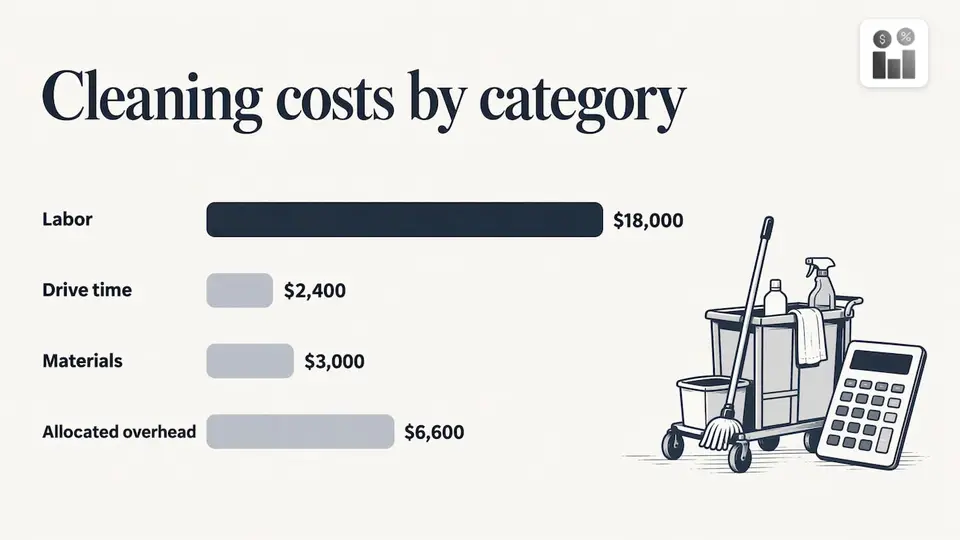
A worked example. A cleaning company completes 200 jobs in a month. Labor costs $18,000, drive time $2,400, materials $3,000 and allocated overhead $6,600. The total is $30,000, so cost per job is $150. If next month brings 200 jobs at $162 each, you know to look at labor hours and routes before touching anything else.
To run these numbers you need time, job and invoice data in the same place. Firmanager’s work orders, time and leave tracking and financial management with real-time analytics are designed to keep those records together, so the cost per job is a report rather than a weekend spreadsheet. Our guide to technician time tracking walks through closing billable gaps over 30 to 90 days.
If you want to price services or allocate overhead rigorously, the Scottish Public Finance Manual gives a useful rule: use actual costs where you know them and estimates only where necessary. For overhead, CurrentCFO suggests allocating by actual resource consumption rather than by revenue alone, so a labor-heavy service line carries its true share.
Step 2: Cut drive time and repeat visits
For a team on the road, the van is a cost center. Every unplanned mile and every second visit for a missing part is paid time with no revenue attached.
McKinsey’s research on productivity in services points to analytics-based demand forecasts, dynamic dispatching and mobile apps as ways to improve technician allocation and real-time response. It also names drive time, repeat visits and first-time-fix rates as the measures that expose inefficiency.
What to do about it:
- Record the baseline. For two weeks, log drive time and repeat visits per technician.
- Fix job data first. Wrong addresses, vague scopes and missing access notes cause more wasted trips than bad routing. Our article on route planning for technicians covers cleaning up job data before you change any software.
- Group jobs by area and urgency. Dispatch the nearest qualified person, not the person who is free first.
- Stock the vehicle for the common job. A 30-day vehicle trunk pilot shows how to track inventory in the van so a missing part does not mean a return trip.
- Review weekly. See where drive time still runs high and adjust territories.
Firmanager includes route and dispatch management and work order and field service management, with real-time notifications by SMS and email. Technicians see job details on the employee mobile portal, and because the platform is cloud-synced, a change made in the office shows up on the phone. For a deeper walkthrough, read how to reduce drive time for your field service team.
Step 3: Remove double entry between tools
Many small service companies run a CRM in one app, schedules in another, time sheets on paper and invoices in a fourth tool. Each handoff is a person retyping data, and each retype is a chance for an error that becomes a credit note or a callback.
An honest audit takes an afternoon:
- List every subscription and what it is used for.
- Mark features that overlap.
- Count how many times one job’s details are typed in before it is paid.
- Note which tool each employee opens first in the morning.
The goal is a single record per job that follows it from quote to cash. Firmanager’s modular design covers customers and facilities, sales pipeline and quoting, work orders, tasks and recurring workflows, supplier and product management, documents and invoicing, so data flows between them without re-entry. Because it is modular, you switch on what you need rather than paying for modules your team will not use. The guide on field service CRM features explains what to look for in a system, including how it behaves on a weak signal.
Automating routine contact helps too. McKinsey reported that a telecom provider that integrated AI into customer care workflows cut total call volume by about 30 percent and raised first-call resolution by 10 to 20 percentage points. A small team will not match a telecom’s scale, but the principle holds: answer repeat questions automatically and keep people on work that needs them. This customer support automation playbook shows one way to approach that. For the basics, see what automation means in a business setting.
Step 4: Simplify invoicing and get paid faster
Invoicing is overhead that earns nothing until it is done well. Late or missing invoices are also a hidden cost: work that was done but never billed.
The U.S. Chamber of Commerce recommends electronic invoicing with integrated payment processing, recurring billing and automated bank reconciliation to reduce repetitive invoice creation, matching and deposit checks. J.P. Morgan adds that invoice automation can capture data, route exceptions and approvals, keep audit trails and pass approved invoices to payment systems, cutting manual re-entry.
For a service business, the practical routine is:
- Invoice from the completed work order. Hours, materials and notes already exist, so nobody rebuilds them.
- Set recurring invoices for maintenance contracts and cleaning schedules.
- Take card payment on the invoice. Firmanager’s invoicing integrates with Stripe, so payment can sit on the same record as the job.
- Review unbilled work weekly. Compare completed work orders with sent invoices.
The Firmanager pricing guide for field service software helps you budget the first year, so the tool itself does not become a cost you did not plan for.
Step 5: Protect the overhead that protects revenue
Cutting everything is not the goal. Some overhead keeps jobs coming and the business legal. A useful test: does this cost protect revenue, is it required for safety, licensing or insurance, and could the same result cost less?
Sort each line into three groups:
| Group | Examples | Action |
|---|---|---|
| Protects revenue or compliance | Dispatch, customer response, insurance, safety training, licensing | Keep, and make it more efficient |
| Duplicated or unused | Overlapping software, unused seats, idle subscriptions | Cancel or consolidate |
| Negotiable | Supplier pricing, service contracts, seasonal spend | Renegotiate or adjust to the season |
Safety and compliance records belong in the first row. Firmanager includes HSE (health, safety and environment) compliance tracking, so those records live beside the jobs they relate to.
Before you commit to any cut, rate it on three questions: how much it saves, whether you can reverse it, and what it risks for growth. MyOfficeOps suggests exactly this kind of rating to set priorities. A cut that saves $200 a month but puts a response-time promise at risk goes to the bottom of the list. Cutting a key sales role to save payroll can also damage your ability to win work later, a trade-off Investopedia notes when it points out that lower costs can hurt sales over time.
Step 6: Check that the savings are real
Cost reduction is only real if quality holds. McKinsey recommends measuring both productivity gains and customer-experience improvements, with stage-gated reviews and clear go/no-go criteria. Deloitte makes a related point: lasting efficiency comes from how work is designed and how technology and people work together, not from occasional cuts.
A monthly review sheet could include:
- Operating expense ratio and category ratios against your target.
- Cost per completed job.
- Drive time per technician and repeat-visit rate.
- Unbilled work orders and days to payment.
- Customer complaints or rebooking rates.
Pick one change, run it for 30 days, compare to the baseline, then keep or reverse it. Small, reversible steps beat one big cut.
Where Firmanager fits
Each step above depends on the same thing: job, time, customer and billing data that agree with each other. Firmanager brings CRM, quoting, work orders, dispatch, time and leave tracking, invoicing and reporting into one login across devices. Your office sees the same data your technicians see, because it is cloud-synced.
Plans are published on the site:
- Free: $0
- Pro: $19 per month
- Business: $49 per month
Start on the free plan, move your customers and open jobs in, and run the cost-per-job calculation from Step 1 on real data. You can see the plans and sign up on the Firmanager site.
If your team is ready to work in the app, you can go straight to Firmanager.
Our perspective
Most cost-cutting advice starts with the lease and the subscriptions list. In field service, we think it should start with the job. Every job passes through a customer record, a quote, a schedule, a visit, a time entry and an invoice. When those live in separate tools, someone pays for the copying: in hours, in errors and in cash that arrives late.
That is why we built Firmanager as one platform with modules that share data. CRM, work orders, dispatch, HSE compliance, time tracking and invoicing sit behind a single login, and the data is cloud-synced so the office and the field see the same thing. You can switch on only what your business needs and grow into the rest.
Our view is simple: lower operating costs come from fewer handoffs, not fewer people. Measure cost per job, remove the duplicate entry, protect the overhead that keeps customers happy, and review the numbers every month.
KaiosMedia
FAQ
What does it mean to reduce operating costs?
It means lowering the ongoing, day-to-day expenses of running your business, such as labor, vehicles, rent, software and administration, so more of each sales dollar becomes profit. The aim is to do the same work with less waste, not to deliver less service.
What are the quickest ways to reduce operating costs in a service business?
Cancel duplicate software, cut drive time through better scheduling and routing, and stop retyping job data between tools. Invoicing straight from completed work orders and billing recurring jobs automatically also recovers time and unbilled work. Start with one change and measure it against a baseline.
Are operating expenses hard to reduce?
Some are, such as insurance, licensing and safety requirements, and some should not be cut because they protect revenue. The easier savings are usually in process: wasted travel, manual re-entry, repeat visits and unused subscriptions. Rate each possible cut by savings, reversibility and growth risk before acting.
How do I know whether my cost cuts are working?
Track operating expense ratio, cost per completed job and utilization together each month. If costs fall while job volume, response times and customer satisfaction hold steady, the change is working. If cost per job rises with stable volume, review the process behind it.
Sources
- Operating Costs: Key Types, Formulas, and Examples (Investopedia)
- Operating Expense Benchmarks for SaaS and Services (Strategize.cloud)
- Commercial Integrator: Business Builders for Integrators, Costs Analysis and Real Growth
- Scottish Public Finance Manual, Annex 2: calculating costs
- Product Line Profitability Framework for SMB Service Businesses (CurrentCFO)
- The productivity imperative in services (McKinsey)
- Deploying gen AI for service operations (McKinsey)
- How To Streamline Payment Processing (U.S. Chamber of Commerce)
- Invoice Automation and Processing Guide for Business (J.P. Morgan)
- Operating Expense Reduction Playbook for SMB Growth (MyOfficeOps)
- Unlocking the true value of Cost Transformation (Deloitte)
- Customer Support Automation: A Resolution-First Playbook
- Automation Meaning (Branded Agency Glossary)
Recommended
Run your whole business in one place
CRM, quotes, work orders, invoicing, expenses, HR and HSE — one login, every device. Free-forever plan.
Start free →