Service Contract Tracking: Setup Steps and KPIs That Work
Service Contract Tracking: Setup Steps and KPIs That Work
Service contract tracking gives your team real-time visibility into SLAs, renewal dates, obligations, and cost usage across every active agreement. Operations leads see what’s due today, finance sees what’s profitable, and field techs see exactly what’s covered before they show up on-site. The immediate fix for most service businesses isn’t new software first, it’s consolidation: pull every contract into one searchable repository and turn on automated alerts for renewals and SLA milestones.
Here’s who feels the difference fastest:
- Operations managers stop reacting to missed renewals and start planning around them.
- Field teams know contract scope and limits before a truck rolls.
- Finance can finally tie billed hours to what a contract actually allows.
Key Takeaways
Service contract tracking works when obligations are extracted, assigned to owners, and monitored continuously rather than filed away and checked manually.
| Point | Details |
|---|---|
| Centralize first | Move every active contract into one searchable repository before adding automation on top. |
| Automate SLA alerts | Set multi-stage, pre-breach notices with escalation paths, not single reminders. |
| Link contracts to field work | Require work-order and evidence linkage before any job gets billed against a contract. |
| Measure what matters | Track SLA compliance, MTTR, and contract profitability, then use those numbers in renewal talks. |
| Pilot before scaling | Prove templates and alert timing on one contract type before rolling out company-wide. |
| Use an integrated platform | Firmanager connects contract tracking to work orders, mobile access, and invoicing in one system. |
Table of Contents
- What Is Service Contract Tracking, and What Features Matter Most?
- How Do You Set Up Service Contract Tracking Step by Step?
- Which KPIs Actually Show Whether Contract Tracking Is Working?
- Which Integrations Make Contract Tracking Actually Work?
- What Goes Wrong With Contract Tracking, and How Do You Fix It?
- Why Most Contract Tracking Advice Misses the Real Problem
- How Firmanager Puts Contract Tracking Into Practice
- Sources
What Is Service Contract Tracking, and What Features Matter Most?
Contract tracking is not the same as contract storage. A shared drive full of PDFs is passive. Active tracking means the system extracts key obligations from each agreement, assigns an owner to each one, and monitors deadlines continuously rather than waiting for someone to check a calendar. That distinction is what modern contract tracking software is built around: monitoring SLAs, delivery milestones, and contractual deadlines throughout the life of the agreement, not just at signing and renewal.

The category has matured past static reminders. Service agreement management now treats each contract as a working record: obligations get pulled out line by line, routed to a named owner, and tracked through workflows that flag risk before it turns into lost revenue or a missed deliverable.
When you evaluate a platform or build your own process, check for these core capabilities:
- A central repository with version control, so nobody works off an outdated PDF.
- SLA timers with pre-breach alerts, not just after-the-fact breach notices.
- Contract-to-work-order and contract-to-asset linking, so field jobs pull scope directly from the agreement.
- Usage and limit monitoring, especially for contracts with capped hours or visit counts.
- Automated renewal workflows tied to invoicing, so a lapsed contract doesn’t quietly keep getting billed.
- Mobile access with attachment and evidence support for field-collected proof.
Pro Tip: Before you shop for software, audit your five highest-value contracts manually. If you can’t answer “who owns this renewal” and “what’s the SLA response window” in under a minute, that’s the gap tracking needs to close first.
How Do You Set Up Service Contract Tracking Step by Step?
Start narrow. Trying to digitize every contract type in week one is how these projects stall.
- Standardize intake. Build one template that captures start and end dates, SLA response windows, obligation owners, and renewal terms before a contract ever gets filed.
- Design your repository structure. Decide on naming conventions, tags by contract type or client, and a clear link between each contract and the assets or sites it covers. Version control matters here. Amendments happen, and nobody should be working off contract v1 when v3 is active.
- Configure SLA timers and alerts. Set notice windows well ahead of breach points, define who gets escalated at each stage, and push those alerts to mobile, not just email.
- Link contracts to work orders and assets. Every billed job should trace back to the contract line item that authorizes it. Require field evidence, like photos or signed forms, before a job is marked billable.
- Pilot on one contract type. Pick your highest-volume or highest-risk category, run it for a full billing cycle, and measure what breaks. Piloting a single contract class before full rollout is standard advice across the industry, and for good reason: it surfaces template gaps and alert timing issues while the blast radius is still small.
Once the pilot holds up, expand:
- Add the next contract type or client segment.
- Reassign ownership gaps you found during the pilot.
- Tighten alert windows based on how often teams actually acted in time.
Which KPIs Actually Show Whether Contract Tracking Is Working?
Tracking contracts without measuring outcomes just moves the paperwork problem into a dashboard. A handful of metrics tell you whether the system is paying for itself.
- SLA compliance rate — the percentage of service events resolved inside the promised window.
- Mean time to repair (MTTR) — how long it takes from ticket open to resolution.
- Contract profitability — billed revenue against labor, parts, and travel cost per contract.
- Average response time — first-touch speed after a request comes in.
- Renewal readiness — how many contracts are flagged and reviewed before their expiration date, not after.
- Percentage of obligations completed on time — the clearest signal of whether ownership assignments are actually working.
Build a few standing views rather than one giant report: a contract summary dashboard, an SLA trend chart by client or technician, a cost-versus-billed-usage comparison, and a vendor or subcontractor performance view. SLA management platforms that offer real-time countdowns and pre-breach escalation turn compliance into something you measure weekly, not something you discover during a client dispute. Set your first-quarter targets from your pilot data, then use the profitability and compliance numbers directly in renewal negotiations.
Which Integrations Make Contract Tracking Actually Work?
A contract tracking system that doesn’t talk to your other tools just creates a second source of truth to reconcile by hand. The integrations that matter most close the loop between fieldwork and billing.
- Mobile work-order apps, so techs see contract scope and limits before starting a job.
- CRM, so account history and contract terms live next to the customer record.
- Accounting and billing systems, so invoices generate directly from contract line items instead of manual entry.
- Procurement or ERP, for parts and vendor contracts tied to service delivery.
- eSignature tools, to speed renewals and amendments without a paper trail.
- Asset inventory, so equipment history ties back to the agreement covering it.
Start with the mobile-to-billing connection first. Closing that loop between field work orders, contract terms, and invoicing eliminates the manual reconciliation that causes most billing disputes and revenue leakage in the first place.
What Goes Wrong With Contract Tracking, and How Do You Fix It?
Most contract tracking failures trace back to a handful of repeat offenders.
- Data fragmentation. Contracts live in email, shared drives, and someone’s desk drawer. Fix it with one enforced repository and mandatory metadata fields at intake.
- Missed renewals and silent auto-renews. A single alert 30 days out isn’t enough. Configure multi-stage notices with escalation to a backup owner if the primary doesn’t act.
- Scope creep and billing disputes. Jobs get billed against a contract without proof they were covered. Require work-order linkage and field evidence before any invoice goes out.
- Low adoption. Field staff won’t use a system that’s slow on a phone. Prioritize mobile-first design and keep training under an hour.
Pro Tip: Assign a single “renewal owner” per client account, not per contract. When one person tracks the full relationship, renewal conversations happen naturally instead of getting buried in a queue of individual expiration dates.
Why Most Contract Tracking Advice Misses the Real Problem
Most guidance on this topic treats contract tracking as a filing problem: get the PDFs organized, set a reminder, done. That’s backwards. The research on active service agreement management makes clear that the real value comes from obligation extraction and ownership, not storage. A contract nobody owns will lapse no matter how well it’s filed.
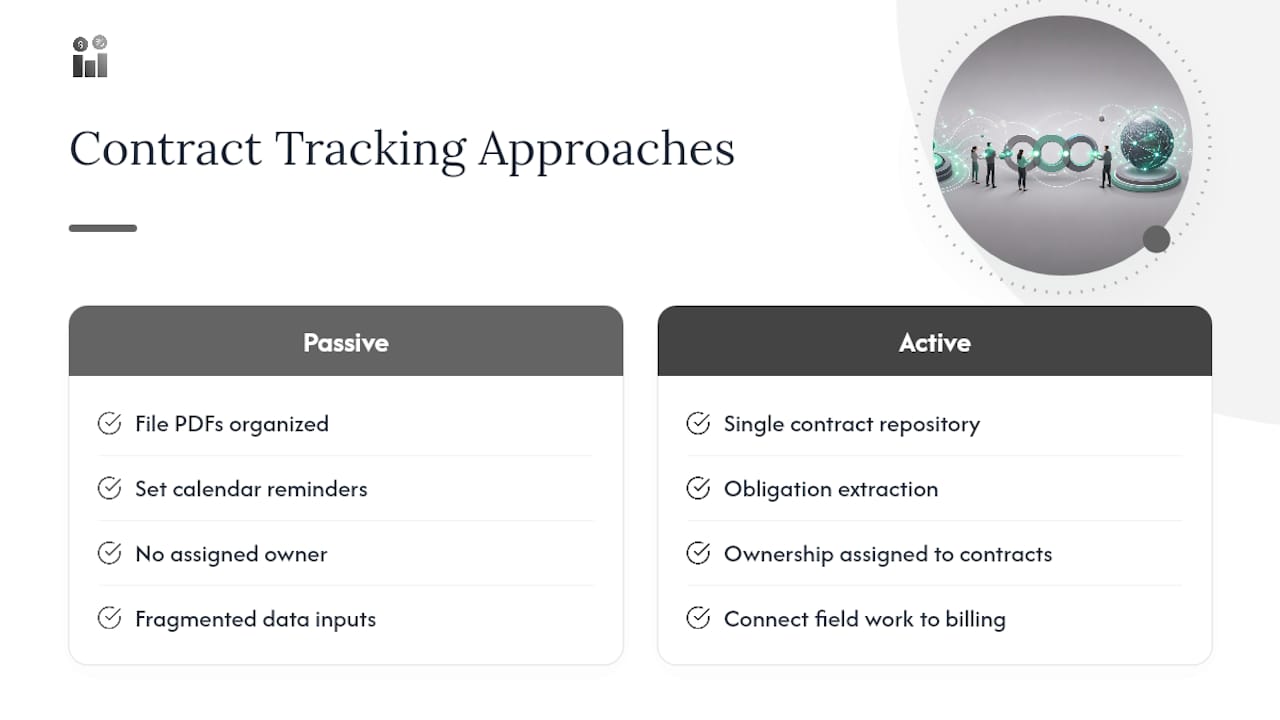
The conventional advice also underweights the field-to-billing link. Plenty of teams track SLA dates carefully while still losing money because a technician bills against the wrong contract line, or a job gets marked complete without the evidence needed to invoice it. Fix the connection between work orders and contract terms before you worry about prettier dashboards.
Prioritize in this order: get contracts into one repository with real ownership assigned, connect field work to billing, then layer in KPI tracking once the basics are enforced. Skipping straight to dashboards on top of fragmented data just produces confident-looking reports built on bad inputs.
— KaiosMedia
How Firmanager Puts Contract Tracking Into Practice
Firmanager builds the checklist above directly into one platform instead of stitching together separate tools for CRM, work orders, and invoicing. Contracts link to work orders and assets natively, SLA timers run in the background with alerts pushed to the mobile app, and billing pulls straight from contract terms through Stripe-integrated invoicing, so a completed job becomes an accurate invoice without manual reconciliation.

For a pilot, start with your highest-volume contract type, invite your operations lead and one finance stakeholder to review the setup, and use the built-in dashboards to check SLA compliance and contract profitability after the first billing cycle. Field teams get scope and limits on their phones before a job starts, which is where most billing disputes get prevented rather than resolved after the fact. If you’re already tracking SLA compliance manually, moving that workflow into a system built around contract-to-work-order linkage is the fastest way to see whether automation actually pays off. Explore the Firmanager platform and start a trial to see how contract tracking, invoicing, and field mobile access work together from a single login.
Sources
- Contract Tracking Software: A Key Feature of Modern Contract Management
- Service Agreement Management: A Complete Guide for 2026
- Service Contract Manager - Yardi
Recommended
Run your whole business in one place
CRM, quotes, work orders, invoicing, expenses, HR and HSE — one login, every device. Free-forever plan.
Start free →