Service Workflow Management: A Practical Guide for Field Teams

Service workflow management means defining every step a job takes, from the customer’s first request to the paid invoice, and running those steps in one system with a named owner for each. Done well, it ends lost job details, double entry and invoices that go out late. Firmanager puts CRM, work orders, scheduling, HR and invoicing under one login, so the workflow lives in a single place instead of across spreadsheets, texts and inboxes.
TL;DR
- Workflow management designs, runs, monitors and improves the sequence of tasks, roles and handoffs in a process. It is not the same as project management.
- Start with intake and scope: if a vague request enters the workflow, every later step pays for it.
- A service workflow has six stages: request, quote, schedule and dispatch, field work, reporting, invoicing. Each needs an owner and a trigger.
- Automate the repeatable parts (recurring tasks, notifications, invoices) and keep people on the exceptions.
- Firmanager covers the whole chain in one platform, with a free plan and paid plans at $19 and $49 per month.
Table of Contents
- What service workflow management actually is
- The six stages of a service workflow
- Fix intake and scope first
- Scheduling and dispatch: where the day is won or lost
- Field work: give technicians what they need on their phone
- Reporting and closing the work order
- Invoicing without the lag
- Automate the repeatable work
- How to implement it: a step-by-step plan
- Common problems to plan for
- Our perspective
- Put your workflow in one place
- FAQ
- Sources
What service workflow management actually is
A workflow is a series of tasks organized to reach a specific outcome, with defined roles, resources and a sequence of actions. Workflow management covers the systems and tools used to design, run, monitor and improve those workflows. In a service business the outcome is usually a completed job that the customer has accepted and paid for.
The word “service” matters. A field service workflow crosses the office and the road. Someone in the office takes a call, someone else schedules it, a technician does the work on a customer’s site, and then the office bills it. Every handoff is a place where information gets lost. Workflow management is the discipline of closing those gaps.
Workflow management vs. workflow automation
Automation is one tool inside management. Management defines who owns each step and what the sequence is. Automation takes specific steps, such as routing a request, sending a reminder or generating an invoice, and runs them by rule. You need the first before the second: automating a broken process only makes the mistakes faster.
Workflow management vs. project management
The difference is repeatability. Workflow management suits recurring, process-driven work that never ends, while project management suits one-time, goal-driven work with a defined end. Replacing a boiler in a large building is a project. Handling the 40 maintenance requests that arrive every month is a workflow.
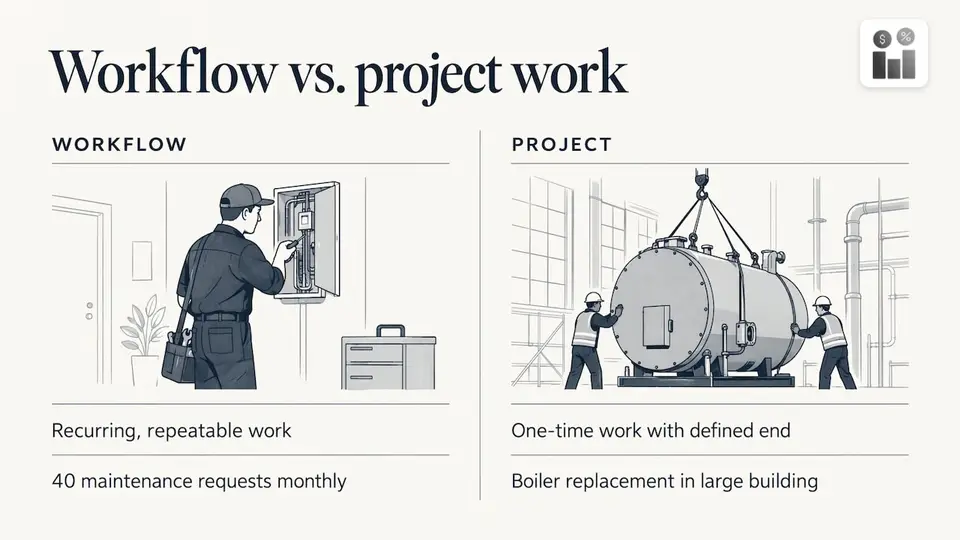
Most service companies run both. A large installation is tracked as a project, and each visit inside it follows the same repeatable job workflow. If you are weighing which tool type fits which kind of work, this comparison of project management tools shows how the project side is usually approached.
The six stages of a service workflow
Every service company has its own variations, but the backbone is the same. Write yours down as stages, and for each one note the trigger, the owner and the output.
| Stage | Trigger | Owner | Output |
|---|---|---|---|
| 1. Request intake | Customer call, email or form | Office or sales | A complete job request tied to a customer and site |
| 2. Quote and approval | Request qualified | Sales or manager | An accepted quote |
| 3. Scheduling and dispatch | Quote accepted or urgent request | Dispatcher | A job assigned to a technician with a time slot |
| 4. Field work | Technician notified | Technician | Work done, notes, photos, time and parts logged |
| 5. Reporting and review | Job marked complete | Manager | A closed work order, checked for quality |
| 6. Invoicing and follow-up | Work order closed | Office or finance | An invoice sent and payment tracked |
The table looks simple. The value is in the triggers. When closing a work order automatically creates the invoice draft, nobody has to remember to bill.
Fix intake and scope first
If the wrong work enters the system, or arrives with vague expectations, every downstream team pays for it. That is where service workflows break most often, and where small changes pay back fastest.
A solid intake record answers these questions before anyone is scheduled:
- Who is the customer, and which site or facility is the job at?
- What exactly is the problem or requested service?
- How urgent is it, and is there a contract or service level behind it?
- What access, parts or permits does the technician need?
- Who approves the price?
Requests that arrive by phone, text and email all need to land in the same place. If you want to see how other service industries think about structured intake, this overview of intake automation covers the principle of capturing requests the same way every time.
In Firmanager, customers and facilities are managed alongside the sales pipeline and quoting, so the request, the site and the quote sit on the same record from the start.
Scheduling and dispatch: where the day is won or lost
Once a job is approved, the question is who goes, when, and with what information. A good dispatch step considers technician skills, location, availability and job priority. A poor one relies on a whiteboard and phone calls.
Two habits improve almost any dispatch process:
- Assign by rule, not by memory. Decide in advance how you choose (nearest qualified technician, contract priority, customer preference) and apply it consistently.
- Send the job, not a phone call. The technician should receive the address, scope, notes and history on their phone, not a verbal summary.
Firmanager includes route and dispatch management and real-time notifications by SMS and email. For a deeper walk-through, read our guide to technician dispatching and the five dispatch best practices for ops teams.
Field work: give technicians what they need on their phone
The field is where most workflow tools fail, because they were designed for the office. A technician standing in a boiler room needs three things: the job details, a way to record what was done, and a way to tell the office the job is finished.
That means mobile access to:
- Job scope, address, contact and customer history
- Checklists and safety requirements for the site
- Time entries and notes
- Status updates the office sees immediately
Firmanager gives employees a self-service mobile portal and cloud-synced data, so what the technician records is what the office sees. The same data supports time and leave tracking and HSE (health, safety and environment) compliance. If your gap is billable time that disappears between jobs, our guide to technician time tracking shows how to close it.
Reporting and closing the work order
A job is not finished when the technician leaves. It is finished when the work order is closed, reviewed and ready to bill. Define what “done” means for your company, for example:
- Work performed matches the scope, or the difference is noted
- Time and materials are logged
- Photos or documents are attached
- Customer sign-off is recorded where required
Maintenance teams that stop firefighting usually do it by tightening this stage and measuring it. Our article on the work order process for maintenance teams covers the KPIs worth tracking.
Invoicing without the lag
Invoicing is the last handoff, and the most expensive one to get wrong, because delays here hit cash flow directly. The principle is simple: the data needed for the invoice should be captured in the earlier stages, so billing is a click and not a research project.
Firmanager supports automated invoicing with Stripe integration, and because work orders, customers and quotes share one data model, invoice details come from the job record. Financial management with real-time analytics then shows what has been billed and what is outstanding.
Automate the repeatable work
Service businesses are full of recurring work: monthly inspections, weekly cleaning rounds, annual compliance checks. These are the clearest case for workflow management, since the process is the same every time.
The approach:
- List every task that repeats on a schedule.
- Define the interval (weekly, monthly, every second Tuesday).
- Attach the checklist and the default assignee.
- Let the system generate the tasks, so nobody rebuilds them by hand.
Firmanager handles task and recurring workflow tracking. Our post on recurring task automation explains how recurrence rules work in practice.
Internal workflows follow the same logic. Leave requests are a good example: a defined approval path with a clear owner keeps decisions moving, as shown in our leave approval workflow guide.
How to implement it: a step-by-step plan
Step 1: Map what happens today
Walk through three recent jobs from request to payment. Note every handoff, every place someone re-typed information and every delay. You will find the same two or three problems repeating.
Step 2: Define stages, owners and triggers
Use the six-stage table above as a starting point. Each stage needs one owner, even if several people work on it. Shared ownership usually means no ownership.
Step 3: Choose a platform that covers the chain
The more tools your workflow spans, the more handoffs you create. A platform that holds CRM, work orders, scheduling, HR and invoicing together removes the copy-and-paste between them. Firmanager is modular, so you can start with the modules you need and add others as the business grows, all from one login.
Step 4: Start small
Move one service line or one team first. Run it for a few weeks, then adjust stages before rolling out to everyone. Visual boards can help teams see work in progress, as in this look at managing daily workflows visually.
Step 5: Measure and improve
Pick a handful of numbers: time from request to scheduled, jobs completed on the first visit, time from completion to invoice, and overdue recurring tasks. Review them monthly and change one thing at a time.
Common problems to plan for
- Information scattered across tools. The cure is one record per job that everyone reads and writes to.
- Stale data. Office plans built on yesterday’s status cause double bookings. Real-time, cloud-synced data prevents this.
- Unclear ownership. If two people think the other is chasing the invoice, nobody is.
- Tools the field team will not use. Keep the mobile experience short: job details in, status and notes out.
- Too much process at once. Add stages only when a real problem justifies them.
Our perspective
Most service companies do not have a software problem first. They have a handoff problem. The request lives in one inbox, the schedule in a spreadsheet, the hours in a notebook and the invoice in an accounting tool.
We built Firmanager on the belief that data should flow once and be reused. A customer record feeds the quote, the quote becomes a work order, the work order drives dispatch, and the closed job feeds the invoice. Time, leave and HSE compliance sit on the same platform, so managers see the whole business at a glance.
That is why we offer modules under one login and keep the platform cloud-synced across devices: owners, dispatchers and technicians all work from the same current picture.
KaiosMedia
Put your workflow in one place
Firmanager gives service businesses CRM, work orders, route and dispatch, recurring tasks, HR, HSE and invoicing in a single platform. The Free plan costs $0, Pro is $19 per month and Business is $49 per month. You can compare the plans and get started on the Firmanager site, or go straight into the Firmanager app.
For more guides on running a service team, browse the Firmanager blog.
FAQ
What is the difference between a workflow and a process?
A process describes how end-to-end work should run across roles, with ownership and governance. A workflow is the specific sequence of tasks and handoffs inside it. Workflow automation is narrower still: it automates individual steps such as approvals, routing or notifications.
Which service businesses benefit most from workflow management?
Any business where jobs move between people: maintenance, cleaning, technical services and other field teams. The more handoffs between office and field, the more a defined workflow saves. Recurring work benefits the most because the same steps repeat.
Do I need a separate tool for each stage?
Not necessarily. Separate tools mean more handoffs and more re-typing. An all-in-one platform such as Firmanager keeps CRM, work orders, dispatch and invoicing on the same data, so each stage starts where the last one ended.
How long does it take to set up a service workflow?
Mapping your current process and defining stages can be done in a few days. Start with one team or service line, run it for a few weeks and adjust before expanding.
Can I start for free?
Yes. Firmanager has a Free plan at $0, with Pro at $19 per month and Business at $49 per month for larger needs. See the plans for current limits.
Sources
- What is workflow management? Benefits and best practices
- Workflow management vs. project management
- Process management guide to business processes
Recommended
Run your whole business in one place
CRM, quotes, work orders, invoicing, expenses, HR and HSE — one login, every device. Free-forever plan.
Start free →