Task Tracking Software for Teams: 2026 Comparison

If your team works in the field, the best task tracking software is the one where tasks, customers, invoices and time live in the same record. Firmanager is built for that: work orders, recurring tasks, CRM, invoicing and a mobile employee portal sit behind one login, and the Free plan costs $0. General-purpose tools such as monday.com, Asana, ClickUp and Trello are strong at organizing work, and this guide compares them on what matters to a service team: who assigns, who sees what in real time, how the job ends up as an invoice, and what it costs.
TL;DR
- Office teams that only need boards and to-do lists have many choices, with entry prices from about $5 to $11 per user per month in Zapier’s May 2026 roundup.
- Service and field teams need more than a task list: jobs, customers, dispatch, time, invoices and compliance in one record.
- Firmanager covers those modules in one platform. Plans: Free at $0, Pro at $19 per month, Business at $49 per month.
- Judge any tool by whether your technicians will actually use the mobile app, and by how little re-entering of data it leaves for the office.
Table of Contents
- What team task tracking software has to do
- Task tracking tools compared
- Firmanager: task tracking inside a full service platform
- How the general-purpose tools fit
- How to choose for your team
- Which tool for which team
- Start with Firmanager
- Our perspective
- FAQ
- Sources
What team task tracking software has to do
Task tracking software gives every piece of work an owner, a due date, a status and a history, so nobody has to ask “who is doing this?” in a group chat. For a team, five capabilities separate a useful tool from a glorified to-do list:
- Assignment and ownership. Each task has one responsible person and a clear deadline.
- Status that updates live. When someone finishes a task in the field, the office sees it without a phone call.
- Recurring work. Weekly inspections, monthly maintenance and routine cleaning should create themselves, not be retyped.
- Reporting. Managers need to see who did what, how long it took and what is overdue.
- Mobile access. People who are not at a desk need the task details, notes and customer information on their phone.
For a service business, add a sixth: the task has to connect to money. A finished job should flow into an invoice, and the hours worked should be visible when you bill. A pure task board stops at “done”; a service business needs the next step.
Task tracking tools compared
The table below mixes general task management tools with Firmanager, which is built around service operations. Starting prices for the general tools are the per-user monthly figures published in Zapier’s list of the best task management software, dated May 29, 2026. They are entry prices and move as vendors change plans, so confirm on each vendor’s pricing page before you buy.
| Tool | Best suited to | Starting price | Field service features built in |
|---|---|---|---|
| Firmanager | Service companies: maintenance, cleaning, technical services | Free at $0; Pro $19/month; Business $49/month | Work orders, dispatch, CRM, invoicing, time and leave, HSE, mobile portal |
| monday.com | Visual workflows | From $9 per seat per month | Task boards; field operations need add-ons |
| Asana | Cross-functional teams | From $10.99 per user per month | Task and project tracking |
| Wrike | Larger teams | From $10 per user per month | Task and project tracking |
| ClickUp | Teams that want heavy customization | From $7 per user per month | Task and project tracking |
| Smartsheet | Spreadsheet-minded teams | From $9 per member per month | Sheets with cross-sheet reporting |
| Trello | Small teams | From $5 per user per month | Simple boards |
| Jira | Software development | From $7.91 per user per month | Sprints and backlogs |
| Notion | Documentation-heavy teams | From $10 per member per month | Docs plus task databases |
Todoist, listed by the same roundup from $5 per user per month, is aimed at personal task management rather than team operations.
A price per user looks cheap until you count what you add around it: a separate invoicing app, a separate customer database, a separate time sheet. If you compare more tools than these, a project management tool comparison shows how plans and pricing stack up across a wider field.
Firmanager: task tracking inside a full service platform
Firmanager is an all-in-one business management platform for service companies. Task tracking is not a separate product you bolt on; it is one module among CRM, work orders, invoicing and HR, and the data moves between them.
What that gives a team in practice:
- Work orders and field service management. A job is a work order with an assignee, customer and facility attached, not a loose card on a board.
- Task and recurring workflow tracking. Routine tasks repeat on schedule, so recurring maintenance or cleaning rounds do not depend on someone remembering to create them.
- Route and dispatch management. The office assigns and plans the day; technicians see their jobs.
- Employee self-service mobile portal. Employees open job details on their phone from the same login the office uses.
- Real-time notifications. SMS and email notifications keep the people involved informed when something changes.
- Sales pipeline and quoting. The path from a lead to a quote to a job stays in one place.
- Invoicing with Stripe integration. Automated invoicing closes the loop from finished work to billing.
- Time and leave tracking. Hours and absences sit next to the tasks, which helps when you plan capacity. Our guide to technician time tracking shows how to close billable gaps.
- HSE compliance. Health, safety and environment tracking is part of the platform, not a spreadsheet on the side.
- Financial management with real-time analytics. Managers see operational and financial figures from the same data.
The platform is cloud-synced and modular, so you switch on the modules your business needs and manage everything from one login across devices. That single data set is the point: a task that is closed in the field is visible to the office, the customer record and the invoice without anyone retyping it.
How the general-purpose tools fit
The other tools in the table are good at what they were designed for. Here is where each shines.
monday.com and Asana
Both are well-known work management platforms. monday.com is described by Zapier as the pick for visual workflows, and Asana as the pick for cross-functional teams. They work well when your tasks are projects: campaigns, launches, internal plans. When your day is made of customer visits, you will need to connect them to a customer database, a scheduling tool and an invoicing tool.
ClickUp, Wrike and Smartsheet
These suit teams that want to configure views, fields and reports themselves. ClickUp is the customization pick, Wrike targets larger teams and Smartsheet appeals to people who think in spreadsheets. They reward teams with someone who enjoys setting up the system.
Trello, Todoist, Jira and Notion
Trello is the simplest: cards moving across columns, which suits a small team with a short list of tasks. Todoist is oriented to personal lists. Jira is designed for software teams with sprints and backlogs, and Notion for teams that keep documentation and tasks together. None of them is built to dispatch a technician or produce a customer invoice.
Field service tools
A second category exists: dedicated field service platforms such as Jobber, Housecall Pro and ServiceTitan. They handle scheduling, job records and invoicing for trades. Several publish quote-based pricing, and plans often scale by technician or by user. If you are weighing them against an all-in-one, compare what is included at each tier and what per-technician fees add up to for your headcount. For a deeper look at the CRM side of the decision, see our comparison of CRM with project management for service teams.
How to choose for your team
Start with the work, not the feature list.
Step 1: Describe how a job really moves
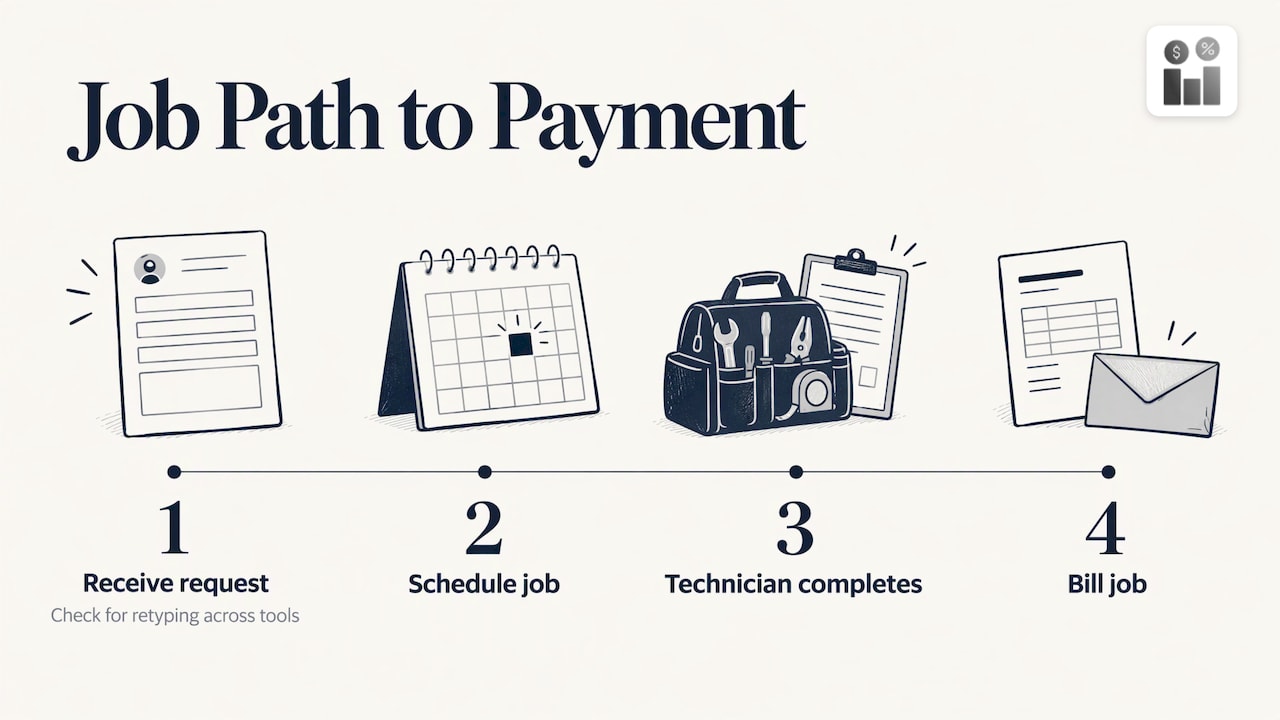
Write down the path from request to payment: who receives the request, who schedules it, who does it, who bills it. If the path crosses more than two tools, count how often someone retypes information. Each retype is a place where errors and delays creep in.
Step 2: Decide who needs to see what
Owners want totals. Managers want status by person and by job. Technicians want today’s list, the address and the customer history on a phone. A tool that serves only one of these audiences will leave the others on spreadsheets and messages.
Step 3: Put mobile first
Teams that work away from a desk live or die by the mobile experience. If the app is clumsy, people work around it and your data goes stale. Try the phone app with the people who will use it daily, on their own devices. Our practical guide to mobile job management covers what field teams need on a phone.
Step 4: Check that data syncs in real time
If the office and the field look at the same record, nobody arrives at a job without the history and nobody re-enters notes at night. Our article on real-time data sync for service teams lists the questions to ask before you commit.
Step 5: Count total cost, not seat price
Add the price of every tool you would need next to the task tracker: invoicing, CRM, time tracking, safety forms. A single platform with a flat plan can cost less than three subscriptions per user. Firmanager’s published plans are Free at $0, Pro at $19 per month and Business at $49 per month, billed monthly or annually depending on seats and usage limits.
Which tool for which team
| Your team | Our recommendation |
|---|---|
| Field service or maintenance company needing jobs, dispatch, invoices and HR | Firmanager |
| Cleaning company with recurring rounds and several sites | Firmanager, see our CRM for cleaning companies comparison |
| Small business owner who wants one login for tasks, customers and billing | Firmanager Free to start |
| Marketing or creative team running campaigns | monday.com, Asana or ClickUp |
| Software team with sprints | Jira |
| One person managing a personal list | Todoist |
Start with Firmanager
If your team does its work at customer sites, the quickest way to see whether one platform can replace your task board, your customer list and your invoicing tool is to set up a few real jobs. Firmanager’s Free plan costs $0, Pro is $19 per month and Business is $49 per month. You can add your team, create work orders, set recurring tasks and send an invoice from the same account. See the plans on the Firmanager site or open the Firmanager app.
Our perspective
Most task tracking software starts from the assumption that work is a list. In a service business, work is a visit: a customer, a place, a person with a phone, a set of hours and, at the end, an invoice. When those pieces live in different tools, your team spends its day moving information from one to the next.
That is why we built Firmanager as one platform. CRM, work orders, tasks, time and leave, HSE compliance and invoicing share the same data, cloud-synced, behind one login on any device. Your technician closes a job on a phone, and the office, the customer record and the invoice all see it.
We also believe in modularity. You do not have to adopt everything on day one. Start with the modules that remove your biggest daily friction, such as assigning work and tracking recurring tasks, and add the rest as your team grows. The aim is simple: less retyping, fewer calls to ask for status, and a clear picture of your business at any moment.
KaiosMedia
FAQ
What is the difference between task tracking and project management software?
Task tracking follows individual pieces of work: who owns them, when they are due and whether they are done. Project management adds timelines, dependencies and budgets across many tasks. Firmanager combines both with work orders, task and workflow tracking, and detailed project management in one platform.
Do I need a free task tracking tool or a paid one?
A free plan is a sound way to start with a small team. Firmanager’s Free plan costs $0, and when you need more seats or higher usage limits, Pro is $19 per month and Business is $49 per month. Moving up keeps your data in the same system.
Can task tracking software handle invoicing?
General task boards usually do not. Firmanager includes automated invoicing with Stripe integration, so work you complete in the platform can be billed from the same place, next to your customer records.
How do technicians see their tasks in the field?
Through the employee self-service mobile portal. Employees open job details on their phone with the same cloud-synced data the office sees, and real-time notifications by SMS and email keep everyone informed of changes.
How many people should be able to use the tool?
Everyone who touches a job: owners, managers, dispatchers and technicians. When only the office uses the system, field updates still travel by phone and message, which defeats the purpose of real-time tracking.
Sources
Recommended
Run your whole business in one place
CRM, quotes, work orders, invoicing, expenses, HR and HSE — one login, every device. Free-forever plan.
Start free →