Cut Travel 10% with Technician Scheduling for Service Managers
Cut Travel 10% with Technician Scheduling for Service Managers
Technician scheduling matches the right person to the right job at the right time, based on skills, location, and availability, and it’s the single biggest lever for cutting travel time and boosting on-time performance. Done well, it applies operations research, the mathematical discipline behind logistics and workforce optimization, to daily dispatch decisions. Platforms like comprehensive field service management software build on that discipline to keep field teams productive instead of reactive.
TL;DR:
- Advanced scheduling optimization can reduce travel time by around 10% and improve on-time rates by 25 to 50 percent, especially for large fleets.
- Real-time re-optimization should automatically update schedules when jobs run long or technicians go offline, not rely on manual adjustments.
- Accurate data on job durations, technician skills, and live location tracking are essential for scheduling software to deliver genuine efficiency gains.
- Static, once-a-day schedules are fragile; continuous rebalancing based on real-time conditions significantly reduces day-to-day disruptions.
- Clear KPIs, baseline data, and pilot testing are critical steps to ensure scheduling tools produce measurable improvements before full-scale deployment.
Table of Contents
- What Is Technician Scheduling Software, and Where Does It Fit?
- Key Features to Expect from Technician Scheduling Tools
- What Performance Gains Can You Realistically Expect?
- Why Do Schedules Break Down in the Field?
- How Does Automated Scheduling and Optimization Actually Work?
- How Do You Choose and Roll Out Technician Scheduling Software?
- What Security and Privacy Risks Should You Watch For?
- How Should Customer Notifications Fit into the Schedule?
- Does Scheduling Software Scale as Your Technician Team Grows?
- When Should You Buy, Build, or Upgrade Scheduling Capabilities?
- Where Does Firmanager Fit into Your Scheduling Workflow?
- Sources
What Is Technician Scheduling Software, and Where Does It Fit?
Technician scheduling software assigns field workers to jobs based on skill, location, time window, and availability, then keeps that assignment accurate as the day unfolds. It’s the operational core of field service management (FSM), sitting between the customer request and the invoice. A homeowner books an HVAC repair, a dispatcher checks who’s certified and nearby, a technician gets the job on a mobile app, and the schedule updates when the previous job runs long. That loop is technician scheduling.
FSM and computerized maintenance management systems (CMMS) both rely on scheduling as a functional layer, not a separate product. FSM handles the customer relationship and work order lifecycle. CMMS focuses on asset maintenance history. Scheduling is the engine that turns either system’s backlog into an actual day plan for people carrying tools and parts.
Three groups typically own this process. Dispatchers handle same-day changes and emergency calls. Planners build the week’s schedule around known appointments, recurring maintenance, and crew capacity. Field managers watch utilization and intervene when a route or a technician falls behind. In small operations, one person wears all three hats. In larger companies, these roles split, and the software has to serve each one differently, giving dispatchers a live view while giving planners a longer-horizon calendar.
The common use cases break into three patterns: appointment booking (a customer picks a window), dispatch (an urgent job gets inserted into a live schedule), and daily planning (the morning routine of confirming who’s where and when). A modern platform coordinates work-order creation, appointment booking, scheduling, dispatch, mobile updates, and invoicing as one continuous workflow, according to ORTEC’s field service research. Even so, scheduling at real scale still needs its own optimization logic layered on top.
Key Features to Expect from Technician Scheduling Tools
Not every scheduling tool solves the same problem. Before comparing vendors, know which capabilities actually move the needle on utilization and on-time rates.
- Schedule board and booking interface. A drag-and-drop board with Gantt-style time granularity lets dispatchers see gaps, overlaps, and idle technicians at a glance, rather than scrolling through a spreadsheet.
- Skill and certification matching. The system should flag which technicians hold the license, tool, or training a job requires before anyone gets assigned. IBM’s Maximo platform, for one, factors technician skill and asset criticality directly into its scheduling logic.
- Time windows and SLA handling. Jobs with contractual response times or customer-promised windows need priority weighting so the system doesn’t treat a same-day emergency the same as a routine filter change.
- Route optimization and travel-time awareness. The tool should calculate drive time between jobs, not just list addresses in the order they were booked.
- Real-time re-optimization. When a job runs over or a technician calls in sick, the schedule assistant should recalculate the rest of the day automatically instead of waiting for a human to notice.
- Integrations with work orders, CRM, telematics, and mapping services. Scheduling data is only as good as the systems feeding it; disconnected tools force double entry and stale information.
Microsoft’s Dynamics 365 documentation frames efficient scheduling as a four-step workflow: define resource capabilities, map work requirements, apply automated matching logic, and continuously re-optimize as conditions change. That sequence is a useful checklist when you’re evaluating whether a tool actually does what its feature list claims.
What Performance Gains Can You Realistically Expect?
The payoff from better scheduling shows up in three places: less windshield time, more on-time arrivals, and higher billable utilization per technician per day.
Statistic callout: Organizations that introduce advanced routing and scheduling optimization typically report travel-time reductions of around 10% and on-time performance improvements of 25 to 50 percent, according to ORTEC’s field service research. Those aren’t marginal numbers for a business running ten or more trucks a day.
The gains break down into a few practical categories:
- Travel time drops when routing accounts for real drive distances instead of a dispatcher’s mental map of the territory.
- On-time rates improve because the schedule accounts for realistic job durations and buffer time, not optimistic best-case estimates.
- Utilization rises when idle gaps between jobs shrink, since every extra 20 minutes of windshield time is 20 minutes a technician isn’t billing.
None of this happens automatically. The software optimizes against the data you feed it. If job durations are guessed rather than measured, and if technician locations aren’t tracked in real time, the schedule will optimize around bad inputs and produce a plan that looks efficient on paper and falls apart by 10 a.m.
Why Do Schedules Break Down in the Field?
Most scheduling failures aren’t software failures. They’re the gap between a static plan built the night before and a day that refuses to cooperate.
A schedule built at 6 a.m. assumes every job takes exactly as long as estimated, every technician shows up on time, and no emergency call interrupts the plan. Real days don’t work that way. Cancellations open holes, jobs run long, and reactive work (the emergency call, the warranty comeback) gets jammed into a schedule that had no slack built in. Static, once-a-day scheduling treats execution like an afterthought, and teams that shift to systems built for continuous rebalancing rely far less on manual firefighting to keep the day on track.
A few specific failure modes show up repeatedly:
- Inaccurate job duration estimates. A “one-hour” job estimate that ignores technician experience level guarantees the schedule drifts by afternoon.
- No real-time location or progress data. Without live GPS or job-status updates, dispatchers are scheduling based on where someone was supposed to be, not where they are.
- Dispatcher overload. One person manually re-juggling 15 technicians’ schedules by phone can’t out-calculate a system designed to re-optimize automatically.
- Missing exception rules. When nobody has defined how to handle a cancellation or an overrun in advance, every disruption becomes a judgment call made under pressure.
Technician proficiency compounds all of this. A job that takes an experienced tech 45 minutes might take a newer hire 90, and a schedule that doesn’t account for that difference cascades delays through the rest of the day.
How Does Automated Scheduling and Optimization Actually Work?
Technician scheduling is a combinatorial optimization problem: for any given day, there are thousands or millions of possible ways to assign technicians to jobs, and finding the genuinely best one by brute force is computationally impractical once you factor in skills, travel time, time windows, and workload balance. Advanced systems account for this complexity directly. ORTEC’s research notes that enterprise-grade scheduling engines can evaluate more than 600 configurable parameters when building a single day’s plan.
Because exact optimization is often too slow for real-world use, most scheduling engines rely on a few proven approaches:
- Metaheuristic algorithms (genetic algorithms, simulated annealing, tabu search) explore a large solution space quickly and converge on a strong, if not mathematically perfect, answer. Research on technician routing confirms these methods produce high-quality solutions faster than exact solvers for large, real-world instances with time windows and workload balancing requirements.
- Mixed-integer linear programming (MILP) works well for smaller instances, like a single-day schedule for a ten-technician team, where the problem size stays manageable enough for an exact solver to finish in reasonable time.
- Specialized optimization engines, built specifically for field service, combine both approaches and add domain-specific rules like SLA priority and inventory availability into the mix.
The distinction between batch and real-time optimization matters more than most buyers realize. Batch optimization builds tomorrow’s schedule tonight. Real-time, or continuous, re-optimization recalculates the remainder of the day every time something changes, a job runs long, a technician goes offline, a new emergency call comes in. “Continuous re-optimization” in vendor marketing should mean the second thing, not a nightly batch job dressed up in real-time language.
The parameters an optimization engine weighs directly shape the output: technician skill and certification, travel time between stops, SLA deadlines, parts and inventory availability, and individual technician proficiency, since a task that takes one person 30 minutes might take another an hour.
Pro Tip: Ask any vendor demo one direct question: “Does re-optimization happen automatically when a job runs over, or does a dispatcher have to trigger it?” The answer separates real-time optimization from a schedule board with a nice interface.
How Do You Choose and Roll Out Technician Scheduling Software?
Buying scheduling software without a baseline is like starting a diet without ever weighing yourself. You won’t know if it worked.
- Define KPIs and collect baseline data first. Before evaluating any tool, measure your current jobs per technician per day, travel time as a percentage of the workday, and on-time arrival rate. This is the yardstick everything else gets measured against.
- List your must-have integrations. Work order systems, telematics or GPS tracking, and mapping services all need to talk to the scheduling tool. If your CRM and scheduling software live in separate silos, you’re recreating the exact double-entry problem you’re trying to eliminate.
- Check data readiness. Job duration estimates, technician skill records, and service address accuracy all feed the optimization engine. Garbage in still means garbage out, no matter how good the algorithm is.
- Design a real pilot. Pick one crew or one service line, run it for four to six weeks, and define success metrics in advance, not after you’ve already decided you like the tool.
- Train dispatchers on exception handling. Decide ahead of time how cancellations, overruns, and emergency insertions get handled, and set clear rules for when a human should override the system’s suggestion.
- Set re-optimization governance. Someone needs to own the decision of how aggressively the system re-shuffles the day. Too little re-optimization wastes the tool’s value; too much creates unpredictable schedules technicians can’t plan their day around.
- Measure, refine, and scale on a 30/60/90-day cadence. Check utilization and on-time rates at 30 days, adjust rules at 60, and expand to additional crews at 90 once the pilot’s numbers hold up.
Pro Tip: Run your pilot against the exact baseline numbers you collected in step one. A tool that looks impressive in a demo but doesn’t move your actual on-time rate isn’t worth the switching cost.
Track your progress against a technician utilization benchmark rather than a generic industry average. Every service business has a different mix of job types and travel density, and your baseline is the only number that matters for your rollout decision.
What Security and Privacy Risks Should You Watch For?
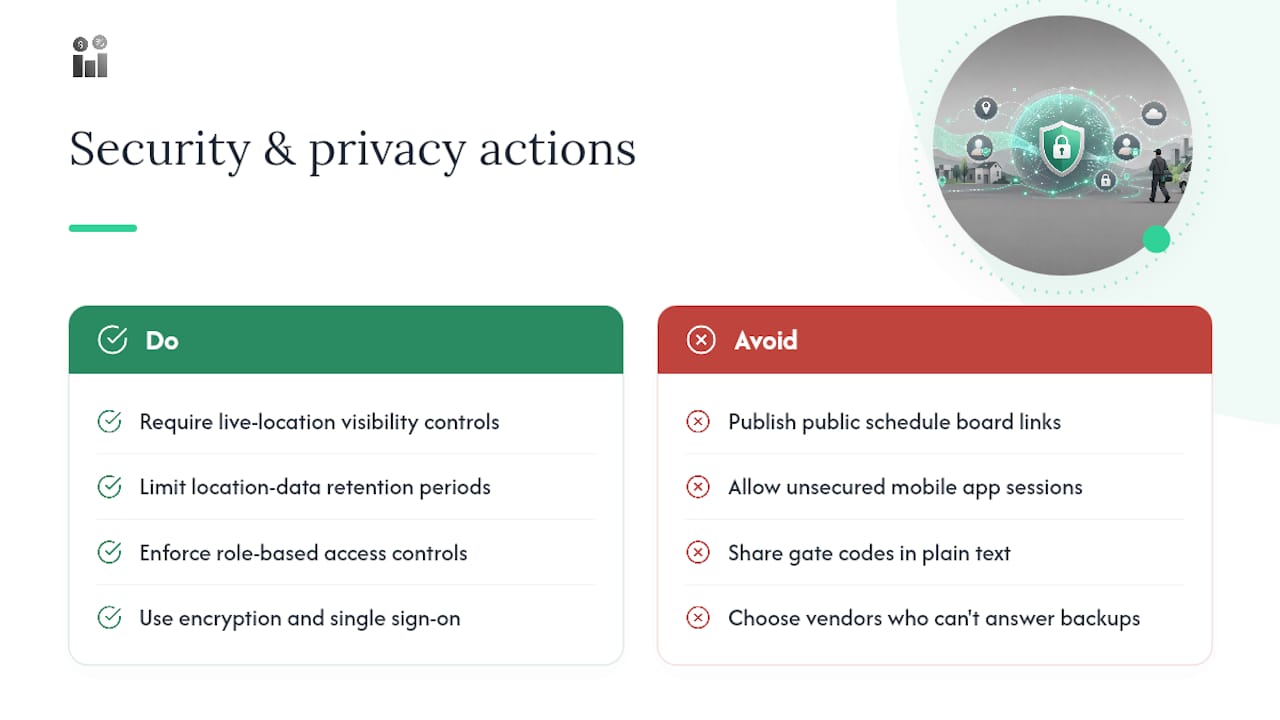
Scheduling software touches customer addresses, technician locations, and often payment or access details tied to a job. That combination makes it a meaningful data privacy surface, not just an operations tool.
Location tracking is the most sensitive piece. Real-time GPS on technician mobile apps improves dispatch accuracy, but it also means the platform is continuously collecting employee location data. Any vendor handling this should offer clear controls over who can see live location data and how long it’s retained.
Customer information carries its own weight. Service addresses, gate codes, and appointment history are exactly the kind of data that shouldn’t be exposed through a public schedule board link or an unsecured mobile app session. Look for role-based access controls that limit what a given technician or dispatcher can see, encryption for data in transit and at rest, and single sign-on that doesn’t leave every field employee juggling separate logins across devices.
Cloud-synced platforms raise the stakes on uptime and backup practices, since a scheduling outage during business hours means dispatchers working blind. Ask any vendor directly about data residency, backup frequency, and what happens to historical schedule and customer data if you cancel the subscription. A platform that can’t answer those questions clearly in a sales call isn’t one you want holding your customer list.
How Should Customer Notifications Fit into the Schedule?
A schedule is only half the job. The other half is telling the customer what’s actually happening, and that communication loop directly affects on-time perception even when the technician is exactly on time by the clock.
Automated appointment confirmations, sent by SMS or email when a booking is made, cut down on no-shows and give customers a chance to flag a scheduling conflict before the day arrives. A reminder 24 hours out and a “technician is en route” alert on the day of the job close the loop further, and they reduce the single most common service call a dispatcher fields: “where’s my technician?”
Time-window communication matters as much as the notification itself. A vague “sometime this afternoon” window frustrates customers regardless of how well-optimized the route is behind the scenes. Systems that can narrow that window as the day progresses, and update customers automatically when a job runs long ahead of them, turn a scheduling delay into a manageable inconvenience instead of a complaint.
Appointment management also needs to handle the reverse flow: customers rescheduling or canceling through a self-service link rather than a phone call. That single feature alone can meaningfully cut the administrative load on a dispatcher who would otherwise spend half the morning fielding reschedule requests by phone.
Does Scheduling Software Scale as Your Technician Team Grows?
A scheduling process that works fine for six technicians can fall apart at twenty, not because the software breaks, but because the manual workarounds that covered its gaps stop being possible.
The clearest early warning sign is dispatcher load. One dispatcher can mentally track a handful of routes and reshuffle by phone when something changes. Past a certain headcount, that becomes impossible, and the business needs software that automates re-optimization rather than software that just displays a calendar for a human to manage by hand.
Multi-crew and multi-location complexity changes the math too. A single-location business scheduling ten technicians across one service area has a fundamentally simpler optimization problem than a business running three crews across two cities with different skill requirements in each. The platform needs to handle territory-based rules and crew hierarchies, not just a flat list of technicians.
Growing teams also need scheduling data to feed other systems cleanly, payroll, inventory, and financial reporting, without someone manually reconciling numbers between disconnected tools. A platform that keeps CRM, work orders, and scheduling under a single login scales more gracefully than one requiring separate systems to be kept in sync by hand as headcount climbs.
When Should You Buy, Build, or Upgrade Scheduling Capabilities?
If the real problem is inconsistent job duration estimates or missing skill records, fix that first. Software optimizes the data you give it; feeding it guesses produces a schedule that looks precise and performs poorly. The right sequence is straightforward: establish a baseline (jobs per day, travel percentage, on-time rate), run a focused pilot on one crew, then scale once the numbers hold. Skipping the baseline step is the single most common reason scheduling software gets blamed for a data problem it never had a chance to fix.
— KaiosMedia
Where Does Firmanager Fit into Your Scheduling Workflow?
If you’re evaluating whether to fix your scheduling process internally or bring in dedicated software, Firmanager is built to handle the operational pieces this article just walked through, without forcing you to stitch together separate tools for each one.

A comprehensive platform can combine work orders, dispatch, route and crew management, and mobile technician updates under a single login, so a job created in the CRM flows straight into a technician’s schedule and back out as an invoice, without re-entering data three times across disconnected systems. Dispatchers get a live schedule board; technicians get job updates on a mobile self-service app; managers get utilization and compliance visibility that usually requires stitching together spreadsheets.
Before requesting a demo or starting a pilot, pull together a few things: a sample of recent job data (duration, technician assigned, travel distance), your current baseline KPIs (on-time rate, travel percentage), and a list of the systems you’ll need to integrate, telematics, mapping, or an existing CRM. The vendor’s team can walk through how those pieces map onto the platform’s modules during the demo request, and a focused pilot on one crew is the fastest way to see whether the fit is right before rolling it out company-wide.
Sources
- Field Service Scheduling Optimization: Hidden Complexity | ORTEC Insights
- Universal resource scheduling for Field Service | Microsoft Learn
- Two metaheuristic algorithms for the technician routing and scheduling problem with time windows and balanced workloads
Recommended
Run your whole business in one place
CRM, quotes, work orders, invoicing, expenses, HR and HSE — one login, every device. Free-forever plan.
Start free →