How to Track Project Progress: A Field Service Guide

To track project progress, define measurable milestones before work starts, record actual progress against a plan at a fixed rhythm, and compare the two with a few numbers: schedule variance, cost variance and percent complete. For service businesses, the hard part is not the math. It is getting accurate updates from people in the field and having them in one place when you need them. That is why we built Firmanager to keep work orders, tasks, time, invoicing and customer records in a single cloud-synced system, so progress is a by-product of the work rather than a weekly chore.
This guide covers the method first, then how to apply it to maintenance, cleaning and technical service projects.
TL;DR
- Set milestones you can measure. Missing or vague milestones and objectives are the top reason projects fail, at 37% in the PMI 2020 figures cited below.
- Track three things on every project: planned vs. actual dates, planned vs. actual cost, and percent complete.
- Report on a fixed rhythm and only the key tasks. Update the moment something changes, not at the end of the week.
- Track variances in days and dollars, not feelings. Act when a variance appears, not when the deadline passes.
- Choose a tool your field team will actually update from a phone, with changes visible to managers immediately.
Table of Contents
- What tracking project progress actually means
- Why progress slips: what the data says
- Step 1: Break the project into milestones you can verify
- Step 2: Choose a small set of metrics
- Step 3: Collect updates at the source, in real time
- Step 4: Review on a fixed rhythm
- Step 5: Turn dashboards into action
- Tracking project progress in a spreadsheet
- What to look for in a tracking tool
- Where time tracking fits
- Perspective: progress tracking works when it is built into the job
- Put it into practice with Firmanager
- FAQ
- Sources
What tracking project progress actually means
Tracking progress means comparing what was planned with what has happened, and doing it early enough to change the outcome. Monitoring and controlling project work lets stakeholders see the project’s current state, see what is being done about performance issues, and view forecasts for cost and schedule, according to Project Management, 2nd Edition from CSU’s open textbook. The same chapter notes that monitoring starts at initiation, not when problems show up.
For a service company, a “project” is often broader than a software rollout. It can be a 12-site cleaning contract, a building maintenance program, a multi-visit installation or a recurring inspection route. The principles are identical: a defined scope, a schedule, a budget, people doing the work and a customer waiting for the result.
Two terms you will see below:
- Baseline: the original plan for dates and cost, frozen so you can measure against it.
- Variance: the gap between baseline and actual. A job planned for 5 days that took 7 has a schedule variance of 2 days.
Why progress slips: what the data says
The PMI 2020 Pulse of the Profession report, as cited in the CSU textbook, lists the factors behind project failure. Lack of clearly defined or achievable milestones and objectives to measure progress ranked first at 37%. Poor communication followed at 19%, lack of communication by senior management at 18%, employee resistance at 14% and insufficient funding at 9%.
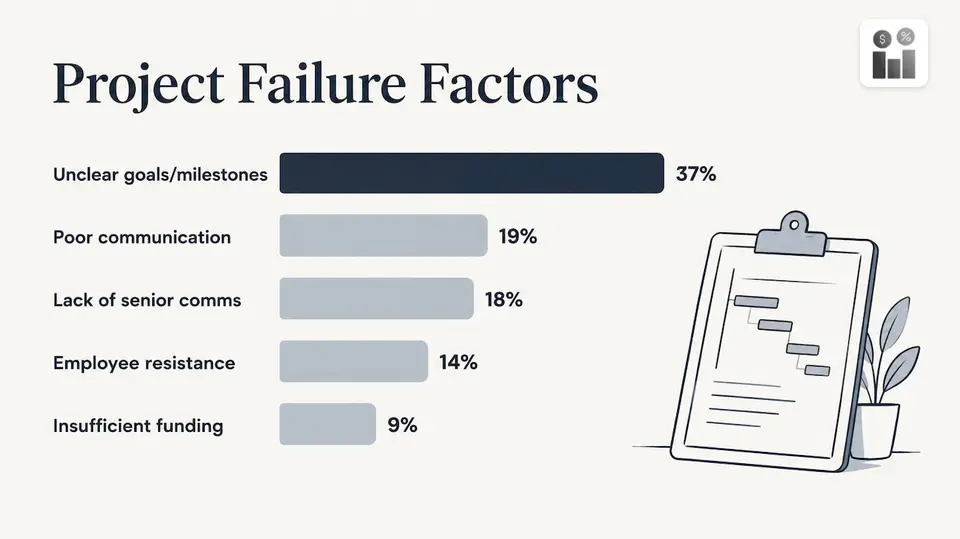
Two of the top three are about measurement and communication, not about technical skill. That tells you where to put effort: define what “done” means for each stage, and make sure the people doing the work can report it without friction.
Step 1: Break the project into milestones you can verify
A milestone is useful only if two people would agree whether it has been reached. “Site prep started” is vague. “Site prep signed off by the customer” is verifiable.
For a field service project:
- List the deliverables. For a 12-site cleaning rollout, each site is a deliverable. For a maintenance contract, each scheduled visit is.
- Attach an end date and an owner to each one. One person is accountable for each, even if a crew does the work.
- Define the completion evidence. A signed work order, a completed checklist, photos or a customer sign-off.
- Mark the dependencies. If the electrician must finish before the inspector arrives, say so now.
Where it goes wrong: milestones set too far apart. If your next checkpoint is three weeks away, a problem on day two will not surface until day twenty-one. Aim for checkpoints at least weekly on short projects.
In Firmanager, work orders and tasks carry the assignee, the status and the customer and facility they belong to, and recurring workflows are tracked alongside one-off jobs. Each milestone becomes a record your team updates as they work, not a line in a separate document.
Step 2: Choose a small set of metrics
More metrics do not mean more control. Three groups cover most service projects.
Schedule: planned vs. actual
Measure the gap in days, not percentages. “Site 7 is 2 days late” is something a manager can act on. Also track which upcoming milestone is next and how confident you are in its date.
Cost: budget vs. actual spend
Track labor hours, materials and subcontractor costs against the budget. Better still, track the forecast to finish: if you are 40% through and have spent 45% of the budget, the final bill will exceed the plan even if no invoice says so yet.
Progress: percent complete
A simple measure of percent complete from 0 to 100% works for most teams. The risk is optimism: a job reported “90% done” stays at 90% for a week. Counter this by counting finished deliverables rather than guessing at effort, and by using the evidence you defined in step 1.
Earned value for larger projects
PMI describes earned-value analysis as comparing the planned budget and schedule with actual costs and duration to date, and with expected figures at completion. The same article explains that cost and schedule variances and performance indexes tell you whether a project is over or under budget and ahead of or behind schedule.
A worked example, using a simple version of the method:
| Measure | Value |
|---|---|
| Budget for the whole project | $40,000 |
| Work planned to be done by week 6 | 50%, or $20,000 |
| Work actually done by week 6 | 40%, or $16,000 |
| Actual cost spent by week 6 | $18,000 |
- Schedule variance: $16,000 minus $20,000 = minus $4,000. You are behind plan.
- Cost variance: $16,000 minus $18,000 = minus $2,000. You have spent more than the work done is worth.
- Schedule performance index: 16,000 divided by 20,000 = 0.80. For every dollar of work planned, 80 cents was delivered.
- Cost performance index: 16,000 divided by 18,000 = about 0.89.
Both indexes are below 1.0, so the project is late and over cost at the same time. At week 6 that is a decision point, not a surprise at week 12. The numbers in this example are illustrative, not drawn from a real project.
Step 3: Collect updates at the source, in real time
PMI’s article on streamlined performance monitoring sets out four reporting rules. They are worth adopting almost as written, because they keep reporting light while keeping data current:
- Limited reporting. Report key tasks with start and end dates and percent complete, and key deliverables with an end date and completion status. Skip the rest.
- Variance reporting. Report only when something departs from the baseline. No variance, no report.
- Real-time data. Updates happen when the change happens, with a guideline such as no later than close of business or within 24 hours.
- Dynamic tracking. Future dates are entered as planned dates; once the work happens, they are replaced with actual dates.
The same author argues that reporting accurate status on complex projects in changing conditions can be harder than managing the project itself, and that the answer is good data and a disciplined way of collecting it.
In the field, this is where most tracking breaks. Technicians finish a job, drive to the next one and promise to fill in the paperwork later. By Friday, the manager is looking at a stale picture. The fix is to make updating faster than not updating:
- Mobile first. The person on site records status, time and notes from a phone.
- One place. The update lands where the manager, the office and invoicing all read from.
- Automatic downstream effects. A completed job should trigger the next step, such as a notification or an invoice, without retyping.
Firmanager’s employee self-service mobile portal gives your team access to job details and lets them update work from their devices, and the platform is cloud-synced so what the technician records is what the office sees. If you are weighing how much “real time” you need, our guide to five questions before choosing real-time data sync walks through it.
Step 4: Review on a fixed rhythm
A rhythm matters more than the format. A common pattern for service projects:
- Daily: a short check of today’s jobs, blocked work and late items. The dispatcher or team lead owns it.
- Weekly: milestones reached or missed, variances in days and dollars, the next milestone and its date, and any risks. The project manager owns it.
- At each milestone or monthly: budget forecast, scope changes and customer communication. The owner or sponsor reviews it.
When a weekly review shows a variance, ask three questions in order. What caused it: scope change, rework, waiting on a customer, a staffing gap? Will it affect later milestones? What decision is needed and from whom? Write down the answer and the date of the next check.
What to put in a status update
Keep it to what readers can act on:
- Overall status: on track, at risk or late.
- Milestones completed since the last update.
- Next milestone, its date and your confidence in it.
- Variances against schedule and budget, with the cause.
- Decisions or help needed.
One line per item. An update nobody can read in two minutes is an update nobody reads.
Step 5: Turn dashboards into action
A dashboard earns its place only if it surfaces exceptions: the late job, the over-budget site, the unassigned order. A wall of charts hides them. Project tracking dashboards give teams visibility into project status, and the best ones show what needs attention first.
For service operations, useful exceptions include jobs past their scheduled date, work orders with no assignee, jobs where logged hours exceed the estimate and customers awaiting an ETA. Our article on seven field service dashboards that surface exceptions lists views that work. If you also want the business-level picture, see how to monitor business performance in a service company.
Tracking project progress in a spreadsheet
A spreadsheet can hold a milestone list, dates and a percent-complete column, and it is a reasonable way to sketch a plan. What it cannot do on its own is collect updates from people in the field. Every number depends on someone remembering to type it in, and the file reflects the last time somebody did. For a team of technicians working across several sites, that gap between the work and the record is where progress tracking loses accuracy. When you notice you are chasing people for updates, that is the signal to move the tracking into the same system where the work is assigned and done.
What to look for in a tracking tool
Whatever you choose, test it against the way your team works:
| Need | What it should do |
|---|---|
| Field updates | Technicians change status, log time and add notes from a phone |
| Real-time sync | The office sees changes as they happen, not after a nightly upload |
| Work and money together | Hours, materials and invoices connect to the job they belong to |
| Exceptions | Late and unassigned work is surfaced without a manual search |
| Notifications | Customers and staff are told automatically when status changes |
| Reporting | Schedule and cost variance can be read without building a spreadsheet |
| Compliance | Safety and health records sit with the job |
The thread through all of it is that tracking should not be a separate job. The more the tool is where the work happens, the less effort tracking takes and the more accurate it is.
Where time tracking fits
Labor is usually the largest cost in service projects, so hours logged against a job are your earliest cost signal. If technicians log time at the end of the week from memory, your cost variance is a week old and approximate. Capturing hours on the job gives you a current forecast and closes billable gaps. We cover the approach in technician time tracking for managers. For long-running agreements, service contract tracking applies the same logic to renewals and recurring visits.
Perspective: progress tracking works when it is built into the job
We see one pattern in how service businesses track progress. The plan is fine. The trouble starts when the record of the work lives somewhere different from the work itself: a calendar here, a spreadsheet there, invoices in a third place.
That is why Firmanager is built as one platform. CRM, customer and facility records, work orders, tasks, time and leave tracking, invoicing and HSE compliance share the same data and the same login across devices. When a technician updates a work order, the people who need to know can see it, and the numbers behind your invoicing and reporting come from the same record.
Our modular design lets you start with the parts you need and grow into the rest. Real-time sync and notifications by SMS and email mean progress is visible when it changes, not when someone has time to report it. For a manager, that turns tracking from a reporting task into a view you open.
KaiosMedia
Put it into practice with Firmanager
If your projects are jobs, visits and contracts, you can run milestones, tasks, schedules, time and invoicing in one place. Firmanager has a Free plan at $0, a Pro plan at $19 per month and a Business plan at $49 per month. Create your first work orders on the Firmanager plans page and see progress update as your team works.
If you are planning a rollout, the 90-day field service implementation guide shows how to get a team running without a second project on top of the first.
FAQ
How do you track progress in a project?
Define measurable milestones with dates and owners, then record actual progress against that baseline at a fixed rhythm. Compare planned and actual dates, planned and actual cost, and percent complete. Act as soon as a variance appears.
How often should you check project progress?
Check daily for short, active jobs and weekly for milestones and budget. PMI’s real-time reporting rule suggests updates happen when a change occurs, with a guideline like no later than close of business or within 24 hours. Review forecasts monthly or at each milestone.
What metrics show whether a project is on track?
Use schedule variance and cost variance, along with the performance indexes described in PMI’s guide to project health metrics. A value below 1.0 on either index means you are behind schedule or over budget. Add percent complete and the next milestone date for a quick read.
What is the difference between tracking and monitoring a project?
In practice the terms overlap. Tracking records what has happened against the plan, and monitoring adds the review and the response: understanding current status, deciding what to do about problems and looking ahead at cost and schedule.
Sources
- Project Management, 2nd Edition: Monitoring and Controlling Project Work (CSU Ohio Pressbooks)
- Understanding project health metrics (PMI)
- Who moved my project? A streamlined approach to project performance monitoring (PMI)
Recommended
Run your whole business in one place
CRM, quotes, work orders, invoicing, expenses, HR and HSE — one login, every device. Free-forever plan.
Start free →