Governance, Pilots, AI Limits: Work Order Automation for Ops Managers
Work order automation is the rule-driven digitization of the maintenance lifecycle, turning a CMMS or field-service platform into the single system of record for requests, assets, labor, and status. Done right, it cuts manual data entry, speeds response times, and builds a service history you can actually trust. Firmanager and other operations platforms treat this as infrastructure, not a convenience feature.
TL;DR:
- Automation accelerates work order creation through rule-based triggers like scheduled maintenance, meter thresholds, or incident reports, reducing manual input.
- Proper setup requires valid templates and clearly defined scope, with thorough testing after any organizational changes to prevent silent failures.
- AI can draft work orders from unstructured data, but human review remains essential to correct errors and fill gaps before finalizing.
- Effective rollout depends on standardizing data fields, piloting small workflows, and establishing rule ownership and monitoring processes.
- The greatest benefits appear in response time and backlog reduction, but automation amplifies only well-organized processes, not chaotic ones.
Table of Contents
- What Is Work Order Automation, Exactly?
- How Automation Applies to Each Stage of the Work-Order Lifecycle
- What Triggers Automated Work Orders, and What Templates Need
- Can AI Draft Work Orders, and Where Does Human Review Fit?
- How Do You Roll Out Work Order Automation Without Breaking Everything?
- Governance: Who Owns a Rule, and How Do You Catch a Broken One?
- What KPIs Actually Prove Work Order Automation Is Working?
- How an Integrated Platform Simplifies the Rollout
- What Security and Privacy Risks Come With Automating Work Orders?
- What Goes Wrong When Teams Automate Work Orders, and How to Fix It
- What’s Next Beyond AI: Predictive Maintenance and Connected Assets
- Where Automation Actually Pays Off, and Where Teams Overreach
- Ready to Pilot Work Order Automation? Here’s Where to Start
- Sources
- FAQ
What Is Work Order Automation, Exactly?
Before you automate anything, get the vocabulary straight. A request is a raw complaint or need (“the loading dock light is out”). An incident is a confirmed event that requires action. A work order is the formal instruction: what to fix, who fixes it, what parts and time it takes, and proof it got done. Work orders exist as the record because they carry accountability, cost, and compliance data that a casual request never captures.
Automation touches nearly every stage of that lifecycle:
- Intake — a request or trigger event enters the system
- Approval — routing rules decide who signs off, if anyone needs to
- Planning — scheduling against technician availability and parts stock
- Dispatch — assignment to the right person or crew
- Execution — the actual field or facility work, tracked in real time
- Documentation and review — closure notes, photos, and audit trail
Generic CMMS and field-service management (FSM) platforms typically control the rule engine, the template library, and the reporting layer. Where they differ is how deeply automation reaches into planning and closure, versus just handling intake.
How Automation Applies to Each Stage of the Work-Order Lifecycle
Every stage of a work order can run partly on rules instead of manual effort, but the payoff differs by stage. Here’s where automation earns its keep, in the order a job actually moves.
-
Creation. Incident rules and templates auto-generate a work order the moment a qualifying event fires, whether that’s a failed inspection, a tenant complaint routed through a portal, or a scheduled preventive maintenance date. No dispatcher has to manually type up the same recurring job every month.
-
Planning and scheduling. Calendar-based preventive maintenance (PM) schedules queue jobs automatically, weeks or months out. SLA-aware scheduling logic can bump a high-priority reactive job ahead of routine PM work, and skill-matching rules make sure a job requiring an electrician doesn’t land on a generalist’s queue by default.
-
Dispatch and execution. Auto-assignment rules route jobs based on technician location, certification, and current load. Mobile checklists standardize what a technician has to verify before marking a job complete, and required photo or signature attachments create closure evidence that holds up if a client or auditor asks questions later.
-
Tracking and documentation. Status updates sync in real time across office and field, so a facility manager sees “in progress” or “parts pending” without calling anyone. That status history becomes the audit-proof service history regulators, insurers, or landlords eventually ask to see.
-
KPI reporting. SLA countdown timers trigger automatic alerts before a breach happens, not after. Weekly or monthly reports on response time, backlog, and technician utilization generate themselves instead of consuming an analyst’s Friday afternoon.
The common thread across all five stages: automation doesn’t replace judgment, it removes the repetitive administrative steps between judgment calls. A technician still decides how to fix a chiller. Automation just makes sure the right technician gets the right work order with the right information, on time, every time.
What Triggers Automated Work Orders, and What Templates Need
Auto-generation only works when two things line up: a matching enabled rule, and a valid template. Miss either one, and the system produces nothing, with no error message to warn you. That’s the single most common cause of “automation silently stopped working” complaints operations teams report.
Reliable triggers generally fall into five categories:
- Structured request fields (a portal form with required dropdowns, not a free-text box)
- Calendar-based preventive schedules (every 90 days, every 500 operating hours)
- Meter thresholds (runtime hours, cycle counts, mileage)
- Condition-monitoring alerts (vibration sensors, temperature thresholds, IoT feeds)
- Predefined incident rules (a failed inspection code automatically spawns a corrective work order)
A minimum viable work order record needs specific fields to be useful downstream: asset ID, problem code, required skills, parts needed, priority level, safety and access notes, due date, and closure evidence requirements. Skip any of these and you get a work order that looks complete but can’t actually route itself correctly. A detailed template structure prevents technicians from reentering the same asset data on every visit.
Configuration pitfalls tend to repeat themselves. Scope mismatches, where a rule is tied to the wrong company or support group after a reorganization, are common. Rules get disabled during a system update and nobody notices for weeks. Templates go missing for a specific asset category, so the trigger fires but has nowhere to write the output.
Pro Tip: After any org chart change, department merger, or system upgrade, manually test every automation rule tied to that group. Silent failures from scope drift are far more common than outright system bugs.
Can AI Draft Work Orders, and Where Does Human Review Fit?
AI can extract a suggested work order from a PDF inspection report, an email, or a technician’s typed notes, and prefill most of the template automatically. That’s a genuine time-saver for teams drowning in unstructured input.
The limitation matters just as much as the capability. Generative AI tools often read text only, meaning a photo of a cracked pipe or a visibly rusted fitting won’t register as a defect unless someone describes it in words. Output quality also tracks input quality: a vague voicemail transcript produces a vague draft, and a detailed inspection report produces a detailed one.
The right workflow keeps a person in the loop every time:
- AI generates a draft work order from the available document or text
- A qualified staff member reviews the draft against what they know about the asset and site
- The reviewer corrects errors, fills gaps, and only then finalizes the work order
- The system logs the edit trail, so anyone can see what AI proposed versus what a human approved
That review step isn’t bureaucratic caution. It’s the difference between AI as a drafting assistant and AI as an unsupervised decision-maker, and IFS’s own documentation on the boundary makes the same case: a knowledgeable worker stays the gatekeeper.
How Do You Roll Out Work Order Automation Without Breaking Everything?
Rolling out automation in the wrong order is the fastest way to waste a budget; following a proven marketing automation checklist offers valuable governance and testing guidance to ensure smooth implementation. Teams that jump straight to buying software before fixing their data structure usually end up automating chaos faster.
-
Design first. Standardize job types, status names, priority tiers, and failure codes before a single rule goes live. Process and data design comes before automation, not after. Build out a skills matrix so assignment rules have something accurate to match against, and define SLA targets and closure evidence requirements up front, not retroactively.
-
Pilot small. Choose one narrow, high-frequency workflow, recurring HVAC filter changes or a common reactive repair category work well, and set concrete success metrics before you start: target response time, percentage of jobs auto-assigned correctly, technician satisfaction. Run the pilot for a fixed window, typically four to eight weeks, long enough to see a real pattern but short enough to correct course fast.
-
Scale deliberately. Once the pilot proves out, integrate condition-monitoring feeds and inventory systems so triggers get richer context. Expand rule coverage to adjacent job types one category at a time, and put a recurring re-test on the calendar rather than assuming rules that worked at launch still work eighteen months later.
Pro Tip: Pick a pilot workflow with a sufficient number of occurrences each month. Anything rarer won’t generate enough data in a short pilot window to tell you whether the automation actually works.
Preventive maintenance scheduling is often the easiest pilot candidate, since the trigger logic is simple and the volume is predictable.
Governance: Who Owns a Rule, and How Do You Catch a Broken One?
Every automation rule needs an owner, and every owner needs a record to work from. A rule register should track, at minimum: the rule owner, its scope (which company, site, or support group it applies to), the template version it references, the expected output, defined exception behavior, and the date it was last tested.
Change control matters more than most teams expect going in. Enabling or disabling a rule needs a defined process, not an ad hoc toggle by whoever’s logged in. Template versions should carry a change log, so if a field gets renamed or removed, everyone downstream knows which work orders were built under the old version versus the new one.
Monitoring catches what testing misses. Comparing expected-versus-actual work order volume against historical baselines flags silent automation failures that a status dashboard alone won’t reveal, since a rule that stopped firing doesn’t announce itself. A quarterly audit against the rule register, paired with status code definitions that stay consistent across teams, keeps the whole system honest.
- Maintain the rule register as a living document, not a one-time setup artifact
- Require sign-off before any rule change goes live in production
- Review expected-versus-actual volume monthly, not just when someone complains
What KPIs Actually Prove Work Order Automation Is Working?
Automation succeeds or fails on measurable outcomes, not on how modern the interface looks. Track response time (request to first action), mean time to repair (MTTR), preventive maintenance compliance rate, first-time fix rate, backlog size, and technician utilization.
The pattern usually shows up fastest in response time and backlog. A facility that used to take a day to route a reactive request through email and phone tag often sees that drop to under an hour once structured intake and auto-assignment rules are live, simply because no one has to manually triage every incoming ticket.
Governance features that mature automation adds beyond simple auto-dispatch include SLA countdowns, breach alerts, dynamic reprioritization, and scheduled reporting, all of which create site- and vendor-level accountability that a purely manual process can’t sustain at scale.
Set a reporting cadence and stick to it: daily alerts for anything approaching an SLA breach, weekly trend reports for backlog and MTTR, and monthly reviews of PM compliance and utilization against targets.
How an Integrated Platform Simplifies the Rollout
Data design gets easier when CRM, inventory, and HR data already live in the same system instead of three disconnected tools. Firmanager’s modular structure means an asset’s service history, the technician’s skill profile, and the parts inventory needed for a repair all pull from the same database, so a work order template doesn’t need custom integration work just to populate correctly.
Templates and status-code standards make or break a pilot. Firmanager’s own resources on equipment service history requirements and work order template design walk through the exact fields discussed above, in more implementation detail than a single article can cover.
- Cross-device access means field techs and dispatchers see the same live data
- HR module ties directly to skills matching for auto-assignment rules
- Financial and invoicing modules close the loop from work order to billed job
What Security and Privacy Risks Come With Automating Work Orders?
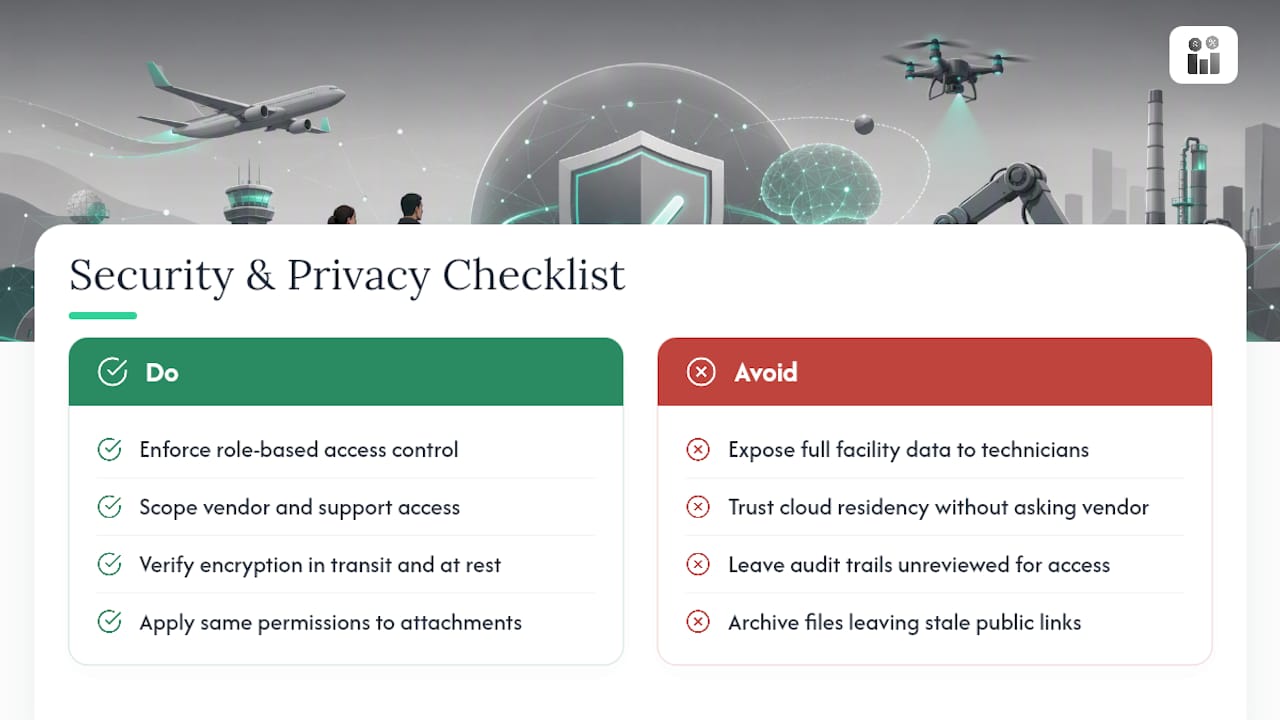
Work orders carry more sensitive data than most operations teams initially account for: building access codes, tenant names, security system details, technician personal information, and sometimes financial data tied to invoicing. Automating the flow of that data means automating its exposure risk too.
Role-based access control matters more once automation is running, because rules can move data between systems faster than a person reviewing each record manually. A technician’s mobile app should only surface the work orders and asset details relevant to their assignment, not a full facility database. Vendor and support-group scoping, the same scoping that governs which rule fires, should also govern who can view historical records for a given site or client.
Cloud-synced platforms raise a fair question about data residency and encryption in transit and at rest, so ask any vendor directly how data is encrypted and where it’s stored. Audit trails cut both ways here: the same edit history that proves compliance also becomes a record of who accessed what, which matters if a client or regulator ever asks who saw a security vulnerability report.
Photo and document attachments, common in closure evidence, need the same access controls as the work order itself. A photo of a server room layout or an access panel is sensitive regardless of what folder it sits in. Before automating attachment handling, confirm the platform applies the same permission rules to files as it does to text fields, and that deleted or archived work orders don’t leave orphaned attachments accessible through a stale link.
What Goes Wrong When Teams Automate Work Orders, and How to Fix It
The most frequent mistake is automating a messy process instead of fixing it first. A rule that auto-generates work orders from a badly structured request form just produces badly structured work orders faster, and now there are more of them to clean up manually.
Rule sprawl is the second common failure. Teams add exceptions and one-off rules to handle edge cases, and eighteen months later nobody remembers why a specific rule exists or whether it still applies. Without a rule register and scheduled review, sprawl compounds until the automation becomes harder to maintain than the manual process it replaced.
Under-communicating changes to field technicians causes real friction too. If dispatch logic changes and nobody tells the crew why jobs are routing differently, trust in the system erodes fast, and workarounds start creeping back in.
A few fixes address most of this directly:
- Fix the underlying data and process before configuring any rule, not after
- Cap the number of active exceptions per rule and review them quarterly
- Communicate every meaningful rule change to the technicians it affects
- Treat a pilot’s failure as useful information, not a reason to abandon automation entirely
Scope mismatches after reorganizations deserve a repeat mention here specifically because they’re so easy to miss: a rule tied to “Support Group A” silently stops working the moment that group gets renamed or merged, and nothing in the interface flags it as broken.
What’s Next Beyond AI: Predictive Maintenance and Connected Assets
AI drafting gets most of the current attention, but the bigger structural shift is condition-based and predictive maintenance feeding directly into the work order engine. Instead of a calendar trigger firing every 90 days regardless of actual equipment condition, sensor data on vibration, temperature, or runtime hours can trigger a work order only when a real degradation pattern appears.
That shift changes the economics of preventive maintenance. Fewer unnecessary visits happen on healthy equipment, and more attention goes to assets actually showing early warning signs. It also means the minimum work-order record needs to expand to include sensor readings and threshold history, not just asset ID and problem code.
Expect deeper integration between building automation systems, IoT platforms, and the work order engine over the next few years, along with more granular reporting that ties maintenance spend directly to asset lifecycle stage. The teams that benefit most will be the ones whose rule registers and data structures are already clean enough to accept richer inputs without a rebuild.
Where Automation Actually Pays Off, and Where Teams Overreach
The conventional pitch for work order automation leans hard on “efficiency” as if the technology itself does the work. It doesn’t. The research is consistent on this point: automation amplifies whatever process discipline already exists, good or bad. A team with clean job types, tested rules, and a real skills matrix gets faster response times and cleaner audit trails. A team without those things just gets more work orders generated faster, most of them low-value.
Where most guides fall short is treating AI drafting as a shortcut around process design rather than a feature that depends on it. AI can only extract a good draft from a clear document. It cannot fix an undefined problem code or a missing asset ID. Teams that skip data design and go straight to AI-assisted intake usually end up doing more manual correction, not less.
Prioritize the boring work first: standardize your fields, build the rule register, run a genuinely narrow pilot. Everything else, including AI drafting, works better once that foundation exists, and it’s close to useless without it.
— KaiosMedia
Ready to Pilot Work Order Automation? Here’s Where to Start
This platform fits operations teams that need work order automation living inside the same system as their CRM, invoicing, HR, and inventory data, rather than bolted onto a standalone maintenance tool. That means an asset’s service history, a technician’s skill profile, and available parts all inform a work order’s auto-assignment logic without a separate integration project.

Teams running a narrow pilot, the kind described in the implementation roadmap above, benefit most: recurring preventive maintenance schedules, a common reactive job category, or a single site’s dispatch workflow all make good starting points. Firmanager’s plans scale with that growth path. The Free plan costs $0 and works for teams testing the waters, the Pro plan runs $19 per month, and the Business plan runs $49 per month for teams ready to run automation across CRM, invoicing, and field service together.
If you’re ready to see how a modular platform handles your specific rule set and template structure, start exploring Firmanager’s plans and set up your first pilot workflow this week.
Sources
This article draws on IBM’s work order management framework, BMC Helix’s auto-generation documentation, IFS’s AI work order generator documentation, and BMC’s trigger and rule configuration guidance.
- What is Work Order Management? | IBM
- Work Order Auto Generation Module - BMC Helix Documentation
- About IFS.ai Work Order Generator
- BMC: Defining events, triggers and actions (Creating a trigger)
FAQ
What Is the Best Work Order Software?
The best fit depends on whether you need a standalone maintenance tool or a platform that ties work orders to CRM, invoicing, and HR data. Firmanager’s Free, Pro, and Business plans target service businesses that want work orders integrated with the rest of their operations rather than isolated in a single-purpose tool.
How Do You Generate a Work Order Automatically?
A work order generates automatically when a configured trigger, like a preventive maintenance date, meter threshold, or structured request, matches an enabled rule with a valid template attached. If either the rule or the template is missing or disabled, no work order gets created, and nothing alerts you to the gap.
What Is the Difference Between a Purchase Order and a Work Order?
A purchase order authorizes buying goods or services from a vendor, tracking cost and delivery terms. A work order authorizes and documents labor performed on an asset or facility, tracking the technician, time, parts used, and completion evidence, and it serves as the maintenance system of record rather than a procurement document.
What Is a CMMS Work Order?
A CMMS work order is a formal maintenance instruction created and tracked inside computerized maintenance management software, covering everything from asset ID to closure evidence. It differs from a paper work order mainly in that the CMMS can auto-generate it from a rule, track its status in real time, and feed its data into reporting dashboards.
How Long Should a Work Order Automation Pilot Run?
Most operations teams run a pilot for four to eight weeks, long enough to capture a real pattern across a recurring workflow like preventive maintenance. Choose a workflow with enough monthly volume, ideally twenty or more occurrences, so the pilot generates data worth acting on.
Recommended
Run your whole business in one place
CRM, quotes, work orders, invoicing, expenses, HR and HSE — one login, every device. Free-forever plan.
Start free →