Work Order Management System: Lifecycle, Features, Setup
A work order management system is software that creates, assigns, tracks and closes every job your team performs, from the first request to the final invoice. It replaces paper forms, text threads and spreadsheets with one record per job that office staff, technicians and managers all see at the same time. This guide explains how the work order lifecycle works, which features matter, and how to set up a digital system your team will actually use.
TL;DR
- A work order management system turns each request into a tracked job with an owner, a status, a schedule, a cost and a history.
- The lifecycle has six stages: request, approval and planning, assignment and scheduling, execution, closeout, and review and billing.
- Look for mobile access for technicians, status codes, scheduling and dispatch, time and parts capture, reporting and invoicing in the same place.
- A work order is an internal instruction to do work. A purchase order buys goods or services from an outside supplier.
- Start with one job type, a short list of statuses and a small group of users, then expand.
Table of Contents
- What a work order management system does
- The work order lifecycle, stage by stage
- Work order, purchase order and CMMS: clearing up the terms
- Features a digital work order system should include
- Work order tracking: how teams stay updated in real time
- Connecting work orders to scheduling, projects, reporting and invoicing
- How to roll out a work order system without disrupting the team
- Our perspective on work order management
- Try Firmanager for your work orders
- FAQ
- Sources
What a work order management system does
A work order is a written request for work to be performed. In asset and maintenance management, work orders sit at the center of the whole system. A U.S. Bureau of Indian Affairs training manual on O&M work orders describes them as the heart of an asset management system and says the goal is to give maintenance staff ready access to work history, safety procedures, labor, materials and tools.
A work order management system (also called work order management software, or a digital work order system) applies that idea to day-to-day service work. It gives you:
- One record per job. Customer, site, equipment, task description, priority, assigned technician, notes, photos, time and materials.
- A visible status. Everyone can tell whether a job is new, scheduled, in progress, waiting on parts or complete.
- A history. Every visit to a site or piece of equipment stays on file, so the next technician starts with context.
- A link to money. Completed work flows into invoicing instead of being retyped by someone in the office.
For a cleaning company, a maintenance contractor or a technical services firm, the value is simple. Fewer jobs get lost, fewer calls go to “where is the technician?”, and fewer finished jobs wait weeks to be billed.
The work order lifecycle, stage by stage
The work order lifecycle (some teams write life cycle) is the path a job follows from request to closed record. The names vary between companies, but the stages are consistent.
- Request. A customer calls, emails or submits a form, or a recurring schedule generates the job. Capture who, where, what and how urgent. A request with a missing site or contact is the most common source of a wasted trip.
- Approval and planning. A dispatcher or manager reviews the request, sets priority, estimates labor and materials, and attaches a quote when the work is billable. Anything that needs customer sign-off waits here.
- Assignment and scheduling. The job gets an owner and a time slot. Good scheduling considers skills, location and workload, not only who is free.
- Execution. The technician receives the job on a phone or tablet, travels to the site, does the work, records time, parts, photos and notes, and updates the status as things change.
- Closeout. The technician marks the work complete, collects any customer confirmation and records what was found and done. The office checks that the record is complete before closing it.
- Review and billing. The job is invoiced, and the data feeds reports: response time, completion time, repeat visits, cost per job and workload per technician.
Two supporting topics are worth reading before you configure anything. Our guide to work order status codes covers how to define and set up the statuses that mark each stage. Our article on the work order process for maintenance teams goes deeper on moving from reactive firefighting to a planned workflow.
Keep statuses short and unambiguous
Most teams do better with six to eight statuses than with twenty. Each status should answer one question the office keeps asking, such as “Is this scheduled?” or “Are we waiting on a part?”. If two statuses mean nearly the same thing, technicians will pick at random and your reports will be unreliable.
Work order, purchase order and CMMS: clearing up the terms
Three questions come up constantly.
What is the difference between a work order and a purchase order? A work order is an internal instruction: someone in your operation is authorized to perform a task. A purchase order is a commercial document you send to a supplier to buy goods or services. If a job needs a replacement part, the technician works from the work order, and the office raises a purchase order to the supplier for the part. Keeping the two linked lets you see the true cost of the job.
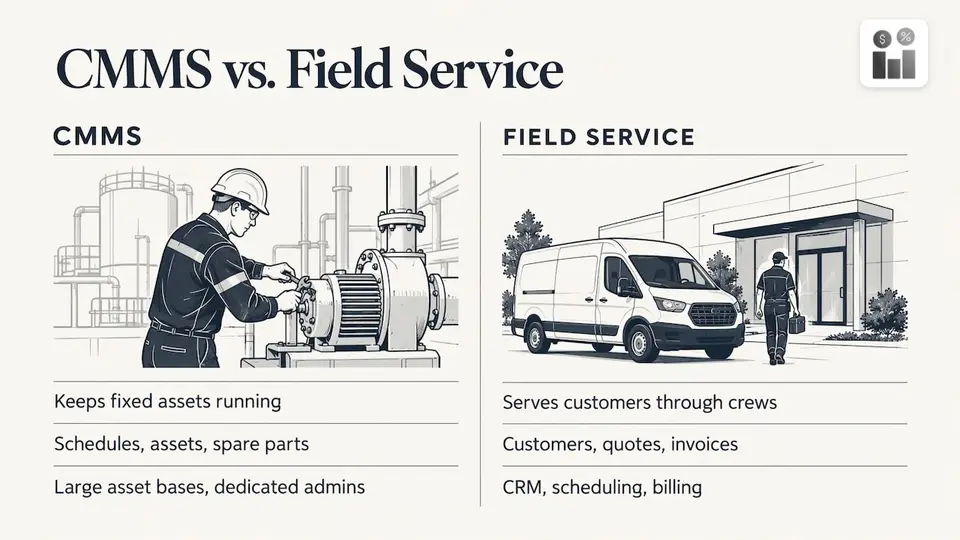
What is a CMMS work order system? CMMS stands for computerized maintenance management system. It focuses on maintenance operations: work orders, preventive maintenance schedules, assets and spare parts. Enterprise platforms such as IBM Maximo combine CMMS and enterprise asset management functions, and they are built for organizations with large asset bases and dedicated administrators.
Do you need a CMMS or a field service platform? It depends on what you manage. If your main job is keeping a fixed set of assets running, a CMMS fits. If you run a service business with customers, crews, quotes and invoices, you need work orders connected to CRM, scheduling and billing. That second case is what we built Firmanager for.
Features a digital work order system should include
Use this table as a checklist when you compare options. The right column explains why each feature matters in daily use.
| Feature | Who benefits | Why it matters |
|---|---|---|
| Mobile access to job details | Technicians | Address, scope, history, contacts and checklists are available on site, with no calls to the office |
| Status updates from the field | Dispatchers, owners | The office sees progress without asking |
| Scheduling and dispatch | Dispatchers | Assign by skill, location and workload; reduce idle time and driving |
| Recurring work orders | Managers | Contracts and inspections generate themselves on a schedule |
| Time and parts capture | Managers, finance | Labor and materials land on the job record for accurate costing |
| Customer and site records | Everyone | One place for contacts, facilities and equipment history |
| Quoting and invoicing | Owners, finance | Approved work becomes a quote, then an invoice, without retyping |
| Notifications | Customers, staff | SMS and email alerts reduce no-shows and status calls |
| Reporting | Managers | Completion times, workload and revenue per job type in real time |
| Compliance records | Safety leads | Health, safety and environment checks stay attached to the work |
A few of these deserve more detail.
Recurring work and service history
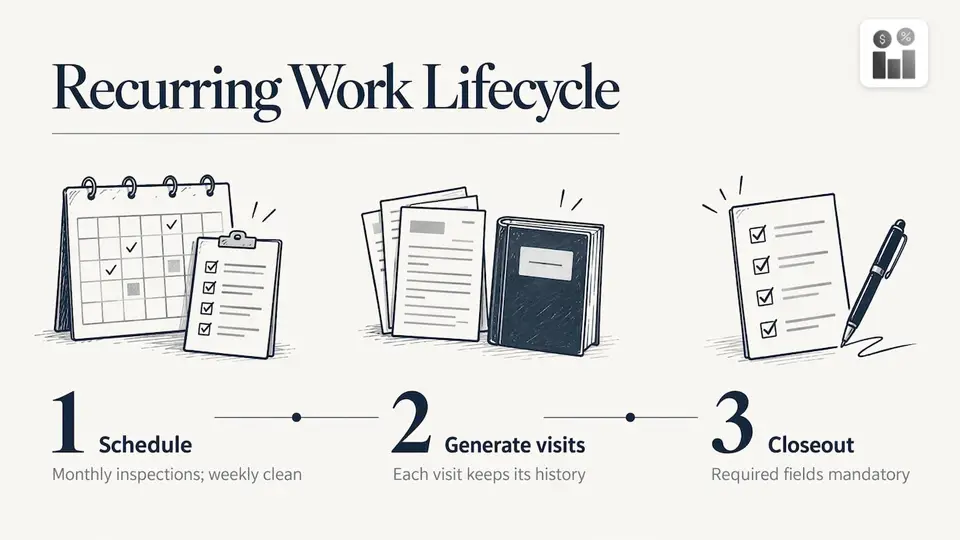
Routine work such as monthly inspections or weekly cleaning should not depend on someone remembering to create the job. Our guide to setting up recurring work orders shows how to generate them while keeping each visit’s record intact. For planned maintenance, the preventive maintenance schedules playbook explains how to build intervals that planners can trust.
If your clients or auditors ask what was done and when, a complete equipment service history is the answer. Define the required fields once and make them mandatory at closeout.
Time tracking
Unrecorded hours are unbilled hours. Capturing time against each work order, rather than on a separate timesheet, makes billing and payroll cleaner. See our piece on technician time tracking for how managers find and close billable gaps.
Work order tracking: how teams stay updated in real time
Work order tracking software gives everyone the same live picture. When a technician starts a job, adds a note or marks it complete, the change syncs to the office right away. The dispatcher no longer phones around to find out who is where, and the customer-facing team can answer “when will you arrive?” from the system.
Three habits make tracking work:
- Update at the moment of change. Technicians tap a status when they leave for a site, arrive, pause and finish. Four taps are better than one long note at the end of the day.
- Use alerts for exceptions. Notify the dispatcher when a high-priority job is unassigned or a job has been in one status too long. Do not alert on everything.
- Tell customers what is happening. Automated SMS or email on scheduling and completion reduces inbound calls.
The same principle applies beyond maintenance. Installation businesses, for example, track each job as a stream of events; the write-up on real-time installation tracking shows how event-driven updates keep operations teams informed. Whatever your trade, the rule is the same: status should be recorded by the person doing the work, at the time it changes.
Connecting work orders to scheduling, projects, reporting and invoicing
A work order system earns its keep when the record keeps moving after the job is done.
Scheduling. Jobs carry priority, location and required skills, so dispatchers can build a day’s route instead of a list. Route and dispatch tools reduce travel between sites and let you move a job when an emergency arrives.
Project coordination. Larger engagements break into several work orders under one project. You can track which pieces are finished, who owns the remainder, and what has been spent so far.
Reporting. Once every job has a status, time, parts and a completion date, you can answer practical questions: How long does an average job stay open? Which job types run over budget? Which sites generate repeat visits? Useful measures to start with:
- Average time from request to completion
- Share of jobs completed on the scheduled day
- Share of planned versus reactive work
- Repeat visits to the same site or asset within 30 days
- Hours per technician against billable hours
Invoicing. When closeout data is complete, invoicing becomes a review step instead of a data-entry task. Labor, parts and quotes come from the job record. Payment through an integration such as Stripe shortens the time between finishing work and getting paid.
How to roll out a work order system without disrupting the team
Most failed rollouts have the same cause: too much configuration before anyone has used the tool. A safer sequence:
- Pick one job type. Reactive repairs, a recurring cleaning contract or an inspection route. Run it fully through the system.
- Write your statuses and required fields. Keep both short. Decide what must be filled in before a job can close.
- Load customers, sites and equipment. Import what you have. Do not wait for perfect data.
- Train technicians on the phone workflow only. They need to open a job, update its status, log time and parts, add a photo and close. Nothing else.
- Run it in parallel for a week or two. Compare the system with your old method, then retire the old method.
- Review the numbers monthly. Adjust statuses, priorities and schedules from real data.
Watch for two common problems. Technicians skip updates when the app asks for too many fields, so make only the essentials mandatory. Dispatchers bypass the system when it is slower than a phone call, so keep job creation to a few fields.
Our perspective on work order management
We built Firmanager on one belief: a work order should never live apart from the rest of the business. A job touches the customer record, the site, the technician’s schedule, the parts used, the safety checks and the invoice. When those live in separate tools, someone retypes the same information at every handoff, and that is where errors and delays come from.
That is why Firmanager puts CRM, work orders, field service, invoicing, HR and HSE compliance behind a single login. Data flows between the modules, so a completed job can move toward billing without a second entry. The platform is cloud-synced, so the office and the field see the same current information.
We also designed it to be modular. A cleaning company and a technical services firm do not need the same setup, so you can use the parts that fit your operation and grow into the rest. Technicians get a mobile self-service portal with the job details they need, and managers get real-time analytics to see how the business is performing.
Our advice is to treat the work order as the backbone of your operation. Get that record right, and scheduling, reporting and invoicing become much easier.
KaiosMedia
Try Firmanager for your work orders
Firmanager gives service businesses work orders, CRM, scheduling and dispatch, time tracking, invoicing with Stripe integration and HSE compliance in one platform, with mobile access for your field team. Three plans are published on our pricing page: Free at $0, Pro at $19 per month and Business at $49 per month.
If you are setting up your first digital work order workflow, the Free plan is a practical place to start with one job type. When your team or usage grows, move to Pro or Business. You can sign in to the Firmanager app to get started.
FAQ
What is a work order management system?
It is software that creates, assigns, tracks and closes work orders in one place. Each job has a status, an owner, a schedule, time and materials, and a history. Teams use it to avoid lost jobs and to bill completed work faster.
What are the stages of the work order management process?
The main stages are request, approval and planning, assignment and scheduling, execution, closeout, and review and billing. Some companies add steps such as customer sign-off or parts procurement. What matters is that each stage has a clear status and an owner.
What is the difference between work order management software and a CMMS?
A CMMS centers on maintaining assets: work orders, preventive maintenance and spare parts. Work order management software for service businesses also covers customers, quotes, dispatch and invoicing. Choose by whether your main task is keeping assets running or running a service business with customers.
How does a digital work order system help technicians?
Technicians open job details on a phone, including the site, scope and previous visits. They update status, log time and parts, and close the job from the field. That removes paperwork and phone calls to the office.
Can a small team use a work order tracking system?
Yes. A small team can start with one job type and a short list of statuses, then add recurring jobs, invoicing and reporting as it grows. A free tier, such as the Free plan we offer, lets you try the workflow before you scale.
Sources
- O&M Work Orders Training Manual, U.S. Bureau of Indian Affairs
- Real-time installation tracking, Installer.com
Recommended
Run your whole business in one place
CRM, quotes, work orders, invoicing, expenses, HR and HSE — one login, every device. Free-forever plan.
Start free →