CRM Data Cleanup: A Practical Hygiene Framework
CRM Data Cleanup: A Practical Hygiene Framework
The fastest way to make your CRM reliable again is to run a focused hygiene sprint — audit, dedupe, standardize, enrich, govern — and then operationalize ongoing checks so the problem does not return. Start today by exporting a duplicate snapshot: pull all contacts where email address appears more than once, count the rows, and you have your baseline duplicate rate. Then do three things before touching any records: back up your full database, pause any active import automations, and assign one person as data owner. Those three steps prevent further damage while you build your plan.
Poor CRM data is not just an inconvenience. Industry estimates link bad contact data to millions of dollars in annual operational waste for larger organizations, and the same data-quality failures hit small service businesses through missed dispatches, duplicate invoices, and broken routing. The good news: a structured approach fixes most of it within a quarter.
Key Takeaways
Effective CRM data cleanup requires a structured five-step framework — governance, analyze, purge, dedupe, maintain — executed in sequence and supported by automation and a named data steward for lasting results.
| Point | Details |
|---|---|
| Start with a duplicate snapshot | Export contacts with duplicate emails today to establish your baseline duplicate rate before any other work. |
| Follow the five-step sequence | Run governance and audit before purging; always dedupe before enrichment to avoid wasted spend. |
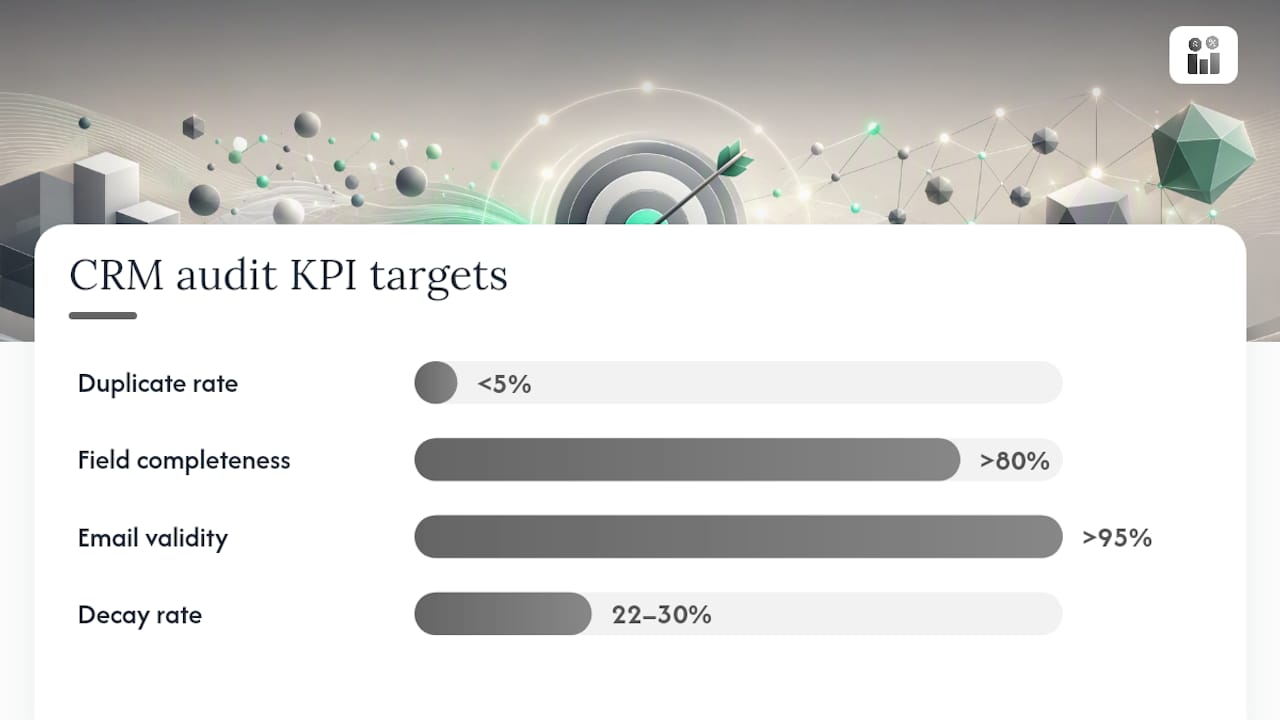
| Target measurable KPIs | Aim for duplicate rate below 5%, required-field completeness above 80%, and email validity above 95%. |
| Automate routine checks | Set validation rules on record create, weekly duplicate reports, and suppression triggers after hard bounces. |
| Firmanager for service businesses | Firmanager’s CRM, work order sync, and automated workflows enforce hygiene rules across customer and field data in one platform. |
Table of Contents
- What does a 5-step CRM data cleanup framework look like?
- The most common CRM data problems and how to detect them
- How to audit your CRM and prioritize fixes
- How do you build a deduplication and merge strategy?
- What should you delete, archive, or keep in your CRM?
- When should you verify data vs. enrich it?
- How do you automate CRM hygiene so it runs itself?
- Native CRM tools, point tools, or a unified platform: which fits your situation?
- How Firmanager helps service businesses maintain clean CRM data
- The operational reality most teams underestimate
- Firmanager keeps your service business data clean from day one
- Sources
What does a 5-step CRM data cleanup framework look like?
CRM hygiene is a continuous discipline, not a one-time project. The five-step framework below — governance, analyze, purge, dedupe/enrich, maintain — gives you a quarter-long program with clear milestones and a realistic time budget.
-
Step 1 — Governance (Week 1–2, 4–8 hours, 1–2 stakeholders). Define your required fields, field taxonomy, and validation rules before touching a single record. Decide which fields are mandatory for a contact to be “active” (at minimum: first name, last name, email, company, lifecycle stage, and record owner). Document merge rules, retention thresholds, and who has write access. Without this foundation, every cleanup you run will drift back to chaos within 90 days. Common pitfall: skipping governance because it feels slow. It is the step that makes every other step stick.
-
Step 2 — Analyze (Week 2–3, 3–6 hours, data owner + CRM admin). Run your audit queries to measure duplicate rate, field completeness, email validity, and record age. Export the results into a simple triage matrix. The goal here is a prioritized list of problems ranked by operational impact, not a perfect census of every bad record. Focus on fields that drive automations and routing first — those are the ones costing you money right now.
-
Step 3 — Purge (Week 3–4, 4–10 hours depending on database size). Archive or delete records that meet your retention thresholds: unengaged contacts older than 18–36 months, hard-bounced emails, and suppressed contacts with no associated revenue activity. Do not skip the backup step before purging. A staged purge — archive first, delete after a 30-day hold — gives you a safe rollback window if a record turns out to matter.
-
Step 4 — Dedupe and Enrich (Week 4–8, 6–20 hours, data owner + sales ops). Run deduplication before enrichment. Enriching duplicates creates records that look complete but are still doubled, making later dedupe significantly harder. Once duplicates are merged and golden records are established, run email verification and append missing firmographic fields. Track your before/after completeness percentage to confirm progress.
-
Step 5 — Maintain (Ongoing, 1–3 hours per week). Schedule recurring hygiene checks: daily spot reviews of new records, weekly duplicate scans, monthly email verification, and a quarterly full governance review. CRM data maintenance is an ongoing process — automation handles the routine load, but a named data steward reviews exceptions and escalates anomalies. Expected outcome: duplicate rate below 5%, field completeness above 80% for required fields, and email bounce rate under 2%.
The most common CRM data problems and how to detect them
Most CRM databases share the same set of recurring problems. Knowing what to look for — and how to find it fast — lets you triage severity before you commit hours to a full audit.
-
Duplicate records. The most visible and damaging issue. Duplicates corrupt routing, inflate pipeline reports, and cause customers to receive the same message twice. Detect them by filtering contacts where email address, phone number, or company name plus first name appears more than once. Duplicate rate is your primary KPI; target below 5%.
-
Incomplete fields. A contact missing an owner, lifecycle stage, or primary email cannot be routed, scored, or enrolled in automations. Run a completeness report on your required fields and calculate the percentage of records where each field is populated. Any required field below 80% completion needs immediate attention.
-
Stale and outdated records. B2B contact data decays at roughly 22–30% per year, meaning nearly a third of your database becomes inaccurate within 12 months without active hygiene. Filter contacts by last activity date: records with no activity in 18+ months and no associated open deals are candidates for archiving or re-engagement campaigns before purge.
-
Formatting drift. Phone numbers stored as “(555) 123-4567”, “555.123.4567”, and “5551234567” all represent the same data but break any automation that parses on format. Run a sample export and scan for inconsistent capitalization, mixed phone formats, and state/country abbreviation mismatches.
-
Orphaned records. Contacts with no associated company, deals with no contact, or tasks with no owner. These records fall outside normal reporting and often indicate import errors or deleted parent records. Filter for contacts where “Company” is blank and deals where “Contact” is empty.
-
Incorrect lifecycle stages. A closed-won customer sitting in “Lead” status, or a churned account still marked “Active,” breaks segmentation and suppression logic. Cross-reference lifecycle stage against deal status and last invoice date to find mismatches.
-
Stale enrichment data. Job titles, company size, and industry fields appended 24+ months ago are often wrong. Flag enriched fields by their last-updated date and schedule re-enrichment for key accounts on a quarterly cadence.
Severity guidance: Fix duplicates and missing required fields first — they break the most automations. Address formatting and lifecycle mismatches next. Stale enrichment is lower urgency unless it drives scoring or routing logic.
How to audit your CRM and prioritize fixes
A practical audit focuses on operational impact, not vanity metrics. Measure the fields your automations actually use before anything else — those gaps cost you money in real time.
The four KPIs to calculate:
- Duplicate rate: (duplicate records / total records) × 100. Target: below 5%.
- Field completeness %: (records with field populated / total records) × 100, per required field. Target: above 80% for each required field.
- Email validity %: (valid, deliverable emails / total email addresses) × 100. Target: above 95% for active marketing lists.
- Decay rate: estimate using the 22–30% annual benchmark and your last enrichment date to project how many records are likely stale.
Sample audit queries to run in most CRMs:
- Contacts where “Email” is empty OR “Email” contains no “@” symbol
- Contacts where “Owner” is blank or assigned to a deactivated user
- Contacts where “Last Activity Date” is more than 18 months ago AND “Deal Stage” is not “Closed Won”
- Deals where “Close Date” is in the past AND “Stage” is not “Closed Won” or “Closed Lost”
- Accounts where “Industry” or “Company Size” is blank
Priority matrix — impact vs. effort:
| Priority | Issue | Impact | Effort |
|---|---|---|---|
| P1 | Duplicates | Breaks routing, reporting, automations | Medium |
| P1 | Missing required fields | Blocks enrollment, scoring | Low |
| P2 | Formatting inconsistencies | Breaks parsing automations | Low |
| P2 | Incorrect lifecycle stages | Corrupts segmentation | Medium |
| P3 | Stale enrichment | Degrades scoring accuracy | High |
| P3 | Orphaned records | Reporting noise | Low |
Run P1 fixes in your first sprint. P2 items can follow in weeks 3–4. P3 issues belong in your quarterly enrichment cycle. This sequencing keeps your sales and marketing teams unblocked while the deeper work progresses.
How do you build a deduplication and merge strategy?
Deduplication is where most CRM cleanup projects either succeed or create new problems. A clear match-key strategy and documented merge rules protect you from both bad merges and broken automations.
Match-key tiers:
- Exact email match — highest confidence; auto-merge candidates.
- Domain + first name + last name — high confidence; queue for review before merging.
- Phone number match only — medium confidence; flag for human review.
- Company name + job title — lower confidence; surface as a potential duplicate, do not auto-merge.
Building the golden record. When merging two records, the golden record is the one that survives. Apply these rules consistently:
- Keep the record with the most complete required fields.
- Preserve all activity history, associated deals, tasks, and documents from both records — never discard them.
- For conflicting field values, prefer the most recently updated value unless it is a first-party contact detail (name, direct phone), in which case prefer the value the contact themselves provided.
- Document your merge logic in a shared operations doc so any team member can audit a merge decision later.
Safe merge process:
- Export a full backup before running any merges.
- Run a sample merge on 10–20 records and verify results manually.
- Execute merges in batches of 50–100 records, not all at once.
- Hold a 30-day archive of pre-merge records as a rollback buffer.
- After merging, verify that associated deals, tasks, and automation enrollments transferred correctly.
Pro Tip: Set a confidence threshold for auto-merge at exact email match only. Queue everything else — domain+name matches, phone-only matches — for a weekly human review queue. AI and fuzzy matching excel at surfacing likely duplicates, but auto-merging medium-confidence matches without review causes data loss that is difficult to reverse.
What should you delete, archive, or keep in your CRM?
Retention policy is the part of CRM data maintenance most teams skip — and then regret when they need to restore a record or respond to a compliance request. A clear archive-vs-delete decision tree removes the guesswork.
Retention thresholds to apply:
- Unengaged contacts: No email open, click, reply, or meeting in 18–36 months with no associated open deal → archive candidate.
- Hard-bounced emails: Move to suppressed status immediately; remove from active marketing lists; retain the record for 12 months for compliance reference, then evaluate for deletion.
- Unsubscribed contacts: Retain indefinitely in a suppressed state to honor opt-out requests — deleting them risks re-importing and re-mailing them later.
- Closed-lost deals older than 36 months: Archive the deal record; retain the associated contact if they have other activity.
Archive vs. delete decision tree:
- Does the record have an associated closed-won deal or revenue? → Retain.
- Is the contact unsubscribed or suppressed? → Archive, never delete (compliance risk).
- Is there a parent-child relationship (contact linked to an active account)? → Archive the contact, keep the account.
- No activity, no revenue, no compliance flag, older than your retention threshold? → Delete after 30-day archive hold.
Operational steps for archiving:
- Reassign the record owner to a dedicated “Archive” user or queue.
- Change lifecycle stage to “Archived” or equivalent.
- Remove from all active marketing lists and automation enrollments.
- Tag with archive date for future reference.
Restoration is straightforward: reverse the lifecycle stage, reassign an owner, and re-enroll in the appropriate workflow. Keep a restoration log so you can track which records were recovered and why.
When should you verify data vs. enrich it?
Verification and enrichment are related but distinct operations, and mixing them up wastes budget and creates conflicts.
Verification confirms that an existing value is accurate and deliverable — for example, checking whether an email address resolves to an active mailbox, or whether a phone number is formatted correctly and in service. Run verification before any outbound campaign or automation trigger.
Enrichment appends missing fields — job title, company size, industry, LinkedIn URL — from a third-party data source. Enrichment only makes sense after deduplication. Appending data to duplicate records doubles your enrichment spend and makes those records harder to merge later.
Recommended cadences:
- Monthly: Email verification for all contacts on active marketing lists. Flag invalid addresses for suppression before the next send.
- Quarterly: Re-enrichment for key accounts (top 20% by revenue or pipeline value). Update firmographic fields — company size, industry, headquarters location — which change more slowly than contact details.
- On import: Validate email format and phone format at the point of entry using CRM validation rules. Reject or flag records that fail format checks before they enter the database.
Conflict-resolution rules when external data disagrees with your records:
- Trust first-party data for contact details (name, direct phone, personal email) — the contact provided it directly.
- Trust third-party enrichment for firmographics (company size, industry, revenue range) unless a sales rep has manually overridden the field with a note.
- Never overwrite a field that was manually updated in the last 90 days without a review step.
Tracking success: measure email validity % before and after each verification pass.
How do you automate CRM hygiene so it runs itself?
Automation does not replace governance — it enforces it. The goal is to catch bad data at entry, flag drift on a schedule, and route exceptions to a human reviewer rather than letting problems accumulate.
-
Validation on record create. Require email format, phone format, and at minimum one of: company name or account association. Reject or quarantine records that fail. Most CRMs support required-field validation natively; use it.
-
Duplicate check on create. Enable your CRM’s built-in duplicate detection on contact and account create. Set the match key to email address for contacts and domain for accounts. Flag potential duplicates for the record owner to review within 48 hours.
-
Enrichment triggers. When a new contact is created with a valid email but missing firmographic fields, trigger an enrichment workflow to append company size, industry, and job title from your enrichment provider. Log the enrichment date in a custom field.
-
Suppression rules after hard bounce. When an email hard-bounces, automatically update the contact’s email status to “Invalid,” remove from active lists, and notify the record owner. Do not wait for a manual review — this should fire within hours of the bounce event.
-
Scheduled hygiene reports. Generate a weekly report of: new duplicates detected, records missing required fields, and contacts with no activity in 90 days. Route this report to the data steward every Monday morning.
Owner and SLA definition. Assign a data steward — one named person responsible for reviewing exception queues, approving merges, and running the quarterly governance review. Set a 48-hour SLA for duplicate review and a 7-day SLA for enrichment gap resolution.
KPIs and alert thresholds to monitor:
- Duplicate rate exceeds 5% → trigger alert to data steward.
- Required-field completeness drops below 80% for any field → weekly report flag.
- Email bounce rate on any send exceeds 2% → pause campaign, review list quality.
- Records with no owner exceeds 1% of total database → immediate alert.
Native CRM tools, point tools, or a unified platform: which fits your situation?
The right tooling depends on your database size, integration complexity, and how much orchestration your hygiene process needs. Most CRMs include native cleanup features that can address 60–80% of common issues; point tools or unified platforms handle the remaining tail.
Decision criteria:
- Database under 5,000 records, single CRM, one team: Native tools plus manual processes cover most needs. Use built-in duplicate detection, required-field validation, and list filters. DIY is feasible and cost-effective at this scale.
- 5,000–50,000 records, multiple data sources, or active enrichment needs: Dedicated deduplication and email verification tools add meaningful value. Look for tools that integrate with your CRM via API and log changes back to the record.
- 50,000+ records, multi-object complexity, or field-service data syncing across systems: A unified platform that connects CRM, work orders, and field data in one place reduces the orchestration burden significantly. At this scale, data drift between systems is as damaging as internal duplicates.
Scenario-based recommendations:
- Small maintenance company (under 500 customers): native CRM dedupe + monthly manual review + email verification service. Total tooling cost is minimal.
- Mid-market contractor (500–5,000 accounts, active sales pipeline): add a dedicated enrichment integration and schedule quarterly dedupe passes with a point tool.
- Multi-location service business with field technicians: a unified platform for service businesses that syncs CRM records with work orders and dispatch data eliminates the manual reconciliation step entirely.
Pro Tip: Sequence your tooling investments in this order: (1) fix governance and validation rules first so new data enters clean, (2) run dedupe on your existing database, (3) add enrichment. Buying an enrichment tool before deduplication is one of the most common and expensive mistakes in CRM data quality management — you pay to enrich records you will later merge or delete.
How Firmanager helps service businesses maintain clean CRM data
For service businesses, CRM data cleanup is not just a contact-list problem. Work order records, technician assignments, customer sites, and invoice histories all need to stay in sync — and when they drift, dispatch breaks, invoicing errors follow, and customer trust erodes. Firmanager’s all-in-one platform maps directly to each step of the hygiene framework.
Feature-to-framework mapping:
- Audit: Firmanager’s real-time analytics and reporting give you a live view of record completeness, open work orders by customer, and account activity — the same data points your audit queries target.
- Dedupe and governance: Owner and permissions controls let you assign a data steward with write access to customer and facility records, while field-level validation rules prevent incomplete records from being saved.
- Enrichment and sync: Firmanager’s cloud-sync architecture keeps customer records, work order data, and contact details updated across devices in real time, reducing the drift that accumulates when field teams update records offline.
- Automation and maintenance: Automated workflows trigger notifications, assign tasks, and update record status based on work order completion — the same logic that enforces hygiene rules without manual intervention.
Implementation steps for a service business using Firmanager:
- Export a full backup of your current customer and contact records before making changes.
- Map your existing fields to Firmanager’s field taxonomy (customer name, site address, contact email, service type, account owner).
- Run staged merges on duplicate customer records, verifying that associated work orders and invoices transfer correctly.
- Enable required-field validation on customer create to block incomplete records at entry.
- Schedule a recurring hygiene report (weekly or monthly) using Firmanager’s reporting module to track duplicate rate and field completeness over time.
A small maintenance company using Firmanager’s work order and CRM workflows can reduce duplicate customer records by enforcing email-based duplicate detection on every new customer entry, and improve dispatch accuracy by keeping site addresses and technician assignments linked to a single verified customer record.
The operational reality most teams underestimate
The technical steps in a CRM cleanup project are straightforward. The harder part is keeping sales and marketing running while the work happens — and making sure the changes stick after the project ends.
Run the cleanup in a sandbox or staging environment first when your CRM supports it. Test your merge rules on a sample of 20–30 records before touching production data. When you move to production, communicate changes to sales and marketing leads 48–72 hours in advance: tell them what is changing, what they might see differently in their views, and who to contact with questions. A phased rollout — purge first, then dedupe, then enrichment — limits the blast radius of any single mistake.

Protect your automations during merges. Before merging any record that is enrolled in an active workflow, pause that enrollment, complete the merge, verify the golden record, and re-enroll. Merging an enrolled record without this step can trigger duplicate emails or break sequence timing.
The single most important governance decision you will make is naming a data steward and putting a hygiene review on the standing operations agenda. Not as a one-time project task — as a recurring calendar item, every quarter, with a defined checklist. Teams that skip this step find themselves running the same emergency cleanup 18 months later.
Firmanager keeps your service business data clean from day one
Clean CRM data and efficient field operations go together. Firmanager gives service businesses a single platform where customer records, work orders, invoicing, and technician assignments stay connected and current — so your hygiene framework runs on real, synchronized data rather than exports and manual reconciliation.

The validation rules, automated workflows, and real-time reporting built into Firmanager handle the routine hygiene load: flagging incomplete records, triggering enrichment steps, and alerting your data steward when thresholds slip. You get the governance controls the framework requires without building them from scratch in a separate tool.
Start with a free trial at Firmanager and see how the platform’s CRM, work order sync, and automated workflows map to your hygiene plan from day one.
Sources
- CRM Data Cleansing: A B2B Guide for 2026 - MakeAutomation
- CRM Data Hygiene: The Definitive Guide to a Clean Database | SyncGTM
- CRM Data Quality: The AI Cleanup Playbook
Recommended
Run your whole business in one place
CRM, quotes, work orders, invoicing, expenses, HR and HSE — one login, every device. Free-forever plan.
Start free →