Audit-Proof Equipment Service History for Field Service: 5 Required Fields
Audit-Proof Equipment Service History for Field Service: 5 Required Fields
Equipment service history is the structured, asset-linked record of every service event, from repairs to inspections to parts replacements, tied to a specific piece of equipment over its lifetime. The best-practice takeaway is simple: keep those records in one searchable system with a minimum set of required fields, not scattered across paper forms and spreadsheets. Do that, and you cut unplanned downtime while giving yourself solid ground for warranty claims.
TL;DR:
- Maintaining a centralized, searchable service history system ensures better tracking of asset repairs, inspections, and parts replacements, reducing unplanned downtime and supporting warranty claims.
- Service history should include detailed evidence such as photos, calibration certificates, and telemetry to stand up during audits and warranty disputes.
- Use standardized, critical fields like asset ID, date, technician, task type, and cost on every entry, and prefer digital platforms over paper or spreadsheets for reliability and ease of analysis.
- Automating data capture through work order systems linking incidents to assets streamlines recordkeeping and provides actionable insights like failure patterns and maintenance costs.
- Consistent enforcement of entry protocols, including attaching photos and linking parts to inventory, helps prevent data gaps and ensures ongoing, accurate asset performance analysis.
Table of Contents
- What Equipment Service History Actually Covers
- What Data Fields Belong in Every Service Event
- Paper, Spreadsheets, or a CMMS: Which Should You Use?
- Turning Work Orders Into a Continuous Service History
- From Records to Decisions: What Service History Tells You
- Best Practices and a Checklist for Auditable Records
- Where Service History Efforts Usually Break Down
- Get Your Service History Off Paper and Into One System
- Sources
- FAQ
What Equipment Service History Actually Covers
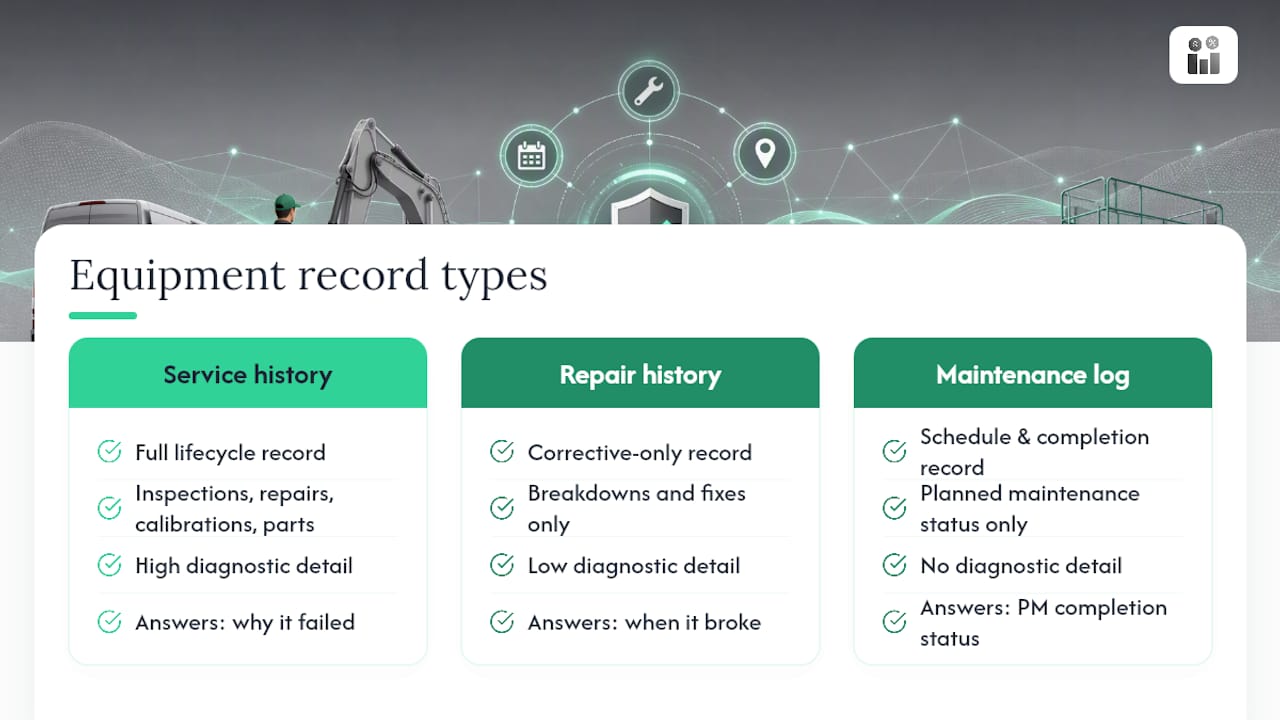
Equipment service history, repair history, and a maintenance log get used interchangeably around most shops, but they aren’t the same thing. Service history is the full record: every inspection, repair, calibration, and part swap tied to one asset over its life. Repair history is a subset. It only covers corrective events, the breakdowns and fixes, not routine checks or preventive tasks. A maintenance log is often just the schedule and completion record, the “did we do the PM on time” tracker, without the diagnostic detail a service history carries.
The distinction matters because each one answers a different question. A repair history alone tells you when things broke, but it strips away the inspections that could have flagged the problem earlier. Oracle’s Asset Service History guidance treats inspection feedback, pass/fail results, downtime, and part-failure notes as core parts of the record, not add-ons, because that context is what turns a log into a diagnostic tool.
Strong service-history entries carry evidence, not just text. Photos of a failed component, calibration certificates, vibration or temperature telemetry, and vendor test reports all belong attached to the event. When an asset service history record includes that evidence, it holds up in an audit and it holds up when you’re arguing a warranty claim with a manufacturer who wants proof, not your word.
What Data Fields Belong in Every Service Event
A service-history entry is only as useful as the fields behind it. Skip the wrong one and you lose the ability to spot a pattern six months later.
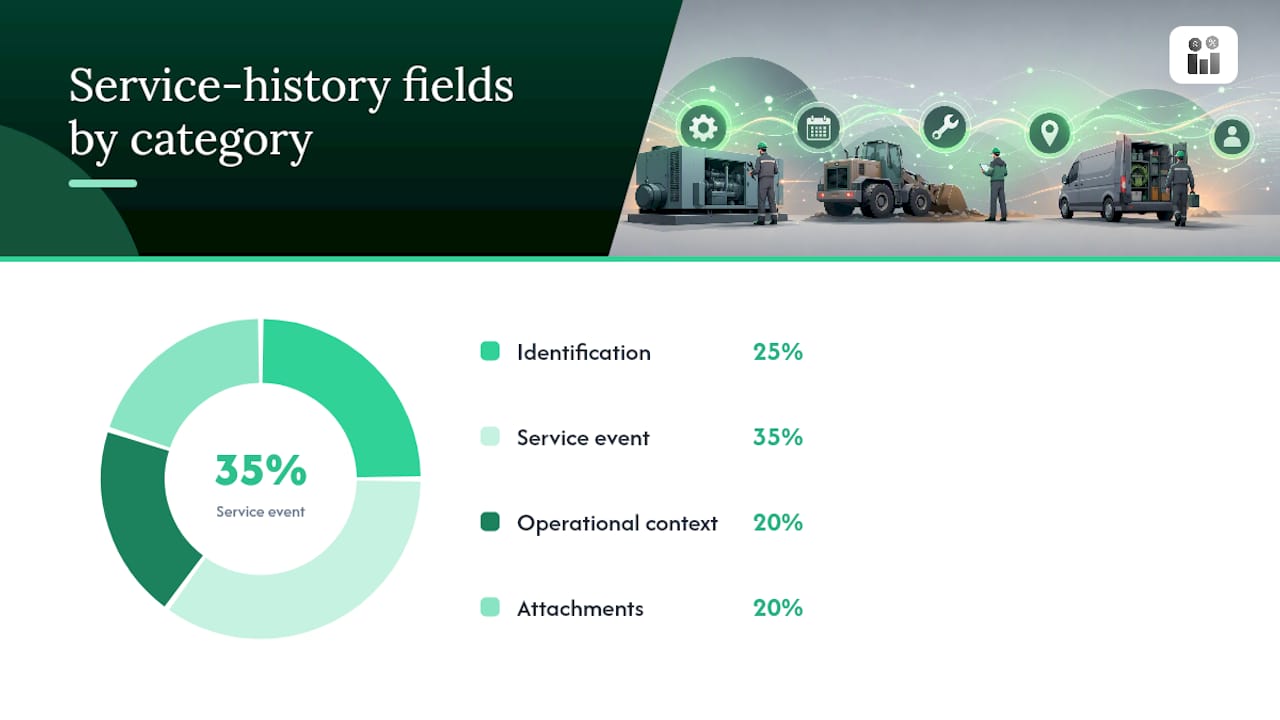
Start with asset identification: asset tag or ID, model, serial number, manufacturer, and installed location. Without a reliable identifier, you can’t guarantee the entry lands on the right equipment record, especially once you’re managing hundreds of assets across multiple sites.
The service event itself needs its own set of fields:
- Date and time of service
- Technician name or ID
- Task type (preventive, corrective, inspection, calibration)
- Work description
- Parts used and quantities
- Labor hours
- Total cost
Operational context rounds out the picture: operating hours or runtime-counter readings at time of service, operator notes on unusual behavior, firmware or software version if the asset runs embedded controls, and any sensor telemetry pulled during the visit. A maintenance log template built around these categories, identification, schedule, completed work, condition, and cost, gives you a structure that scales from one machine to a full fleet.
Attachments close the loop: photos of the work, calibration certificates, test reports, and warranty documentation.
Pro Tip: Make five fields non-negotiable on every form: asset ID, date, technician, task type, and cost. Everything else can stay optional without wrecking your data quality, but skip one of those five and the entry becomes nearly useless for trend analysis.
Paper, Spreadsheets, or a CMMS: Which Should You Use?
The method you use to capture service history shapes how usable that history becomes later.
- Paper forms have the lowest friction to start, technicians just write. But paper gets lost, damaged, or filed wrong, and searching six months of paper records for a recurring bearing failure is close to impossible.
- Spreadsheets improve on paper for search and sorting, but they depend entirely on someone manually keying in data correctly, consistently, every time. One dropped row or inconsistent date format and your trend analysis breaks.
- Mobile apps built for field service change the equation. Technicians capture photos and signatures on-site, work offline in areas with poor signal, and get required fields enforced before they can close a task. Maintenance apps built for fleets replace paper specifically because they give real-time visibility into asset condition instead of a stack of forms waiting to be transcribed.
- CMMS and work-order platforms go a step further: they link every service event automatically to the correct asset record, generate history entries from closed work orders, and let you pull KPI reports without manual aggregation.
Your choice comes down to team size, how much regulatory pressure you’re under, and budget. A two-person shop might get by on a well-built spreadsheet for a while. A facility running compliance audits or warranty-dependent equipment needs the asset linkage and reporting a work order platform provides.
Turning Work Orders Into a Continuous Service History
The most reliable way to build equipment service history isn’t a separate data-entry task. It comes directly from the work you’re already doing, provided you associate the right asset to the right incident every time.
When your field service operation records customer or facility assets, you can build a service history from work-order incidents and service-agreement incidents. Associating an asset to an incident is what generates the history entry, not a manual log-back step after the fact.
That raises a practical question: when do you record a brand-new incident versus append to an existing entry? A general rule works well:
- A new failure mode or a different symptom gets its own incident, even on the same asset.
- A follow-up visit for the same unresolved issue appends to the existing record.
- A scheduled PM visit generates its own routine entry, separate from corrective work.
Recurring service agreements make this easier to scale. You can add multiple incidents to a single agreement, and the generated work orders carry those agreement incidents along with their associated assets automatically. That means a quarterly inspection contract doesn’t need a technician to manually re-link the asset every visit; the system defaults it.
Pro Tip: Default the asset and location fields on your work-order form before the technician opens it, and require a photo attachment for any corrective task. Both are small changes that eliminate the two most common gaps in field-collected service history.
The full loop looks like this: incident reported → work order created and asset associated → technician completes work and attaches evidence → work order closes → service-history entry populates automatically. Get the association right at step two, and everything downstream takes care of itself.
From Records to Decisions: What Service History Tells You
Raw records only pay off when someone reads the pattern. Service history exists to answer four operational questions on a repeating basis.
Recurring failures. If the same asset shows three corrective entries for the same component in a year, that’s not bad luck, that’s a root-cause problem worth investigating before the fourth failure takes the line down.
Repair or replace. Tallying labor hours, parts cost, and downtime per asset over time gives you an actual maintenance cost figure. Once that number approaches or exceeds the asset’s replacement cost, the decision usually makes itself.
Warranty and vendor liability. A documented history with dates, part numbers, and technician notes is what you hand a manufacturer when you’re disputing a warranty denial. Without it, you’re arguing from memory.
PM interval validation. If service history shows a component failing before its scheduled preventive maintenance date, your interval is too long. If it never shows wear at inspection, you might be over-servicing and wasting labor hours.
- Mean Time to Repair (MTTR)
- Mean Time Between Failures (MTBF)
- Downtime per asset
- Cost per operating hour
Illustrative example: Picture a facility tracking cost per operating hour on a fleet of ten identical compressors. Nine average $0.40 per hour in parts and labor. One averages $1.60. That single number, pulled straight from service history, tells you exactly which unit to inspect first, no guesswork required.
Best Practices and a Checklist for Auditable Records
Clean service history doesn’t happen by accident. It happens because someone standardized the process before the first entry was ever logged.
- Standardize field names across every location and every technician. “Runtime hrs,” “hours,” and “meter reading” should never describe the same field on three different forms.
- Use dropdown reason codes instead of free text wherever possible. A short mandatory-field policy, asset ID, date, technician, description, parts used, drives far higher compliance than a long open-ended form.
- Require photo attachments and calibration certificates for any critical safety or compliance-related event.
- Link parts and labor cost fields directly to your inventory and invoicing data so cost-per-asset numbers update themselves instead of requiring a manual reconciliation.
- Set a retention policy, most regulated industries expect records kept for the life of the asset plus several years past disposal, and archive rather than delete.
- Keep frequency and interval fields visible (daily, weekly, every 250 hours) so PM scheduling stays synced with actual service history.
- Build one downloadable template your whole team uses, not five competing versions.
- Review a sample of entries monthly for missing fields before bad habits calcify.
Where Service History Efforts Usually Break Down
Technician compliance is the real barrier, not software. Long forms get abandoned halfway through, and free-text fields turn into shorthand nobody else can decode later. A structured work-order template that forces a reason code and a photo at completion closes that gap faster than any policy memo.
Prioritize four moves in your first month: require asset ID on every entry, lock down four or five mandatory fields, turn on photo capture for corrective work, and train the whole team on one workflow before adding a second. Chasing perfect data from day one usually backfires, consistent, partial data beats inconsistent, complete data every time.
— KaiosMedia
Get Your Service History Off Paper and Into One System
Firmanager gives service businesses one place where work orders, recurring service agreements, and asset records connect automatically, so every completed job writes itself into that asset’s service history without a second data-entry step. That’s the real advantage over juggling paper forms and disconnected spreadsheets: your technicians close a work order once, and the parts cost, labor hours, and photos land exactly where they belong.

The platform links parts inventory and invoicing to each service event, so cost-per-asset numbers update on their own instead of waiting for a monthly spreadsheet reconciliation. Recurring service agreements generate scheduled incidents automatically, keeping your PM intervals and service history in sync without manual re-entry. Firmanager runs on a Free, Pro, or Business plan, starting at no cost and scaling to $19 or $49 per month as your team grows. Start on the free plan today and see your first asset’s service history build itself from your next closed work order.
Sources
- Build a service history for assets in Field Service - Dynamics 365 Field Service
- About Service History - Oracle Work & Asset Cloud Service
- Equipment maintenance log: How-to guide, example & free template - ProjectManager
FAQ
Can I look up my car’s maintenance history?
Yes, many manufacturers and dealer networks keep digital service records tied to your vehicle identification number, and third-party vehicle history services can pull some of that data, though completeness varies by where the work was done.
What is a PM checklist?
A preventive maintenance checklist is a standardized list of inspection and service tasks performed on a set schedule, based on time or operating hours, designed to catch wear before it causes a failure.
What is the 10 rule in maintenance?
Definitions vary by industry, but it commonly refers to the idea that a failure caught early costs roughly a tenth as much to fix as the same failure caught after it causes secondary damage or downtime.
What is an equipment maintenance log?
An equipment maintenance log is a record of scheduled and completed maintenance tasks for a piece of equipment, typically including dates, tasks performed, and technician notes, and it usually feeds into the broader service history record.
How does Firmanager help track equipment service history?
Firmanager links work orders, recurring service agreements, and parts inventory to each asset record automatically, so completed jobs populate that asset’s service history without manual re-entry.
Recommended
Run your whole business in one place
CRM, quotes, work orders, invoicing, expenses, HR and HSE — one login, every device. Free-forever plan.
Start free →