90-Day Field Service Implementation for SMBs, No Second Project
90-Day Field Service Implementation for SMBs, No Second Project
The fastest reliable path to field service management value is a phased implementation that delivers core wins within 90 days while you build the integrations and governance needed to scale. Done right, you get faster dispatch, quicker invoicing, and higher technician utilization inside a single quarter. Platforms like Firmanager fit this model well because their modular design lets you launch core workflows first and expand later without a second implementation project.
TL;DR:
- Focus on completing the discovery, requirements, design, and core configuration phases without rushing custom development to avoid project stalls.
- Prioritize data quality audits and validation before migration, setting clear thresholds and having a rollback plan to prevent workflows from breaking.
- Connect your system through a middleware or API layer rather than direct point-to-point links, and continuously monitor integrations for accuracy and growth capacity.
- Implement role-based security, encryption, and audit logging during the design phase to reduce costs and ensure proper governance from the start.
- Launch core modules like dispatch and invoicing within 90 days, using phased configuration, and prepare a detailed go-live checklist that includes rollback plans and dedicated hypercare support.
Table of Contents
- What Does a Field Service Implementation Actually Involve?
- How Long Does a Field Service Software Rollout Take?
- Data Migration: The Step Most Teams Underestimate
- How Should Field Service Software Connect to Other Systems?
- What Security Controls Should Be In Place Before Go-Live?
- How Do You Test and Train Users Before Go-Live?
- What Belongs on a Go-Live Checklist?
- How Firmanager Supports a Phased Rollout
- What Do Implementation Veterans Wish They’d Known Sooner?
- Ready to Start Your Own 90-Day Rollout?
- Sources
What Does a Field Service Implementation Actually Involve?
A field service implementation moves through four early phases before you write a single line of custom code: discovery, requirements, design, and core configuration. Each phase produces a specific deliverable, and skipping one is the most common reason projects stall in month four instead of finishing in month three.
Discovery sets the baseline. Your team maps current dispatch and invoicing workflows, documents KPI benchmarks (first-time fix rate, average job cycle time, invoice turnaround), builds a stakeholder roster, and names an executive sponsor who can break ties when departments disagree on priorities.
Requirements turns discovery findings into a build list. Separate must-haves from should-haves early, because every requirement you mark “must-have” adds testing time later. Write acceptance criteria for each one, not a vague description. “Technicians can update job status from a mobile device” is a requirement. “Technicians can update job status from a mobile device within 5 seconds while offline, and the update syncs within 60 seconds of reconnecting” is an acceptance criterion you can actually test against.
Design is where architecture decisions get made, including the integration map, the security model, and the role structure. Vendor best-practice guides consistently flag this as a phase worth protecting: a focused architecture sprint early in the project saves months of rework later, because retrofitting an integration pattern after go-live is far harder than designing it up front.
Configuration comes last, and it should center on standard features before anyone touches custom development. Vendor setup documentation for major platforms consistently emphasizes configuring core objects — work types, job templates, service territories, and the mobile app — before layering on anything custom. That sequence matters:
- Configure work types and job templates first; they define what a “job” even means in your system.
- Set up service territories and dispatch rules before touching pricing or invoicing logic.
- Enable the mobile app for a small internal group before rolling custom fields onto it.
- Save custom development for processes that genuinely differentiate your business, not for anything a standard field already covers.
How Long Does a Field Service Software Rollout Take?
A phased rollout that delivers core value within a few months is a practical baseline for small to midsize field service businesses implementing dispatch, mobile access, and invoicing. That figure comes directly from buyer-side implementation timelines built for SMB deployments, and it holds as long as your data set is manageable and your integration list is short.
The 90 days typically break down like this:
- Weeks 1 to 2, kickoff and contract review. Confirm scope, sign off on the architecture sprint output, and assign a system owner on your side plus an implementation lead on the vendor side.
- Weeks 3 to 6, core configuration. Build work types, territories, job templates, and user roles inside the platform.
- Weeks 5 to 8, data migration. Overlaps with configuration; clean and load customer, asset, and job history records.
- Weeks 7 to 9, pilot. A small group runs live jobs through the new system while the old one stays in read-only backup mode.
- Weeks 9 to 11, wider rollout. Expand to the full team once pilot issues are resolved.
- Week 12, go-live and hypercare begins.
That timeline stretches when complexity rises. Enterprise deployment guides for larger platforms show that deeper ERP integrations, larger headcounts, and multi-system data migrations can push a comparable rollout well past six months. Every additional integration point, every thousand extra customer records, and every added approval layer multiplies your baseline. Build a milestone gate at the end of each phase above, and don’t let the project advance past a gate until the deliverable for that phase is actually signed off, not just “mostly done.”
Data Migration: The Step Most Teams Underestimate
Bad data migrated into a new system is just bad data with a better interface. Before you move a single record, run a full audit of your existing customer, asset, and job history data, and quarantine anything that fails basic validation, duplicate contact records, jobs with no linked customer, assets with no service history.
Define required fields for every core object before migration starts. A work order without a service address or a customer record without a valid phone number will break your dispatch and invoicing workflows the first week you go live, not months later when someone finally notices.
Test your import process with a sample batch before you run the full migration. Set explicit go/no-go criteria: if more than a defined percentage of records fail validation on the sample, stop and fix the source data rather than pushing forward and cleaning up after the fact. Have a rollback plan ready in case the full migration needs to be repeated.
- Audit every core data set (customers, assets, job history, contracts) before migration begins.
- Quarantine records that fail validation instead of migrating them “to fix later.”
- Run a sample import first and set a numeric go/no-go threshold for data quality.
- Assign a named data steward for each core object, not a shared team inbox.
- Put automated quality monitoring in place after go-live, with a defined remediation window for flagged records.
Pro Tip: Budget real hours for data cleanup before configuration starts, not during it. Teams that treat data quality as a parallel afternoon task instead of a dedicated work stream almost always end up doing the same cleanup twice, once before go-live and once after users start complaining about duplicate customer records.
The math favors doing this early. A week spent auditing and cleaning data before migration is far cheaper than months of technicians working around bad records, dispatchers double-checking addresses, and finance reconciling invoices tied to duplicate accounts.
How Should Field Service Software Connect to Other Systems?
Integration architecture is where a lot of field service automation projects quietly go wrong. The safest pattern connects your field service platform to CRM, ERP, payment, and telematics systems through an API or middleware layer rather than a web of direct point-to-point connections. Point-to-point integrations work fine with two systems. Add a third or fourth and every schema change anywhere in the chain risks breaking something you didn’t touch.
Common integration targets and what to test before trusting each one in production:
- CRM sync (customer records, contact history): run at least 10 live-like test transactions covering new customers, updates, and merges.
- ERP/accounting (invoicing, general ledger): test a full invoice cycle from job completion through payment posting.
- Payment processing: confirm both successful and failed transaction handling, including retries.
- Telematics/GPS: verify location data updates at the frequency your dispatch logic actually needs, not just at idle.
Set up monitoring and reconciliation on every integration point once it’s live: a daily check that record counts match between systems catches silent failures long before a customer notices a missing invoice. Vendor developer documentation for major field service platforms lays out the standard integration references worth reviewing before you design your own connectors from scratch.
Plan for growth from day one. A dispatch volume that doubles in year two shouldn’t require rebuilding your integration layer, so size your middleware and API rate limits against your 24 month forecast, not your current headcount.
What Security Controls Should Be In Place Before Go-Live?
Security and governance belong in the design phase, not the punch list you get to after go-live. Retrofitting role-based access after users already have broad permissions means auditing every account and walking back access one person at a time. Building it in from the start means each role gets exactly the access it needs from day one.
- Design role-based access controls and least-privilege permissions during the design sprint, before configuration begins.
- Turn on encryption at rest and in transit for every data store the platform touches.
- Enable full audit logging so every record change has a traceable author and timestamp.
- Add an access review process, plus clear data export and retention terms, into your vendor contract before signing.
Security and governance need to be configured during implementation, not bolted on afterward. Role-based controls, encryption, and audit logging are dramatically cheaper to design correctly the first time than to retrofit once real customer and payment data is already flowing through the system. Vendor trust pages, including Salesforce’s operational and security status page, are a useful model and are worth checking during contract review so you know what uptime and security posture you’re actually buying.
How Do You Test and Train Users Before Go-Live?
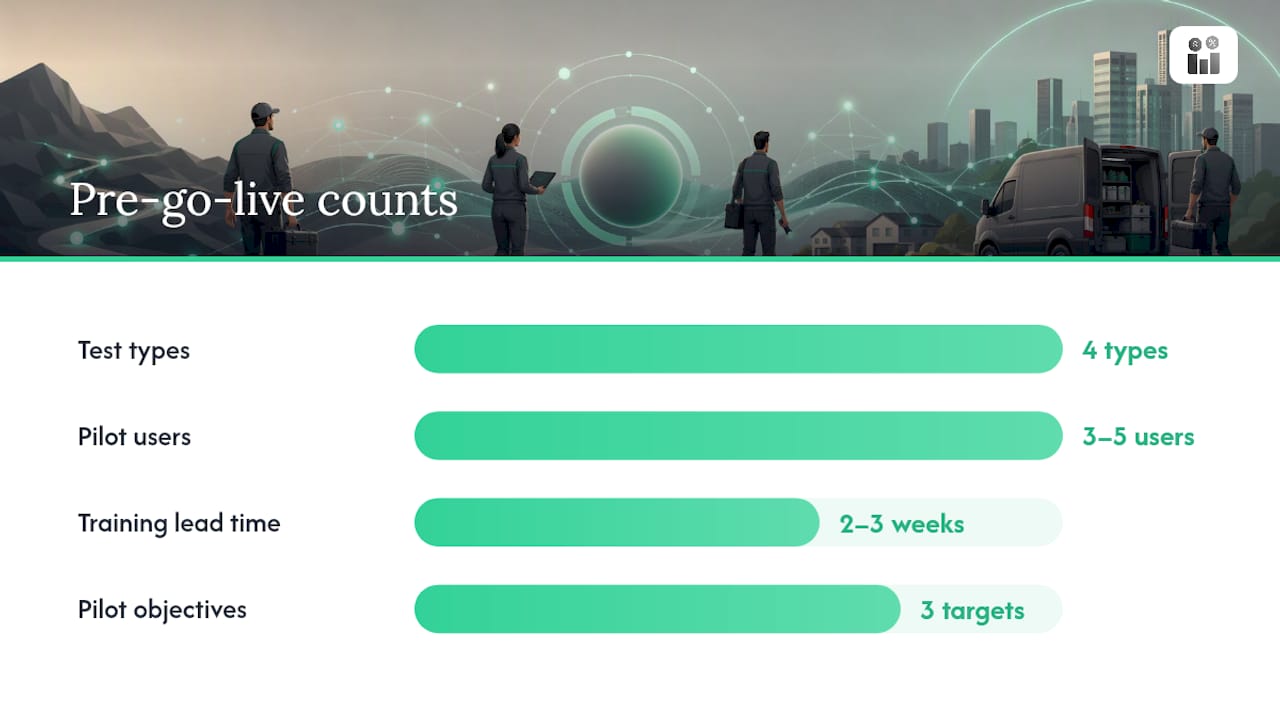
Testing has four distinct types, and skipping any one of them is how bugs make it to production. Run functional tests against each configured workflow, integration tests across every connected system, performance tests under realistic job volume, and user acceptance testing (UAT) with the actual people who’ll use the system daily. Use anonymized but realistic test data for all four, not a handful of dummy records that don’t reflect your real job complexity.
- Select 3 to 5 pilot users who represent your range of technician experience, not just your most tech-savvy staff.
- Set specific pilot week objectives: complete X jobs end-to-end, log Y customer interactions, process Z invoices.
- Run a daily debrief during the pilot week; issues caught on day two are cheap, issues caught on day nine are expensive.
- Schedule role-based training 2 to 3 weeks before go-live, not the week before, so users have time to practice before it counts.
- Back up live training with short reference job aids technicians can pull up mid-job when they forget a step.
Once you’re in hypercare, watch adoption metrics as closely as functional ones. Daily active users, feature utilization by module, and ticket volume trends tell you whether people are actually using the system the way it was designed, or working around it. Guides on avoiding shelfware after implementation point to named champions and visible adoption targets as the difference between a system that sticks and one that quietly reverts to spreadsheets by month three.
Pro Tip: Track feature utilization by module, not just overall logins. A technician can be “active” every day while only ever touching the mobile job list and never using the invoicing or compliance features you implemented for a reason.
What Belongs on a Go-Live Checklist?
Go-live day isn’t the finish line, it’s the start of the phase where problems actually surface under real load. Have a rollback plan documented and ready, keep the legacy system available in read-only mode for reference, and set up a dedicated escalation channel so issues get triaged fast instead of sitting in a general support queue.
- Confirm rollback plan is documented and the team knows how to trigger it.
- Keep legacy system access available, read-only, for at least the first few weeks.
- Stand up a dedicated escalation channel separate from routine support tickets.
- Assign dedicated hypercare staff with defined response SLAs for the first two to four weeks.
- Build a KPI dashboard tracking first-time fix rate, jobs completed same-day, invoice turnaround, and payment collection speed.
After hypercare winds down, keep a cadence: weekly operational reviews for the first quarter, then a shift to quarterly enhancement planning and an annual strategy check-in against the KPIs you baselined during discovery.
How Firmanager Supports a Phased Rollout
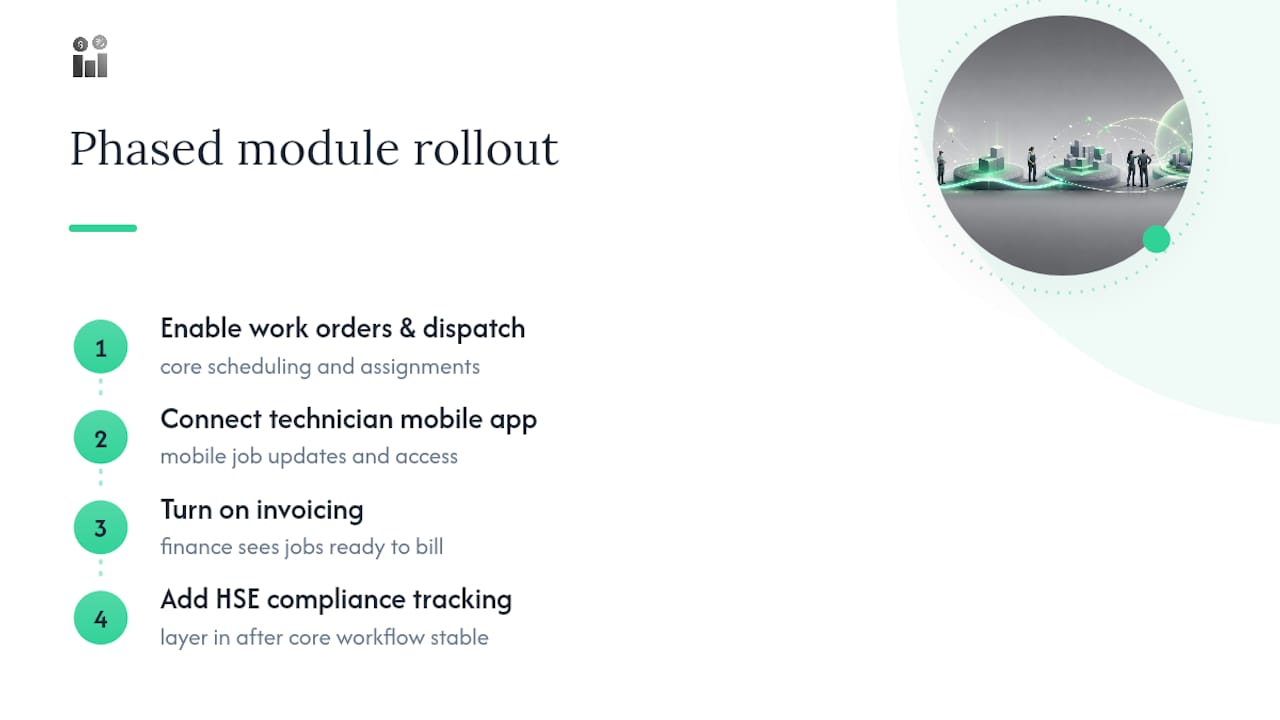
A modular structure maps directly onto the phased approach above. Work orders, mobile access for technicians, route and dispatch management, invoicing, and HSE compliance tracking can be independent modules under one login, allowing a Phase 1 quick-win covering dispatch, mobile job updates, and invoicing without waiting for HR, document management, or supplier tracking to be configured.
A practical starter configuration might enable work order and dispatch modules first, connect the employee self-service mobile app for technicians, turn on invoicing, and layer in compliance tracking once the core workflow is stable. For role permissions, a common pattern gives dispatchers full visibility into scheduling and customer records, technicians access limited to their assigned jobs and mobile updates, and finance staff access to invoicing and payment data without work order edit rights.
Because the platform is cloud-synced, every module can share the same real-time data. There’s no batch sync delay between a technician closing a job and finance seeing it ready to invoice.
What Do Implementation Veterans Wish They’d Known Sooner?
Most failed rollouts share the same handful of root causes: skipping the architecture sprint, migrating dirty data without a quality gate, under-training users right before go-live, and letting scope creep replace configuration with custom development. Each has a straightforward fix. Protect a two-week architecture sprint at the start of the project and treat its output as binding. Set a numeric data quality threshold before migration, not after something breaks.
Vendor relationships fail quietly when there’s no defined change-request process. Name an escalation contact on both sides before kickoff, and put change requests in writing with an agreed turnaround time, so “quick asks” don’t silently become unbudgeted scope.
Pilot selection deserves more thought than it usually gets. Choose pilot users who represent your real range of technical comfort, not your three most enthusiastic staff, because that’s the only way the pilot tells you the truth about training gaps before wider rollout does it for you.
— KaiosMedia
Ready to Start Your Own 90-Day Rollout?
The platform provides a modular starting point this playbook assumes: work orders, mobile access, route and dispatch, invoicing, and compliance tracking under one cloud-synced login, so Phase 1 doesn’t depend on finishing every module before technicians can go live. That structure means your team can launch dispatch and invoicing in weeks, not months, and add HR or supplier management later without a second implementation project.

If you’re planning a rollout along the lines described above, the Firmanager platform is built to configure in stages rather than all at once. Start with a free plan or request a walkthrough of the work order and dispatch modules to see how your own 90-day plan would map onto it.
Sources
For deeper technical detail, review Salesforce’s field service setup guide and the SMB implementation timeline guide referenced throughout this playbook.
- Set Up Field Service Basics — Salesforce Help
- FSM implementation timeline – buyers guide
- Field Service Cloud best practices — XylityTech
- How to build custom field service software — TechQuarter
Recommended
Run your whole business in one place
CRM, quotes, work orders, invoicing, expenses, HR and HSE — one login, every device. Free-forever plan.
Start free →