Safety Managers: Matrix Safety Training Records in Under a Minute
Safety Managers: Matrix Safety Training Records in Under a Minute
OSHA doesn’t demand a single training-record form. It demands proof, whenever a standard requires training, that a specific employee learned a specific topic from a qualified trainer on a specific date and can demonstrate competency. The fastest way to meet that bar is one training matrix tied to a folder of signed certificates, with Firmanager handling the tracking and reminders so nothing expires unnoticed.
TL;DR:
- Training records must prove each employee learned specific topics from qualified trainers on particular dates and demonstrate competency, not just confirm attendance.
- Keep detailed records including employee info, training topic, date, trainer credentials, proof of understanding, and signature or attestation, especially for high-risk standards.
- Retain training records based on the longest applicable window, such as three years for forklift evaluations or 30 years for medical surveillance, and develop a retention schedule.
- Use a training matrix linked to evidence like certificates, with automated due date alerts, to support quick retrieval during audits and prevent noncompliance; larger operations benefit from specialized software.
- Prioritize employee-specific record access over class-wide lists, maintaining organized, easily searchable files linked to individual training and certifications to ensure audit readiness.
Table of Contents
- What Belongs in a Compliant Safety Training Record
- How Long You Actually Need to Keep Training Records
- Setting Up a System That Puts Records at Your Fingertips
- Getting Ready Before an Inspector Ever Shows Up
- The Documentation Mistakes That Keep Coming Back
- Making the Matrix-Plus-Folder System Actually Work Day to Day
- Why Audit Readiness Beats Perfect Documentation
- Put Your Training Records on Autopilot
- Sources
What Belongs in a Compliant Safety Training Record
An inspector doesn’t ask whether training happened. They ask you to produce it in minutes, and if you can’t, OSHA treats the training as if it never occurred. That single fact should shape every record you keep.
Every training record, regardless of standard, needs these fields:
- Employee full name and ID number
- Training date and duration
- Topic covered and the OSHA standard it satisfies
- Trainer name and qualifications
- Method used (classroom, hands-on demonstration, online module)
- Proof of comprehension: a quiz score, a demonstrated task, or a supervisor evaluation
- Signature or a digital attestation timestamp
Some standards ask for more. Respiratory protection training under 1910.134 needs a documented fit test and medical clearance. Powered industrial truck operators need a documented practical evaluation under 1910.178. Lockout/Tagout training under 1910.147 typically requires a hands-on evaluation of each authorized employee, not just a signature on a handout.
Acceptable proof varies in form, not in substance. A signed paper certificate works. An LMS completion log works, but only if it captures the same fields, not just a completion percentage, and preserves an audit trail. A scanned, signed sign-in sheet works too, as long as it’s retrievable by employee name within minutes.
How Long You Actually Need to Keep Training Records
OSHA never wrote one master retention rule for training documentation. Retention requirements sit inside individual standards, which is why so many safety managers guess wrong. Recordkeeping obligations spread across dozens of separate provisions rather than living in one place, so the safest strategy is building your own retention schedule rather than relying on memory.
Common retention windows worth building your schedule around:
- General safety training records: minimum 1 year
- Powered industrial truck (forklift) operator records: 3 years
- OSHA 300, 300A, and 301 injury and illness logs: 5 years
- Medical surveillance and exposure records: duration of employment plus 30 years
Retention benchmark: Forklift operator evaluations carry a 3-year retention requirement, one of the longer standard-specific windows outside medical surveillance, and a common gap point when operators change roles or leave the company.
When a standard doesn’t specify a period, default to the longest comparable rule you can find rather than the shortest. Build a simple retention schedule mapping each training type to its required window, and set disposal dates that trigger secure deletion, not silent deletion, so you can prove records were destroyed on schedule rather than lost.
Setting Up a System That Puts Records at Your Fingertips
A training matrix is the backbone of an audit-ready program. Rows list employees, columns list required trainings, and each cell shows the completion date and next due date. Done right, it becomes a live operational tool, not a static spreadsheet you update once a year. It should also capture triggered retraining, the kind mandated by an equipment change, a process update, or a near-miss, not just calendar-based refreshers.
Build yours with these steps:
- List every employee down the rows and every required training across the columns.
- Enter completion dates and let due dates calculate automatically from each standard’s refresh cycle.
- Link every cell to its underlying evidence, whether that’s a certificate scan or an LMS record.
- Color-code or flag anything within 30 days of expiration.
Spreadsheets paired with a certificates folder work well for smaller operations, and that pairing remains one of the highest-leverage setups available because it’s cheap and fast to maintain. Larger operations with multiple sites or high headcounts tend to outgrow that setup fast, since manual cross-checking eats hours every audit cycle. A dedicated compliance management platform or safety-focused software handles that scale automatically, generating employee-level history reports instead of forcing you to search a shared drive.
Pro Tip: Store your master matrix and original certificates separately from your day-to-day working files, and keep at least one backup off your primary server. Losing the only copy of a signed LOTO evaluation during a server failure is a documentation gap you cannot retroactively fix.
Name every file consistently: employee ID, training code, and date. That single habit saves more retrieval time during an audit than any software feature.
Getting Ready Before an Inspector Ever Shows Up
Inspectors gravitate toward the highest-risk standards first. Records for HazCom, Lockout/Tagout, respiratory protection, and forklift training typically get requested within the opening minutes of a walkthrough. Your prep work should mirror that priority order.
Before an inspection:
- Run a gap report against your training matrix quarterly, not annually.
- Confirm backup copies of certificates exist outside your primary storage.
- Verify trainer qualification files are current and linked to their sessions.
During an inspection:
- Assign one person to communicate with the inspector and pull records.
- Search by employee name first, then cross-reference by standard and date.
- Export digital records in PDF or a similarly stable, printable format inspectors can review offline.
After an inspection:
- Document every gap found and the corrective action taken.
- Update the training matrix immediately, not at the next scheduled review.
- Revise your retention schedule if the inspection revealed a standard you’d underestimated.
| Inspection Phase | Priority Action | Owner |
|---|---|---|
| Before | Quarterly gap report | Safety manager |
| During | Employee-level record pull | Designated liaison |
| After | Corrective action log update | Safety manager or HR |
Being unable to produce a requested record on the spot reads as noncompliance even when the training actually happened, an outcome practitioners consistently flag as avoidable. Speed of retrieval, not just accuracy of records, is what gets tested in the room.
The Documentation Mistakes That Keep Coming Back
Most training-record failures trace back to a handful of repeat offenders, and every one of them has a cheap fix.
- Scattered records across departments: consolidate into one system and assign a single record owner.
- Missing competency proof: add a two-minute verification step, a quiz or demonstration, to every session before it closes out.
- No renewal tracking: set automated expiration reminders 30 and 60 days out, with escalation to a supervisor if the deadline passes.
- Unverifiable trainer credentials: keep trainer qualification files linked directly to each training event, not stored separately where they get disconnected over time.
None of these fixes require new software or a policy overhaul. They require deciding who owns the record and building one habit around checking it.
Making the Matrix-Plus-Folder System Actually Work Day to Day
A training matrix only earns its keep if it’s connected to real evidence and updated without someone remembering to do it manually. That’s the gap most paper-based systems fall into: the matrix looks current until an audit reveals half the certificates were never scanned in.
The platform centralizes training history per employee, attaches certificates directly to each training event, and can trigger automated renewal reminders before a certification lapses. A workflow might run like this: a technician completes respiratory fit-testing, the certificate gets attached to their profile, the system sets the next required date automatically, and a report generates on demand showing every current and expiring credential across your workforce. That’s the difference between a matrix you maintain and one that maintains itself.

Why Audit Readiness Beats Perfect Documentation
Most guidance on safety training records fixates on completeness, listing every field a form should contain. That’s necessary but not sufficient. The real test isn’t whether your records are thorough. It’s whether you can produce the right one, for the right employee, in the time an inspector is standing in your office.
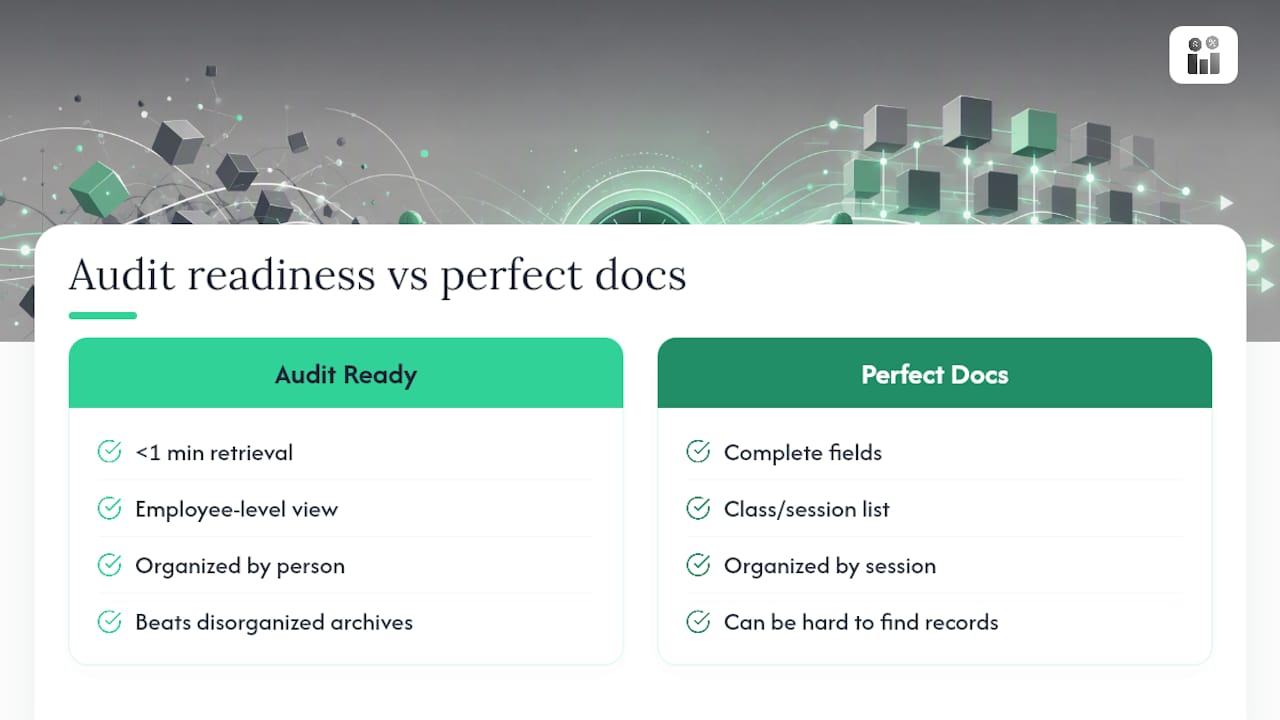
Conventional advice underweights retrieval speed. A company with meticulous paper files scattered across three site binders can still fail an audit if nobody can find the forklift evaluation for the one operator the inspector asks about. Speed and organization matter as much as accuracy, and most safety programs invest in the latter while ignoring the former.
If you’re prioritizing one thing this quarter, make it the employee-level view, not the class-level list. Inspectors ask about people, not sessions. A system that answers “show me everything for this employee” in under a minute will outperform a technically complete but disorganized archive every time. Build for that question first, and the rest of your documentation practice tends to fall into place around it.
— KaiosMedia
Put Your Training Records on Autopilot
Chasing down signed certificates in shared drives or paper binders costs you hours every time an inspector calls or a renewal quietly lapses. Firmanager centralizes that entire workflow: one training matrix per employee, certificates attached directly to each training event, and automated reminders before anything expires.

Compliance tracking can be integrated alongside CRM, work orders, and HR tools in a single login, so training history stays connected to the people and jobs it actually affects. Instead of rebuilding your recordkeeping process from scratch, you get one system designed to address this problem. If your current setup leaves you guessing what’s current and what’s overdue, start a Firmanager trial and see your entire workforce’s training status on one screen before your next audit.
Sources
- Recordkeeping | Occupational Safety and Health Administration
- OSHA Training Recordkeeping: What Employers Need to Know
- The safety training records OSHA inspectors look for first | EHS, Inc.
- Safety Training Records: What OSHA Wants on Paper and How Small Businesses Get It Right
Recommended
Run your whole business in one place
CRM, quotes, work orders, invoicing, expenses, HR and HSE — one login, every device. Free-forever plan.
Start free →