Six Question Checklist: Suite vs Best of Breed for Service Businesses
Six Question Checklist: Suite vs Best of Breed for Service Businesses
Choose a suite for systems of record like accounting, HR, and compliance, and best-of-breed for systems of differentiation where a specialized tool wins on workflow depth. Most service businesses land somewhere in between: a suite core, like Firmanager, running daily operations, with a specialist added only where a capability genuinely demands it. Run that choice per capability, not once for the whole company, and hybrid becomes the default rather than the compromise.
TL;DR:
- Choosing a hybrid approach requires careful assessment of each capability’s differentiation and statutory needs to avoid unnecessary complexity and costs.
- Integrations in best-of-breed stacks demand active API governance, ownership, and ongoing testing to prevent fragmentation and operational risk.
- Hybrid architectures with core suites and edge specialists can work effectively if interfaces are well documented and a designated owner manages orchestration.
- Vendor management complexity increases with multiple best-of-breed vendors, as each requires its own contracts, support, and risk mitigation efforts.
- Long-term costs of best-of-breed stacks grow through recurring integration work and maintenance, making a well-chosen suite often more predictable and cost-effective over time.
Table of Contents
- Suite vs Best of Breed: What Each Term Actually Means
- Suite vs Best of Breed: Weighing the Trade-offs
- Which Capabilities Actually Need Best-of-Breed?
- What It Takes to Run Best-of-Breed Well
- Hybrid Architectures That Actually Work
- How Vendor Management Complexity Changes With Each Model
- Scalability and Flexibility: Where Each Model Bends or Breaks
- Security and Compliance: Where the Real Exposure Lives
- Real-World Outcomes: What Suite and Best-of-Breed Choices Actually Produce
- The Real Long-Term Cost of Each Model
- Firmanager’s View: Why an Integrated Core Fits Most Service Businesses
- Start Evaluating Firmanager as Your Suite Core
- Sources
Suite vs Best of Breed: What Each Term Actually Means
“Best of breed” and “best of suite” describe two opposite bets on how software should fit your business. A suite is an integrated platform where CRM, invoicing, scheduling, and HR share one data model and one login. A best-of-breed stack picks the single strongest tool for each job, then wires those tools together with integrations.
You’ll also see “best-in-breed” used interchangeably with “best-of-breed.” They mean the same thing; the label just varies by writer. Neither phrase tells you anything about your actual requirements, which is the trap: teams argue over the label instead of the capability.
A few grounding examples clarify the split:
- Suite example: an integrated operations platform handling work orders, invoicing, and payroll under one account, the model Firmanager follows for service businesses.
- Best-of-breed example: a specialized field-service scheduling tool chosen purely for dispatch logic, paired separately with accounting software and a CRM.
- Common confusion: assuming best-of-breed always means “better.” It means “deeper in one domain,” which is only an advantage if that domain is where your business actually differentiates.
Suite vs Best of Breed: Weighing the Trade-offs
Suites win on coherence. A single data model means fewer interfaces, consistent permissions, and upgrades that don’t break three other systems at once. Vendor management simplifies to one contract, one support line, and one release calendar. DynamicWeb’s analysis notes suites can also be more affordable than stitching together many specialized tools when IT resources are limited.
The cost shows up as depth. Suites tend to lack the granular functionality a specialist tool builds for one job, and switching later means unwinding a system embedded across your whole operation. Innovation on edge use cases moves slower, because the vendor is balancing every module at once.
Best-of-breed inverts both sides of that equation.
- Deeper functionality for the specific workflow it’s built for.
- Faster innovation, since the vendor isn’t spread across a dozen modules.
- Better user experience for specialist roles who live in that one tool daily.
- Integration cost and orchestration ownership become your problem, not the vendor’s.
- Testing obligations increase, since every vendor update can break a connection nobody outside IT notices until it fails.
The convenience vs. effectiveness trade-off: Forbes Technology Council frames it plainly: suites optimize for convenience and lower integration overhead, while best-of-breed optimizes for effectiveness and speed of innovation in a specific domain. You rarely get both from the same choice.
Choosing a suite purely because it looks cheaper up front commonly backfires the moment a specialist team needs a workflow the suite doesn’t support, pushing them toward spreadsheets or shadow IT that costs more than the integration would have.
Which Capabilities Actually Need Best-of-Breed?
Run this six-question checklist against every capability separately, not against your software stack as a whole. Altivate’s framework argues the suite-versus-specialist debate is the wrong question entirely; the right question is capability by capability.
- Is this a system of record or a system of differentiation? Payroll is record. Custom quoting logic might be differentiation.
- Does it require certified or statutory output? Tax filing formats and regulatory reporting often lock you into whatever already produces that certified output.
- Who owns orchestration if you add a specialist here? Someone signs the SLA for the connection itself, not just for each tool.
- How much release and regression exposure will this create? Every vendor update on either side risks breaking the seam.
- Does this capability need authoritative master data, or can it tolerate a copy? Master data belongs in one place; copies drift.
- Can this workflow tolerate eventual consistency, or does it need real-time accuracy? Dispatch schedules often can’t wait for a nightly sync.
A quick example: scheduling scores high on differentiation and low on statutory need, so a specialist can make sense if the gap is real. Accounting scores high on statutory output and record-keeping, so it almost always stays in the core system.
Pro Tip: Before adding any specialist tool, ask who signs the SLA for the integration itself, not just for the tool. If nobody can answer that question, you don’t have an orchestration owner, and the connection will fail quietly within a year.
What It Takes to Run Best-of-Breed Well
Adding a specialist tool means your organization now owns the seam between it and everything else. That’s not a one-time integration project; it’s an ongoing operational function. Governa warns that without active API and data governance, best-of-breed stacks fragment into disconnected “island landscapes” that quietly inflate cost and risk.
Budget for the real requirements, not just the license fee:
- API contracts defining what data moves where, and how often.
- Retry and error-handling logic for when a sync fails at 2 a.m.
- Observability so someone notices a broken connection before a customer does.
- Master-data reconciliation, with a named owner responsible for fixing conflicts.
- Integration engineers or release testers who regression-test every vendor update before it goes live.
Altivate’s guidance is specific here: orchestration needs runbooks for cross-system retries and observability, plus an assigned owner for reconciliation. Skip that, and best-of-breed’s flexibility becomes its liability.
Vendor releases are the recurring risk. A specialist tool pushes an update, your integration breaks, and nobody finds out until invoices stop syncing. Staged rollouts and an integration sandbox catch most of this before it hits production, but both take time your project plan needs to account for from day one. A guide to enterprise software integration covers the API management patterns that make this sustainable rather than a permanent fire drill.
Hybrid Architectures That Actually Work
Most organizations don’t run pure suite or pure best-of-breed. Lensing confirms hybrid setups are common and effective, provided integration tooling and orchestration ownership are in place from the start. Three patterns cover most cases:
- Suite core plus edge specialists: the suite runs CRM, invoicing, and HR; one or two specialist tools handle a narrow, high-value workflow.
- Finance core plus operational specialists: accounting and compliance stay centralized; field operations get purpose-built tools.
- Orchestrator-first platform with specialist agents: a coordination layer routes data between several specialist systems, with no single core.
For a mid-market cleaning or maintenance company, this might mean the suite handles scheduling, invoicing, HR, and compliance tracking, while a niche route-optimization tool plugs in only for a fleet large enough to need it.
The rules that make any of these work: name the orchestrator, document every interface in writing, test vendor upgrade compatibility before it ships, and put a data-owner SLA in the contract, not in someone’s memory.
How Vendor Management Complexity Changes With Each Model
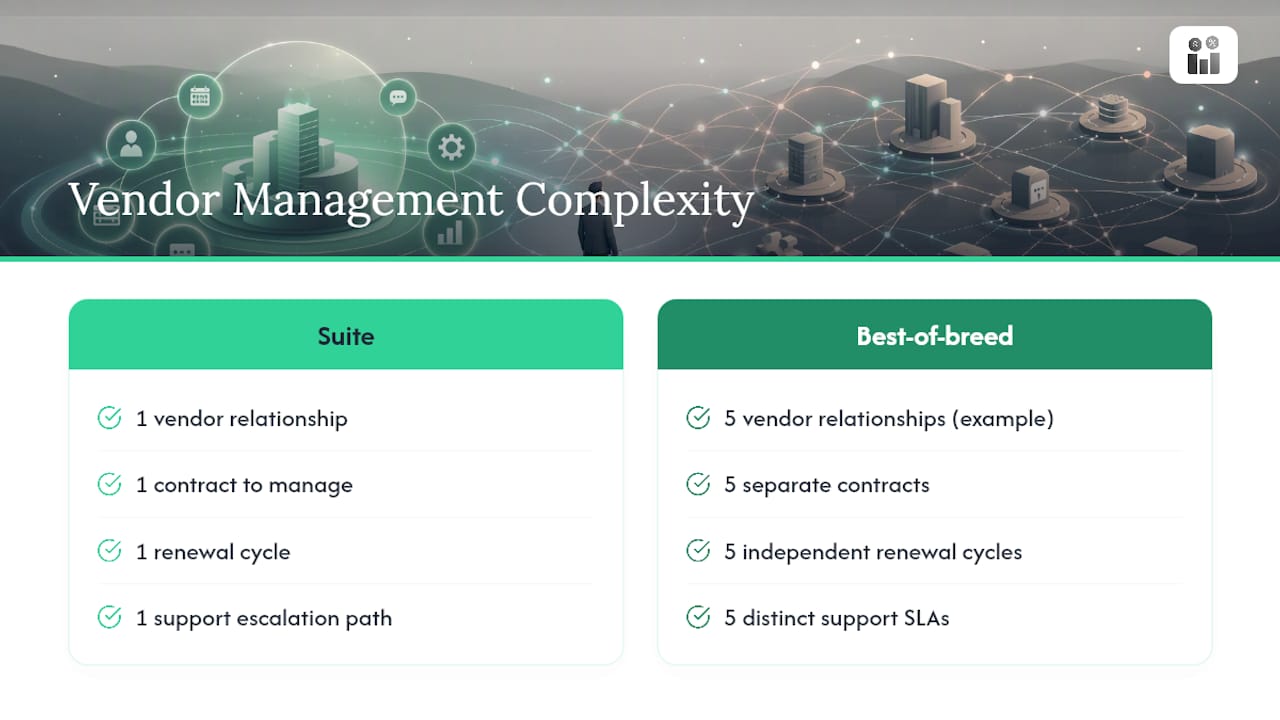
A suite collapses vendor management into one relationship. One contract, one renewal date, one support escalation path, one roadmap to track. Your procurement team negotiates once and monitors one vendor’s financial health, security posture, and product direction.
Best-of-breed multiplies that work by however many specialists you add. Each vendor has its own contract terms, its own renewal cycle, its own support SLA, and its own risk profile. A five-tool stack means five relationships to audit, five roadmaps that might diverge from each other, and five points where a vendor’s business decisions (a price increase, a feature deprecation, an acquisition) can disrupt your operations independently.
The complexity compounds when vendors don’t coordinate. A suite vendor has internal incentive to keep its own modules compatible across releases. Best-of-breed vendors have no such incentive toward each other; a scheduling tool’s API update doesn’t consider your accounting integration at all, because that vendor has never heard of it.
This is where the “who owns orchestration” question from the capability checklist earns its place in every vendor contract, not just your internal documentation. Industry adoption data from Okta shows many organizations already run a core suite alongside several best-of-breed apps for specific functions, which means most procurement teams are managing this hybrid complexity whether they planned for it or not.
Fewer vendors also means fewer security questionnaires, fewer compliance audits to coordinate, and fewer renewal negotiations competing for your team’s attention in the same quarter.
Scalability and Flexibility: Where Each Model Bends or Breaks
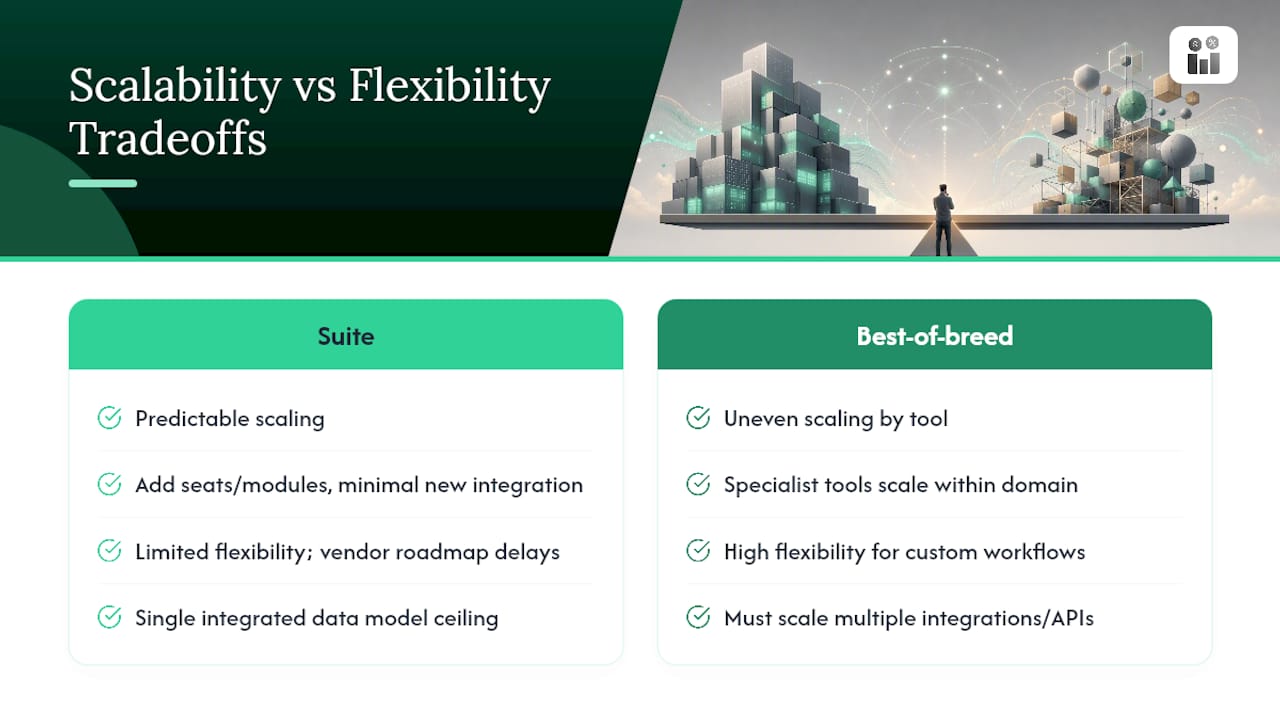
Suites scale predictably because growth usually means adding seats or modules within a system already built to handle it. Adding a new location, a new service line, or twenty more field technicians rarely requires new integration work; the data model already accounts for it.
Flexibility is where that predictability costs you. If your business needs a workflow the suite vendor hasn’t built, you wait for their roadmap or you work around it. That’s fine for standard operations. It’s a real constraint if your differentiation depends on a process no general platform anticipated.
Best-of-breed scales unevenly. Each specialist tool can scale within its own domain, sometimes better than a suite module built to serve many use cases at once. A dedicated scheduling tool built for high-volume dispatch may handle three times the load a suite’s scheduling module was designed for.
The catch is that scaling the business means scaling every integration point simultaneously. Add a location, and you’re not just provisioning new seats. You’re checking whether every connected tool’s API tier supports the new volume, whether rate limits hold, and whether the orchestration layer can absorb more transaction throughput without new latency. Growth in a best-of-breed stack is really growth across several unrelated systems at once, each with its own ceiling.
This is why the capability-level framework matters more as a company grows, not less. A five-person operation can tolerate a fragile integration. A fifty-person operation with fragile integrations across five vendors is running an operational risk that scales faster than the business does.
Security and Compliance: Where the Real Exposure Lives
A suite concentrates your data in one place, which simplifies security review considerably. One access model, one audit trail, one vendor’s compliance certifications to verify against standards like SOC 2 or, for health, safety, and environment obligations, whatever regulatory framework applies to your industry. Fewer systems touching customer and employee data means fewer places a breach can originate.
That concentration is also the risk. A suite vendor’s security failure exposes everything at once, since CRM data, invoicing records, and HR files all live behind the same authentication layer.
Best-of-breed spreads the exposure across every vendor in the stack, and each one needs its own security review, its own data-handling agreement, and its own breach notification process. A specialist tool with weak security practices can compromise data even if your core suite is airtight, because the integration itself becomes an attack surface: credentials, API keys, and webhooks all create paths a single-vendor setup doesn’t have.
Compliance gets harder to track in a mixed stack because audit evidence lives in multiple places. If your business needs to demonstrate HSE compliance history or certified statutory reporting, pulling that evidence from four disconnected systems takes longer and introduces more room for gaps than pulling it from one. This is exactly the kind of capability where Altivate’s certified-output test applies directly: if a capability needs statutory or regulatory proof, the system that already produces it reliably should usually win, regardless of which model it belongs to.
Real-World Outcomes: What Suite and Best-of-Breed Choices Actually Produce
A field-service company that adopts a single integrated platform for scheduling, invoicing, and compliance typically reports fewer dropped handoffs between departments, since the same record follows a job from quote to invoice without anyone re-entering data. The trade-off shows up later, when a specialty workflow, like complex multi-site route optimization, needs more nuance than the suite’s scheduling module offers.
A company that goes best-of-breed for that same route optimization tool often gets exactly the dispatch logic it needed, and reports better utilization on that specific function. The cost shows up in the seams: invoicing has to sync with a scheduling tool that doesn’t share the CRM’s customer records, so someone manually reconciles mismatches every billing cycle until an integration engineer fixes the sync properly.
The pattern across both outcomes is consistent with what the research on hybrid adoption shows: organizations rarely regret going deep on the one or two capabilities where they actually compete, and they rarely regret keeping everything else in a coherent core. What they do regret is choosing a model for the whole business instead of capability by capability, then discovering the mismatch only after a contract renewal or a busy season exposes it.
The Real Long-Term Cost of Each Model
Initial licensing cost is the smallest number in this decision. A suite’s subscription fee and a specialist tool’s per-seat price both look comparable on a spreadsheet before you add what happens after go-live.
Suite total cost of ownership stays relatively flat over time. Upgrades are included, support is centralized, and adding capacity rarely triggers new integration work. The main long-term cost is opportunity cost: capability gaps you work around instead of solve.
Best-of-breed total cost of ownership climbs steadily after implementation, and rarely in ways procurement anticipated at signing. Every specialist tool needs its own renewal negotiation, its own upgrade testing cycle, and its own share of an integration engineer’s time whenever an API changes. ERP-Check’s analysis points to hybrid patterns, a coherent core with specialists only at genuine edges, as the path that keeps this cost from compounding.
The hidden line item most procurement plans miss is orchestration ownership itself. Without a named role responsible for cross-system reconciliation, integrations degrade quietly until something breaks publicly, usually during a busy season when nobody has time to fix it properly. That failure mode doesn’t show up in year-one budgeting. It shows up in year three, as a fragile, expensive stack nobody remembers signing off on piece by piece.
Firmanager’s View: Why an Integrated Core Fits Most Service Businesses
For most service businesses, the capability checklist points toward a suite core. Some integrated platforms centralize CRM, invoicing, work orders, and HR under one login, which can reduce orchestration burden for the systems of record that rarely need specialist depth.
Add a specialist alongside Firmanager only where a capability genuinely scores as differentiation on the six-question test, then validate the integration with a sandbox test before your busy season, not during it.
— KaiosMedia
Start Evaluating Firmanager as Your Suite Core
Some platforms provide service businesses with a coherent core as recommended by the capability checklist, without the orchestration burden a scattered stack creates. CRM, invoicing, work orders, and HR management can run through one login across devices, keeping systems together by design.

Two steps make this evaluation concrete instead of theoretical. First, run the six-question checklist from this article against your top three capabilities, whether that’s scheduling, invoicing, or compliance tracking, and see how many actually score as differentiation rather than system of record. Most will land squarely in “keep it centralized.” Second, if you’re weighing whether a specialist scheduling tool is worth the integration cost, compare it against what an integrated job scheduling module already covers before committing budget elsewhere.
Once you’ve mapped your capabilities, request a Firmanager demo and walk through your specific workflow list. You’ll see exactly where the platform covers a capability outright and where you’d still want a specialist at the edge.
Sources
- Best-of-Breed or Suite Is the Wrong Question (Altivate white paper)
- Lensing
- Future of eCommerce Automation: Best-of-Breed vs Best-of-Suite? (DynamicWeb)
Recommended
Run your whole business in one place
CRM, quotes, work orders, invoicing, expenses, HR and HSE — one login, every device. Free-forever plan.
Start free →