Two Way Texting for Service Businesses: A Practical Guide
Two Way Texting for Service Businesses: A Practical Guide
Two-way texting is SMS that lets both your business and your customer send and receive replies in the same thread. For service businesses managing appointments, dispatch, and field teams, it’s not optional — it’s the fastest way to confirm jobs, handle reschedules, and resolve issues before they become complaints. The verdict: implement two-way SMS messaging inside an operations platform like Firmanager and make sure every message thread is logged to a work order or customer record from day one. U.S. businesses must also comply with TCPA consent rules before sending a single outbound text.
Table of Contents
- What does two-way texting actually mean for your operations?
- Why two-way messaging matters for service companies
- How two-way SMS should integrate with your CRM and work orders
- Checklist: what to require from any vendor before you buy
- Technical choices: 10DLC, toll-free, short codes, and APIs explained
- U.S. legal essentials: TCPA, consent, and opt-outs
- How to measure success: KPIs and ROI signals
- How Firmanager implements two way texting in your operations
- Five questions to answer before enabling two-way SMS
- Key Takeaways
- The part most rollouts get wrong
- Firmanager gives you two way SMS built into your operations
- Useful sources for technical setup and compliance research
What does two-way texting actually mean for your operations?
One-way SMS pushes a message out and stops there. Two-way messaging creates a live thread — your customer can reply, and that reply routes back into your platform inbox, not a dead-end carrier number.
The functional difference matters for service firms:
- Appointment reschedules by text: A customer replies “Can we move to Thursday?” and your scheduler sees it in the inbox, linked to the work order.
- Technician ETA questions: A customer texts “Is the tech still coming?” and your dispatcher responds directly from the platform without picking up the phone.
- Customer-sent photos: A homeowner texts a photo of the damage before the technician arrives, giving your team context before they’re on-site.
The building blocks are straightforward: a message-capable number (10DLC, toll-free, or short code), a platform inbox that receives inbound replies, and an API or webhook that routes each message to the right customer record or ticket. Two-way SMS platforms typically include team inboxes, keyword-based automation, message templates, and MMS support for photo attachments.
Why two-way messaging matters for service companies
The core advantage is speed. Most texts are read within minutes of delivery, making SMS the right channel for time-sensitive confirmations and dispatch coordination — not email, not voicemail.
Concrete benefits for service operations:
- Fewer no-shows: Automated confirmation texts with a reply option (“Reply YES to confirm or NO to reschedule”) cut appointment gaps without a single phone call.
- Faster issue triage: Customers describe problems by text before a technician arrives, reducing diagnostic time on-site.
- Lower call volume: Routine status questions (“Where’s my tech?”) get handled by text, freeing your office staff for complex calls.
- Higher NPS and CSAT: Conversational SMS builds trust through low-friction, personal interactions that customers prefer over hold queues.
Common use cases: appointment confirmation and rescheduling, dispatch ETA and live coordination, quote approvals, and post-service feedback requests.
Pro Tip: Phrase confirmation messages with a clear binary reply option (“Reply YES to confirm, NO to reschedule”). Open-ended prompts generate ambiguous responses that require a follow-up call — defeating the purpose.

How two-way SMS should integrate with your CRM and work orders
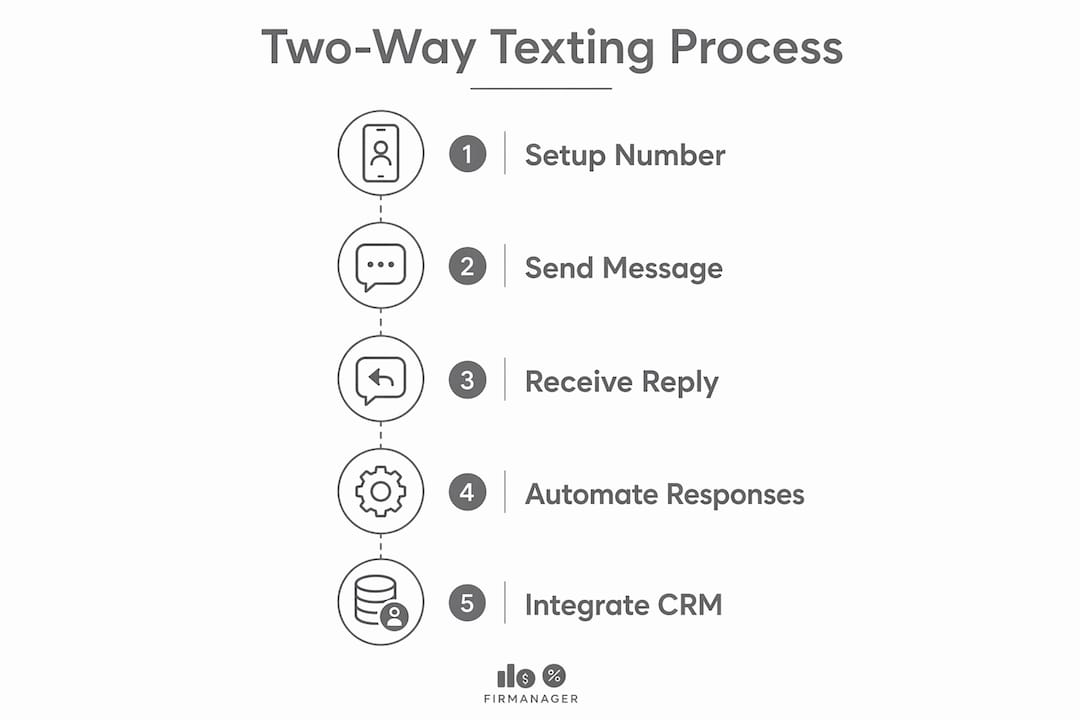
The ideal flow looks like this: an inbound message arrives → a webhook fires → the platform matches the sender to a customer record → the message appears in the inbox linked to the open work order → a scheduler or automated rule replies → the exchange is logged with a timestamp.
Key integration touchpoints to require from any platform:
- Contact record linking: Every inbound text matched to an existing customer automatically.
- Work order updates: Reply content (reschedule requests, photo attachments) appended to the relevant job record.
- Scheduling sync: Reschedule replies trigger a calendar update without manual re-entry.
- Event logging: Every send, receive, and opt-out timestamped for audit and compliance.
- SLA and routing rules: Unread messages after a set time escalate to a supervisor or alternate agent.
For developer teams, APIs and webhooks handle inbound routing and event notifications — most integration-first vendors provide schema documentation and retry logic examples. No-code teams can use native integrations or middleware to connect SMS events to their CRM without writing a line of code.
Treat SMS as a component of your CRM, not a separate channel. Every inbound reply should be logged and linked to the customer’s record for service continuity and better segmentation. — CM.com
Pro Tip: Use AI-driven smart replies to handle high-volume routine queries automatically — route only the exceptions to a human agent. This keeps response times fast without adding headcount.
Checklist: what to require from any vendor before you buy
Must-have features
- Persistent shared inbox with conversation threading
- Conversation routing and agent assignment rules
- CRM and work-order logging (automatic, not manual)
- Keyword-based automation and auto-reply templates
- API and webhook support with documented schemas
- Role-based access control for schedulers, dispatchers, and managers
- MMS support for inbound photo and document attachments
Vendor questions to ask
- What is your message throughput per second, and does it scale during peak dispatch windows?
- Which number types do you support: 10DLC, toll-free, short code, long number?
- How do you handle opt-in consent capture and opt-out logging?
- What is your data retention period, and can we export full conversation logs?
- What are your SLA and support hours for delivery failures?
- Is pricing per message, per seat, or per throughput tier — and what are MMS surcharges?
Technical choices: 10DLC, toll-free, short codes, and APIs explained
| Number Type | Best For | Throughput | Key Trade-off |
|---|---|---|---|
| Dedicated short code | High-volume campaigns, branded keywords | Very high | Expensive lease; weeks-long setup |
| Shared short code | Keyword-based opt-ins on a budget | Moderate | Shared with other brands; carrier restrictions tightening |
| 10DLC (local long code) | Local-branded service messages, A2P | Moderate | Requires carrier registration; best for conversational threads |
| Toll-free SMS | Broad acceptance, national reach | Moderate–high | Less local feel; requires toll-free verification |
| Long number (international) | Global reach | Low | Not suited for high-volume U.S. A2P use |
Key points on number selection:
- 10DLC is the standard for most U.S. service businesses sending appointment and dispatch messages. Short codes, long numbers, and 10DLC each carry different cost, throughput, and regulatory profiles — choose based on your monthly volume and use case.
- Toll-free SMS works well for businesses with a national customer base and moderate volume.
- APIs and webhooks handle inbound routing regardless of number type; your platform should expose both so your CRM or work-order system receives every reply as a structured event.
U.S. legal essentials: TCPA, consent, and opt-outs
TCPA governs text messaging in the United States. Non-compliance carries statutory damages per message — the risk is real and the rules are specific.
Compliance checklist:
- Obtain express written consent before sending promotional texts.
- For transactional messages (appointment reminders, service updates), document that the customer initiated the relationship.
- Include your business name, message purpose, and estimated frequency in the opt-in disclosure.
- Provide a clear opt-out mechanism in every message thread (e.g., “Reply STOP to unsubscribe”).
- Honor opt-outs immediately — within the same message session.
- Log the timestamp, source, and method of every consent capture.
- Retain consent and opt-out records for a minimum of four years.
Sample consent language: “By providing your phone number, you agree to receive service updates and appointment reminders from [Business Name] via text. Message frequency varies. Reply STOP to opt out. Msg & data rates may apply.”
Compliance note: This article is general information, not legal advice. Confirm your specific consent and recordkeeping obligations with a qualified attorney or by reviewing the FCC’s TCPA guidance directly.
How to measure success: KPIs and ROI signals
| Metric | Definition | Data Source | Sample Target |
|---|---|---|---|
| Response rate | share of outbound texts that receive a reply | Platform inbox | a significant portion |
| Average response time | time from send to customer reply | Platform analytics | typically short |
| First-contact resolution | issues resolved in one SMS exchange | Work order logs | substantial share |
| No-show reduction | drop in missed appointments after SMS confirmation | Scheduling system | measurable improvement |
| NPS/CSAT lift | score change after SMS touchpoints added | Survey tool | noticeable increase |
A simple ROI signal: (time saved per week × employee hourly rate + revenue from recovered bookings − monthly messaging cost) ÷ monthly messaging cost. Even modest no-show recovery at $150 per recovered appointment can offset a full month of SMS platform costs within the first few weeks.
Key metrics to track from launch:
- Response rate by message type (confirmation vs. dispatch vs. feedback)
- Opt-out rate (a spike signals messaging frequency or relevance problems)
- Conversion rate from SMS quote prompts
- Average resolution time compared to phone-based baseline
How Firmanager implements two way texting in your operations
Firmanager embeds two-way SMS directly into its operations platform — not as a bolt-on, but as part of the same interface where you manage work orders, dispatch, and customer records.
Key features that surface interactive text communication inside Firmanager:
- Real-time SMS notifications tied to work order status changes and scheduling events
- Customer and work-order linked inbox so every reply is matched to the right job automatically
- Route and dispatch updates sent by text with reply routing back to the dispatcher’s queue
- Employee mobile portal for field staff to receive and respond to job updates by text
- Audit logs capturing every message send, receive, and opt-out with timestamps
A typical workflow: a booking is created → Firmanager sends an automated SMS confirmation → a reminder fires 24 hours before the job → the customer replies to reschedule → the inbox routes the reply to the scheduler → the work order updates → the assigned technician receives a new ETA notification. No phone tag. No manual re-entry.
When two-way SMS is embedded in the same platform as your CRM and work orders, every conversation becomes part of the service record — not a disconnected thread in a separate app.
Pro Tip: Start with one message type — appointment confirmations — and instrument response rate and no-show reduction before expanding to dispatch coordination or post-service feedback. A focused pilot gives you clean data to justify the broader rollout.
Five questions to answer before enabling two-way SMS
- What is your expected monthly message volume? This determines whether 10DLC, toll-free, or a short code is the right number type and what your per-message cost will be.
- Does the platform log every reply to a CRM record or work order automatically? Manual logging defeats the operational benefit.
- How does the vendor handle consent capture and opt-out recording? If they can’t show you the consent log, walk away.
- How are inbound messages routed and assigned? Unrouted replies sitting in a shared inbox with no assignment rules create the same bottleneck as a phone queue.
- What are the SLA and support hours for delivery failures? A missed appointment confirmation during a carrier outage has a direct revenue cost.
Pilot scope to validate before full rollout:
- Select one service line or geographic zone
- Run for 30 days with response rate, no-show rate, and opt-out rate tracked weekly
- Define a go/no-go threshold before the pilot starts (e.g., response rate above 35%, opt-out rate below 3%)
Key Takeaways
Two-way texting reduces no-shows, cuts call volume, and improves NPS when it’s embedded in your CRM and work-order system — not treated as a standalone blast channel.
| Point | Details |
|---|---|
| Define the channel correctly | Two way texting means replyable threads routed to a platform inbox, not one-way blasts. |
| Compliance is non-negotiable | TCPA requires express consent, clear opt-outs, and timestamped records before you send a single promotional text. |
| Integration drives the ROI | Every inbound reply must auto-link to a customer record and work order — manual logging erases the time savings. |
| Measure from day one | Track response rate, no-show reduction, and first-contact resolution from your pilot’s first week. |
| Firmanager unifies it all | Firmanager connects SMS notifications, inbox routing, work orders, and dispatch in one platform — no separate SMS app required. |
The part most rollouts get wrong
Most service businesses treat two way texting as a notification upgrade — they automate the outbound message and ignore what happens when the customer replies. That’s where the value actually lives. A customer who replies “Can we reschedule?” at 7 PM on a Tuesday is giving you a chance to save the booking without a single phone call the next morning. If that reply lands in an unmonitored inbox, you’ve built a system that creates the illusion of responsiveness without delivering it.
The second mistake is skipping the consent infrastructure. TCPA enforcement is active, and the per-message statutory damages add up fast. Consent capture and opt-out logging aren’t a compliance checkbox — they’re the foundation the whole channel runs on.
Start narrow. One message type, one service line, four weeks. Instrument it properly and you’ll have the data to expand with confidence.
Firmanager gives you two way SMS built into your operations
If you’ve been running SMS through a separate tool that doesn’t talk to your work orders or CRM, you already know the cost: double entry, missed replies, and conversations that disappear when a staff member leaves. Firmanager solves that by putting two-way SMS notifications inside the same platform where you manage jobs, dispatch, invoicing, and customer records.

Every inbound reply links to the right work order automatically. Schedulers see the full conversation thread next to the job. Field staff get updates on their mobile portal. Opt-out logs are captured and stored. You get the response rates and no-show reductions without building a separate integration stack.
Start a free trial at Firmanager and see inbox routing, work-order linkage, and compliance logging in a live demo. No long-term contract required.
Useful sources for technical setup and compliance research
- NICE: What is two-way SMS messaging? — industry overview and read-rate context
- CM.com: What is two-way messaging? — number types, routing logic, and CRM integration guidance
- NotMyRobocalls: TCPA and spam text compliance — U.S. legal framework and consent requirements
- Textedly: Two-way SMS platform features — inbox, automation, and MMS capabilities reference
- 42voice integration resources — webhook and API documentation for SMS event routing
- Hauzed: AI smart replies for inbound SMS — automation patterns for high-volume inbound handling
- Firmanager workforce management comparison — platform evaluation criteria for operations managers
Next steps: Register your 10DLC number with your carrier, run a 30-day pilot on appointment confirmations, log all consent and opt-outs from day one, and track response rate weekly against your baseline.
Recommended
Run your whole business in one place
CRM, quotes, work orders, invoicing, expenses, HR and HSE — one login, every device. Free-forever plan.
Start free →