Progress Invoicing for Contractors: A Practical Guide
Progress Invoicing for Contractors: A Practical Guide
Progress invoicing splits a contract into staged bills so you get paid as work is delivered, not just when the job is done. It protects your cash flow, aligns client payments with completed work, and reduces your need to finance long projects out of pocket. To get started right now:
- Confirm your contract value and billing method before the first shovel hits the ground or the first line of code is written.
- Choose a cadence — milestone-based (payment triggers on accepted deliverables) or percent-complete (payment tracks work completed to date).
- Issue your first progress invoice with clear lines for this period’s amount, cumulative billed to date, and any retainage withheld.
A solid invoice template and accounting software cut the admin time significantly. Both are covered in detail below.
Key Takeaways
Progress invoicing protects cash flow by aligning client payments with delivered work — and the businesses that do it well combine clear contract language, consistent retainage tracking, and integrated billing software.
| Point | Details |
|---|---|
| Define milestones precisely | Write each billing trigger as a verifiable event, not a vague phrase, to prevent disputes. |
| Show retainage as a separate line | List gross earned, retainage withheld, and net due on every invoice for clean reconciliation. |
| Reconcile estimates to invoices | Match cumulative billed to contract value after each draw to catch overbilling early. |
| Invoicing and revenue recognition differ | Billing cadence does not change your accounting method — confirm treatment with your CPA. |
| Firmanager automates the workflow | Estimate-to-invoice linkage, retainage tracking, and an AR dashboard reduce admin errors across projects. |
Table of Contents
- What progress invoicing is and when you should use it
- How progress invoicing actually works: the three billing models
- Step-by-step: how to set up and issue a progress invoice
- Creating progress invoices in QuickBooks: a quick-start summary
- Exactly what fields belong on a progress invoice
- Three worked examples and a template checklist
- How to track and report on progress invoices
- U.S. accounting and tax considerations for progress billing
- How Firmanager reduces billing friction for progress invoicing
- What most contractors get wrong about progress billing
- Firmanager brings your invoicing, estimates, and field operations together
- Sources
What progress invoicing is and when you should use it
Progress invoicing — also called progress billing or staged billing — breaks a single contract into a series of invoices issued at defined intervals or completion thresholds. Instead of waiting until project closeout to send one large invoice, you bill incrementally as value is delivered.
The industry sometimes uses “milestone invoicing” and “progress billing” interchangeably, but there is a practical distinction. Milestone invoicing ties each invoice to a discrete, accepted deliverable (foundation poured, design approved). Percent-complete billing ties each invoice to a calculated share of total contract value, regardless of whether a specific deliverable is finished.
Common use cases:
- General contracting and construction (the most common application, where AIA forms G702/G703 and a schedule of values are standard documentation)
- Long software implementations and IT deployments
- Monthly retainers for professional services
- Material-heavy projects where you need cash to purchase supplies before the next phase
- Large equipment installations spanning multiple weeks
- Multi-month creative or marketing engagements
The core benefits are straightforward. Progress billing improves cash flow, aligns what clients pay with what you have actually delivered, and reduces the financing risk that comes with fronting labor and materials on a long project. For material-heavy or long-duration work, maintaining steady cash flow through staged invoices can be the difference between a profitable project and one that drains your operating account.
How progress invoicing actually works: the three billing models
Every progress billing arrangement uses one of three core models. Picking the right one depends on how your project is structured and how clearly you can measure completion.
Percent-of-completion
You calculate what percentage of the total contract is done, then invoice that share of the contract value. The most common measurement method is cost-to-cost: divide costs incurred to date by total estimated costs, then multiply it by the contract value. This model suits continuous work — a renovation in progress, a software build mid-sprint — where there is no clean deliverable to point to.
The trade-off is administrative effort. Cost-to-cost requires accurate job costing records, and any estimate error compounds across every invoice. Clients sometimes challenge the percentage, so your supporting documentation needs to be airtight.
Milestone-based billing
Each invoice is triggered when a defined deliverable is accepted. The contract specifies what each milestone is worth, and you bill that amount when the client signs off. This model works best for projects with discrete, verifiable outputs: a completed design phase, a passed inspection, a delivered software module.

Dispute risk is lower here because the trigger is objective. The cash-flow downside is that payment can bunch up unevenly if milestones are spaced far apart.
Time and materials with draws
You bill actual hours at agreed rates plus materials, usually on a regular cycle (weekly or monthly). Draws are partial payments against an estimated total. This model fits open-ended discovery work, service contracts, or projects where scope is genuinely uncertain at the start.
The table below compares the three models across the dimensions that matter most operationally.
| Billing model | Admin effort | Client transparency | Dispute risk | Cash-flow predictability |
|---|---|---|---|---|
| Percent-of-completion | High (requires job costing) | Moderate | Moderate | High if cadence is regular |
| Milestone-based | Low to moderate | High (clear triggers) | Low | Moderate (depends on spacing) |
| Time and materials | Moderate (timesheets required) | High (itemized) | Low to moderate | High if draws are frequent |
Step-by-step: how to set up and issue a progress invoice
Getting the setup right before you start billing saves significant reconciliation work later. Follow this sequence.
Pre-contract checklist
- Lock in the total contract value (TCV) and confirm it in writing before any work begins.
- Agree on the billing model (percent-complete, milestone, or T&M) and document it in the contract.
- Define retainage terms — the standard U.S. practice is some retainage withheld per draw, released on final acceptance.
- Set acceptance criteria for each milestone or billing period so disputes have a clear resolution path.
- Establish a change-order process — require written approval before any scope increase is billed.
Operational setup
- Build a schedule of values (SOV) or milestone list that maps each billing event to a dollar amount and a completion percentage.
- Set up sequential invoice numbering tied to the project or contract reference so every invoice is traceable.
- Link each progress invoice to the originating estimate or purchase order so cumulative totals reconcile automatically.
- Record cumulative billed to date on every invoice, not just the current period’s amount.
- Show retainage as a separate line item — never net it into the gross amount.
Issuing the invoice
- Generate the invoice from your estimate or SOV.
- Attach supporting proof: photos of completed work, signed timesheets, or inspection reports.
- Include payment instructions and your accepted payment methods.
- Add a line noting the next invoice date or trigger so the client is never surprised.
Pro Tip: Preview the next invoice date or milestone on every invoice you send. Clients who know what is coming next pay faster and raise fewer disputes at billing time.
Creating progress invoices in QuickBooks: a quick-start summary
QuickBooks Online is one of the most widely used accounting platforms for small contractors and service businesses, so it is worth covering the core workflow here. The full step-by-step with screenshots lives in Intuit’s official support docs — use those for navigation-level detail.
The core flow in QuickBooks Online:
- Turn on progress invoicing in Account and Settings under the Sales tab.
- Create an estimate for the project first. QuickBooks requires an existing estimate before it will generate a progress invoice.
- Open the estimate and select “Create invoice.” Choose whether to bill a fixed amount, a percentage of each line, or a custom amount per line.
- Each subsequent progress invoice pulls from the same estimate, so cumulative totals update automatically.
What to watch for:
- Invoice numbering: confirm your numbering sequence is consistent with your project reference system before you send the first invoice.
- Tax calculations: QuickBooks applies tax based on your product/service setup — verify that each line item’s tax treatment is correct before issuing.
- Estimate linkage: if you edit the original estimate after creating progress invoices, reconcile carefully. Changes can affect cumulative totals.
As BerryDunn notes, QuickBooks Online requires the estimate to exist first — verify your setup requirements before you rely on automated conversion for a live project.
Exactly what fields belong on a progress invoice
A well-structured progress invoice reduces client questions and speeds up payment. Every invoice you send should include the following.
Standard header fields:
- Project name and contract reference number
- Invoice number (sequential, tied to the project)
- Invoice date and payment due date
- Client name, address, and contact
- Your business name, address, license number (if applicable), and remittance instructions
Progress-specific lines (these are what separate a progress invoice from a standard one):
- Amount due this period
- Percent complete as of this invoice
- Cumulative billed to date (all prior invoices plus this one)
- Retainage withheld this period (shown as a separate deduction)
- Cumulative retainage withheld to date
- Net amount due after retainage
- Remaining contract balance
- Approved change orders billed this period (listed separately)
Investopedia’s breakdown of progress billings confirms that total contract amount, percent complete, cumulative billed, and remaining balance are the standard components — and that a schedule of values supports transparency for both parties.
Supporting attachments:
- Timesheets or labor logs for T&M invoices
- Photos or inspection sign-offs for milestone invoices
- Signed change-order documentation
Pro Tip: Add a one-line “Next invoice” note at the bottom of every invoice — either the next scheduled date or the next milestone trigger. It sets expectations and reduces the “when is the next bill coming?” email.
Three worked examples and a template checklist
Example 1: Milestone billing
A landscaping contractor has a $40,000 contract with four milestones.
| Milestone | Trigger | Amount |
|---|---|---|
| Site prep complete | Client sign-off | $8,000 |
| Irrigation installed | Inspection passed | $12,000 |
| Planting complete | Client walk-through | $12,000 |
| Final cleanup and punch list | Final acceptance | $8,000 |
Invoice 2 (irrigation milestone): Amount this period = $12,000. Cumulative billed = $20,000. Net due = $10,800. Remaining contract balance = $20,000.
Example 2: Percent-complete billing (cost-to-cost)
A general contractor has a $200,000 renovation contract. Total estimated costs: $160,000. Costs incurred through Month 2: $64,000.
Prior billings = $40,000. Amount this period = $40,000. Net due = $38,000.
Billed’s progress invoicing guide reinforces that showing each period’s amount, cumulative billed, and retainage as separate lines is the clearest way to prevent disputes on exactly these calculations.
Example 3: Time and materials with draws
A managed IT services firm bills $150/hour plus materials on a monthly draw cycle.
Month 1: 80 hours × $150 = $12,000 labor. Materials: $3,200. Total this period: $15,200. Cumulative billed: $15,200. No retainage (T&M contract). Net due: $15,200.
Template column labels for your invoice:
- Invoice date / Period
- Description of work
- % complete (or hours)
- Amount this period
- Cumulative billed to date
- Retainage withheld
- Net amount due
- Remaining balance
How to track and report on progress invoices
Billing accuracy depends on the controls you build around it. Tracking progress invoices is not just an accounting task — it is a project management function.
Key reports to run:
- Schedule of values vs. billed: compares each SOV line to what has been invoiced so you can spot overbilling or underbilling before the client does.
- Cumulative billed-to-date by project: your running total against contract value, updated after every invoice.
- AR aging by project: shows which invoices are outstanding and for how long, so you can prioritize collections.
- Retainage outstanding: tracks withheld amounts across all active projects so you know what is owed on final acceptance.
Reconciliation steps:
- After each billing period, reconcile your estimate or contract total to cumulative invoiced amounts.
- Match payments received to specific invoices — never apply a lump payment without noting which invoice it covers.
- Log retainage release on the final invoice and confirm the client’s acceptance documentation is on file.
Automation and workflow tips:
- Link estimates to invoices in your billing software so cumulative totals calculate automatically.
- Set automated payment reminders at 7 days before due and 1 day after due. Manual follow-up is a time drain that manual billing processes make worse at scale.
- Use a project-level billing dashboard to flag any project where invoiced amount exceeds the contract value — a common sign of unapproved scope creep.
Weekly review checklist:
- Any invoice past due by more than 7 days? Escalate to a phone call, not just an email.
- Any project where cumulative billed exceeds 90% of contract value but work is less than 90% complete? Flag for review before issuing the next invoice.
- Any approved change orders not yet billed? Add them to the next invoice cycle.
U.S. accounting and tax considerations for progress billing
Progress invoicing and revenue recognition are not the same thing. Issuing an invoice accelerates cash collection, but it does not automatically change how you recognize revenue under GAAP or for tax purposes. As NetSuite explains, ERP or accounting integration helps manage volume and reconcile billings to project accounting — but the underlying revenue recognition method is a separate decision that your CPA should guide.
Key considerations for U.S. contractors and service businesses:
- Revenue recognition: your invoicing cadence and your revenue recognition method can differ. Consult your accountant to confirm whether you are on cash basis, accrual, or percentage-of-completion for tax and GAAP reporting.
- Sales tax: state rules vary significantly. In some states, sales tax applies to each draw as goods or services are delivered; in others, it applies at project completion. Check your state’s department of revenue guidance or ask your CPA before issuing the first invoice.
- Retainage treatment: standard U.S. practice is to withhold 5–10% per draw as a performance bond. Show gross earned, retainage withheld, and net due as three separate lines so both parties can reconcile easily. Do not net retainage into the gross amount — it creates reconciliation errors at closeout.
- Contract language: require written change orders before billing any scope increase. Include a stop-work clause for invoices unpaid beyond your agreed terms — this protects you legally and operationally.
- Lien rights: on construction projects, your right to file a mechanics lien often depends on proper notice and timely invoicing. Consult a construction attorney for your state’s specific requirements.
This article provides general information, not legal or tax advice. Confirm revenue recognition treatment, sales tax obligations, and lien procedures with a qualified CPA or attorney.
How Firmanager reduces billing friction for progress invoicing
Managing progress invoices manually — spreadsheets, separate accounting software, disconnected timesheets — creates the exact gaps where billing errors and cash-flow delays happen. Firmanager connects the operational and financial sides of your business so your invoicing keeps pace with your field work.
What Firmanager handles for progress billing:
- Estimate-to-invoice linkage: convert an approved estimate directly into a progress invoice without re-entering line items.
- Schedule of values support: track each billing line against the contract value and cumulative billed to date.
- Retainage lines: add retainage as a separate line item on every invoice, with cumulative retainage tracked automatically.
- Automated invoice numbering: sequential numbering tied to the project or work order, so your audit trail is clean.
- Proof attachments: attach photos, timesheets, and sign-off documents directly to the invoice before sending.
- AR dashboard: see outstanding invoices, aging balances, and retainage owed across all active projects in one view.
The operational result is fewer admin errors, faster collections, and cleaner reconciliation at project closeout. For field service businesses managing multiple concurrent projects, that visibility is what keeps cash flow predictable. Linking your work orders to invoices is one of the fastest ways to close the gap between work completed and cash collected.
It gives you time to confirm scope, document change orders, and prepare the final invoice before the client is surprised by the closeout bill.*
What most contractors get wrong about progress billing
The most common failure in progress billing is not a math error. It is a documentation failure that happens before the first invoice is sent.
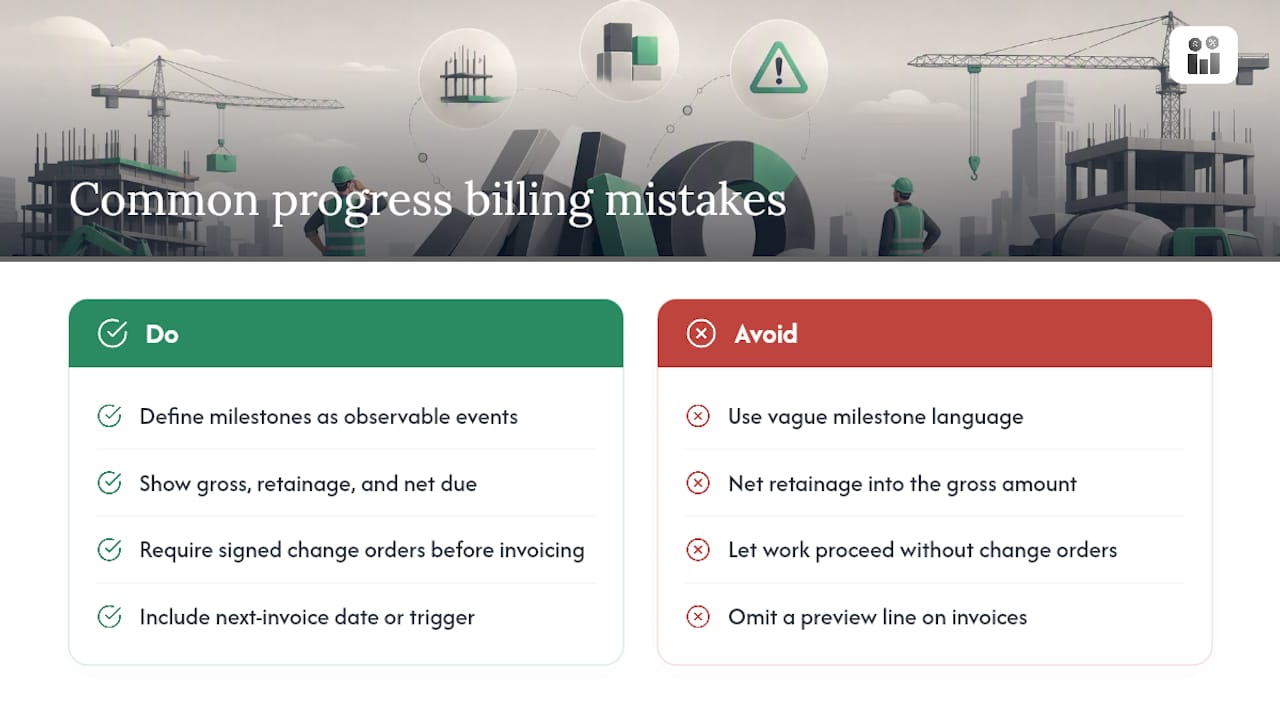
Vague milestones are the root cause of most billing disputes. When a contract says “substantial completion” without defining what that means in measurable terms, every invoice becomes a negotiation. The fix is simple: write milestones as observable, verifiable events. “Foundation poured and inspected” is a milestone. “Good progress on phase one” is not.
The second most common mistake is treating retainage as an afterthought. Contractors who net retainage into the gross amount rather than showing it as a separate line create reconciliation nightmares at closeout. The client’s accounts payable team cannot match what they owe against what was withheld, and you end up chasing a number no one can agree on. Show gross earned, retainage withheld, and net due every time.
Scope creep is the third failure mode, and it is the most expensive. Work expands, the team absorbs it, and no one issues a change order because the relationship feels solid. Then the final invoice arrives and the client sees a number that does not match their mental model of the contract. The rule is straightforward: no work outside the original scope without a signed change order, and no invoice for that work until the change order exists.
One more thing most guides skip: the preview line. Putting the next invoice date or trigger on every invoice you send is one of the highest-leverage habits in project billing. It removes the surprise, sets the client’s expectation, and shortens the payment cycle on the next draw.
Firmanager brings your invoicing, estimates, and field operations together
Running progress billing across multiple projects without an integrated platform means manually reconciling estimates, invoices, timesheets, and payments — a process that costs time and introduces errors at every handoff.

Firmanager is built for exactly this workflow. The platform connects your CRM, estimates, work orders, and invoicing in a single environment, so a progress invoice is generated from the same data your field team is already updating. Stripe integration means clients can pay directly from the invoice, and your AR dashboard shows outstanding balances and retainage across every active project in real time. No spreadsheet juggling, no re-entering line items, no chasing down which timesheet belongs to which invoice.
If you manage multi-week or multi-month projects and want to see how estimate-to-invoice automation works in practice, explore Firmanager’s platform and request a demo to see the billing workflow live.
Sources
- What is progress invoicing? | Stripe
- Understanding Progress Billings: Key Concepts and Benefits
- Progress Invoicing Guide | Billed
- When would you use progress invoicing? | GoCardless
Recommended
Run your whole business in one place
CRM, quotes, work orders, invoicing, expenses, HR and HSE — one login, every device. Free-forever plan.
Start free →