Role Based Access: How IT Admins Implement and Scale It
Role Based Access: How IT Admins Implement and Scale It
Role based access assigns permissions to named roles, then grants those roles to users, so your team enforces least privilege without managing individual rights one by one. Choose it as your default model for most organizations, especially when job functions map predictably to access needs. Consider an attribute-based approach only when decisions genuinely depend on context like time or location.
- Roles: named collections of permissions tied to a job function
- Permissions: specific actions allowed on a resource (read, write, approve)
- Role assignment: the link between a user and one or more roles
Key Takeaways
Role based access controls succeed when administrators define roles by function, enforce least privilege by default, and review assignments on a fixed schedule.
| Point | Details |
|---|---|
| Define roles by function | Name roles after capabilities like “approve invoice,” not job titles, so they stay stable as staff change. |
| Start broad, refine later | Begin with Admin, Editor, and Viewer roles before creating custom roles for documented exceptions. |
| Watch for role explosion | Too many narrowly scoped roles create more audit burden than they solve; consolidate where possible. |
| Automate the lifecycle | Use directory-group sync or SCIM provisioning to handle onboarding and offboarding without manual steps. |
| Firmanager applies RBAC by module | Firmanager assigns role-based permissions like Technician and Billing Admin across work orders, invoicing, and HR. |
Table of Contents
- What Is Role Based Access Control?
- Why Does Role Based Access Matter for Security Teams?
- What Are the Core Components of an RBAC Model?
- How Does Role Based Access Control Work Day to Day?
- What Do RBAC Role Patterns Look Like in Practice?
- Should You Choose RBAC, ABAC, or ACL?
- How Do You Implement Role Based Access Control?
- How Does a Service-Business Platform Apply RBAC?
- Why Firmanager Builds Role Based Access This Way
- See Role Based Access Control Inside a Service-Business Platform
- Frequently Asked Questions
- Sources
What Is Role Based Access Control?
Role based access control (RBAC) is a method of restricting system access based on the roles assigned to individual users within an organization, according to NIST. Permissions attach to roles, not to people, and role permissions can inherit through a hierarchy so a Senior Technician automatically gets everything a Technician has plus more.
IBM frames the model around three governing rules:
- Role assignment: a user can exercise a permission only after being assigned an appropriate role
- Role authorization: a user’s active role must be authorized for that user
- Permission authorization: a user can exercise a permission only if it’s authorized for their active role
A user can execute a transaction only if the user has selected or been assigned a role, that role is authorized for the user, and the transaction is authorized for that active role.
Those three rules are the required foundation. Everything else, hierarchies, constraints, custom roles, builds on top of them.
Why Does Role Based Access Matter for Security Teams?
RBAC enforces least privilege by default: users get exactly the permissions their function requires, nothing more. That shrinks your attack surface, because a compromised account only exposes whatever its role can touch, not the entire system.
The operational payoff shows up fastest during onboarding and offboarding. Assign a new hire to “Field Technician” and they inherit a tested, consistent permission set instantly, rather than someone manually copying rights from a coworker’s account (a common and risky shortcut). Offboarding works the same way in reverse: pull the role, and access disappears everywhere it applies.
- Faster provisioning with fewer manual errors
- Consistent permission sets across similar job functions
- Simpler audits, since reviewers check role definitions instead of thousands of individual grants
Compliance callout: RBAC directly supports separation-of-duty and least-privilege requirements found in NIST SP 800-53, and it’s a common control pattern auditors look for under HIPAA and PCI DSS.
What Are the Core Components of an RBAC Model?
Formal RBAC models describe five elements: subjects (S), roles ®, permissions (P), sessions (SE), and assignments that link them. A subject activates a session, the session invokes one or more roles, and each role carries a defined set of permissions. That’s the entire mechanism.
Role hierarchies let you build inheritance instead of duplicating permissions. A “Regional Manager” role can inherit everything a “Branch Manager” role includes, then add region-wide reporting on top. NIST’s RBAC model documents this hierarchical layer along with a constrained layer that enforces separation of duties, like preventing the same user from both creating and approving a purchase order.
- Subject: a user, service account, or system identity
- Role: a named function with an associated permission set
- Permission: an approved operation on a specific resource
- Session: the active period during which a subject exercises role permissions
- Assignment: the mapping between subjects and roles
Hierarchy and constraint layers reduce administrative overhead, but they also introduce a common failure mode: role explosion, where too many narrowly scoped roles pile up faster than anyone can track.
Custom roles and groups extend the base model, but each addition needs a documented reason or it becomes technical debt.
How Does Role Based Access Control Work Day to Day?
Enforcement follows a predictable sequence every time you provision access:
- Create the role and give it a clear, function-based name
- Attach permissions that match the actions that function actually performs
- Assign the role to a user, group, or service principal
- The active session applies whatever permissions the assigned roles grant
Scope matters as much as the role itself. Cloud platforms let you apply the same role at different levels: globally across an organization, at the project or resource-group level, or on a single object. A “Viewer” role scoped to one project behaves very differently than the same role scoped organization-wide, even though the permission set is identical.
Most real deployments assign multiple roles to a single user, and the effective permissions become the union of everything those roles grant. That union matters for auditing: if a user holds three roles, you have to review the combined effect, not each role in isolation, to confirm nothing violates separation-of-duty rules. Document effective permissions per user periodically rather than assuming role definitions alone tell the full story.
- Watch for permission unions that accidentally violate separation-of-duty rules
- Log role assignments and scope changes for audit trails
- Re-verify effective access after any role definition change
What Do RBAC Role Patterns Look Like in Practice?
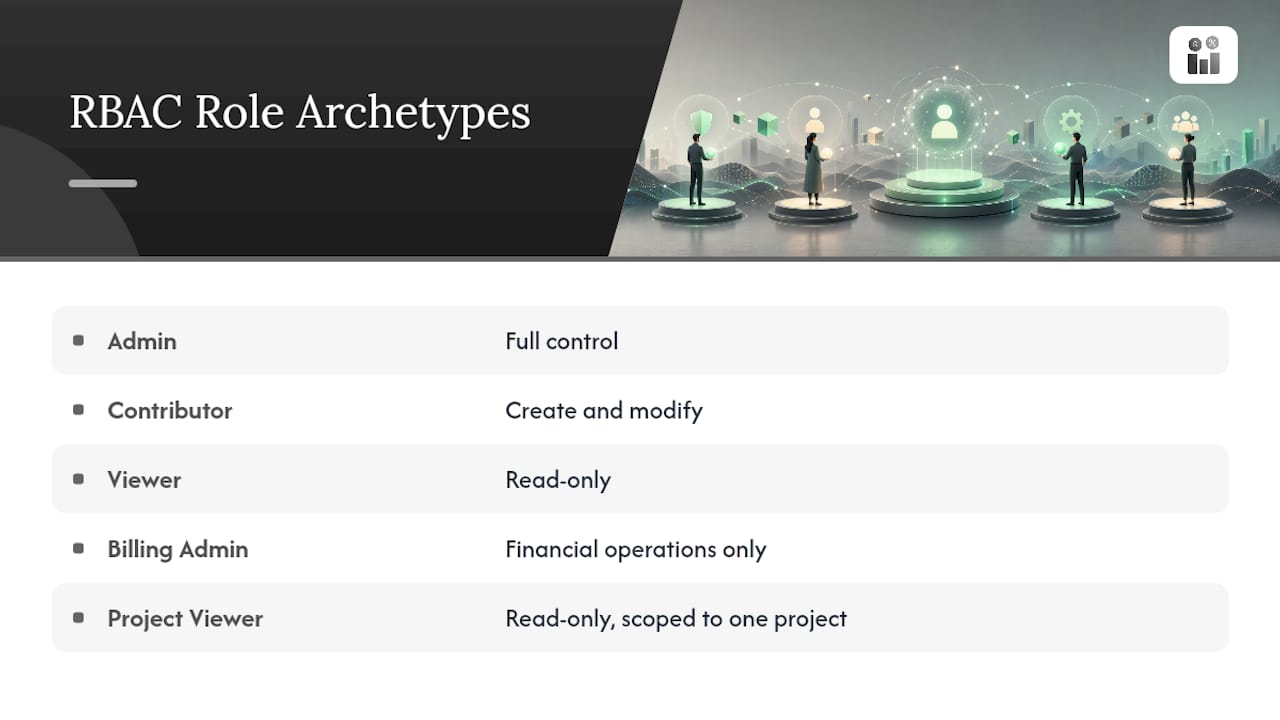
Most systems converge on a familiar set of archetypes: Admin (full control), Editor or Contributor (create and modify), Viewer (read-only), Billing Admin (financial operations only), and Project Viewer (read-only, scoped to one project).
Azure RBAC is a widely cited real-world example. It ships built-in roles like Owner, Contributor, and Reader, and lets you assign them at the management-group, subscription, resource-group, or resource level. A common pattern: assign “Reader” at the subscription level so a team can see everything, then assign “Contributor” only on the specific resource groups they actively manage.
A simplified role-to-permission mapping might look like this for a work order resource:
role: "Technician"
permissions: [read_work_order, update_work_order_status]
role: "Billing Admin"
permissions: [read_invoice, create_invoice, void_invoice]
Google Cloud IAM takes a similar tiered approach: basic, predefined, and custom roles, and it explicitly recommends checking predefined roles before building custom ones to avoid unnecessary role sprawl.
Should You Choose RBAC, ABAC, or ACL?
RBAC groups permissions into roles and assigns those roles to users. Attribute-based access control (ABAC) instead evaluates attributes like time, device, or location at request time. Access control lists (ACL) attach permissions directly to individual objects on a per-user or per-group basis. RBAC sits in the middle: simpler to implement than ABAC, more granular than a flat ACL.
Run through this checklist before committing to a model:
- Do most access needs map cleanly to job function? Choose RBAC.
- Do decisions depend on context like time, location, or device posture? Choose ABAC.
- Do you need fine-grained control over a small number of individual resources? Layer in ACLs.
- Start with RBAC for the majority of enterprise and cloud workloads
- Add ABAC only when environmental attributes genuinely change the decision
- Reserve ACLs for narrow, object-level exceptions RBAC can’t express cleanly
How Do You Implement Role Based Access Control?
Build RBAC from the top down, not the bottom up. Start broad, then refine.
- Inventory existing privileges across systems before defining a single role
- Group access by function, not by department or job title
- Define broad starter roles (Admin, Editor, Viewer) before creating anything custom
- Assign, test, and iterate with a small pilot group before rolling out organization-wide
Automation prevents most long-term maintenance headaches. Connecting your identity directory to application roles through SCIM provisioning or directory-group mapping cuts down on the manual errors that come from someone forgetting to revoke a role, according to IBM’s implementation guidance.
- Automate onboarding and offboarding through directory-group sync
- Schedule quarterly permission reviews and separation-of-duty checks
- Log every role assignment change and alert on unusual grants
Pro Tip: Resist the urge to create a new role every time someone asks for one extra permission. Check whether an existing role already fits before building another, since role sprawl is the single most common RBAC failure mode.
How Does a Service-Business Platform Apply RBAC?
Inside a field-service SaaS product, roles typically map to functions like Work Order Admin (full control over job scheduling), Technician (update assigned work orders only), Billing Admin (invoice and payment operations), and Viewer (read-only reporting access).
Enforcement happens at the object level: a Technician role grants update_work_order_status but withholds void_invoice, so a field employee can close out a job without ever touching financial records.
- Work Order Admin: create, assign, close work orders
- Technician: view and update only assigned work orders
- Billing Admin: create and void invoices, no work order editing rights
Pro Tip: Define roles around what someone does, not their job title. “Approve invoice” stays stable even when titles change; “Office Manager” doesn’t.
Why Firmanager Builds Role Based Access This Way
We design role permissions around least privilege first: every custom role starts narrow, then expands only when a documented task requires it. Audit logs and role templates exist because administrators shouldn’t have to guess who can touch payroll data or void an invoice six months from now.

See Role Based Access Control Inside a Service-Business Platform
Firmanager builds role permissions directly into every module, so a service business doesn’t need a separate identity system bolted on top of its CRM, invoicing, and work order tools.

Instead of stitching together spreadsheets and shared logins across your dispatch, billing, and HR tools, Firmanager gives every employee one login with a role that determines exactly what they see: Technicians touch work orders, Billing Admins handle invoicing through Stripe, and owners keep full visibility across every module. Role templates cut setup time for new hires, per-module permissions keep sensitive financial and HSE compliance data locked down, and audit logs track every assignment change. For businesses managing outsourced or part-time staff, the same model applies to structuring limited permissions for virtual assistants and contractors, granting exactly the access a temporary role needs and nothing more. If your current setup relies on shared passwords or manual permission tracking, start a free trial on Firmanager and set up your first role template today.
Frequently Asked Questions
What is role based access control in simple terms? It’s a system where you assign permissions to a named role, like “Technician” or “Billing Admin,” and then assign users to that role instead of managing individual permissions per person.
Is role based access the same as user roles and permissions? Yes. “Role based access,” “user roles and permissions,” and “role permissions management” all describe the same underlying model: grouping access rights into roles rather than assigning them individually.
How do you implement role based access control from scratch? Inventory current access, group it by function, define a small set of broad starter roles, assign them to a pilot group, and refine based on what’s missing or excessive before rolling out further.
What’s the difference between RBAC and ABAC? RBAC grants access based on a user’s assigned role. ABAC evaluates attributes like time, location, or device at the moment of the request, making it better suited for dynamic, context-dependent decisions.
How often should you audit role assignments? Quarterly reviews are a common baseline for most organizations, paired with immediate checks whenever someone changes roles, teams, or leaves the organization.
Sources
- What Is Role-Based Access Control (RBAC)? | IBM
- role-based access control (RBAC) - Glossary | CSRC
- Roles and permissions | Identity and Access Management (IAM) | Google Cloud Documentation
Recommended
Run your whole business in one place
CRM, quotes, work orders, invoicing, expenses, HR and HSE — one login, every device. Free-forever plan.
Start free →