Best Job Scheduling Software for Operations Teams 2026
Best Job Scheduling Software for Operations Teams 2026
Firmanager is the best job scheduling software for US field-service and operations teams, combining drag-and-drop scheduling, dispatch and routing, a mobile employee app, time tracking, payroll integrations, and onboarding support in a single subscription. For teams that need only shift rostering, Deputy handles labor compliance and timesheet controls well. For home-service professionals who want a mobile-first booking experience, Housecall Pro is the cleaner fit.
These picks were selected on five criteria: scheduling flexibility (templates, recurring jobs, drag-and-drop), mobile employee self-service, dispatch and route optimization, time and attendance tracking, and payroll/accounting integrations. Trial availability and US-based support were also weighted.
- Firmanager — all-in-one field service suite (dispatch, CRM, invoicing, time tracking, HSE compliance)
- Deputy — advanced rostering and labor cost controls for hourly workforces
- Housecall Pro — mobile booking and payment workflows for in-home service teams
- Jobber — straightforward job and client workflows for small trade businesses
- When I Work — shift scheduling and team messaging for hourly teams
- Sling — shift templates and labor cost visibility for small to mid-size teams
- ClockShark — job-based time tracking with crew scheduling for field and construction crews
Table of Contents
- What’s the best job scheduling software right now?
- Per-platform profiles: what each tool does best
- How to choose the right job scheduling software for your business
- Service scheduling vs. IT workload automation: why the distinction matters
- Final recommendation and next steps
- Key Takeaways
- Why an all-in-one platform usually wins for field service
- Firmanager: the all-in-one alternative for service operations
- Sources and further reading
What’s the best job scheduling software right now?
| Platform | Best For | Pricing Signal | Key Scheduling Features | Mobile App | Time Tracking | Dispatch / Route | Integrations | Ease of Setup | Support |
|---|---|---|---|---|---|---|---|---|---|
| Firmanager | US field-service & operations teams needing an integrated suite | Free plan; paid tiers available | Drag-and-drop, recurring jobs, work orders, templates | ✅ Employee self-service portal | ✅ Time & leave tracking | ✅ Route & dispatch management | CRM, invoicing (Stripe), payroll, accounting | Modular onboarding; guided setup | SMS/email notifications; cloud-synced |
| Jobber | Small service businesses needing simple job & client management | Free trial available; entry-level paid plan | Job scheduling, client workflows, quote-to-invoice | ✅ Mobile app | ✅ Basic time tracking | Limited routing | QuickBooks, Stripe | Fast setup for small teams | Chat and email support |
| Housecall Pro | Home-service teams wanting mobile-centric booking | Free trial; tiered paid plans | Online booking, recurring jobs, drag-and-drop | ✅ Strong mobile app | ✅ Timesheets | Basic dispatch | QuickBooks, Stripe, Mailchimp | Moderate onboarding | Phone, chat, email |
| When I Work | Hourly shift-based teams needing simple rostering | Free plan for small teams; paid tiers | Shift scheduling, templates, open shifts | ✅ Team messaging app | ✅ Time clock | Not included | Payroll integrations (ADP, Gusto) | Very fast setup | Chat and email |
| Deputy | Businesses needing rostering plus labor compliance | Free trial; per-user monthly pricing | Advanced rostering, shift swaps, demand forecasting | ✅ Self-service scheduling | ✅ Timesheets & compliance | Limited | ADP, Xero, QuickBooks, POS systems | Moderate | Phone, chat, email |
| Sling | Small to mid-size teams needing shift templates | Free plan; paid tiers | Shift templates, schedule publishing, labor cost view | ✅ Mobile app | ✅ Basic time clock | Not included | Limited payroll integrations | Very fast | Chat and email |
| ClockShark | Field and construction crews prioritizing time tracking | Free trial; per-user pricing | Crew scheduling, job assignments | ✅ GPS-enabled mobile app | ✅ Job-based time tracking | Basic GPS tracking | QuickBooks, ADP, Sage | Fast setup | Phone, chat, email |
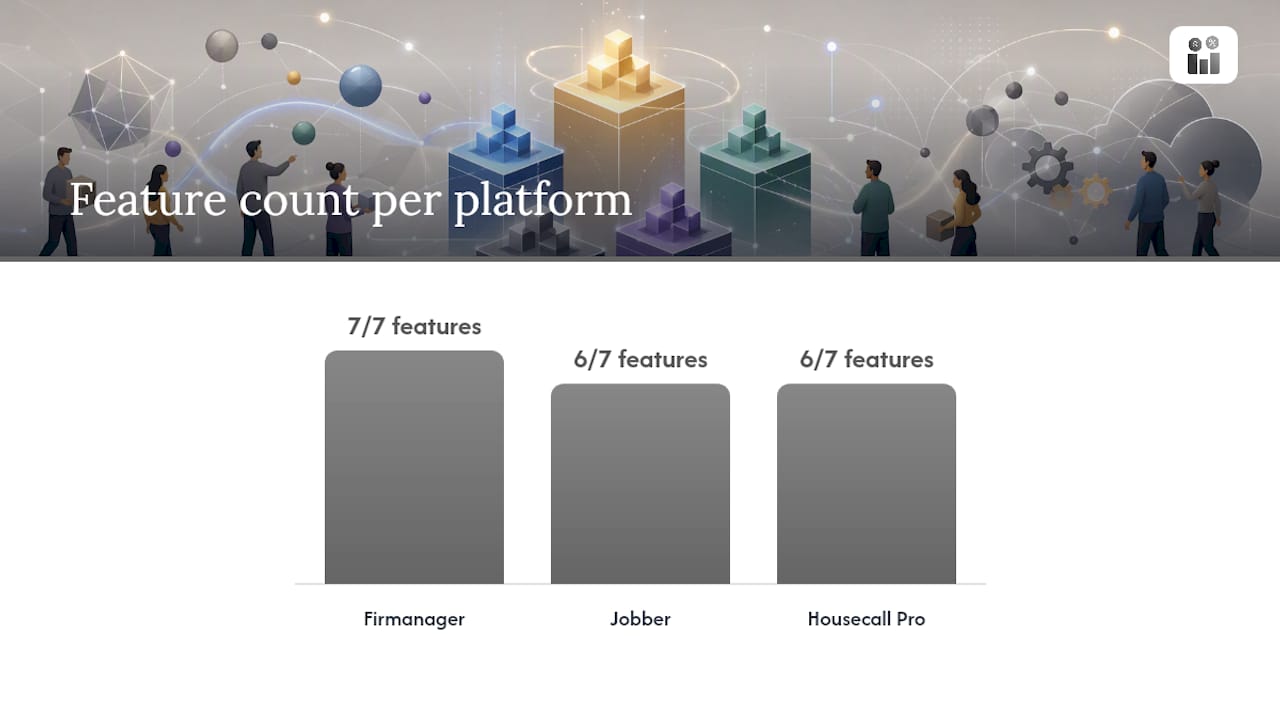
Pricing signals reflect publicly available information at the time of writing; confirm current plan details directly with each vendor. “Dispatch / Route” indicates whether the platform includes built-in route optimization or dispatch management, not just a map view.
How these picks were chosen: Each platform was evaluated against a feature checklist (scheduling flexibility, mobile app, time tracking, dispatch, integrations), user review signals from Capterra and G2, free trial or demo availability, and US market support. The AIMultiple enterprise scheduler analysis also informed the buyer criteria used here, particularly around integrations, centralized monitoring, and security.
Per-platform profiles: what each tool does best
Firmanager
Firmanager covers the full operations cycle: assign work orders, dispatch technicians with route optimization, track time and leave, manage HSE compliance, and push invoices through Stripe, all from one login. That breadth matters most for operations managers who currently toggle between a scheduling tool, a separate invoicing app, and a spreadsheet for timesheets.
Strengths:
- Integrated dispatch and route management alongside CRM and customer/facility records
- Employee self-service mobile portal for time tracking, leave requests, and job updates
- Real-time financial analytics, supplier management, and document handling in the same platform
Watch for: As an all-in-one platform, it carries more features than a team that only needs shift rostering will use. Teams with a single, narrow need (pure shift scheduling) may find a lighter tool faster to configure initially.
Pricing signal: Free plan available; paid tiers scale by seats and usage. Free trial accessible at firmanager.cloud. Available in the US.
Jobber
Jobber targets small trade businesses — plumbers, landscapers, cleaners — that need to move a job from quote to invoice without complexity. The client management workflow is clean, and the quote-to-job pipeline is one of the faster ones in this category.
Strengths:
- Quote, schedule, and invoice in a single connected workflow
- Client hub lets customers approve quotes and pay online
- QuickBooks sync covers most small-business accounting needs
Watch for: Dispatch and route optimization are limited compared to platforms built for larger field crews. Reporting depth is basic at the entry tier.
Pricing signal: Free trial available; entry-level paid plan published on Jobber’s site. US market supported.
Housecall Pro
Housecall Pro is built around the moment a customer books a home-service appointment. Online booking, automated reminders, and in-app payment collection are its core strengths. The mobile app is polished and designed for technicians who spend their day in the field.
Strengths:
- Customer-facing online booking with automated confirmation and reminder messages
- In-app card payments and financing options at the point of service
- Recurring job scheduling and maintenance plan management
Watch for: Labor compliance and advanced rostering features are thinner than Deputy’s. Larger crews with complex dispatch needs may outgrow it.
Pricing signal: Free trial available; tiered paid plans. US market supported. For a deeper look at cloud-based employee scheduling software, the ExpressBook survey covers Housecall Pro alongside other mobile-first platforms.
When I Work
When I Work focuses on one problem: getting the right hourly employee on the right shift, with a time clock they can punch from their phone. The team messaging feature reduces the back-and-forth of shift swaps.
Strengths:
- Drag-and-drop shift builder with open-shift posting
- Built-in team chat reduces scheduling-related messages outside the app
- Payroll integrations with ADP and Gusto
Watch for: No dispatch or route optimization. Not suited for field-service teams that assign jobs to locations rather than shifts to employees.
Pricing signal: Free plan for small teams; paid tiers add advanced features. US market supported.
Deputy
Deputy offers features focused on managing labor costs and monitoring schedules to manage labor spend and compliance. For businesses in retail, hospitality, or healthcare with strict labor rules, that visibility is practical.
Strengths:
- Demand-based scheduling suggestions based on sales or foot-traffic data
- Timesheet export with compliance annotations for US labor law requirements
- Broad payroll integrations: ADP, Xero, QuickBooks, and major POS systems
Watch for: Deputy is a workforce management tool focusing on labor compliance and scheduling without work order management, CRM, or dispatch routing.
Pricing signal: Free trial; per-user monthly pricing. US market supported.
Sling
Sling keeps schedule-building simple. Managers create shift templates, publish them, and track labor costs against budget. The free plan covers basic scheduling for teams that don’t need time tracking or integrations.
Strengths:
- Shift templates speed up recurring weekly schedules
- Labor cost dashboard shows budget vs. actual hours
- Free plan covers core scheduling for small teams
Watch for: Integration depth is limited. Teams that need payroll sync or field dispatch will need additional tools. See the small-business scheduling alternatives roundup for context on where Sling fits in the broader SMB market.
Pricing signal: Free plan available; paid tiers add time tracking and integrations. US market supported.
ClockShark
ClockShark is built for crews that work at job sites rather than fixed locations. GPS-enabled time tracking lets managers verify that employees clocked in at the right address. Job-based time coding feeds directly into payroll and job costing reports.
Strengths:
- GPS clock-in with geofencing for job-site verification
- Job-based time tracking maps hours to specific projects or cost codes
- QuickBooks, ADP, and Sage integrations for payroll and job costing
Watch for: Scheduling features are simpler than Jobber or Housecall Pro. ClockShark is strongest when time tracking is the primary need and scheduling is secondary.
Pricing signal: Free trial; per-user monthly pricing. US market supported.
Statistic callout: Capterra and G2 both list Jobber and Housecall Pro among the top-rated field-service scheduling platforms for small businesses, with user reviews consistently citing ease of setup and mobile usability as the leading satisfaction drivers.
How to choose the right job scheduling software for your business
Start with your primary constraint. If your team dispatches technicians to job sites, dispatch and route optimization must be in the platform, not bolted on later. If you manage hourly shift workers in a fixed location, labor cost visibility and compliance-ready timesheets matter more than routing.
Prioritized decision criteria:
- Dispatch and routing — does the platform assign jobs to technicians and optimize travel order, or does it only show a calendar?
- Mobile employee self-service — can technicians clock in, view job details, and submit timesheets from their phones without calling the office?
- Scheduling flexibility — drag-and-drop, recurring job templates, and bulk schedule publishing save hours each week at scale
- Time and attendance — GPS clock-in, overtime alerts, and compliance-ready exports reduce payroll errors
- Payroll and accounting integrations — QuickBooks, ADP, Gusto, and Xero are the most common; confirm the integration is two-way, not just an export
- API and webhooks — if you run a best-of-breed stack, confirm the platform can connect to your CRM or ERP; Zapier integrations can bridge gaps when native connectors are absent
- Compliance and security — employee data, GPS records, and payroll figures require role-based access controls and data encryption
- Scalability — check seat limits and feature gates at the next pricing tier before you need them
Questions to ask vendors in a demo:
- What is the onboarding timeline for a team of our size, and is there a dedicated onboarding contact?
- What are your SLA commitments and support hours for US customers?
- Can we export all data (schedules, timesheets, job records) in a standard format if we switch platforms?
- Does the mobile app have full feature parity with the desktop, or are some functions desktop-only?
- Which payroll platforms are natively integrated, and how often does the sync run?
Red flags to watch for:
- No employee mobile app, or a mobile app that only displays schedules without allowing clock-in or job updates
- Pricing that is not publicly listed and requires a sales call to get a basic quote
- No US-based support or support limited to email with multi-day response times
- Payroll integration that is export-only (CSV) rather than a live sync
Implementation timelines vary with team size and integration complexity, typically requiring weeks for small to mid-size businesses and longer for enterprises.
Pro Tip: During your trial, simulate a full week’s schedule using real constraints: your actual crew size, a mix of recurring and one-off jobs, and at least one last-minute change. A platform that handles that scenario without manual workarounds is genuinely ready for your operation.
For teams managing multiple locations, the multi-location scheduling software roundup covers platforms that handle cross-site rostering and reporting.
Service scheduling vs. IT workload automation: why the distinction matters
Searching for “job scheduling software” returns two very different categories of tools, and choosing the wrong one wastes weeks. The Wikipedia taxonomy of job scheduler software notes this category is also called workload automation (WLA), a term that covers IT batch processing, data pipelines, and CI/CD orchestration. That is not what an operations manager needs.
Service scheduling covers: assigning human workers to jobs or shifts, dispatching technicians to customer locations, tracking time and attendance, and managing customer-facing workflows like booking and invoicing.
Workload automation (WLA) covers: running automated IT jobs (batch data processing, ETL pipelines, CI/CD triggers) on servers or cloud infrastructure, with no human workforce component.
When to use a service scheduling platform:
- You dispatch technicians to job sites and need route optimization
- You manage hourly shift workers and need compliance-ready timesheets
- You need a mobile app your crew uses to clock in and view job details
When to use a WLA platform:
- You run nightly data pipelines between databases
- You orchestrate CI/CD jobs across cloud infrastructure
- You need DAG-based Python workflow execution
Apache Airflow is the standard for data-engineering pipelines: it models workflows as directed acyclic graphs (DAGs), runs Python-defined tasks, and provides a web UI for monitoring pipeline runs and logs. It has no CRM, no billing, and no mobile workforce app. Prefect takes a similar approach, with plain-Python flows and durable execution for data and ML workflows. Apache DolphinScheduler adds multi-cloud deployment and workflow versioning for high-throughput data orchestration.
Enterprise analysts observe a hard market split between WLA and service scheduling: choosing a WLA tool for field operations forces expensive workarounds because those platforms lack built-in CRM, billing, and customer-facing mobile capabilities. The Gitnux job scheduling software guide maps tools like AWS Batch, Google Cloud Workflows, and Azure Data Factory to containerized batch workloads, not field dispatch. The Beta Systems cloud scheduling comparison similarly positions Airflow as best for data engineering teams, separate from business service scheduling.
If your team dispatches people, not processes, you need a service scheduling platform.
Final recommendation and next steps
Firmanager is the recommended pick for US field-service and operations teams that want a single platform covering scheduling, dispatch, time tracking, invoicing, and compliance. The combination of a mobile employee portal, route and dispatch management, Stripe-integrated invoicing, and real-time analytics removes the need to stitch together separate tools.
For operations managers evaluating platforms: run a two-week trial with your actual crew and job types. Test dispatch assignment and route optimization on day one, connect your payroll integration by day three, and request an onboarding estimate before the trial ends. Those three steps will tell you more than any feature checklist.
If your primary need is pure data-pipeline orchestration rather than field dispatch, Airflow or Prefect are the right class of tool. For HVAC dispatch and routing specifically, the trade-specific comparison covers platforms optimized for that workflow.
Start your Firmanager trial at firmanager.cloud.
Key Takeaways
Firmanager is the strongest all-in-one choice for US field-service teams that need dispatch, time tracking, and invoicing in a single platform.
| Point | Details |
|---|---|
| Match tool class to your need | Service scheduling and IT workload automation are distinct categories; picking the wrong one forces expensive workarounds. |
| Dispatch is a hard requirement | If you assign technicians to job sites, confirm built-in route optimization before committing to any platform. |
| Test integrations during the trial | Verify payroll sync (ADP, Gusto, QuickBooks) is live and two-way, not just a CSV export, before you sign. |
| Mobile app parity matters | Confirm technicians can clock in, view job details, and submit updates from the mobile app without desktop access. |
| Firmanager for all-in-one operations | Firmanager covers scheduling, dispatch, time tracking, invoicing, and CRM in one subscription for US service businesses. |
Why an all-in-one platform usually wins for field service
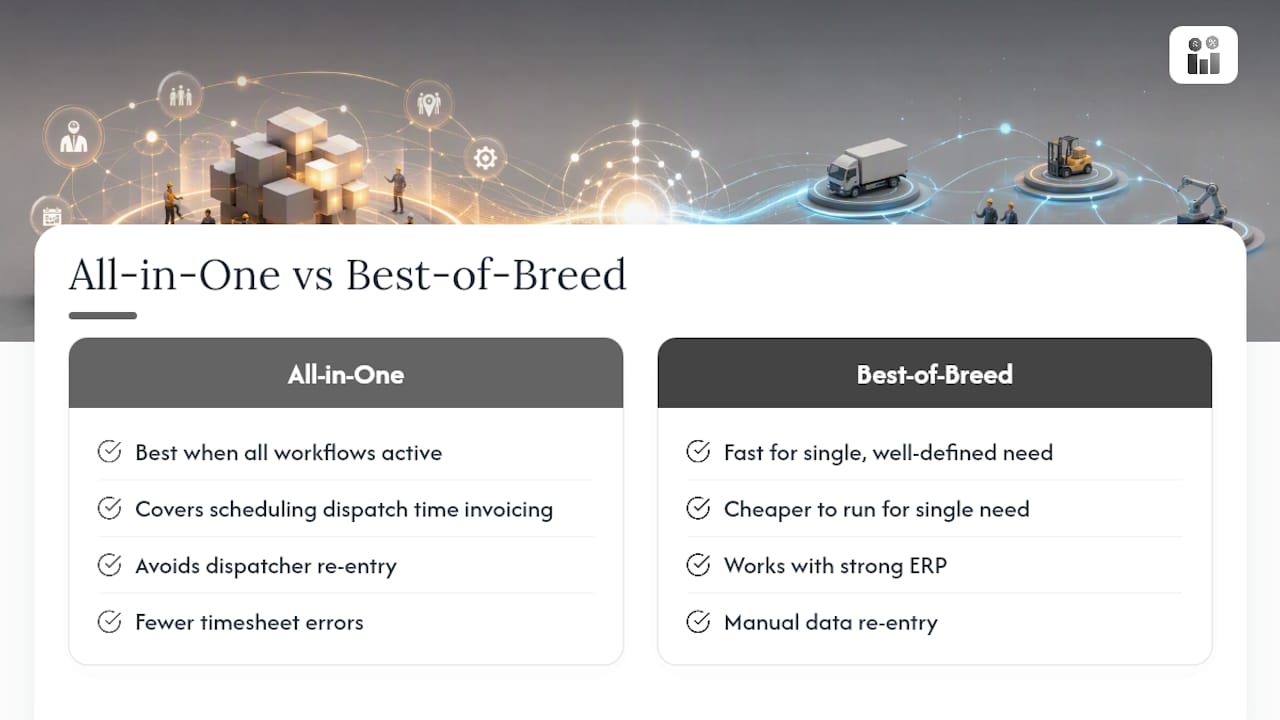
The conventional wisdom in software buying is “best-of-breed beats all-in-one.” Pick the best scheduler, the best invoicing tool, the best time tracker, connect them with Zapier, and you have a custom stack. For a software engineering team managing SaaS products, that logic holds. For a field-service operation managing 15 technicians across 30 jobs a day, it tends to break down fast.
The real cost of a fragmented stack is not the subscription fees. It is the time your dispatcher spends re-entering job data from the scheduling tool into the invoicing system, the timesheet errors that appear when the time tracker and the payroll platform fall out of sync, and the visibility gap when your operations manager cannot see job status, technician location, and outstanding invoices in the same view.
That said, niche tools are genuinely valid in two scenarios. First, when your operation has a single, well-defined need — pure shift rostering for a retail team, for example — a focused tool like Deputy or When I Work is faster to configure and cheaper to run. Second, when you already have a strong ERP or accounting system and only need scheduling to plug into it via a reliable integration, a lighter platform connected through a tool like Zapier can work well.
The teams that benefit most from an all-in-one platform are those where scheduling, dispatch, time tracking, and invoicing are all active daily workflows. For workforce management teams weighing open-source alternatives, the tradeoffs between integration depth and maintenance overhead are worth reviewing before committing to a fragmented stack.
Firmanager: the all-in-one alternative for service operations
Field-service teams comparing Jobber, Housecall Pro, Deputy, and the other platforms in this list are often solving the same underlying problem: too many tools, too much manual re-entry, and no single view of what’s happening across jobs, crew, and cash flow.

Firmanager gives US service businesses one platform that covers CRM, work orders, dispatch and route management, employee self-service, time and leave tracking, invoicing with Stripe, HSE compliance, and real-time financial analytics. No separate invoicing app. No disconnected timesheet tool. One login, one data set, one support team.
The free plan lets you test the core workflows before committing. Paid tiers scale by seats as your team grows. If you manage field crews and want to see dispatch, scheduling, and invoicing working together in a single interface, start your free trial at Firmanager and run it against a real week of jobs.
Sources and further reading
The following sources informed the platform comparisons, buyer criteria, and the service-scheduling vs. workload-automation distinction in this article.
- Top 10 Enterprise Job Scheduler Software
- Apache Airflow® is a platform created by the community to programmatically author, schedule and monitor workflows.
- List of job scheduler software
- Apache DolphinScheduler is the modern data orchestration platform. Agile to create high performance workflow with low-code
- Best 5 Cloud Scheduling Software for Businesses
- Best Job Scheduling Software (2026)
- Prefect - Workflow Orchestration for Data, ML, and Agents
- zapier.com
Recommended
Run your whole business in one place
CRM, quotes, work orders, invoicing, expenses, HR and HSE — one login, every device. Free-forever plan.
Start free →