Best Service Scheduling Software for Field Teams
Best Service Scheduling Software for Field Teams
For most U.S. field-service owners who need dispatch, work orders, routing, and on-site invoicing, an all-in-one field-service platform is the right call. Start your pilot with Firmanager today.
- Why it works: Consolidating scheduling, dispatch, mobile work orders, and Stripe-integrated invoicing into one platform reduces app-switching, recovers hours weekly per user, and shortens payment cycles from weeks to days.
- What to do next: Map your workflows from lead to final invoice, then run the 7-step trial checklist below before committing.
Table of Contents
- What does “service scheduling software” actually mean for field teams?
- How do you choose the best service scheduling software?
- What should you expect from implementation and onboarding?
- How Firmanager maps to every must-have feature
- A 7-step checklist to validate any FSM platform during a free trial
- What support and training resources should you expect?
- How does the platform handle security and data access controls?
- Does the software work with your existing hardware?
- What do current users say about FSM platforms?
- Key Takeaways
- The mistake most buyers make before they even open a demo
- Run your first live jobs on Firmanager
- Useful sources
What does “service scheduling software” actually mean for field teams?
This guide covers field-service management (FSM) platforms: software built to handle dispatch, routing, work orders, mobile technician apps, and invoicing for companies that send crews into the field. Think HVAC, plumbing, cleaning, electrical, and maintenance businesses.

Out of scope: meeting-booking tools, retail shift planners, and general appointment apps. Those solve a different problem for a different buyer.
This guide is for you if:
- You own or manage a U.S.-based field-service company
- You dispatch technicians daily and need real-time job visibility
- You want work orders, invoicing, and payments in one place
- Your team size ranges from a few techs to roughly 20
How do you choose the best service scheduling software?
Before you compare platforms, map your end-to-end workflows from lead to final invoice. Remove bottlenecks first. New software will not fix a broken process; it will just run it faster and make the errors harder to find.
The nine dimensions that matter
- Scheduling and dispatch — Can you drag-and-drop jobs, assign by skill or location, and see real-time tech status on a map?
- Mobile and offline support — Does the app work without a signal and sync automatically when connectivity returns?
- Work orders and job history — Can techs attach photos, notes, and documents on-site? Is the full job history searchable?
- Invoicing and payments — Can techs invoice on-site and accept Stripe payments? When invoice creation and payment processing live in different tools, reconciliation becomes a recurring manual task.
- Reporting and dashboards — Can you pull revenue per tech by job type without exporting to a spreadsheet?
- Integrations and API — Does it connect to your accounting software and GPS devices without middleware?
- Implementation and onboarding — What is the realistic go-live timeline? Does the vendor offer migration support?
- Pricing model — Per-seat, tiered, or usage-based? Is there a free trial or pilot option?
- Support and training — Is there a dedicated customer success manager (CSM), live chat, and documented training materials?
Trial questions to ask every vendor
- “Can my techs invoice on-site and collect Stripe payments from their phones?”
- “Does the mobile app work offline and sync automatically?”
- “How long does customer and job data migration take?”
- “What does your onboarding look like for a 10-tech team?”
Red flags that disqualify a vendor fast
- No mobile parity between the app and the desktop version
- Reporting requires manual exports to see basic revenue metrics
- No Stripe or flexible merchant integration
- No migration path for existing customer and job data
- Job status updates are not real-time
Automated scheduling and real-time mobile apps prevent double-booking, improve punctuality, and enable on-site invoicing with signature capture. Those are non-negotiables, not nice-to-haves.
What should you expect from implementation and onboarding?
Most field-service platforms take 30–90 days to fully deploy. Here is a realistic phased timeline:
- Days 1–14 (Pilot): Import 10–20 customers, configure one service line, and run live jobs with two or three techs. Measure scheduling time, invoice completion time, and payment settlement speed.
- Days 15–45 (Roll-out): Migrate remaining customer and job history. Train office staff and all technicians. Activate integrations (accounting, GPS, Stripe).
- Days 46–90 (Optimization): Refine dispatch rules, build recurring job templates, and set up dashboards for revenue per tech by job type.
Cost categories to budget for: subscription fees (per-seat or tiered), payment processing fees (Stripe’s standard rate applies), data migration time, and staff training hours.
Pro Tip: Pilot with live jobs, not demo scenarios. Have both office staff and technicians use the system during the trial. Friction that never shows up in a polished vendor demo will surface immediately on a real job.
The most common adoption failure is digitizing a broken process. If your current scheduling relies on a whiteboard and three group texts, fix the handoff logic before you automate it. Good vendor onboarding includes a dedicated CSM, video training libraries, and a migration checklist. Ask for all three before signing.
Below a moderate revenue level and with a relatively small technician team, an all-in-one platform saves money and time. Above that threshold, best-of-breed stacks often become necessary for advanced reporting and marketing needs.
How Firmanager maps to every must-have feature
Firmanager is built specifically for service companies. Every module connects to the same data layer, so your dispatcher, your techs, and your office manager all see the same job in real time.
| Feature dimension | Firmanager capability | Operational benefit |
|---|---|---|
| Scheduling and dispatch | Route and dispatch management with real-time job assignment | Fewer missed jobs, faster response times |
| Mobile app | Employee self-service mobile portal | Techs manage jobs, photos, and signatures on-site |
| Work orders | Work order management with document and photo attachments | Full job history searchable from any device |
| Invoicing and payments | Automated invoicing with Stripe integration | On-site payment collection; payment cycles shorten from weeks to days |
| Reporting | Real-time financial analytics and dashboards | Revenue per tech by job type without manual exports |
| CRM and job history | Customer and facility management with full interaction history | No repeat data entry; techs arrive informed |
| Integrations | API, SMS/email notifications, accounting sync | Fewer reconciliation errors, less manual data transfer |
| HSE compliance | Health, safety, and environment compliance tracking | Audit-ready records without a separate compliance tool |
The best scheduling software is a single, intuitive source of truth. Cross-module dashboards that show revenue, job status, and technician performance without requiring a spreadsheet export are what separate a genuine FSM platform from a scheduling app with invoicing bolted on.
Firmanager’s work-order and job-history features cover photo attachments, document storage, and recurring job templates. For teams running HVAC, cleaning, or maintenance routes, that depth matters. Customization is strong at the module level; teams with highly conditional workflows across many service lines may eventually need supplemental tools as they scale past the ~$500K revenue mark.
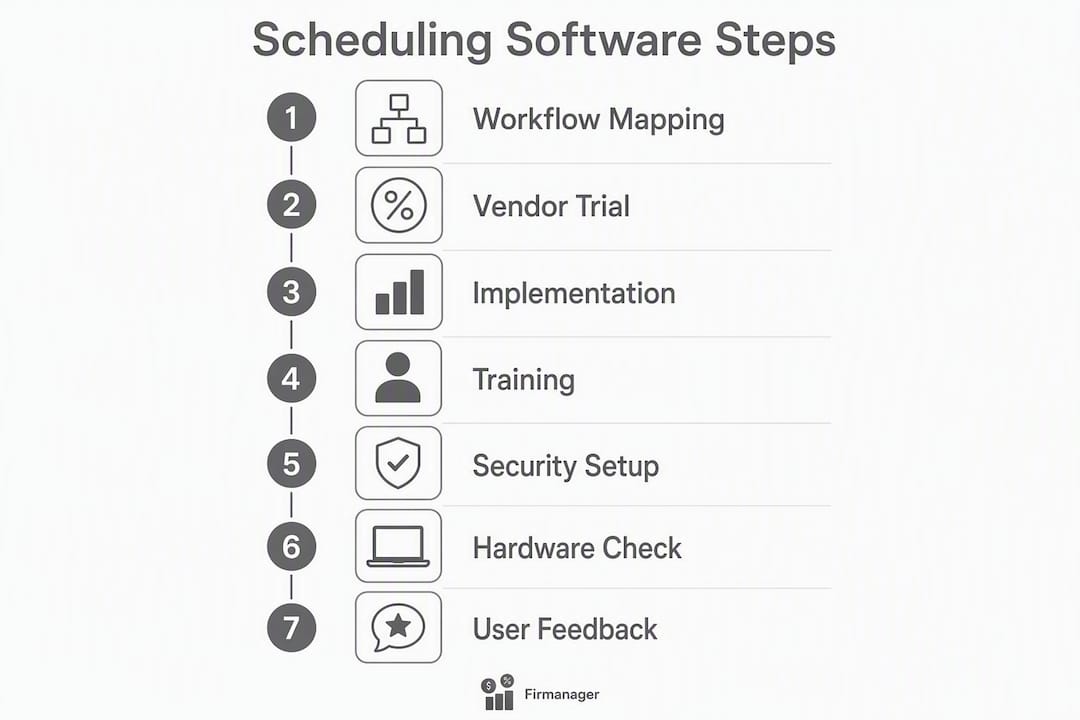
A 7-step checklist to validate any FSM platform during a free trial
Run these steps in sequence. Grade each one pass or fail before you commit.
- Import 10 customers — Time it. Pass: under 30 minutes with no data loss.
- Schedule three real jobs — Assign by tech and location. Pass: zero double-bookings, real-time map updates.
- Have a tech complete a job on mobile — Photos, notes, and customer signature captured on-site. Pass: all attachments sync to the office view within 60 seconds.
- Test offline sync — Disable mobile data mid-job, complete the work order, restore connectivity. Pass: automatic sync with no data loss.
- Invoice on-site and collect a Stripe payment — Pass: payment processed and recorded in the dashboard within the same session.
- Run a revenue-per-tech report — Pass: report generated in under two minutes without a spreadsheet export.
- Simulate a refund and check support response — Submit a support ticket. Pass: response within one business day.
| Trial metric | Target threshold | Pass / Fail |
|---|---|---|
| Customer import time | Under 30 minutes | Pass if met |
| Scheduling time per job | Under 3 minutes | Pass if met |
| Invoice completion time | Under 5 minutes on mobile | Pass if met |
| Offline sync accuracy | Zero data loss | Pass if met |
| Report generation time | Under 2 minutes | Pass if met |
| Support response time | Within 1 business day | Pass if met |
If Firmanager passes all six metrics during your pilot, you have a platform worth deploying. Start a demo or pilot here.
What support and training resources should you expect?
Good FSM vendors provide more than a help center. Look for a dedicated CSM during onboarding, live chat or phone support during business hours, video training libraries organized by role (dispatcher, technician, admin), and a documented migration checklist. Firmanager provides real-time SMS and email notifications to keep your team informed without requiring a separate communication tool. Training materials accessible on mobile matter too: your techs will not sit at a desktop to learn the app.
How does the platform handle security and data access controls?
Cloud-synced platforms like Firmanager store data centrally, which means role-based access controls are critical. Your dispatcher should not have access to payroll data; your techs should see only their assigned jobs. Ask every vendor for role-level permission settings, data encryption in transit and at rest, and audit logs that show who changed what and when. For U.S. field-service companies handling customer payment data through Stripe, confirm that the platform’s payment flow is PCI-compliant. Firmanager’s cloud architecture keeps data current across all devices, which also means your backup and recovery posture depends on the vendor’s infrastructure. Ask for their uptime SLA and data retention policy before signing.
Does the software work with your existing hardware?
Most cloud-based FSM platforms run through a browser or a native iOS/Android app, which means compatibility with existing hardware is largely a function of your devices’ operating systems. Firmanager’s mobile portal runs on standard smartphones and tablets. For teams using GPS tracking devices, confirm the platform’s API supports your GPS vendor’s data feed. Barcode scanners used for parts inventory typically connect via Bluetooth to a mobile device; check that the mobile app supports Bluetooth input if that workflow applies to your operation.
What do current users say about FSM platforms?
Vendor reputation is best evaluated through verified review platforms such as G2, Capterra, and Google Business profiles. When reading reviews, weight comments about support responsiveness and data migration experience more heavily than feature lists. A platform with strong features and poor migration support will cost you weeks of lost productivity during onboarding. Look for patterns in negative reviews: recurring complaints about mobile app crashes, slow support, or billing surprises are more telling than isolated one-star posts.
Key Takeaways
An all-in-one FSM platform with dispatch, mobile work orders, and Stripe-integrated invoicing is the right starting point for most U.S. field-service teams with moderate revenue levels and a small to medium-sized technician team.
| Point | Details |
|---|---|
| Map workflows first | Remove process bottlenecks before buying software; new tools will not fix broken handoffs. |
| All-in-one fits most teams | Below ~$500K revenue and 15–20 technicians, an all-in-one platform saves time and money. |
| Run a live pilot | Test with real jobs, real techs, and real customers; polished demos hide friction points. |
| Stripe integration matters | Integrated invoicing and payments eliminate manual reconciliation and shorten payment cycles. |
| Firmanager covers all nine dimensions | Dispatch, mobile work orders, Stripe payments, reporting, and HSE compliance in one platform. |
The mistake most buyers make before they even open a demo
The field-service software market is full of platforms that look identical in a 45-minute demo. The real differences show up on day three of a live pilot, when a tech is standing in a customer’s basement with no signal and needs to complete a work order.
What KaiosMedia sees repeatedly is buyers who skip workflow mapping, sign a contract after a polished demo, and then spend three months trying to configure software around a process that was already broken. The software gets blamed. The real problem was the process.
The evaluation framework in this article, map first, pilot with live jobs, measure six concrete metrics, exists because that sequence works. It surfaces the friction before you are locked in. If a platform cannot pass a 7-step live pilot, it will not perform when your whole team depends on it.
Firmanager’s trial resources are a practical place to run that pilot. Use them.
Run your first live jobs on Firmanager
Firmanager gives U.S. field-service teams dispatch, mobile work orders, Stripe-integrated invoicing, real-time reporting, and HSE compliance in one platform. No separate invoicing tool, no manual reconciliation, no app-switching between dispatch and payments.

The trial includes full access to every module: scheduling, dispatch, work orders, mobile portal, invoicing, and dashboards. Most teams complete the 7-step pilot checklist within their first week. Onboarding support is available from day one.
Start your Firmanager pilot and see how your workflows run in a live environment before you commit.
Useful sources
- 15 questions to ask before choosing field service management software — Backs the workflow-mapping-first recommendation and adoption pitfall warnings.
- All-in-one vs best-of-breed field service software (2026) — Source for the ~$500K / 15–20 technician inflection point and the app-fatigue argument.
- How to Evaluate Field Service Software: A Framework for Service Business Owners — Supports the pilot-testing approach and the “demo trap” warning.
- Stop Juggling Apps: Why Every Small Contractor Needs an All-in-One FSM — Evidence for reduced admin time, faster payment cycles, and app-switching costs.
- Essential Features to Look for in Field Service Management Software — Backs the automated scheduling, offline mobile, and on-site invoicing feature requirements.
- All-In-One vs Best-of-Breed Tech Stack for Service Biz | AnovaGrowth — Rule-of-thumb guidance on when team size and service complexity favor each approach.
- How to Choose Field Service Management Software 2026 | Softabase — Practical framework for matching platform scale to technician headcount.
- Firmanager – All-in-One Business Management Platform — Primary source for Firmanager feature details, integrations, and trial access.
Recommended
Run your whole business in one place
CRM, quotes, work orders, invoicing, expenses, HR and HSE — one login, every device. Free-forever plan.
Start free →