Best Estimating Software for Service Businesses in 2026
Best Estimating Software for Service Businesses in 2026
For service businesses managing quotes, dispatch, and invoicing across multiple jobs, Firmanager is the recommended all-in-one platform. It connects estimating directly to CRM, work orders, and billing so nothing falls through the cracks between the quote and the final invoice. Three reasons to act now:
- Efficiency: A single platform removes the back-and-forth between spreadsheets, email, and separate billing tools, cutting the time from quote to job start.
- Accuracy: Centralized cost libraries and templated quotes reduce pricing errors and protect your margins on every bid.
- Time-to-value: Firmanager’s free tier and structured onboarding mean you can run a live pilot in days, not months.
Ready to see it in action? Start a free trial or request a demo to walk through the estimating and quoting workflow with your own job data.
Table of Contents
- Why does an all-in-one estimating platform matter for service companies?
- What features must your estimating software include?
- How does Firmanager meet the must-have features checklist?
- What does implementation actually look like?
- How do you evaluate estimating software vendors before you buy?
- Key Takeaways
- The case for committing to one platform early
- Firmanager is built for service businesses like yours
- Useful sources and further reading
Why does an all-in-one estimating platform matter for service companies?
The gap between a winning estimate and a profitable job is almost always an operations problem, not a pricing problem. When your quoting tool doesn’t talk to your dispatch system, field techs work from outdated scope, change orders get missed, and invoices go out late. A single platform closes that gap.

Digital takeoff tools can significantly reduce takeoff time compared with manual methods, and that time saving compounds: faster quotes mean faster job starts, which means faster cash collection. Connecting 2D/3D takeoffs directly to live estimates also prevents estimate drift when plans change mid-project, a problem that cloud-connected preconstruction platforms are specifically designed to solve.
Practical benefits for service businesses include:
- Fewer rework cycles because scope, labor rates, and materials are pulled from one centralized cost library
- Faster quote approvals with templated proposals and built-in approval workflows
- Mobile access so field teams see the current scope, not a PDF from last week
- Tighter cash flow because invoicing triggers directly from completed work orders
Pro Tip: Link your cost library to your most common service types first. Getting your top 10 job templates right will cover the majority of your quoting volume and deliver the fastest ROI.
What features must your estimating software include?
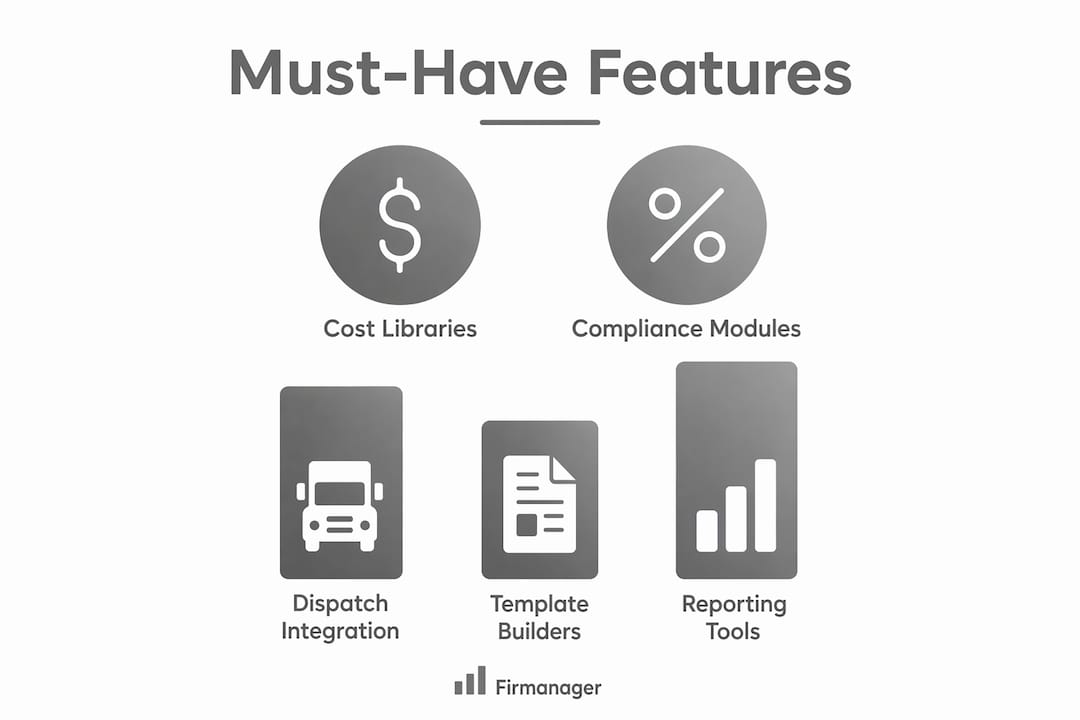
Use this checklist when evaluating any platform. Each item is table-stakes for a service business that wants to move from estimate to invoice without switching tools.
- Cost libraries with regionalized data: Pre-built databases like RSMeans or ProEst’s Costbook (over 23,000 regionalized cost lines) speed accurate pricing and reduce manual lookups.
- Templated quotes and proposals: Reusable templates cut quote time and enforce consistent margin rules across your team.
- Change orders and versioning: Every scope change needs a paper trail. Versioned change orders protect you legally and financially.
- 2D/3D takeoff connectivity: For construction-adjacent service work, linking plan measurements directly to cost items prevents double-counting and manual re-entry.
- Labor and equipment rate management: Rates should update in one place and flow through every open estimate automatically.
- Margin and markup controls: Set floor margins by job type so no one accidentally quotes below cost.
- Approval workflow: Quotes above a threshold should require a manager sign-off before they go to the customer.
- Mobile field handoff and dispatch: Technicians need the current scope on their phone, not a printout from the office.
- Invoicing and payment integration: Stripe and ACH support turn a completed work order into a paid invoice without manual re-entry.
- Accounting exports: CSV or QuickBooks-ready exports protect your audit trail and keep your bookkeeper happy.
- Reporting and dashboards: Real-time margin and pipeline visibility lets you catch a problem job before it closes.
- Security and backups: Role-based access, encrypted data, and documented backup policies are non-negotiable for client financial data.
Pro Tip: Ask every vendor for their OSHA-aware scope item library or HSE compliance module. If a job requires safety documentation and your estimating tool doesn’t flag it, you’re carrying that risk manually.
How does Firmanager meet the must-have features checklist?
Firmanager maps directly to every item on that checklist. The table below shows the alignment.
| Must-Have Feature | What Firmanager Provides |
|---|---|
| Cost libraries | Supplier and product management with centralized pricing |
| Templated quotes | Sales pipeline and quoting module with reusable templates |
| Change orders | Work order versioning and task tracking |
| Mobile field handoff | Employee self-service mobile portal with real-time notifications |
| Dispatch | Route and dispatch management built into the platform |
| Invoicing and payments | Invoicing module with Stripe integration |
| Accounting exports | Financial management with export-ready reporting |
| CRM integration | Built-in CRM and customer management, no third-party sync needed |
| HSE compliance | Dedicated HSE module for health, safety, and environment tracking |
| Dashboards | Real-time financial analytics and live dashboards |
| Security | Role-based access and documented data handling |
For service businesses that also manage field service workflows or recurring maintenance, Firmanager’s dispatch and work order modules handle the handoff from quote to technician without a separate scheduling tool.
A free tier is available, and paid plans scale by seat count and feature access. Request a demo to see the quoting and invoicing workflow with your own data loaded.
What does implementation actually look like?
Realistic onboarding for a service business typically runs four to six weeks from kickoff to go-live. Here are the standard phases:
- Discovery (Week 1–2): Map your current quoting and invoicing workflow, identify cost library gaps, and define user roles.
- Data migration (Week 2–3): Import customer records, supplier pricing, and job templates.
- Template build (Week 3–4): Configure your top job types, approval rules, and margin floors.
- Pilot (Week 4–5): Run two to three live jobs through the new system alongside your old process.
- Training and go-live (Week 5–6): Train field and office staff, then cut over fully.
| Phase | Typical Duration |
|---|---|
| Discovery | a few weeks |
| Data migration | a few weeks |
| Template build | a few weeks |
| Pilot | a few weeks |
| Training and go-live | about a week |
Pricing models for platforms in this category generally follow three structures: a free tier with limited seats or features, a per-seat monthly subscription, and an annual plan with a discount. Common add-on costs include data migration support, custom integrations, and extended training. Firmanager’s free option lets you validate the workflow before committing to a paid plan.
ROI shows up fastest in two places: quote turnaround time and change order capture. A team that cuts quote preparation from three hours to one and captures every change order instead of absorbing scope creep can recover significant margin within the first billing cycle.
How do you evaluate estimating software vendors before you buy?
Forbes Advisor’s analysis of leading estimating products recommends comparing features, pricing, and verified reviews before committing. Here are ten specific questions to ask on any demo call:
- Can I export all my data at any time, in a standard format?
- What accounting systems does your export support natively?
- Do you offer a sandbox or trial with real sample data loaded?
- What is your documented uptime SLA?
- How does offline mobile access work when a tech is on-site without signal?
- Can I build custom quote templates without developer help?
- What does your onboarding plan look like for a team our size?
- What is your support SLA for critical issues during business hours?
- Can you provide two customer references in our industry?
- How does your platform flag AI-generated assumptions in an estimate so I can review them?
That last question matters more than it used to. Vendors increasingly position AI-assisted bid analysis as a risk-reduction tool, but the value depends entirely on whether the system surfaces its assumptions or buries them.
Red flags to watch for:
- Integrations listed on the website that require a paid third-party connector not mentioned in the demo
- Pricing that changes significantly between the sales call and the contract
- No trial, no sandbox, and no references available before you sign
- Security documentation that amounts to “we take security seriously” with no specifics
- Training resources limited to a PDF manual and a single onboarding call
Also verify: cost benchmarking methods and estimate types vary by job complexity, so confirm the platform supports the level of detail your bids require, from rough order-of-magnitude through detailed line-item estimates.
Key Takeaways
The best estimating software for service businesses connects quoting, dispatch, and invoicing in one platform, and Firmanager is built to do exactly that.
| Point | Details |
|---|---|
| All-in-one beats point solutions | A unified platform removes re-entry errors between quoting, dispatch, and billing. |
| Digital takeoffs save significant time | Digital takeoff tools can significantly reduce takeoff time compared with manual methods. |
| Evaluate with a 10-question checklist | Ask about data portability, offline access, SLAs, and AI assumption transparency before signing. |
| Pilot before full rollout | Run two to three live jobs in a sandbox or free tier to validate the workflow with real data. |
| Firmanager covers the full checklist | CRM, quoting, dispatch, Stripe invoicing, HSE compliance, and real-time dashboards in one platform. |
The case for committing to one platform early
The conventional wisdom says to pick the best tool for each job: a specialist estimating app, a separate CRM, a standalone invoicing system. For construction-only firms with a dedicated estimating department, that can work. For service businesses where the owner or a small team wears every hat, it creates a data fragmentation problem that compounds with every job.
The real risk isn’t choosing the wrong software. It’s spending six months in a fragmented stack before realizing the integrations don’t hold under real workload. Running a structured pilot on a single platform, with your actual job types and your actual team, is the fastest way to find out whether it works before you’re dependent on it. Protect your margins during that transition by keeping your old process running in parallel for the first two to three jobs. Once the numbers match, cut over completely.
Firmanager is built for service businesses like yours
Service businesses that manage quoting, dispatch, and invoicing across multiple jobs need a platform that handles all three without duct-taping separate tools together. Firmanager delivers CRM, sales pipeline and quoting, work order management, Stripe-integrated invoicing, route and dispatch, HSE compliance, and real-time financial dashboards in a single subscription.

A free tier is available so you can test the quoting and invoicing workflow with your own data before committing to a paid plan. Onboarding support and training are included, and the CRM and contractor integrations are documented and ready to configure from day one. Start your free trial at Firmanager or schedule a demo to walk through the platform with a live job scenario.
Useful sources and further reading
- Firmanager – All-in-One Business Management Platform — Product overview, pricing, demo signup, and feature documentation for U.S. service businesses.
- Sage Estimating — Industry-standard estimating platform with AI-assisted bid analysis and eTakeoff integration.
- Autodesk Forma Estimate — Cloud-based connected preconstruction linking 2D/3D takeoffs to live estimates.
- Autodesk ProEst — Cloud estimating with a 23,000-line regionalized Costbook and accounting integrations.
- Forbes Advisor: Best Construction Estimating Software — Independent buyer’s roundup comparing features, pricing, and reviews across leading platforms.
- PlanSwift Takeoff Software — Takeoff and estimating software with AI-powered Takeoff Boost for construction estimators.
- WinEst by Trimble — Cost estimation software for building contractors covering conceptual through detailed estimates.
All market data, regulations, and platform availability referenced in this article apply to the United States.
Recommended
Run your whole business in one place
CRM, quotes, work orders, invoicing, expenses, HR and HSE — one login, every device. Free-forever plan.
Start free →